CATEGORY PLAYBOOK / FINANCE
ASO FOR
FINANCE APPS.
A budget is a plan. A transfer moves money. A tax app helps file a return. Build your store page around the financial job people actually came to do.
FIND YOUR CATEGORY STRATEGY ↓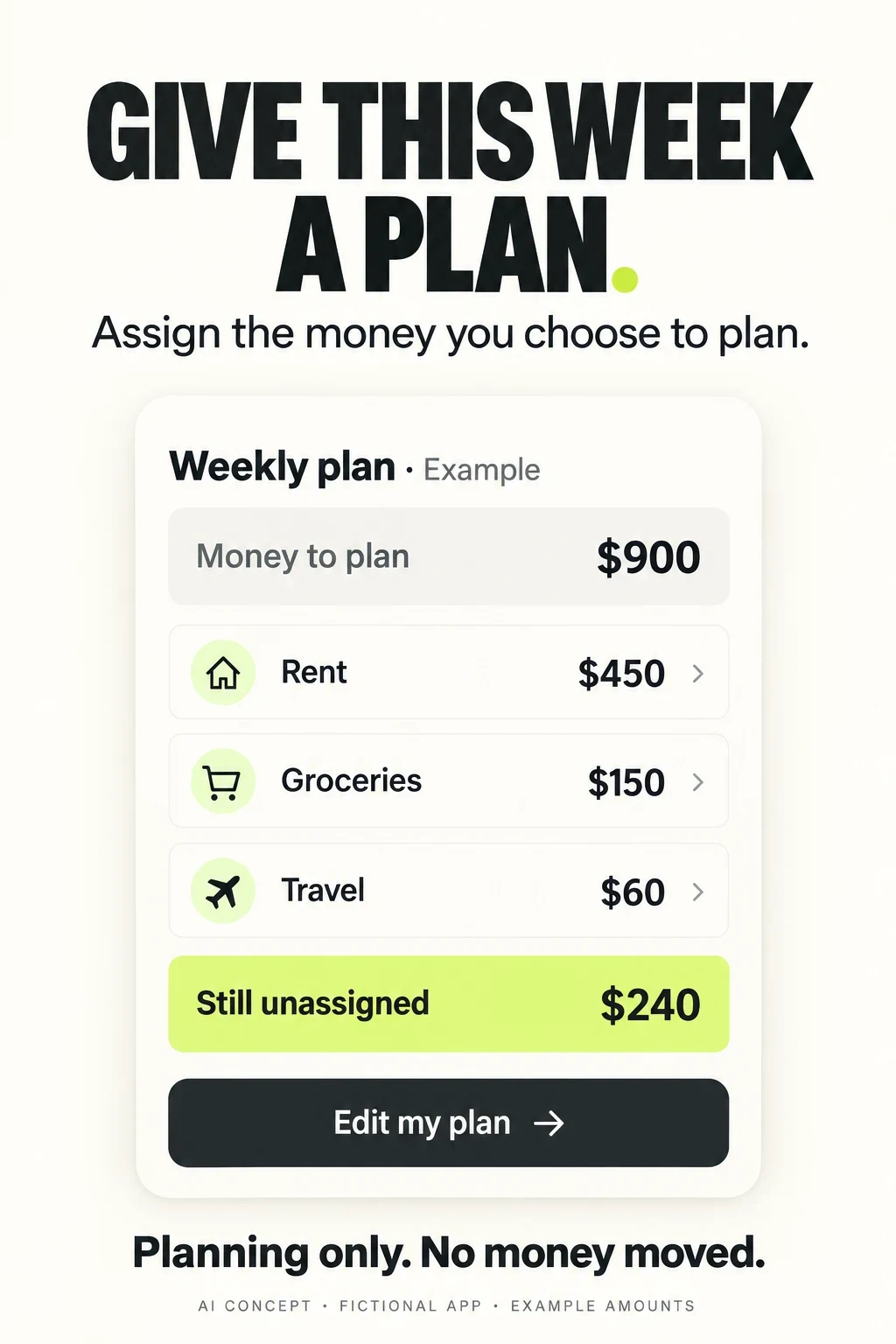
FINANCE APP ASO
Start with the money job, then decide what belongs in the listing.
“Manage your money” can describe dozens of incompatible jobs. Someone searching for a receipt log does not necessarily want a bank account. Someone comparing a transfer fee needs a corridor-specific quote, not a net-worth dashboard. Someone researching a stock should not mistake an advertised cash-program rate for a stock return.
This is the parent strategy guide for finance apps. It compares the decisions that change between budgeting, expenses, banking, transfers, investing, credit and tax. Choose the relevant branch below before building a keyword set. The examples evaluate store communication; they do not recommend financial products or establish which provider is best.
Choose a subcategory · Potential audiences · 100 keyword candidates · Eight apps · Real screenshots · Worked copy · Apple Ads
Swipe horizontally to compare all columns →
| Subcategory | Primary search job | Proof to show first | Meaningful success |
|---|---|---|---|
| Budgeting | Make a usable spending plan | Category allocation and editable period | A relevant first plan understood and saved |
| Expense tracking | Know what was spent and where | Actual entry, category and source | A correctly categorized record or import |
| Banking | Use or apply for an eligible account | A specific account task and access requirements | Appropriate customer task or qualified application |
| Money transfers | Send a known amount to a supported recipient | Total cost, rate, recipient amount and delivery estimate | An informed eligible transfer with completion tracked |
| Investing | Research or use a supported investment service | Instrument, account, fees and actual workflow | Suitable informed onboarding or research use |
| Credit management | Understand a record or compare an offer | Score context, update and application state | Correct understanding and appropriate next step |
| Tax preparation | Prepare or file a particular return | Tax scope, service mode and documents | A relevant preparation milestone or accepted filing |
A broad brand can serve several jobs. Its general page can introduce the range, while intent-specific pages should lead with the relevant workflow. This is a choice about communication, not permission to hide material conditions. Use ASO strategy to define the promise and search intent to decide whether the same visitor would actually want both offers.
- PLANAssign or record money without moving it
- TRANSACTReview an actual payment or transfer
- ASSESSUnderstand a record, quote or eligibility result
- ACTMake the correct next step explicit
FINANCE APP ASO
Seven subcategories need seven different creative briefs.
Use these as separate briefs. They share a need for clarity, but the proof, costs, eligibility and activation event change. Future deep dives should answer narrower questions inside these branches rather than repeating this category overview.
Budgeting: show the plan people can change.
Lead with assigning, adjusting or reviewing a specific period. Explain whether figures come from manual input or connected accounts. A savings goal, planned amount and spendable bank balance are different numbers.
What I would test: Try a weekly plan for variable income against a generic monthly dashboard. Check whether people understand what happens when a category is edited.
Expense tracking: prove the record is useful.
Show a real entry or imported transaction, its category and the relevant period. Explain receipt capture, duplicate handling and export only when supported. An expense log does not automatically pay a bill or prepare a tax return.
What I would test: Try a large receipt-to-category example for receipt searches and a recurring-charge list for subscription searches. Do not promise cancellation if the app only detects charges.
Banking: distinguish access from acquisition.
An existing customer wants to deposit a check, pay a bill or lock a card. A prospective customer needs eligibility and account terms. A store download is not an account-opening decision. Broad financial brands may also have separate investment services.
What I would test: Separate customer-task creative from new-account creative. Show the actual confirmation state, fees or availability conditions that matter to the selected action.
Transfers: make the recipient outcome inspectable.
Use the real sender country, funding method, currency pair and recipient route. Show the total sent, fee treatment, converted amount and recipient amount together. An estimated arrival and a quote-validity period answer different questions.
What I would test: Try a quote-first opener for a supported corridor. Ask users to explain what the recipient receives and whether the transfer has actually been sent.
Investing: name the service and instrument.
A watchlist, portfolio tracker, broker, managed portfolio and retirement account do different things. Keep cash-program rates separate from investment performance. Explain the relevant product and risk rather than relying on a rising green chart.
What I would test: Try a readable research or order-review task for the specific instrument. Measure informed appropriate use; increasing trading frequency is not a universal product goal.
Credit: separate information from approval.
Name the score context, source and update where relevant. A monitoring alert, simulator, recommended offer and lender decision must have different labels. A favorable offer presentation does not establish approval.
What I would test: Try a dated score explanation or a clear offer-review state. Test whether the person knows who makes the final decision and what applying will do.
Tax: explain who does the work.
Identify the tax market, supported year, return scope and filing mode. Self-filing, expert help and complete handoff are different services. A prepared or submitted return is not the same as an accepted return or received refund.
What I would test: Try a clear service-choice panel before an expert portrait. Match free-filing language to actual eligibility and keep document upload, review and filing status distinct.
Choose one branch and write its first useful action in a sentence. Then decide whether the opening screenshot proves that action. The value-proposition guide helps turn a broad financial benefit into a specific promise; screenshot storytelling turns that promise into a sequence.
FINANCE APP ASO
Research financial tasks and constraints without inventing a demographic.
These are potential audiences to investigate, not measured demographic shares. Recruit by the task, experience and constraint. Compare younger and older adults, household structures, languages, device access and financial literacy without assuming that age predicts income, wealth or risk tolerance. No segment below is a recommendation to target a person’s financial distress.
Swipe horizontally to compare all columns →
| Potential audience | Main job | Research variation | Question to ask | Proof to show |
|---|---|---|---|---|
| First-time budget planners | Understand what can be planned before connecting an account | Compare adults new to budgeting across ages and financial literacy levels | Can they distinguish a planned amount from an available bank balance? | One small editable category plan |
| People with variable income | Plan around uneven pay dates and changing amounts | Freelancers, shift workers and people with multiple income sources; do not assume income level | Can they adjust a plan without inventing future income? | Actual pay-cycle controls and manual edits |
| Households coordinating expenses | Share the right information with the right person | Couples, roommates and multigenerational households with joint or separate accounts | Who can view, edit or move money? | Permission and contribution workflow |
| Existing bank customers | Complete a familiar account task | Different account types, devices and accessibility needs | Can they find the relevant payment, deposit or card control? | An actual eligible account workflow |
| People comparing a new account | Understand availability, requirements and costs | Different residency, documentation and account-purpose constraints | Does installing mean opening or being approved for an account? | Real eligibility and application steps |
| Cross-border senders | Know the recipient amount and expected arrival | Different corridors, languages, funding methods and recipient access | Can they identify total cost and the exact destination method? | A complete supported transfer quote |
| People researching investments | Understand the tool and service before committing money | Different knowledge, account eligibility and research habits; no presumed risk appetite by age | Can they distinguish research, order placement and execution? | Readable instrument or order review with relevant context |
| People reviewing credit information | Understand the score, update and offer relationship | Different credit-file histories and familiarity with lender decisions | Do they mistake a recommendation for approval? | Dated score context and actual next step |
| Tax filers choosing a service | Know who does the work and what is included | Different return complexity, document readiness and language needs | Is this self-filing, assisted preparation or an expert handoff? | Service choice and document checklist |
| People who need greater control over data | Use a useful tool without unexpected access | Shared phones, screen-reader users and people preferring manual input | What is read, stored, shared or authorized? | Real connection permissions, optional input and deletion controls |
Show the first three screenshots before explaining the app. Ask: “What can you do here?”, “Does this move money?”, “What does this number mean?”, “Who provides the service?” and “What would you expect to pay?” Record the misunderstandings by intended use, not just by demographic label. A small interview study can reveal confusion; it cannot establish market size.
For a finance product, a person who understands the offer but cannot access it is different from someone who misunderstands the offer. Record country, account type and supported feature constraints where appropriate. Do not use real balances, credit files, account numbers or tax documents in design testing. Use neutral demonstration data and a proportionate research process.
Connect audience questions to keyword research and readability checks. The same headline can be clear at full export size and unreadable beside other store results.
FINANCE APP ASO
100 keyword candidates, with a feature check before every cluster.
These 100 candidates are grouped by the job they imply. They are unmeasured editorial research ideas, not verified volume, difficulty or ranking data. Each cluster has a product requirement. A budgeting app cannot adopt brokerage, transfer or tax-filing terms merely because they sit in the same store category.
Budget planning
Product requirement: Editable plans for the stated period; no implied bank transfer
Swipe horizontally to compare all columns →
| Candidate | Decision before targeting |
|---|---|
| budget planner | Unmeasured · verify intent, actual feature and market |
| weekly budget app | Unmeasured · verify intent, actual feature and market |
| monthly budget planner | Unmeasured · verify intent, actual feature and market |
| paycheck budget app | Unmeasured · verify intent, actual feature and market |
| zero based budget | Unmeasured · verify intent, actual feature and market |
| envelope budget app | Unmeasured · verify intent, actual feature and market |
| flexible budget planner | Unmeasured · verify intent, actual feature and market |
| budget categories app | Unmeasured · verify intent, actual feature and market |
| manual budget planner | Unmeasured · verify intent, actual feature and market |
| spending plan app | Unmeasured · verify intent, actual feature and market |
Expense and subscription records
Product requirement: Actual recording, import or subscription workflow; cancellation must be separately supported
Swipe horizontally to compare all columns →
| Candidate | Decision before targeting |
|---|---|
| expense tracker | Unmeasured · verify intent, actual feature and market |
| daily spending tracker | Unmeasured · verify intent, actual feature and market |
| receipt expense tracker | Unmeasured · verify intent, actual feature and market |
| subscription tracker | Unmeasured · verify intent, actual feature and market |
| recurring bills tracker | Unmeasured · verify intent, actual feature and market |
| spending categories app | Unmeasured · verify intent, actual feature and market |
| transaction categorizer | Unmeasured · verify intent, actual feature and market |
| expense CSV export | Unmeasured · verify intent, actual feature and market |
| bill reminder app | Unmeasured · verify intent, actual feature and market |
| subscription cancellation app | Unmeasured · verify intent, actual feature and market |
Banking tasks
Product requirement: Eligible account and provider; verify feature and territory availability
Swipe horizontally to compare all columns →
| Candidate | Decision before targeting |
|---|---|
| mobile banking app | Unmeasured · verify intent, actual feature and market |
| checking account app | Unmeasured · verify intent, actual feature and market |
| bank transfer app | Unmeasured · verify intent, actual feature and market |
| mobile check deposit | Unmeasured · verify intent, actual feature and market |
| debit card lock app | Unmeasured · verify intent, actual feature and market |
| bank balance alerts | Unmeasured · verify intent, actual feature and market |
| bank statement download | Unmeasured · verify intent, actual feature and market |
| bill pay banking app | Unmeasured · verify intent, actual feature and market |
| direct deposit account | Unmeasured · verify intent, actual feature and market |
| open checking account online | Unmeasured · verify intent, actual feature and market |
Cross-border money
Product requirement: Actual sender country, recipient destination, currency and delivery method
Swipe horizontally to compare all columns →
| Candidate | Decision before targeting |
|---|---|
| international money transfer | Unmeasured · verify intent, actual feature and market |
| send money abroad | Unmeasured · verify intent, actual feature and market |
| money transfer fee calculator | Unmeasured · verify intent, actual feature and market |
| USD to EUR transfer | Unmeasured · verify intent, actual feature and market |
| transfer to overseas bank | Unmeasured · verify intent, actual feature and market |
| remittance tracker | Unmeasured · verify intent, actual feature and market |
| recipient amount calculator | Unmeasured · verify intent, actual feature and market |
| international payment status | Unmeasured · verify intent, actual feature and market |
| multi currency account | Unmeasured · verify intent, actual feature and market |
| international transfer quote | Unmeasured · verify intent, actual feature and market |
Investing tools
Product requirement: Supported service and instruments with relevant eligibility fees and risk context
Swipe horizontally to compare all columns →
| Candidate | Decision before targeting |
|---|---|
| stock investing app | Unmeasured · verify intent, actual feature and market |
| ETF investing app | Unmeasured · verify intent, actual feature and market |
| investment watchlist | Unmeasured · verify intent, actual feature and market |
| portfolio tracker | Unmeasured · verify intent, actual feature and market |
| recurring investment app | Unmeasured · verify intent, actual feature and market |
| stock price alerts | Unmeasured · verify intent, actual feature and market |
| brokerage account app | Unmeasured · verify intent, actual feature and market |
| investment order review | Unmeasured · verify intent, actual feature and market |
| retirement account tracker | Unmeasured · verify intent, actual feature and market |
| investment fee comparison | Unmeasured · verify intent, actual feature and market |
Credit information
Product requirement: Accurate score model source update and offer relationship; no approval guarantee
Swipe horizontally to compare all columns →
| Candidate | Decision before targeting |
|---|---|
| credit score app | Unmeasured · verify intent, actual feature and market |
| credit report monitor | Unmeasured · verify intent, actual feature and market |
| credit score alerts | Unmeasured · verify intent, actual feature and market |
| credit utilization tracker | Unmeasured · verify intent, actual feature and market |
| credit history app | Unmeasured · verify intent, actual feature and market |
| credit report changes | Unmeasured · verify intent, actual feature and market |
| credit card offer comparison | Unmeasured · verify intent, actual feature and market |
| credit score simulator | Unmeasured · verify intent, actual feature and market |
| credit account overview | Unmeasured · verify intent, actual feature and market |
| loan offer comparison | Unmeasured · verify intent, actual feature and market |
Tax preparation
Product requirement: Correct tax market year forms service tier and filing capability
Swipe horizontally to compare all columns →
| Candidate | Decision before targeting |
|---|---|
| tax filing app | Unmeasured · verify intent, actual feature and market |
| tax document organizer | Unmeasured · verify intent, actual feature and market |
| W2 import app | Unmeasured · verify intent, actual feature and market |
| self employed tax app | Unmeasured · verify intent, actual feature and market |
| tax return progress | Unmeasured · verify intent, actual feature and market |
| expert tax preparation | Unmeasured · verify intent, actual feature and market |
| tax filing in Spanish | Unmeasured · verify intent, actual feature and market |
| simple tax return app | Unmeasured · verify intent, actual feature and market |
| tax forms upload | Unmeasured · verify intent, actual feature and market |
| tax filing checklist | Unmeasured · verify intent, actual feature and market |
Household coordination
Product requirement: Actual shared access permissions or expense-splitting functions
Swipe horizontally to compare all columns →
| Candidate | Decision before targeting |
|---|---|
| shared budget app | Unmeasured · verify intent, actual feature and market |
| couples budget planner | Unmeasured · verify intent, actual feature and market |
| roommate expense tracker | Unmeasured · verify intent, actual feature and market |
| household bill planner | Unmeasured · verify intent, actual feature and market |
| shared spending categories | Unmeasured · verify intent, actual feature and market |
| family expense tracker | Unmeasured · verify intent, actual feature and market |
| split household bills | Unmeasured · verify intent, actual feature and market |
| joint budget separate accounts | Unmeasured · verify intent, actual feature and market |
| shared savings goal planner | Unmeasured · verify intent, actual feature and market |
| household money calendar | Unmeasured · verify intent, actual feature and market |
Irregular income and goals
Product requirement: Actual planning or records; distinguish an estimate from advice or a payment
Swipe horizontally to compare all columns →
| Candidate | Decision before targeting |
|---|---|
| irregular income budget | Unmeasured · verify intent, actual feature and market |
| freelancer expense log | Unmeasured · verify intent, actual feature and market |
| variable income planner | Unmeasured · verify intent, actual feature and market |
| weekly pay budget | Unmeasured · verify intent, actual feature and market |
| annual bills planner | Unmeasured · verify intent, actual feature and market |
| sinking fund tracker | Unmeasured · verify intent, actual feature and market |
| cash flow calendar | Unmeasured · verify intent, actual feature and market |
| manual savings goal | Unmeasured · verify intent, actual feature and market |
| debt repayment planner | Unmeasured · verify intent, actual feature and market |
| net worth tracker | Unmeasured · verify intent, actual feature and market |
Access and control
Product requirement: Verified implementation and accessibility; no inferred privacy or security guarantee
Swipe horizontally to compare all columns →
| Candidate | Decision before targeting |
|---|---|
| budget app without bank linking | Unmeasured · verify intent, actual feature and market |
| offline expense tracker | Unmeasured · verify intent, actual feature and market |
| manual transaction entry | Unmeasured · verify intent, actual feature and market |
| large text budget app | Unmeasured · verify intent, actual feature and market |
| VoiceOver finance app | Unmeasured · verify intent, actual feature and market |
| export spending history | Unmeasured · verify intent, actual feature and market |
| read only account tracker | Unmeasured · verify intent, actual feature and market |
| hide balance notifications | Unmeasured · verify intent, actual feature and market |
| multi currency expense log | Unmeasured · verify intent, actual feature and market |
| delete financial app data | Unmeasured · verify intent, actual feature and market |
Score relevance first. A “read-only account tracker” and a “bank transfer app” imply different authority. A “credit score simulator” must actually simulate and explain its limits. “Offline” and “without bank linking” are implementation conditions, not decorative modifiers.
Use volume estimates only after checking the live results and product fit. Build a shortlist with keyword prioritization. Research each country and store separately: bank names, tax terms, currency routes and financial vocabulary do not transfer automatically between markets.
FINANCE APP ASO
Narrow opportunities come from a real constraint or output.
Swipe horizontally to compare all columns →
| Narrow opportunity | Why the intent is distinct | Required proof | Useful research test |
|---|---|---|---|
| Budget planner for variable weekly income | The user needs a flexible period and editable assumptions | Actual pay-cycle and adjustment behavior | Can the plan change without pretending future pay has arrived? |
| Expense tracker without bank linking | The user prefers manual records | Working manual entry and clear account requirements | Can someone start before granting account access? |
| Couples budget with separate bank accounts | Collaboration does not imply a joint account | Actual shared view and permission boundaries | Who can see or edit each record? |
| Annual bill planner with monthly set-asides | The task is preparing for irregular costs | Goal period and amount explanation | Can users distinguish a planned set-aside from a transferred deposit? |
| USD to EUR transfer with fee preview | The sender wants a specific supported route | Complete corridor quote and funding conditions | Can the total sent and amount received be reconciled? |
| Card lock from a banking app | The customer needs one immediate control | Real card selector and lock confirmation | Does the person understand the actual effect and limits? |
| Portfolio tracker without trading | The user wants records or research rather than execution | Read-only or manual portfolio scope | Do trade-like buttons create the wrong expectation? |
| Credit change alerts with update dates | The user wants context for a change | Source, date and actual alert explanation | Is an old or simulated number mistaken for a current lender decision? |
| Tax filing in Spanish with expert help | The service includes language and support-mode needs | Actual localized workflow and available expert service | Does translation cover assistance as well as menus? |
| Receipt export for a freelancer | The desired output is a usable record | Actual fields, format and export preview | Does the export match the downstream task without claiming tax advice? |
Specific phrases are not automatically easy, cheap or high-converting. They help define a clearer test. Validate language and actual search results, then compare relevant outcomes. Avoid creating near-identical pages for every currency pair or tax form unless the service and explanation genuinely differ.
Use long-tail research and gap analysis to find an unmet communication need. The category advantage comes from proving a useful constraint, not appending “for beginners” to every phrase.
FINANCE APP ASO
Eight verified apps show how different finance promises work.
These eight relevant apps were checked against Apple’s US listing pages and lookup data on 27 October 2026. They are a deliberately varied comparison set, not a ranking by market share, trustworthiness or financial performance. The listed legal seller can differ from the brand displayed in the store. Titles and subtitles below reproduce the capture.
Swipe horizontally to compare all columns →
| App and primary source | Listed seller | Current title | Current subtitle |
|---|---|---|---|
| YNAB ↗ | You Need A Budget LLC | YNAB | Never worry about money again |
| Monarch ↗ | Monarch Money, Inc. | Monarch: Budget & Track Money | Spending, Net Worth, Investing |
| Rocket Money ↗ | Rocket Money | Rocket Money - Bills & Budgets | Subscription & Expense Manager |
| Chase ↗ | JPMorgan Chase Bank, NA | Chase Mobile®: Bank & Invest | Credit Score. Budget. Payments |
| Wise ↗ | Wise Payments Ltd | Wise: Global Money Transfer | Send payments internationally |
| Robinhood ↗ | Robinhood Markets Inc | Robinhood: Trading & Investing | Stocks, ETFs, Crypto & Options |
| Credit Karma ↗ | Credit Karma, Inc. | Intuit Credit Karma | Save, Spend & Grow Your Credit |
| TurboTax ↗ | Intuit Inc. | TurboTax: File Your Tax Return | E-file Taxes & Get Your Refund |
Swipe horizontally to compare all columns →
| App | What the app promises | What you can learn |
|---|---|---|
| YNAB | A proactive spending plan with category assignments, goals, manual or connected transactions and shared plans. | Show how assigning money differs from moving it. Its emotional promise and savings testimonials are publisher claims, not category benchmarks. |
| Monarch | Account aggregation, spending reports, category or flexible budgets, goals and household collaboration. | The description calls the platform read-only. Account visibility and investment tracking should not be confused with trading or transferring. |
| Rocket Money | Subscription tracking and cancellation help, budgets, bill negotiation and an AI assistant described as part of Premium+. | Separate detecting a charge, requesting an action and confirming the result. Explain paid entitlements and human verification where the product uses them. |
| Chase | Account management, payments, deposits, budgeting and investing through the relevant Chase or J.P. Morgan services. | Differentiate existing-customer tasks from new-account acquisition. The description distinguishes deposit and investment products and conditions. |
| Wise | International transfers, currency conversion, account details and card functions subject to location and product availability. | A corridor-specific quote is concrete proof. Receiving, holding, spending and sending currencies are different capabilities with separate conditions. |
| Robinhood | Several investing and trading services, plus subscription-related features and eligible brokerage-cash programs. | Explain the actual product, eligibility, fees and risk. A cash-program rate is not a return promised on stocks or crypto. |
| Credit Karma | Credit information, personalized offers, spending tools and additional banking or tax-related features with separate providers and conditions. | The description explicitly says approval odds do not guarantee approval. Monitoring a score, comparing an offer and applying are different actions. |
| TurboTax | Tax preparation with self-filing, expert-assisted and expert-led paths, subject to product and return eligibility. | Clarify who prepares and files the return. Free-edition scope, expert access and refund timing need their actual qualifications. |
Claims about savings, security, rates, popularity, awards, guarantees and approval are publisher statements, not independently verified results. This guide does not reproduce current prices as recommendations or assess which financial service someone should choose. The screenshots are evidence of communication choices.
The useful comparison is within a job. Compare YNAB and Monarch for planning explanations, Chase for account-task clarity, Wise for quotes, Robinhood for product and risk distinctions, Credit Karma for offer states and TurboTax for service choice. Rocket Money adds the distinction between finding a recurring charge and completing an action on it.
Keep app ID, locale, source date and feature scope in your competitor research. A broad brand’s metadata is a map of its own products, not a keyword list that another app is entitled to copy.
FINANCE APP ASO
Platform fields are shared; financial promises are product-specific.
Swipe horizontally to compare all columns →
| Decision | iOS | Google Play | Finance-specific implication |
|---|---|---|---|
| Product identity | Name: 30 characters | Title: 30 characters | Name the actual planning, account, transfer or filing product |
| Supporting message | Subtitle: 30; keyword field: 100 characters | Short description: 80; full description: 4,000 characters | Use supporting space for task and scope; explain material conditions clearly |
| Creative experiment | Product Page Optimization for eligible creative treatments | Store listing experiments for eligible variants | Compare one understandable workflow with a stable control |
| Intent-specific story | Custom product pages with supported configuration | Custom store listings with supported targeting | Separate the supported job while keeping its important conditions |
| Financial functions | Review applicable financial-service and licensing provisions | Review Financial Services policy and financial-features declaration | Verify the entity, function and distribution territory before making claims |
Official field and creative sources: Apple product pages, Product Page Optimization, custom product pages, Google Play listing fields, listing experiments and custom listings.
Apple’s review guidelines include financial-service submission and licensing provisions and separate rules for certain products. Google’s Financial Services policy requires a financial-features declaration for apps with financial features and sets product-specific conditions. Have the responsible product and compliance owners review the actual functionality and territories. This guide is not a substitute for that review.
Do not treat “available in the US store” as proof that every US user can access every service. Similarly, a translated interface does not create a supported transfer corridor or tax jurisdiction. The platform rules and the real service map both matter.
For field-level implementation, use the iOS name, subtitle, keyword field, Play title and short-description guides. This is a US iOS competitor audit with Android platform guidance; Android competitor creative has not been audited here.
FINANCE APP ASO
Five real screenshot teardowns and eight lessons to apply.
These 20 original iPhone screenshot panels were captured from Apple’s US lookup feed and individually inspected on 27 October 2026: the first four returned for each of five apps. The live store may present a different device slot or order. Capture date does not establish when the artwork was made. Rates, prices, claims, numbers and example balances in publisher artwork are not verified live offers. Open any image at full size.
YNAB: The upright plan explains more than the emotional opening.
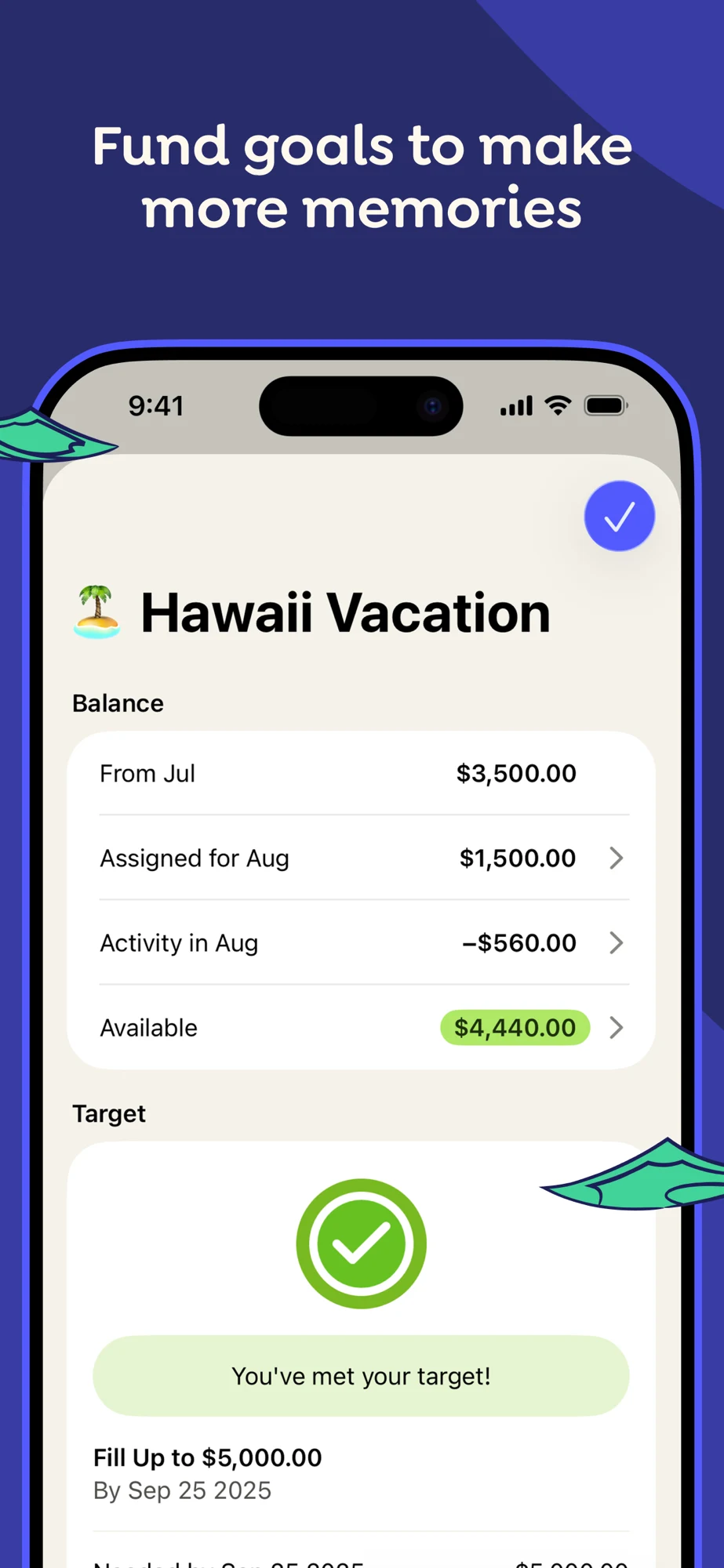
Source: YNAB on the US App Store · captured 27 October 2026.
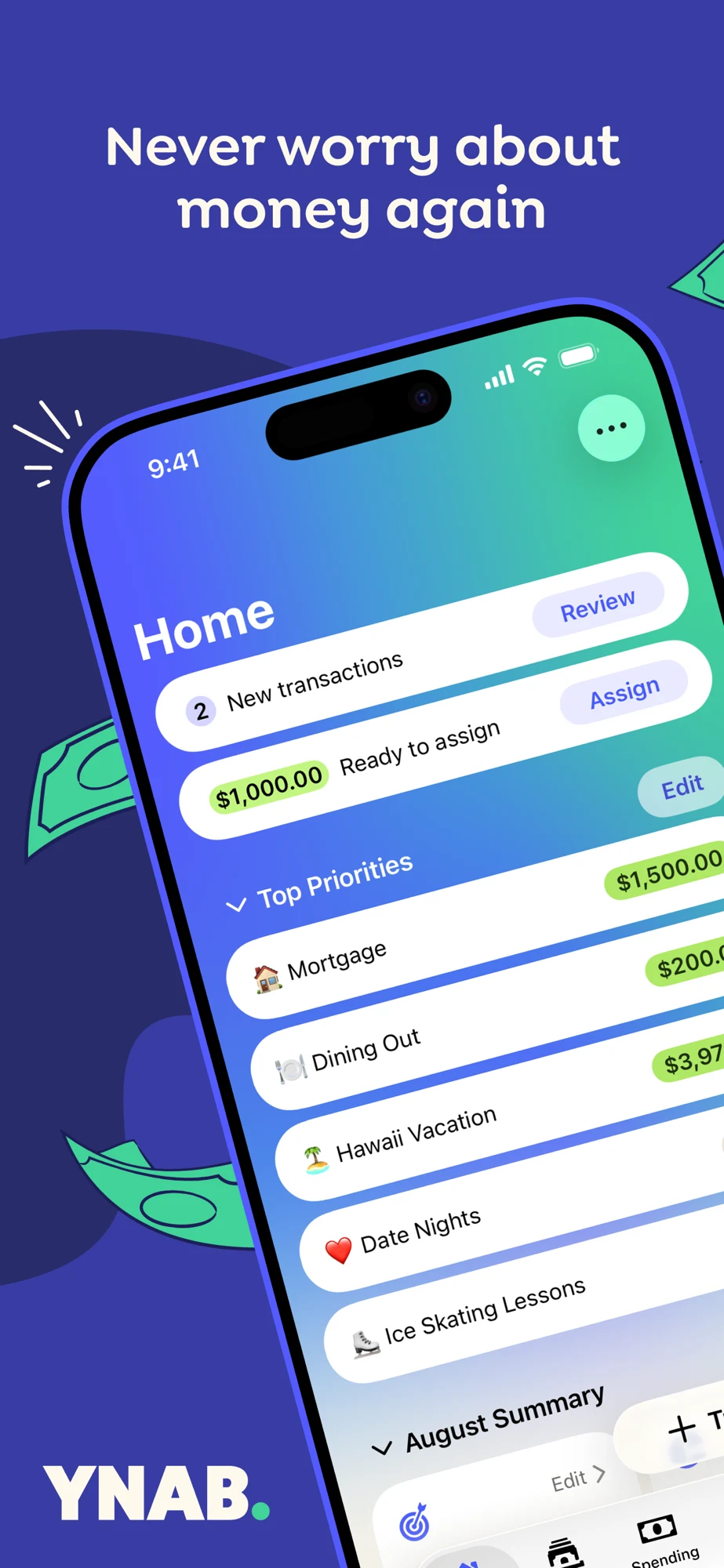
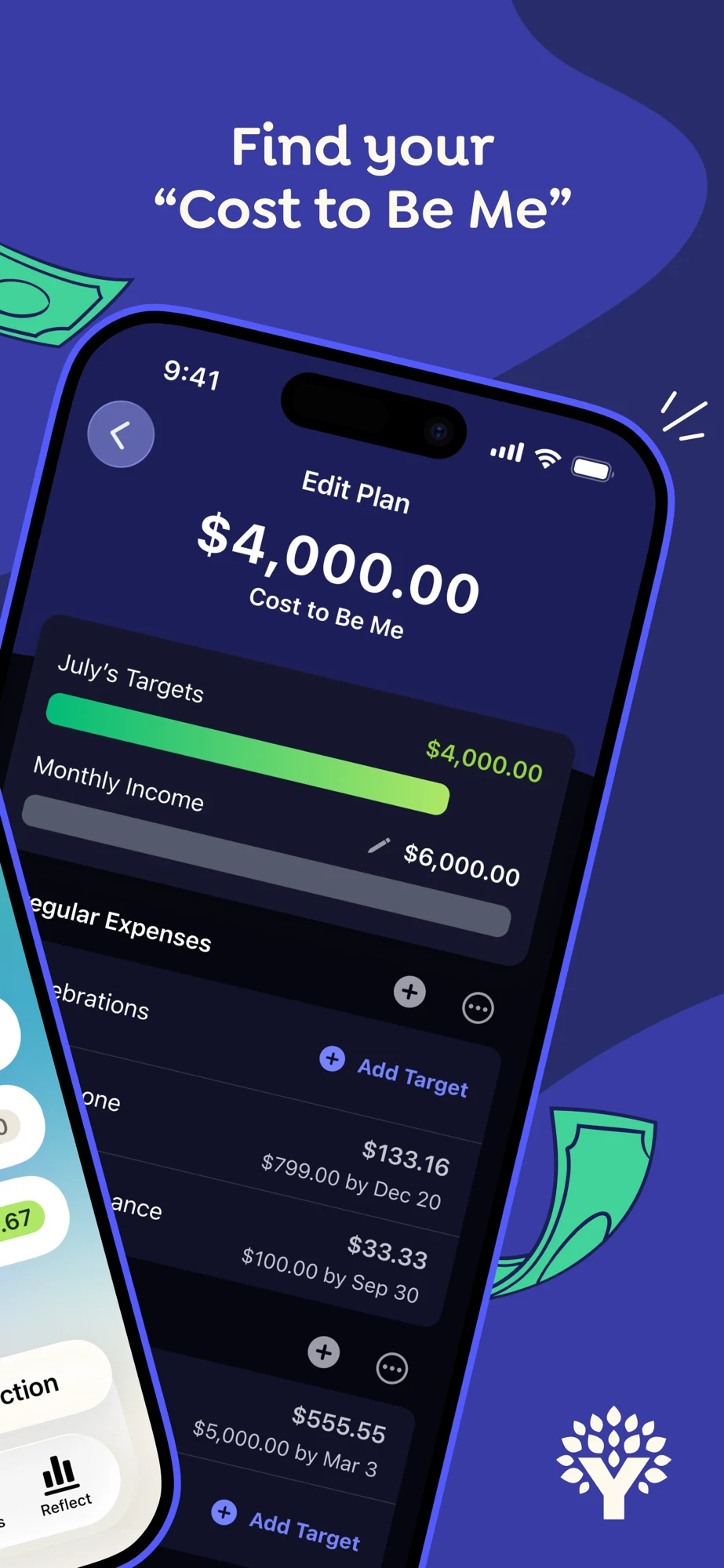
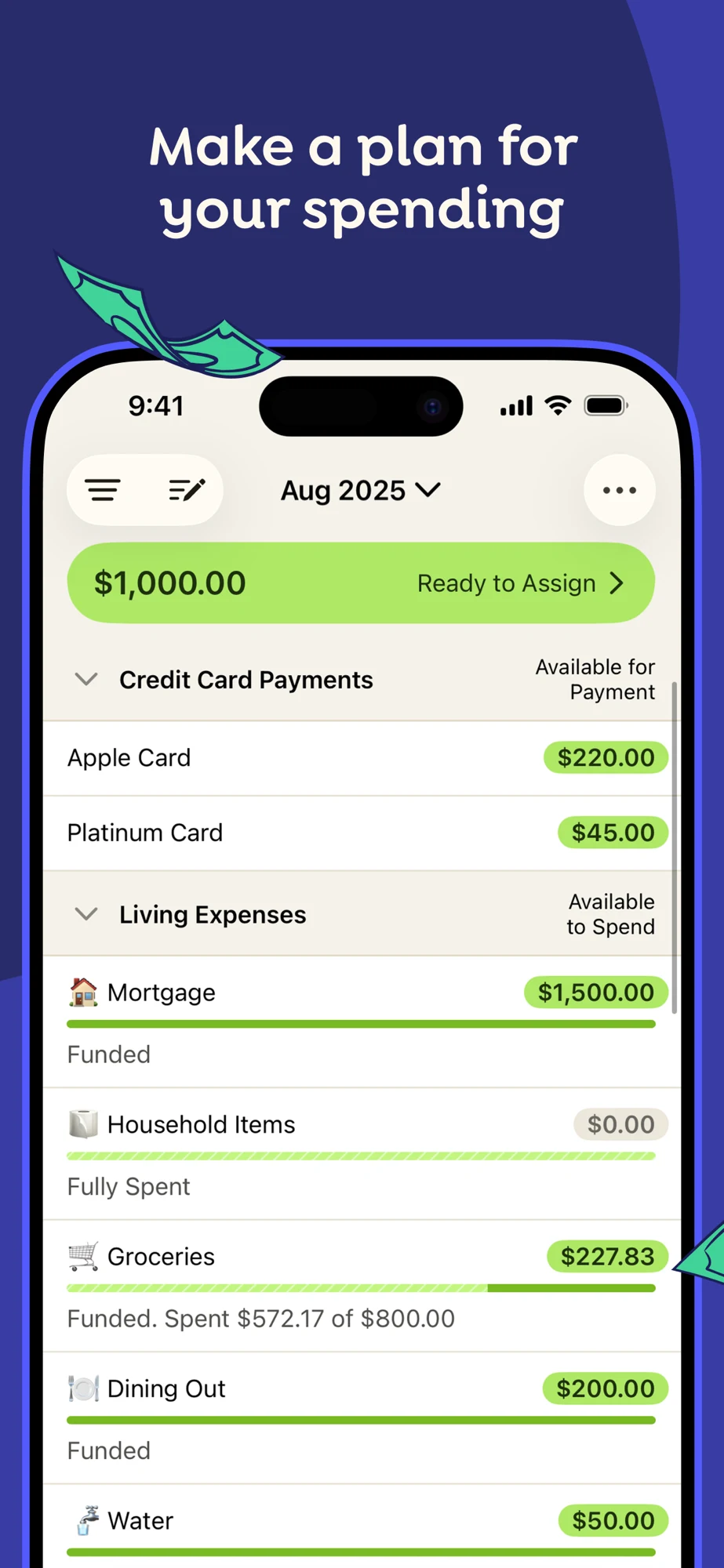
What the screenshots show: The first panel pairs an absolute reassurance headline with a tilted, cropped home view. The second introduces a named planning concept through another angled screen. Panel three turns upright and shows money ready to assign, categories and available amounts. Panel four shows a goal with assigned money, activity and a target state. The third panel provides the clearest direct task; the early angles make some numbers harder to inspect.
What I would test: For budget-planning searches, test the upright allocation screen earlier with a plain explanation of assigning money. Keep planned, spent and available amounts distinct. Explain the target period rather than assuming a green completion marker explains every displayed amount. Do not turn a publisher’s emotional or savings claims into a universal result for a new product. These recommendations are hypotheses; conversion effects have not been measured.
Chase: A broad brand needs a separate first frame for each account task.
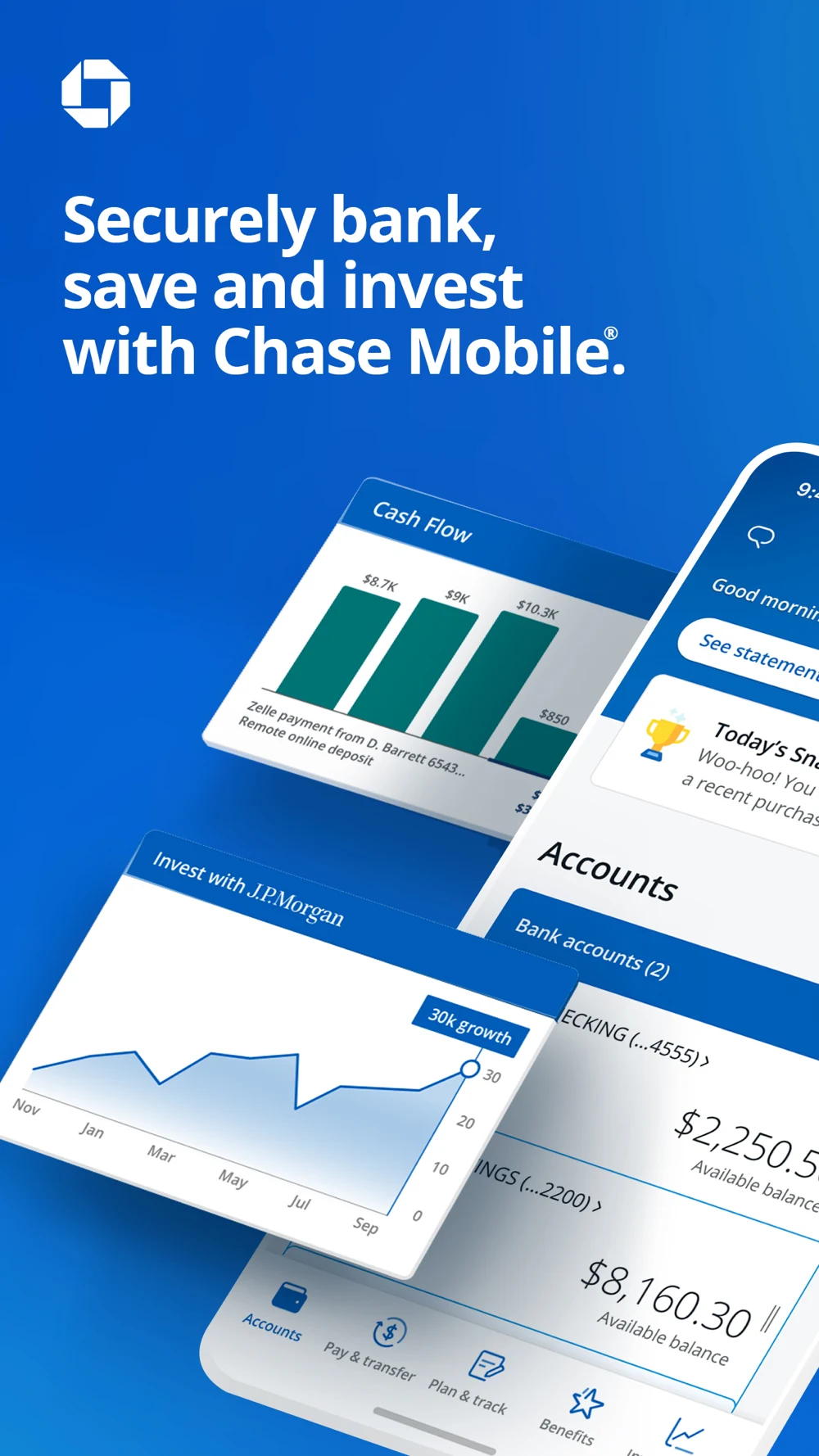
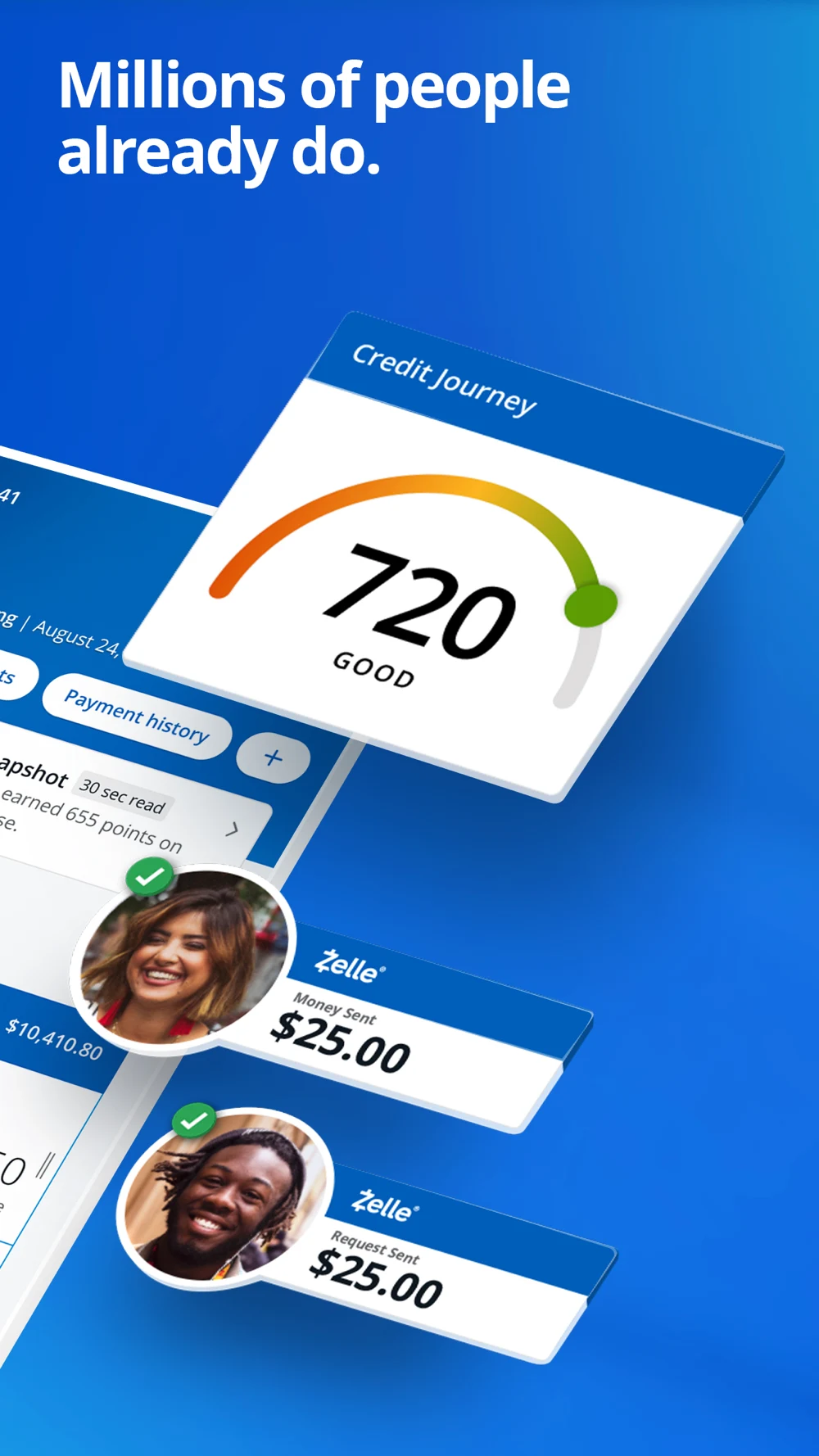
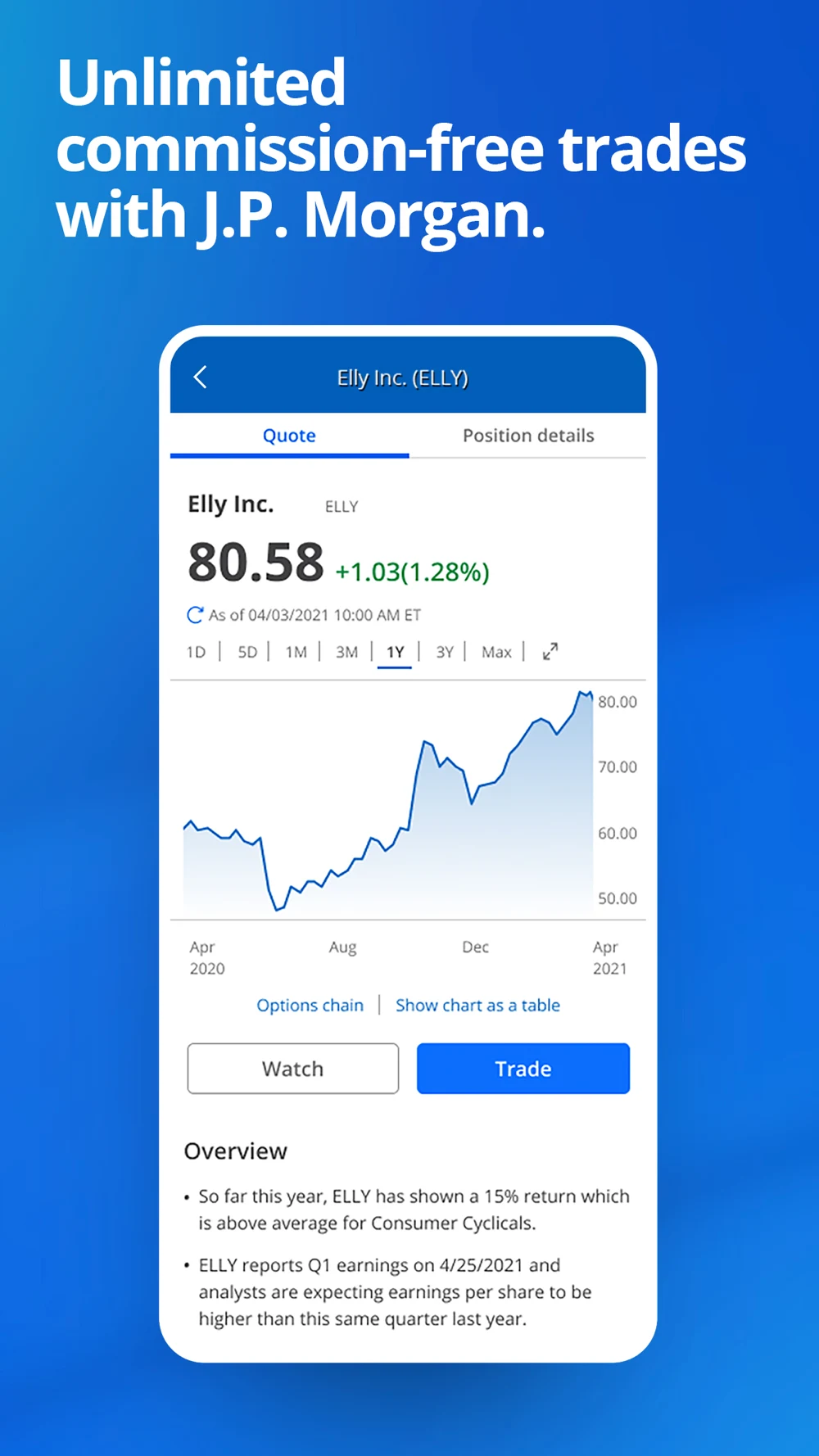
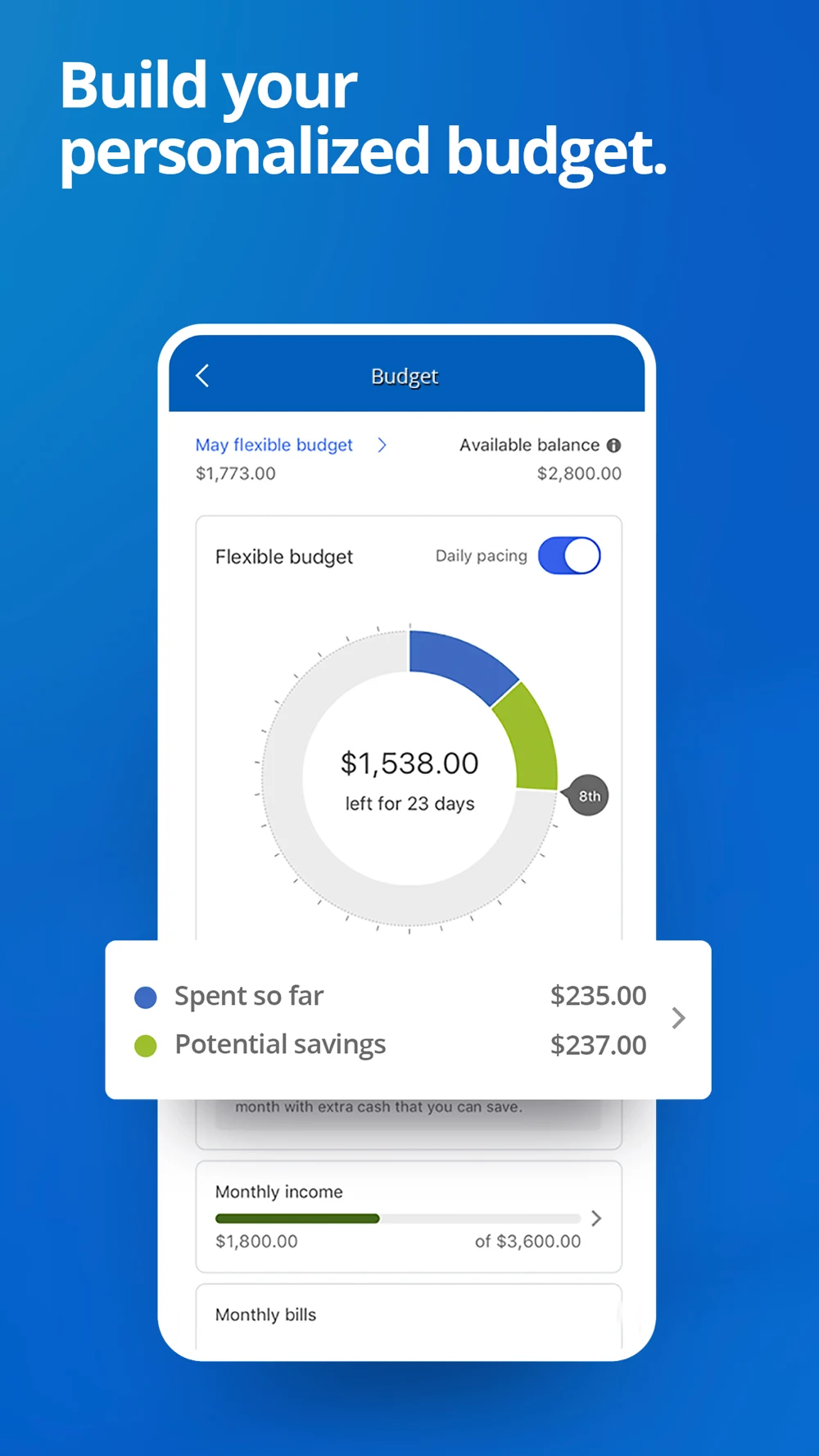
Source: Chase on the US App Store · captured 27 October 2026.
What the screenshots show: The opening combines account balances, cash flow and investment graphics in a tilted montage. The second mixes credit information and payment states under a popularity message. The third uses an upright investment quote and chart, including an option to view the chart as a table. The fourth shows a budget with remaining money, days and potential savings. It is a broad capability tour, not one continuous task.
What I would test: For payment intent, try a real review-and-confirm flow. For budget intent, lead with the budget and explain how remaining budget differs from account balance. For investing intent, preserve fee and product context rather than letting an upward example chart imply an outcome. The captured quote contains an older date; that identifies demonstration artwork, not a failure of the current live service. These recommendations are hypotheses; conversion effects have not been measured.
Wise: The quote is strong product proof; its time labels need context.
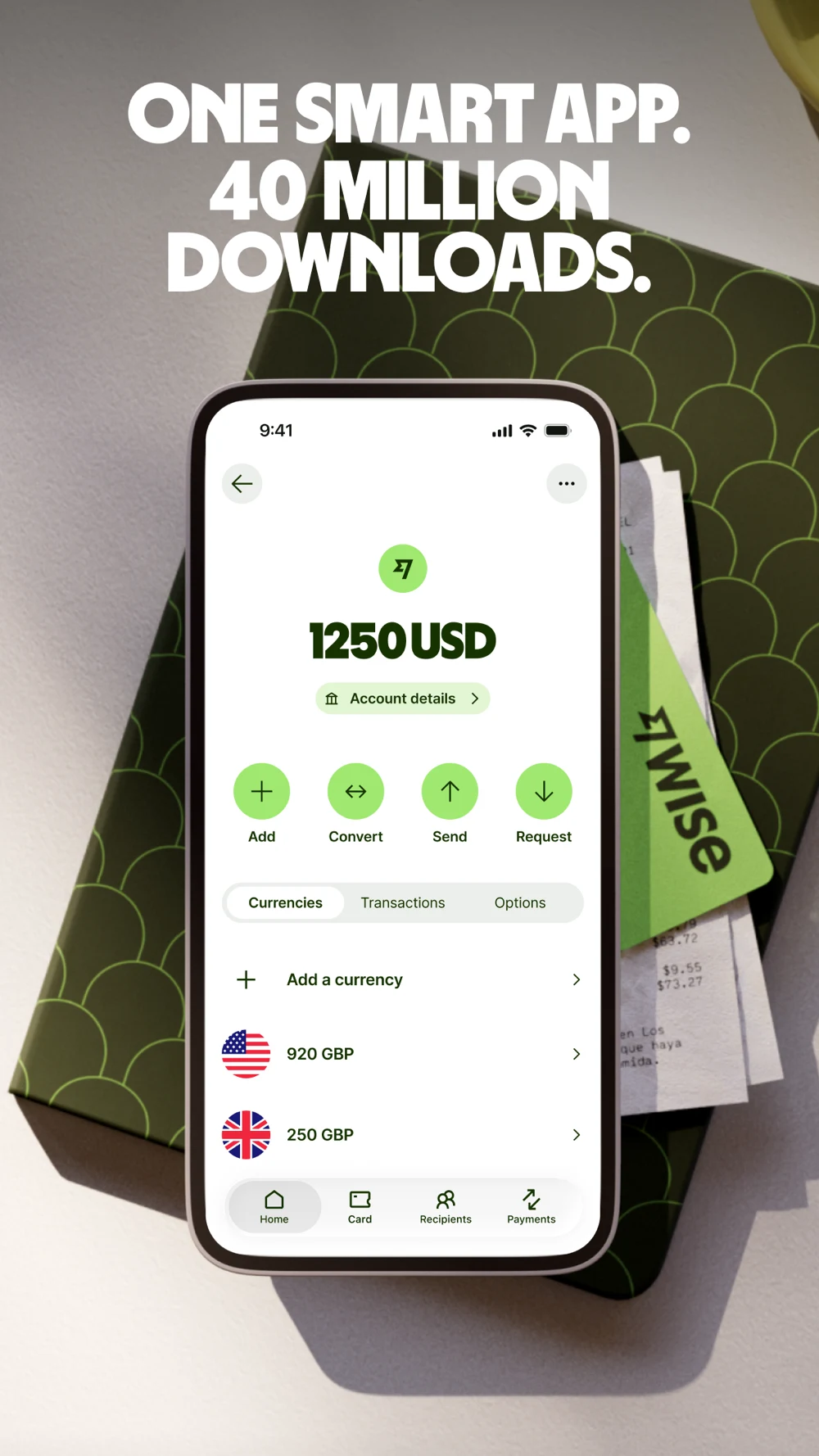
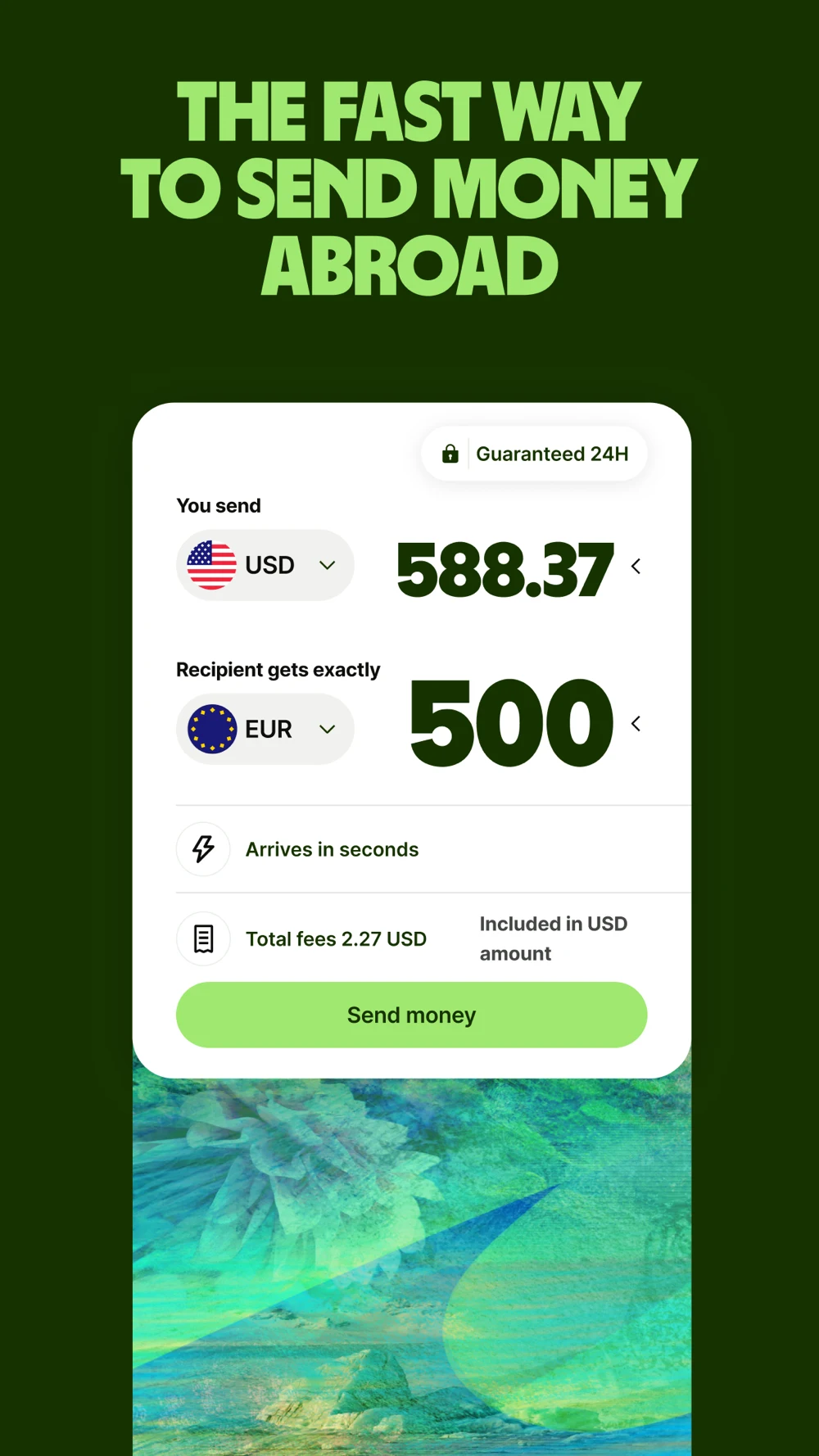

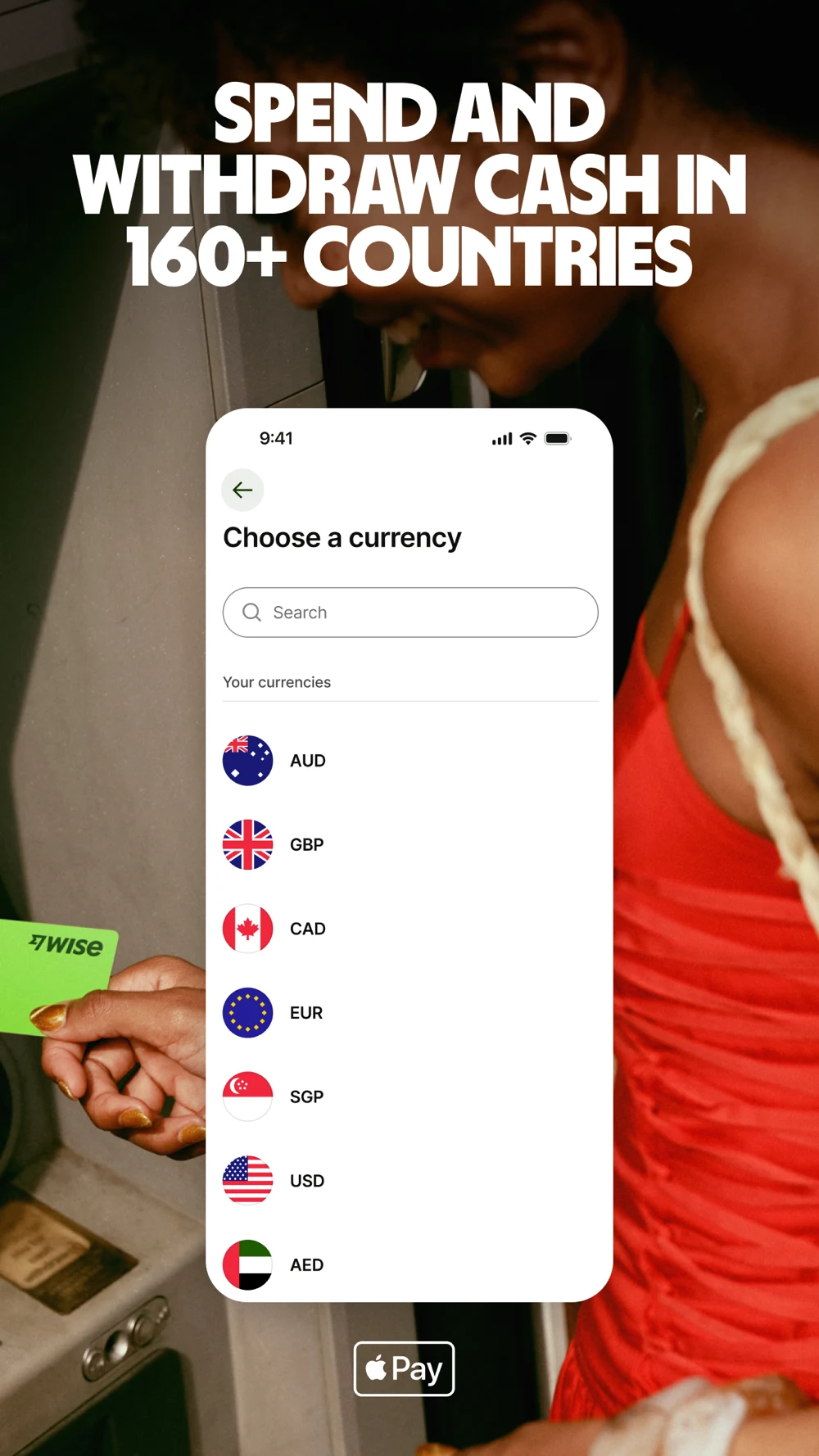
Source: Wise on the US App Store · captured 27 October 2026.
What the screenshots show: The first panel shows a multi-currency home screen with a large popularity claim. Panel two enlarges sender and recipient amounts, fee treatment and arrival wording, with a separate 24-hour badge. Panel three returns to trust language and a lock graphic. Panel four combines a currency chooser with card-use imagery. The quote is the most immediately inspectable decision in the sequence.
What I would test: For transfer intent, test the quote first. Clarify exactly what the time badge refers to so rate validity cannot be confused with arrival. Keep fee treatment, rate and recipient amount legible together. Check every currency code and symbol in exported artwork: the captured home illustration pairs a US flag with a GBP row, and the later chooser displays SGP. Those are artwork details to verify, not evidence of live transaction behavior. Keep location-dependent availability visible. These recommendations are hypotheses; conversion effects have not been measured.
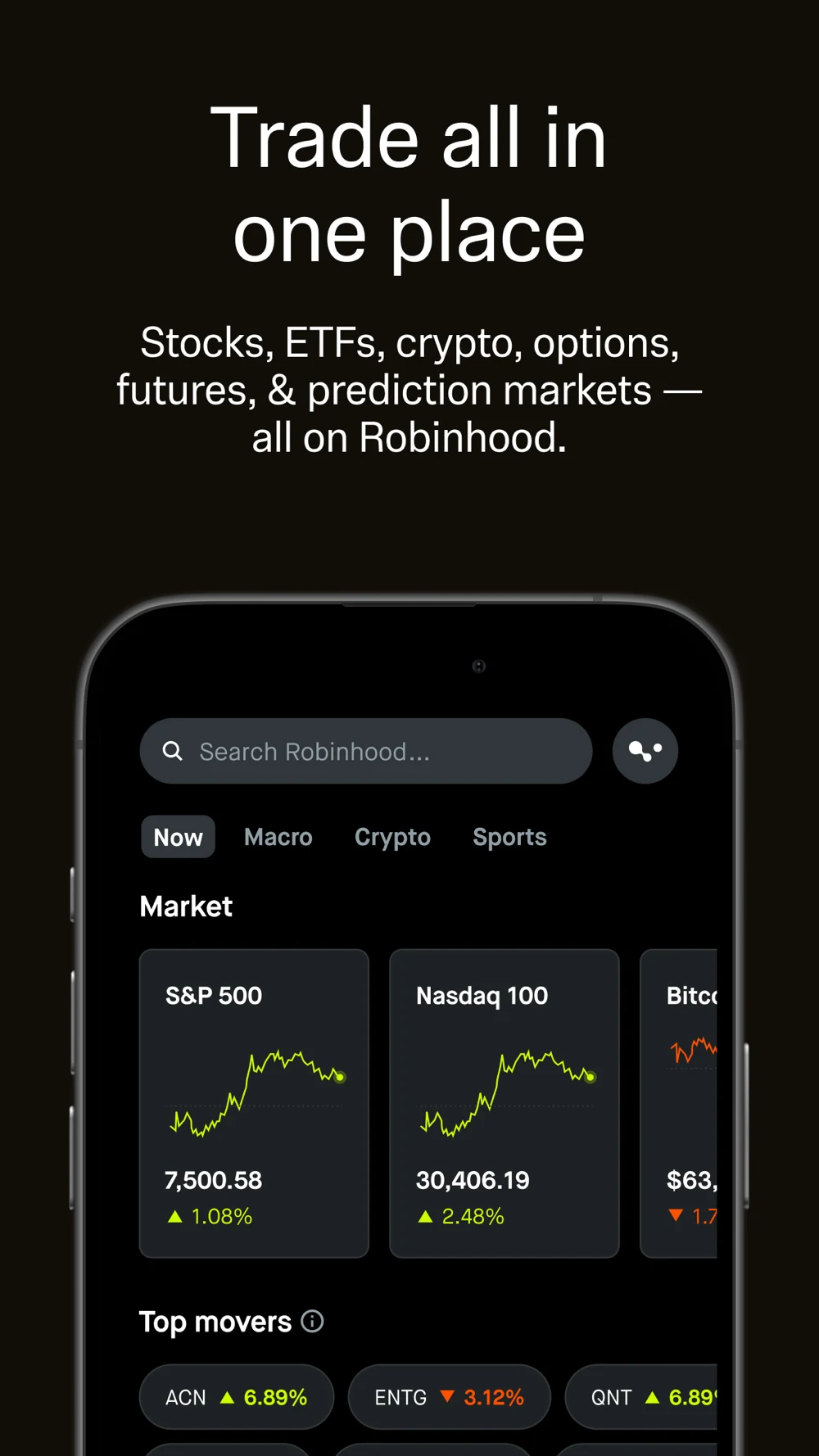
Robinhood: Clear type cannot make different financial products interchangeable.

Source: Robinhood on the US App Store · captured 27 October 2026.
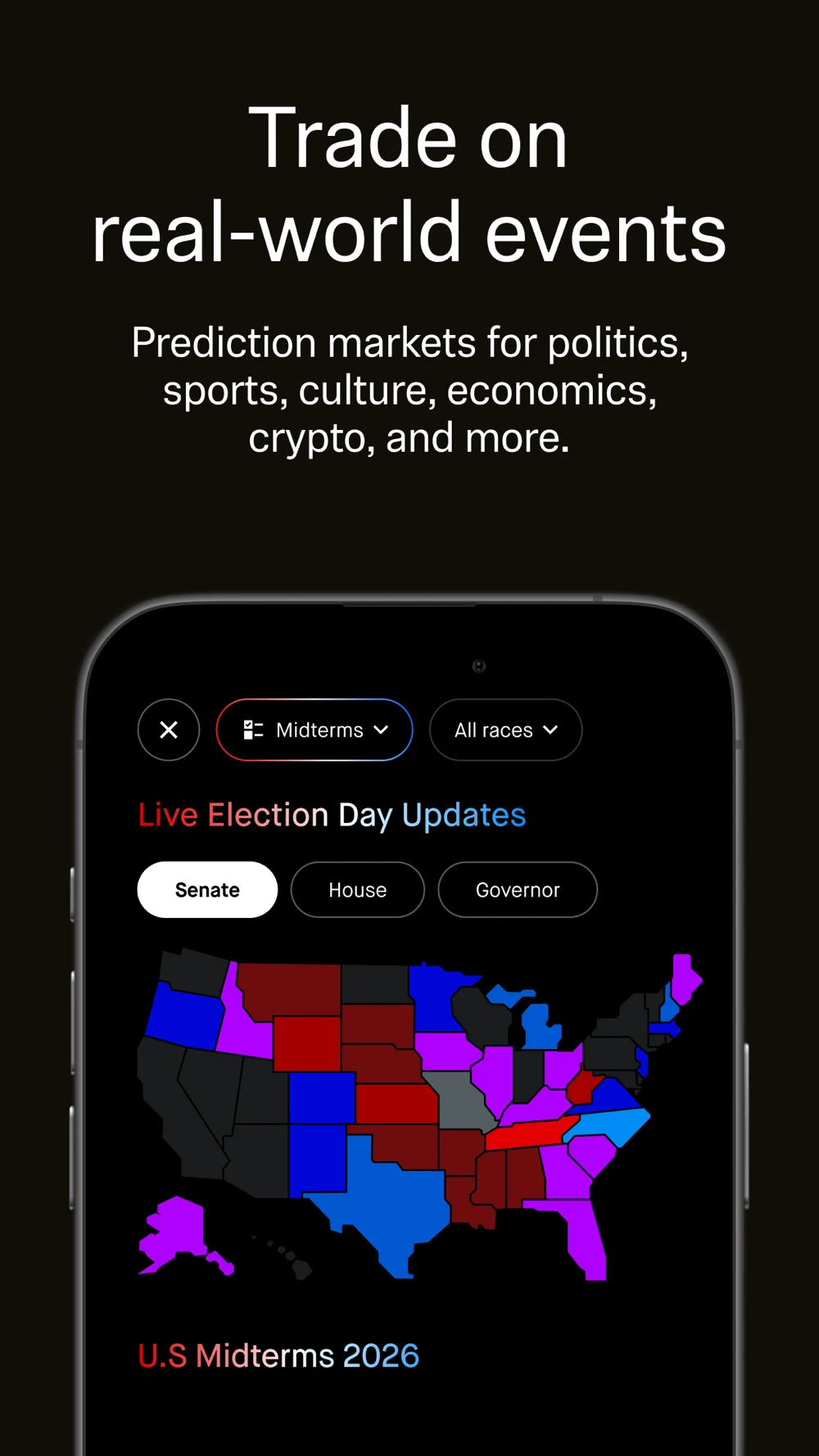
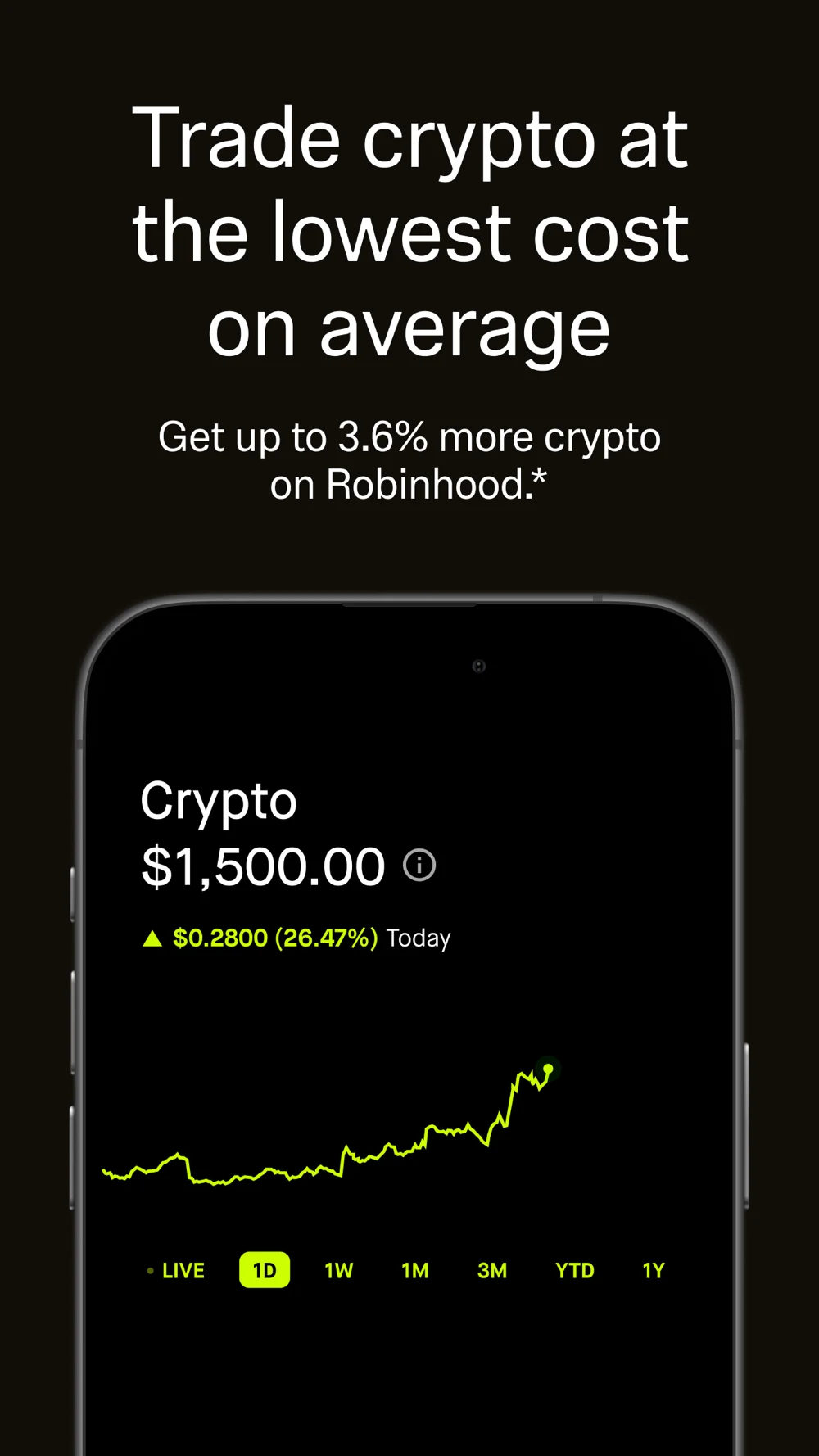
What the screenshots show: The first panel names several trading products and shows market cards. The second promotes a cash-program rate with subscription, eligible-cash and changeable-rate wording. The third switches to event-contract imagery. The fourth pairs a comparative crypto-cost claim with a rising portfolio-style chart. Type is large and contrast is strong, while the sequence moves between products with different conditions.
What I would test: Match the opening to the supported account or instrument. Retain readable conditions when showing a rate. A comparative cost message needs the approved comparison basis, not just a chart showing price movement. A broader product lineup is not proof that every user is eligible for every feature. Do not copy event-contract or crypto promotion into a general budgeting campaign or infer advertising eligibility from the listing alone. These recommendations are hypotheses; conversion effects have not been measured.
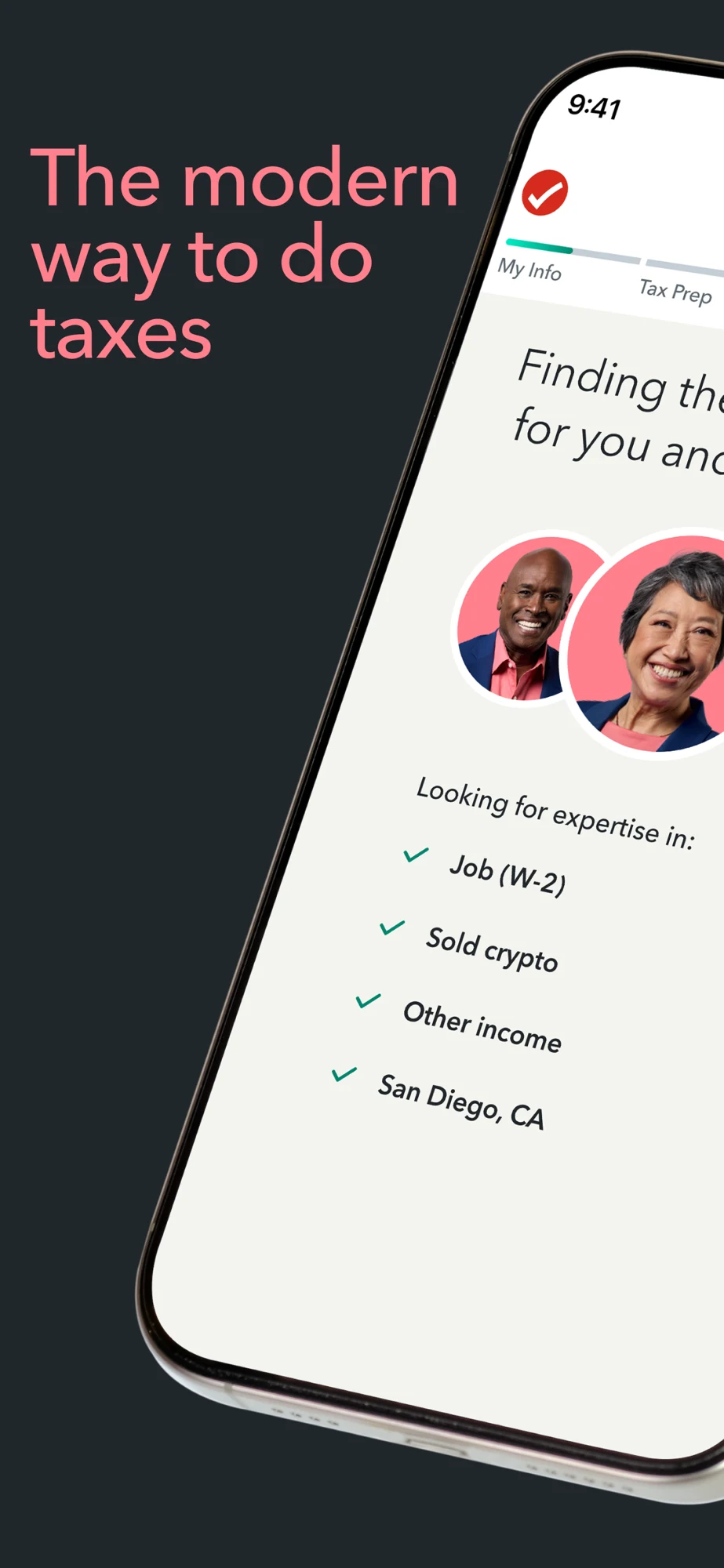
TurboTax: Expert-led imagery should still explain the service choice.



Source: TurboTax on the US App Store · captured 27 October 2026.
What the screenshots show: The first two panels split a large tilted interface across a panorama: a matching story sits beside language about filing yourself or using an expert. Panel three shows a named expert portrait and handoff message. Panel four shows more expert portraits and matching language. The sequence strongly establishes human help, but the practical document, price and filing-state steps are not prominent in these first four panels.
What I would test: For expert-help searches, show the actual matching and document handoff. For self-filing searches, use an opener that proves that route. Make each panel understandable on its own because the panorama can be viewed one frame at a time. Explain the service tier and supported return scope before borrowing a free-filing or refund message. This critique does not assess the quality of the tax service. These recommendations are hypotheses; conversion effects have not been measured.
Lesson 1 — Choose the money job before the screenshot.
- PLANAssign or record money without moving it
- TRANSACTReview an actual payment or transfer
- ASSESSUnderstand a record, quote or eligibility result
- ACTMake the correct next step explicit
Lesson 2 — Name the number and its time frame.
- WHATBalance, budget, price, score or estimate?
- WHENAs-of time, period or valid-until date
- SOURCEUser entry, connected account or provider quote
- LIMITWhat is pending, missing or conditional?
Lesson 3 — Let the title identify the useful product.
- TITLEPocketDraft: Budget Planner
- SUBTITLEManual Expenses & Weekly Plans
- PROOFA readable plan with unassigned money
- ACTIONEdit the plan without moving funds
Lesson 4 — Explain a transfer in the order people need.
- TOTAL500.00 USD includes a 4.00 USD fee
- CONVERT496.00 USD at an example rate of 0.92
- RECEIVE456.32 EUR in this fictional example
- NEXTReview recipient; nothing sent yet
Lesson 5 — A request is not a completed transaction.
- STARTChoose the action and relevant account
- REVIEWCheck cost, recipient and conditions
- SUBMITSend the request with clear authorization
- CONFIRMDistinguish pending, completed and failed
Lesson 6 — Make trust inspectable.
- PROVIDERName the entity for the relevant service
- PERMISSIONExplain what access is being requested
- CONTROLShow an actual setting or review step
- BOUNDARYKeep product-specific limits visible
Lesson 7 — Keep a claim attached to its conditions.
- PROMISEWhat exactly is being offered?
- CONDITIONEligible account, tier, period or corridor
- EVIDENCEApproved current source for the claim
- RECHECKOwner and trigger for updating the asset
Lesson 8 — Match acquisition to a meaningful next step.
- QUERYA supported financial task
- CREATIVEOne accurate example of that task
- ACTIVATIONRelevant informed use, not any install
- LEARNINGImprove copy without exporting financial details
These graphics explain decisions and states. They are not performance charts. Use screenshot strategy to choose the job, ordering to sequence the proof and copy to make the action clear. Check all important amounts and qualifications with readability testing.
FINANCE APP ASO
Worked metadata, copy, screenshot sequence and stage-specific CTAs.
PocketDraft is a fictional example of a manual budget planner. Assume it supports weekly plans, income entries, expense records, editable categories, bill planning and goal records without a bank connection. It does not hold funds, move money, offer credit, provide investments or file taxes. These assumptions are a creative brief, not verified product capabilities. Check every one before adapting the copy.
Swipe horizontally to compare all columns →
| Field | Worked example | Characters / limit |
|---|---|---|
| iOS name | PocketDraft: Budget Planner | 27 / 30 |
| iOS subtitle | Manual Expenses & Weekly Plans | 30 / 30 |
| iOS keywords | spending,tracker,money,categories,paycheck,bills,income,goals,cash,flow,household,log | 85 / 100 |
| Google Play title | PocketDraft: Budget Planner | 27 / 30 |
| Google Play short description | Plan weekly spending, record expenses and adjust your categories. No bank link. | 79 / 80 |
Opening copy: Give this week a plan. Enter the amount you want to plan, divide it between your categories and see what remains unassigned. Record expenses as you go, then adjust your plan when the week changes.
Supporting copy: Keep income, planned spending and recorded expenses separate. Add upcoming bills and goal amounts to your plan. Edit a category when priorities change, and review the period you are working on. PocketDraft uses the records you enter; it does not connect to a bank or know about transactions you have not recorded.
Longer feature copy: Create a weekly plan with your own category names. Add an expense with a date, amount and category. Review the difference between the plan and the records you entered. Keep upcoming bills and goals visible while deciding what to assign next. No money moves when you edit the plan. Before launch, add the actual account, storage, export and payment details rather than assuming that a manual app is automatically offline, anonymous or free.
Why this division works: The name identifies a budget planner. The subtitle adds manual expenses and weekly plans. The first screenshot demonstrates allocation. Longer copy explains that the figures depend on the user’s records. The keyword field supplies complementary supported language. No transfer, tax or brokerage term is needed to make this product more discoverable.
Swipe horizontally to compare all columns →
| Panel | Headline to test | Actual proof required | Next action |
|---|---|---|---|
| 1 | Give this week a plan | An editable allocation with unassigned money | Edit my plan |
| 2 | Record what you spend | Date amount and category in a real entry | Add expense |
| 3 | See the plan and the record | Clearly labeled planned and recorded amounts | Review category |
| 4 | Keep upcoming bills in view | Actual bill planning with a period and due-date meaning | Add a bill to my plan |
| 5 | Adjust when the week changes | A real edit and recalculated remaining amount | Save changes |
| 6 | Plan without a bank connection | Working manual workflow with accurate limits | Start a manual plan |
Swipe horizontally to compare all columns →
| Other product | Specific title direction to validate | Supporting copy direction | CTA that describes the stage |
|---|---|---|---|
| Transfer service | RouteSend: Money Transfers | Review the fee and recipient amount for supported routes | Get a quote |
| Read-only expense tool | LedgerView: Expense Tracker | Review imported transactions and category records | Review transactions |
| Tax service | ReturnPath: Tax Filing | Choose the supported filing mode for your return | Compare filing options |
| Credit information tool | CreditView: Score Tracker | Review your score source and update date | View score details |
The additional names are fictional directions, not cleared brands or complete listings. Their service and market need verification. A transfer CTA should distinguish getting a quote, reviewing a recipient and authorizing a payment. A tax CTA should distinguish choosing help, uploading a document and filing. “Get approved” cannot stand in for submitting an application.
Preview direction: For PocketDraft, show entering a planning amount → assigning categories → recording a neutral expense → reviewing the updated plan. Keep the period and number labels visible. For a transfer service, show the quote and review stages with sample data and a clear unsent state. Use the real interface for production previews; do not fabricate a successful payment, refund or investment outcome.
Develop the message with value propositions, select the opener with first-screenshot strategy, and expand features with long-description guidance. More financial keywords cannot compensate for an unclear product identity.
FINANCE APP ASO
Ten communication mistakes to catch before chasing more installs.
Swipe horizontally to compare all columns →
| Mistake to investigate | Concrete example or risk | Better test |
|---|---|---|
| Treating all money jobs as one intent | A general budget planner borrows transfer and investing keywords | Name its planning task and remove unsupported clusters |
| Making a number self-explanatory | A large balance or goal amount lacks a period and definition | Label planned, recorded, available and estimated values |
| Using an emotional promise as the only explanation | YNAB opens with broad reassurance before its clearest upright plan | Test the allocation task first for planning intent |
| Showing too many jobs at once | Chase’s opening combines account, cash-flow and investing cards | Lead with one supported customer task for that query |
| Mixing quote validity and arrival | Wise’s quote contains a time badge and separate arrival wording | Label each time reference and the actual conditions |
| Missing currency consistency checks | Captured Wise artwork includes flag/code details needing review | Validate currency codes, labels and calculations in every export |
| Using a chart to prove a cost claim | Robinhood’s comparative crypto-cost message sits above a rising chart | Show the approved fee comparison basis and distinguish price movement |
| Making a panorama carry essential meaning | TurboTax splits the matching interface over its first two frames | Make every frame independently understandable |
| Confusing a recommendation with a decision | A credit-offer recommendation is treated as approval | Show the actual lender application and decision state |
| Letting automation hide authority | An assistant finds a recurring charge and is assumed to have canceled it | Explain request, confirmation and actual completed status |
These are critiques of store communication, not findings of financial harm, misconduct or conversion loss. A screenshot does not expose the whole product. Keep successful elements—such as readable quote amounts and explicit subscription conditions—while testing a specific improvement. Download the ten-test backlog.
Use test hypotheses and prioritization to pick one change. Check comprehension before running a conversion experiment, especially where a more persuasive image could also create the wrong expectation.
FINANCE APP ASO
Build campaigns around a financial task and an honest completion state.
Use Apple Ads search-results research to test a supported money job, then follow the result beyond the install. PocketDraft can investigate manual budgeting and expense records. It cannot advertise a transfer corridor, bank account, investment return or tax-filing service. This is a planning blueprint; no campaign or spend has been created.
Before any launch, check the actual service, advertiser entity, territory and creative against Apple’s advertising policies. Claims must be substantiated and pricing must be accurate. Eligibility can depend on content and location; a competitor’s store presence is not proof that your ad or product is eligible. Product-specific review is especially important for lending, crypto, derivatives or event-contract features. The worked campaign below stays with a manual planner.
Swipe horizontally to compare all columns →
| Campaign / group | Intent and examples | Matching creative | Measure after the install |
|---|---|---|---|
| Category exact — weekly plan | weekly budget app; paycheck budget app | Weekly allocation with a clearly labeled remaining amount | Relevant first plan and voluntary return |
| Category exact — manual records | manual transaction entry; budget app without bank linking | Actual no-link entry workflow | First valid expense record and understood limitations |
| Category exact — bill planning | annual bills planner; household bill planner | Upcoming amount and period, with no payment implication | A useful bill entry in a plan |
| Brand exact — own product | Actual brand and genuine spelling variants | Recognizable product and primary task | Separate new users from existing-customer navigation |
| Discovery — broad | A few supported budget and expense seeds | Accurate general planning story | Relevant search terms and qualified use |
| Discovery — Search Match | Platform-discovered matches for the actual listing | Same accurately scoped planner | Inspect terms for unsupported financial services |
| Conditional — transfer service | Supported currency route and transfer-fee intent | Complete route-specific quote | Eligible completed transfer, with failures and reversals tracked |
| Conditional — tax service | Supported filing market, return and service mode | Correct self-file or expert path | Relevant preparation progress and filing status |
Matching mechanics: Keep selected exact groups separate from bounded broad and Search Match discovery. Exact match can include close variants, so inspect the queries rather than assuming literal matching. Move useful queries into the right intent group after checking relevance and the downstream result. Use Apple’s campaign structure and match-type guidance for current setup behavior.
Negatives for the fictional planner: Investigate exclusions for “instant loan,” “send money abroad,” “stock trading,” “file taxes” and “open bank account,” because PocketDraft does not provide those services. Review the actual mismatched queries and their variants. Do not remove a useful budgeting phrase just because it contains “bank”; “budget without bank linking” fits this example. Apple currently documents exact as the default negative match type. Do not assume one negative excludes every related phrase. Keep service exclusions and discovery-routing exclusions separate. Source: negative keywords.
- QUERYA supported financial task
- CREATIVEOne accurate example of that task
- ACTIVATIONRelevant informed use, not any install
- LEARNINGImprove copy without exporting financial details
Custom product pages: A weekly-plan page should open with allocation. A manual-expense page should show entry and category review. A bill-planning page should show the period and due-date meaning. Keep the no-bank-link scope consistent. Supported deep links should reach the relevant task without bypassing required explanations, consent or payment review. Check the actual new-user path and Apple’s custom-page configuration.
Define a bounded experiment: Choose one market, one supported task and one creative hypothesis. Set a maximum spend, evaluation window, evidence threshold and stop rule before launch is authorized. Stop a misleading promise immediately. For statistical evaluation, use a predefined plan rather than repeatedly checking until a favorable number appears. Keep the other screenshots stable when testing the opener.
Worked economics, entirely hypothetical: Suppose documented contribution economics permit $24 in acquisition cost per retained paying customer. If 8% of new installs become retained paying customers, the illustrative install ceiling is $1.92. At 35% tap-to-install, the tap ceiling is $0.672, about $0.67. These are invented teaching assumptions, not finance-app benchmarks or recommended bids. Replace them with real costs, refunds, retention, uncertainty and cohort definitions.
Different services need different economics: A transfer app must account for its actual margin, processing costs, failed transfers and relevant risk costs. A tax service must account for service delivery and seasonal use. A bank must distinguish account applications from eligible opened accounts and continuing relevant use. Do not evaluate all seven branches with the same install-to-subscription model.
Useful measurement: Keep impressions, taps, downloads, relevant setup and meaningful task completion distinct. For a planner, a useful plan is more informative than permission acceptance. For transfers, a submitted request is not a settled payment. For tax, preparation, submission, acceptance and refund are separate states. Avoid using profit, approval or refund-size promises as acquisition success targets.
Protect the research boundary: Use approved aggregate events and cohort reports. Do not send account numbers, balances, credit scores, tax documents, recipient details or transaction narratives into advertising parameters. Even generic events require review of the actual data flow. Paid keyword performance is not proof of organic ranking potential. Compare ASO KPIs, reconcile conversion definitions, separate traffic sources and record changes in the metadata log.
FINANCE APP ASO
Current category patterns that deserve a specific test.
Swipe horizontally to compare all columns →
| Pattern in current sources | Evidence reviewed 27 October 2026 | Question for the next brief |
|---|---|---|
| Broad brands combine several financial jobs | Chase, Credit Karma and Robinhood describe multiple products or services | Does the first frame identify the job this visitor needs? |
| Planning tools differentiate by method and collaboration | YNAB describes shared plans; Monarch describes flexible or category budgets and household access | Can users recognize the planning method and permissions? |
| An assistant can extend beyond an in-app dashboard | Rocket Money describes its Rowan messaging assistant, Premium+ access and human-verified workflows | Can users tell what is automatic, requested, reviewed and completed? |
| Payment products can also contain account or investment features | Wise distinguishes money services and location-dependent features in its description | Are the provider and conditions explained for the exact feature shown? |
| Expert-led tax help is prominent in creative | TurboTax’s captured opening sequence emphasizes matching and handoff | Do self-filing visitors still recognize their route? |
| A rate-led screenshot needs maintenance | Robinhood’s captured cash-rate panel includes eligibility, membership and rate-change wording | Who checks whether the claim and its conditions remain current? |
These are dated observations from the linked primary listings, not measured adoption or growth trends. No market-share, demand or conversion increase is established. The practical editorial opportunity is to explain a changing product clearly, then test comprehension and relevant use.
Create a claim register for volatile creative: the exact phrase, supported product, source, locale, owner and refresh trigger. Rates, transfer availability, tax-year support, service tiers and eligibility can change independently. A previous approval does not make an old screenshot permanently accurate. Use the change-log process to connect a new claim to its evidence and release.
FINANCE APP ASO
Use AI to explain the money decision, then verify every number.
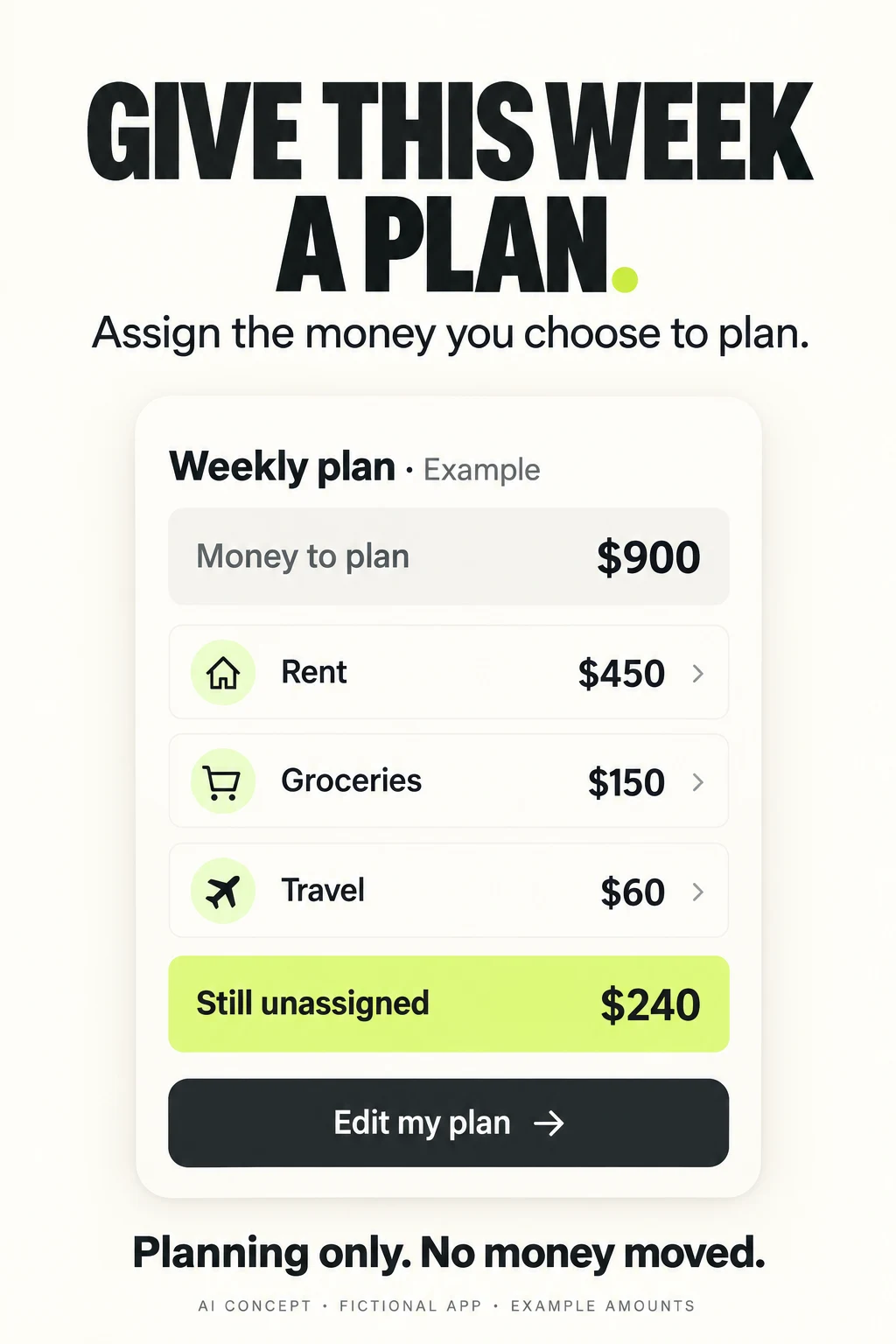
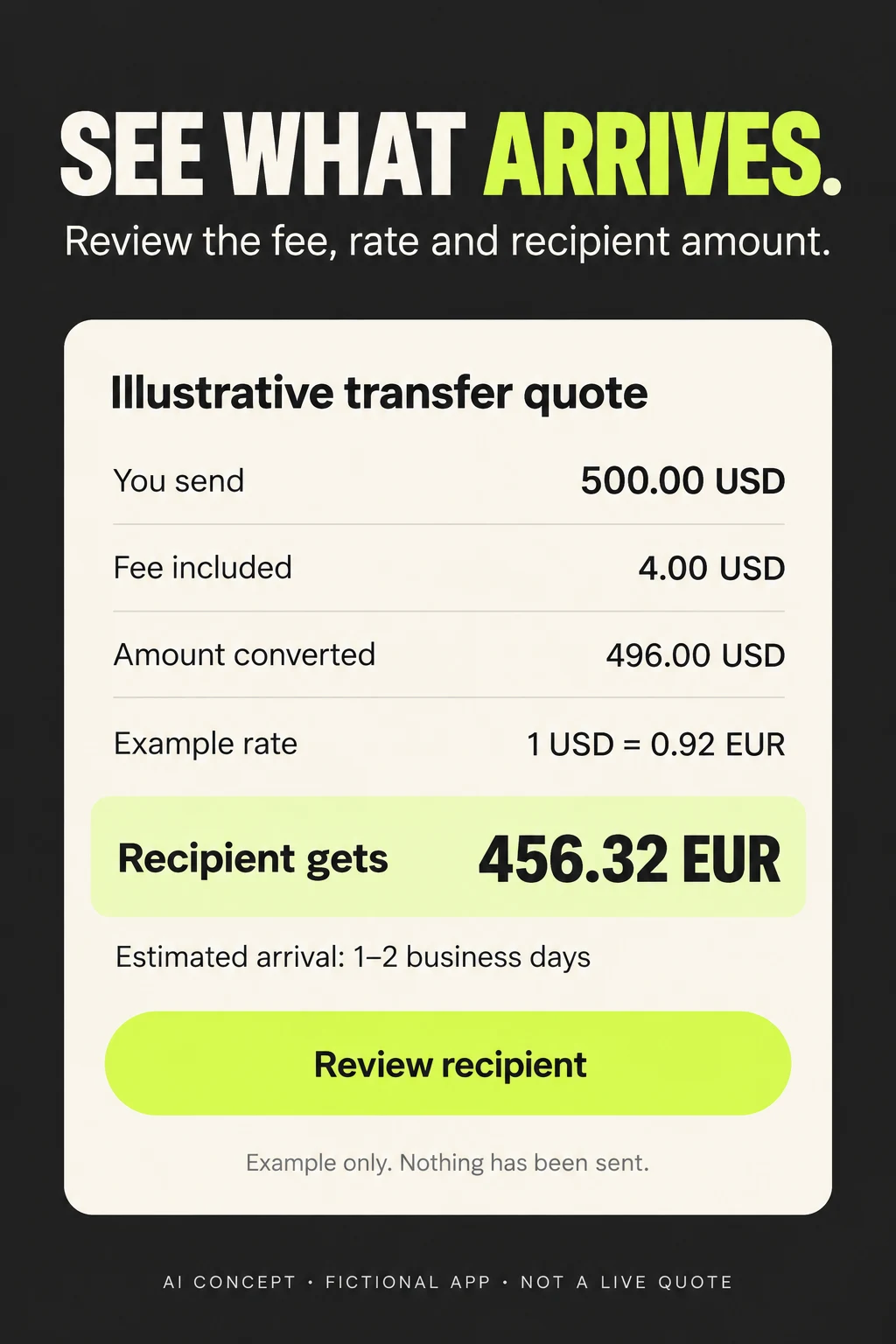
These two original AI concepts illustrate different finance jobs. PocketDraft is a fictional manual planner; RouteSend is a fictional transfer service. They are not competitor screenshots, live interfaces, tested improvements or current offers. The figures are teaching examples. Planning and payment deserve different proof even when both use the same restrained visual system.
Swipe horizontally to compare all columns →
| Workshop task | Approved input | Useful prompt direction | Human check |
|---|---|---|---|
| Clarify a budget | Actual planning fields and neutral sample amounts | Show planned categories and the unassigned remainder | Arithmetic, period and meaning match the product |
| Explain a quote | Approved quote schema and fictional values | Show total sent, fee inclusion, rate and recipient amount together | Funding method, route, validity and arrival qualification are accurate |
| Improve a statement view | Sanitized product UI and known data-refresh rules | Make the source and as-of time readable | No fictional live-sync or balance guarantee |
| Explain an assistant | Actual permission and confirmation workflow | Separate request, review and confirmed action | No invented authority or human oversight |
| Rewrite a claim | Current approved wording and its conditions | Keep the useful benefit and make the condition legible | No unsupported cheapest, guaranteed or free claim |
| Prepare the test | Existing control, relevant query family and one hypothesis | Compare task-first creative with the current opening | No invented uplift; same remaining sequence and planned evaluation |
Concept A critique: The category amounts reconcile: 900 minus 450, 150 and 60 leaves 240. The no-money-moved statement makes the product boundary explicit. The generator omitted the requested PocketDraft brand name and used a plane icon for travel, which may suggest a holiday rather than routine transport. Add the real brand treatment and actual category icon in production. Show the real period or date range and define whether the planning amount is entered manually. Do not imply that the example is a recommended household allocation.
Concept B critique: The fee is included in the sender total, leaving 496 USD to convert; at the fictional 0.92 rate, the example recipient amount is 456.32 EUR. The image separates an arrival estimate from the unsent state. The generator omitted the RouteSend brand name. A production quote also needs the actual funding method, supported route, quote validity and any applicable additional-cost conditions. The displayed estimate is not a delivery promise. Use the product’s real review and authorization sequence.
Production review: Both images use large type and one upright decision card. Keep that clarity while replacing invented controls with real UI. Confirm currency precision, separators, rounding, dates, accessible contrast and translation expansion. Use synthetic data; never provide actual statements, tax documents or account credentials to a creative generator.
Test order: Ask users to explain the number, period and next step. For the quote, ask whether the fee is extra and whether anything has been sent. For the plan, ask whether assigning rent pays the landlord. Fix misunderstandings before a store experiment. Then compare one improved opening against the current control with a stable remaining sequence, tracking relevant use and complaints alongside conversion.
FINANCE APP ASO
Release a specific financial promise with evidence and an owner.
Swipe horizontally to compare all columns →
| Area | Finance-specific release check |
|---|---|
| Product identity | Actual financial job and service provider; do not imply a bank, broker or tax service that does not exist |
| Eligibility | Territory, residency, account type, supported instrument or transfer corridor; age and documentation where applicable |
| Number meaning | Currency, period, source, as-of time, estimated versus actual and pending versus completed |
| Pricing | Real fee treatment, subscription entitlement, billing interval and conditional free features |
| Claims | Approved support for comparative costs, rates, savings, guarantees and awards; no borrowed competitor claim |
| Permission | Connection scope, view/edit/transaction authority, sharing and actual controls |
| Local language | Currency code and decimal format, local account terminology, dates, tax year and service-language support |
| Accessibility | Readable amounts and qualifications; labels beyond color; actual supported text and assistive modes |
| Measurement | Separate acquisition, eligible setup and actual task completion; review sensitive event data |
| Maintenance | Named owner and update trigger for rates, dates, prices, availability and service scope |
Localization changes the product story. A currency selector is not evidence that every send-and-receive route is supported. A Spanish interface is not evidence that a human service is available in Spanish. A tax term meaningful in one jurisdiction may be wrong elsewhere. Start with market prioritization, validate local keywords, adapt screenshots and run localization QA.
For seasonal products, distinguish product changes from calendar effects. A tax campaign compared with a different filing period can produce a misleading conclusion. A new rate or market event can also change the audience mix. Keep the test context, paid traffic and release history with the results instead of attributing every movement to the screenshot.
Start an ASO audit with the one financial job that matters most. Use ASO services to connect research, metadata, creative and measurement. Return to the subcategory map when the product expands; each new service needs its own evidence and message.
Research limits: US iOS public listings and original screenshot assets, with official iOS and Google Play guidance. No Android competitor screenshot audit, private account access, financial-product recommendation, licensing audit, independent security assessment, measured keyword demand or conversion results. The concepts and unit economics are explicitly fictional teaching examples.
TAX PREPARATION APP ASO
Explain who prepares the return and what happens next.
Explore 100 keyword candidates, eight filing apps, two adjacent tools and 20 original screenshots and worked filing, document and Search Ads strategies.
Read the tax-preparation ASO playbook ↗CREDIT MANAGEMENT APP ASO
Keep the score with its context and explain the service.
Explore 100 keyword candidates, eight apps, 20 real panels and worked monitoring, credit-building and report-review creative.
Read the credit-management ASO playbook ↗INVESTING APP ASO
Explain the investment model and the next action.
Explore 100 keyword candidates, eight apps, 20 real screenshot panels and practical copy, account-clarity and Apple Ads tests.
Read the investing-app ASO playbook ↗MONEY TRANSFER APP ASO
Make the route, the cost and the recipient outcome clear.
Explore 100 keyword candidates, eight apps, 20 original screenshots and worked quote, pickup and Search Ads strategies.
Read the money-transfer ASO playbook ↗BANKING APP ASO
Make the account, the action and the state clear.
Compare 100 banking keyword ideas, eight apps, 20 original screenshot panels and worked copy for account access, deposits, cards and acquisition.
Read the banking-app ASO playbook ↗EXPENSE TRACKING RESEARCH
Turn a receipt into a useful record.
Explore personal and work expense journeys through 100 keyword candidates, eight competitors, real screenshots and practical copy tests.
Read the expense-tracking ASO playbook ↗BUDGETING APP RESEARCH
Show the plan people can change.
Compare envelopes, pay cycles, shared budgets and manual planning through real screenshots, 100 keyword candidates and worked creative tests.
Read the budgeting-app ASO playbook ↗