CATEGORY PLAYBOOK / EXPENSE TRACKING
ASO FOR
EXPENSE TRACKING APPS.
A receipt is the beginning. Show the record people can check, find and use. Build sharper keywords, screenshots and copy for personal spending and work expenses.
MAKE THE EXPENSE STORY CLEAR ↓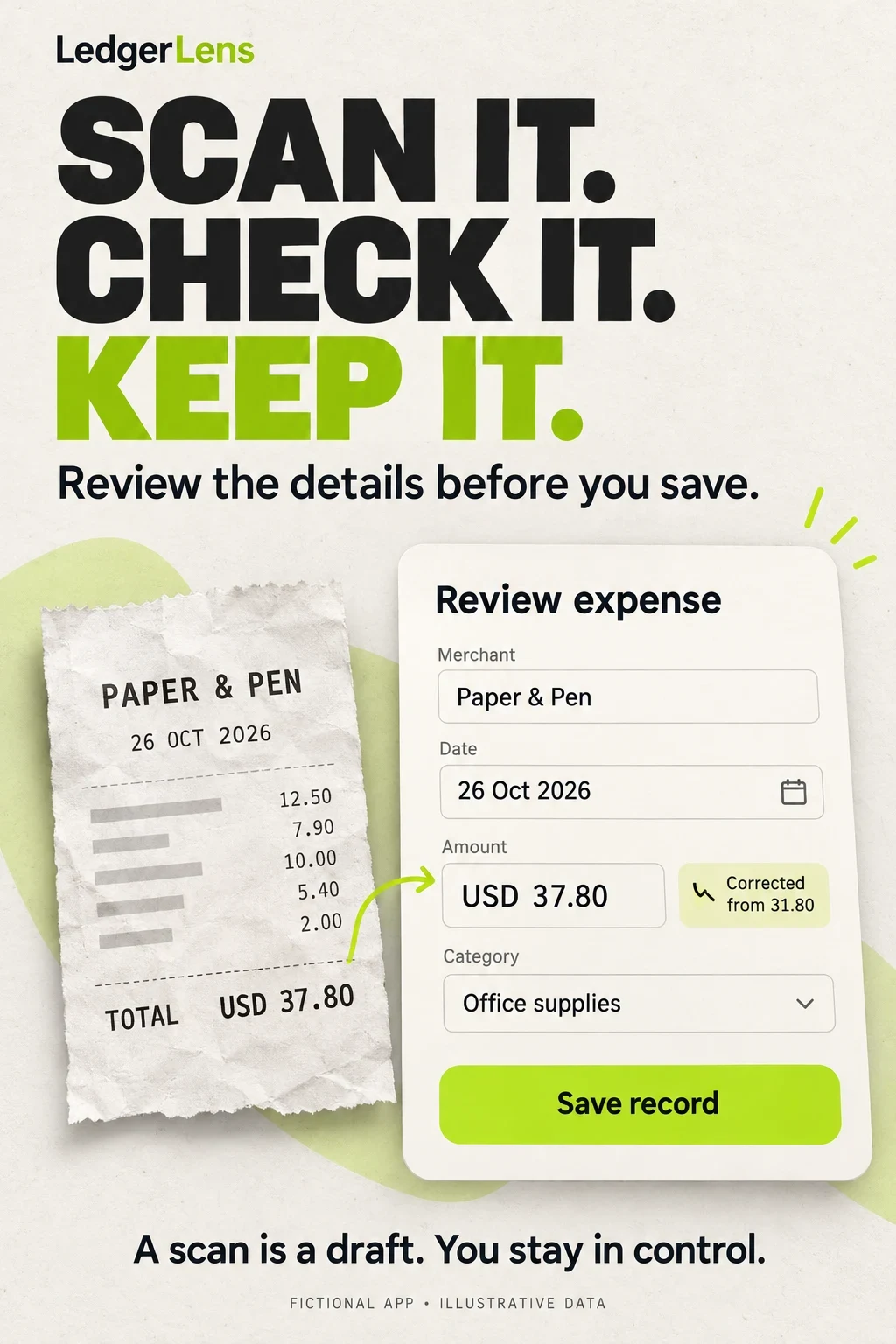
EXPENSE TRACKING APP ASO
Show what happens between a purchase and a useful record.
Expense tracking starts with evidence: what was bought, when, for how much and for whose records. The app-store story should make that chain easy to understand. A colorful spending chart is less useful when the visitor cannot tell whether they must type purchases, connect an account or photograph receipts. A reimbursement headline can be misleading for someone who only needs a private ledger.
This guide covers the acquisition journey for expense capture, review, retrieval and reporting. It complements the finance overview and the separate budgeting guide. Budgeting asks how to allocate future spending. Expense tracking asks how to make a usable record of activity. Products can do both, but the opening promise should match the search task.
Potential audiences · 100 keywords · Niche opportunities · Eight competitors · Real screenshots · Worked copy · Apple Ads
Swipe horizontally to compare all columns →
| Acquisition job | Opening proof | Critical distinction |
|---|---|---|
| Keep a personal spending log | Amount, date, category and save control | A manual record is not a complete bank feed |
| Turn receipts into records | Receipt beside extracted fields and review | Capture is not checked extraction |
| Review connected purchases | Source, state, freshness and correction | Imported is not necessarily final or categorized correctly |
| Organize independent work costs | Project label, attachment and export | A work label does not decide tax treatment |
| Submit employee expenses | Workspace, destination and report state | Submission is not reimbursement |
| Review company claims | Evidence and approval/correction action | An approver has a different task from an employee |
Write a brief in one sentence: “For people who need [recording task], the app lets them [actual action], then [usable result].” For a manual tracker, the result might be a searchable record. For a receipt tool, it might be a checked entry with its source attached. For an organization product, it may be a policy-complete report. The more concrete the result, the easier it becomes to choose search intent and value-proposition proof.
Keep this page’s intent focused. Do not add investment charts, bank-account offers or tax-filing claims just because competing finance apps also have them. Build the feature-to-proof map as part of ASO strategy, then choose the smallest truthful story that establishes why this expense tool fits.
EXPENSE TRACKING APP ASO
Recruit around real recording habits and responsibilities.
These are potential segments and research questions, not measured demographic shares. Recruit across adult age bands, work arrangements, household structures, languages and device/access needs. Age or income alone does not explain whether someone prefers manual entry. An employee’s purchasing authority also differs from their role as the person scanning a receipt.
For an initial qualitative study, use a small purposive sample spanning manual personal users, connected-account users, independent workers and employee submitters. Include people who recently abandoned a tracker and those who consistently use one. This is a discovery sample, not a representative survey. Ask them to reconstruct a recent ordinary expense, using redacted or fictional records. Observe which information they consider essential and which steps they assume the app performs automatically.
Swipe horizontally to compare all columns →
| Potential audience | Job to understand | Recruitment dimensions | Question to test | Screenshot proof |
|---|---|---|---|---|
| Personal cash users | Keep small purchases visible without connecting a bank | Adults using cash for different reasons; avoid income assumptions | Can they save a useful record without a connection prompt? | Manual amount, date and category |
| Busy repeat purchasers | Record the purchase before details are forgotten | Shift schedules, caregiving and interrupted routines across ages | Can they resume an unfinished entry? | Actual shortcut or saved draft |
| People rebuilding a spending record | Find missing or duplicated entries | Recent move, new account, device change or a gap in tracking | What is still uncertain after import? | Review queue and clear date range |
| Receipt-heavy independent workers | Keep documents linked to the right project | Freelancers, contractors and microbusiness owners with varied accounting experience | What does their accountant actually need exported? | Project label and linked original receipt |
| Employees on a work trip | Submit evidence to the right organization | New employees and experienced travelers, different employer policies | Do they need an invitation, workspace or policy assignment? | Destination, report state and submit action |
| Expense approvers | Resolve missing evidence without losing context | Team managers and finance staff; separate from the submitter | Can they see what changed and what still needs review? | Actual review state and request-for-correction path |
| Travelers using more than one currency | Understand original cost and reporting value | Different currencies, languages, trip lengths and connectivity | Which rate, date and rounding created the converted number? | Original amount plus conversion context |
| Households sharing records | Coordinate selected expenses | Partners, roommates and extended households with different access preferences | Does sharing expose all records or only a selected wallet? | Real permission and shared-scope controls |
| Spreadsheet users considering a switch | Preserve a usable record outside the app | Different comfort with import formats and reconciliation | Can they export the fields they rely on? | An actual export preview, not a spreadsheet logo |
| People needing accessible entry | Read, correct and save reliably | Large text, low vision, motor or screen-reader needs; recruit directly | Can a person distinguish states without color alone? | Supported text sizes, labels and focus behavior |
Ask “What happens after you scan?” rather than “Do you like AI?” Ask “Who needs this record next?” rather than assuming everyone wants reimbursement. Ask which language appears on receipts, which currency is used for reporting, and whether they record purchases while offline. Those answers can change the first three frames more than a broad demographic label.
For each candidate frame, ask the participant to describe the source of the data, the action they can take and the result they expect. Record incorrect interpretations before revising. Then check small-screen readability and turn the finding into a specific test hypothesis. An attractive image with an incorrect expectation is still a weak acquisition asset.
EXPENSE TRACKING APP ASO
100 expense-tracking keywords with a feature check for every cluster.
The following 100 unique phrases are research candidates, not measured demand or a list to paste into metadata. They are grouped by the action implied. Some are broad discovery terms; others are long natural-language searches that may have little or no store demand. Use the worksheet to preserve what each term requires before checking live results.
Everyday personal recording
Feature check: A useful personal ledger with amounts, dates and categories
Manual and cash entry
Feature check: Actual manual entry; separately verify offline, login and storage claims
Receipt capture and review
Feature check: Receipt attachment or extraction as stated, with supported inputs and review
Connected transaction review
Feature check: Supported institutions and handling of record states; no universal bank promise
Work expense submission
Feature check: Real reports, workspace access and submission; not merely a personal ledger
Freelancer record organization
Feature check: Supported records and exports without promising tax eligibility or accounting advice
Travel and currencies
Feature check: Original currency, conversion basis and supported travel workflows
Search and reporting
Feature check: Actual filters, periods and retrievable record details
Corrections and exceptions
Feature check: Correct treatment of transfers, refunds, duplicates and splits
Specific access and collaboration
Feature check: Actual sharing, devices, access and review workflow; no inferred demographic ability
Validate separately by storefront and platform. Search “receipt scanner” and inspect whether the results emphasize document storage, bookkeeping or reimbursement. Search “expense tracker” and identify which results support manual entry, connected records or company workflows. Record the date, result set and product fit; do not treat a familiar word as proof of commercial opportunity.
Use relevance and research process before volume estimates. A high-volume term that promises unavailable bank sync is a poor target. A narrow phrase can inform screenshot copy even if it is unsuitable as a paid keyword. Choose a small validated subset using prioritization.
The fictional LedgerLens brief below supports receipt review, manual records, split categories, search and CSV export. It does not support employer approval, bank sync or live mileage tracking. Those clusters remain in the category research pool but are excluded from its launch metadata and campaign. Competitor brands belong in separate comparative research, not in another app’s organic keyword field.
EXPENSE TRACKING APP ASO
Find a narrower job your product can actually finish.
Swipe horizontally to compare all columns →
| Niche opportunity | Distinct need | Proof needed | Long-tail phrase to investigate |
|---|---|---|---|
| Mixed personal and work purchase | One payment needs two record labels | Original total, split and attachment | split receipt between work and personal expenses |
| Manual entry without a bank link | Control over what enters the ledger | Real manual setup before any connection | track cash expenses without linking a bank |
| Receipt correction | A photographed total was misread | Source, editable field and saved result | receipt scanner with editable amount and date |
| Independent projects | The accountant needs costs grouped by job | Actual tags and export columns | expense tracker with project tags and CSV export |
| Travel with original currencies | Reporting must preserve source amounts | Original currency and rate basis | travel expense tracker showing original currency |
| Employee unsure of payment state | The receipt is approved but money has not arrived | Real state labels and next responsible actor | track submitted and reimbursed work expenses |
| Cash and imported card records | The same purchase may enter twice | Supported review and duplicate handling | expense tracker for cash and bank transactions |
| Receipt retrieval months later | A purchase must be found with its evidence | Merchant, date, amount and attachment search | find old receipts by merchant and amount |
| Refund after a period closes | Historical and current totals may differ | Actual refund treatment and dates | expense tracker for partial refunds |
| Low-connectivity work travel | Capture now, synchronize later if supported | Queued state and explicit sync result | offline receipt capture for business trips |
Choose one narrow route only if the product can demonstrate the complete task. A mixed-purchase story requires split behavior, not merely two editable categories. A “no bank link” story requires manual use, but it does not prove local-only storage or anonymous access. An offline claim needs a tested disconnected flow and recovery after reconnection.
Compare the current result set with the actual feature gap, not a presumed weak competitor. A small audience can still be expensive to acquire or unsupported by store search behavior. Use long-tail research to identify language and gap analysis to find missing proof. Measure qualified use after the install before calling a niche valuable.
EXPENSE TRACKING APP ASO
Eight relevant apps, with very different reasons to download.
The eight apps below are relevant examples across personal recording and business-expense workflows. Identities, titles, subtitles and descriptions were checked against public US iOS listings and Apple lookup data on 27 October 2026. This is a selection for contrasting jobs and creative choices, not a ranking by downloads, revenue, trustworthiness or conversion.
Expensify and Zoho Expense are listed in Business; their expense-capture and reporting workflows make them relevant to this editorial topic. The other examples emphasize personal finance. Comparing them should help you choose a scope, not imply that a private spending log should become an enterprise reimbursement system.
Swipe horizontally to compare all columns →
| App and primary source | Listed seller | Current title | Current subtitle |
|---|---|---|---|
| Money Manager ↗ | Realbyte Inc. | Money Manager Expense & Budget | 20M+DN,Budget&Expense Tracker |
| Spending Tracker ↗ | MH Riley Ltd | Spending Tracker | Take Control Of Your Money |
| Toshl ↗ | Toshl Inc. | Toshl Finance - Best Budget | Expense, bank account tracker |
| Expensify ↗ | Expensify, Inc. | Expensify - Travel & Expense | Track receipts & expenses |
| Zoho Expense ↗ | Zoho Corporation | Zoho Expense: Travel & Expense | Mileage & Corporate cards |
| Wallet ↗ | BudgetBakers s.r.o. | Wallet - Daily Budget & Profit | Personal Expense Tracker |
| Money Lover ↗ | Finsify Joint Stock Company | Money Lover: Money Manager | Money Manager Expense Tracker |
| Spendee ↗ | CLEEVIO s.r.o. | Expense & Budget App: Spendee | Money Tracker & Planner |
Swipe horizontally to compare all columns →
| App | Position | What the app promises | What you can learn |
|---|---|---|---|
| Money Manager | Personal records and account organization | Manual records, categories and subcategories, currencies, account views and reporting. The description distinguishes full-version and subscription capabilities. | Show a recognizable expense task before the wider account dashboard. Do not read internal account transfers as evidence of actual bank payment initiation. |
| Spending Tracker | Personal spending with optional budgeting | Income and expense entry, periods, categories and reports; the description identifies repeat entries and export as Pro features. | A simple ledger can be its own proposition. Explain the paid export boundary and show a usable entry before promising a complete financial picture. |
| Toshl | Personal tracking across sources and currencies | Manual entries, supported connections, tags, photos and web imports; advanced capabilities are divided across plans. | Connect the currency claim to the original amount and conversion basis. A screenshot of bank logos does not establish current institution availability. |
| Expensify | Work expenses and reimbursement workflows | Receipt scanning, manual and distance entries, submissions, approval workflows, reimbursements and accounting integrations. | Separate the submitter from the approver. Scanning, approving and paying are different events, even when they belong to one workflow. |
| Zoho Expense | Organization travel and expense management | Receipt scanning, mileage, corporate-card feeds, reports and approvals. Its description also describes offline entry followed by synchronization. | An employee choosing an expense app may need an existing company workspace. Put role and access requirements near the first useful action. |
| Wallet | Connected personal spending and wider finance | Supported bank synchronization, record filters, categories, reports, multiple currencies and broader account features; several capabilities are premium. | For expense searches, begin with an inspectable transaction and a useful filter. Portfolio features can distract from the acquisition task. |
| Money Lover | Personal logging, wallets and reports | Transactions, widgets, reports, multiple wallets and currencies. The description distinguishes the linked-wallet subscription from premium purchase. | Do not imply a premium purchase includes every connection feature. US storefront availability does not mean every US institution is supported. |
| Spendee | Personal and shared wallet records | Wallets, labels, shared finances and multiple currencies; the current description promotes AI receipt entry. | Show the review after the receipt, and clarify who can see a shared record. Automation claims need a correction path. |
A listed feature is publisher evidence, not an independent usability, accuracy or security test. Regional coverage and paid access can differ. Money Lover’s linked-wallet description names several Asian markets, for example; the US storefront alone is not a US-bank coverage guarantee. Check the exact institution, currency, plan and device before borrowing any availability claim.
Do not repeat audience counts, awards or savings promises as if independently verified. This guide focuses on visible communication and documented product scope. Use competitor research to build a fair comparison around supported jobs; reserve claims about actual reliability for evidence you have collected with the product.
EXPENSE TRACKING APP ASO
Adapt the evidence to each store, not just the image dimensions.
Platform guidance below was checked on 27 October 2026. The competitor screenshots in this report are US iOS assets. They are not an Android competitor audit. Build Android evidence separately before assuming the same listing, feature access or creative sequence applies.
Swipe horizontally to compare all columns →
| Store element | Current rule or capability | Expense-app decision |
|---|---|---|
| iOS name and subtitle | Up to 30 characters each | Identify the tracker, then explain the supported capture or review method |
| iOS keyword field | 100 characters total; comma-separated terms | Use relevant complementary vocabulary; avoid competitor names and redundant terms |
| Google Play text | Name 30; short description 80; full description 4,000 characters | Explain the workflow naturally instead of importing an iOS keyword list |
| iOS creative experiments | Product page optimization tests eligible icons, screenshots and previews | Compare one expense-story hypothesis with a defined control |
| Audience-specific pages | Apple custom product pages and Google custom store listings support tailored experiences | Separate supported personal, receipt and workplace stories where appropriate |
Sources: Apple product-page guidance, Google Play listing fields, Apple product page optimization, Apple custom product pages and Google custom store listings. Eligibility and targeting settings should be checked in the relevant console before implementing a variant.
Use real product UI for production screenshots. Apple’s screenshot guidance explains showing the app in use; the AI concepts later in this guide are planning examples, not replacement evidence. Do not draw a receipt-correction control your app lacks. Price and feature access must also be accurate under the review guidelines.
Google’s experiment guidance supports testing graphics and localized text and reviewing acquisition and retention. Choose a test with enough traffic and an appropriate observation window; a week is not automatic statistical certainty. Keep a change log so a creative result is not confused with a release, price change or new acquisition mix.
EXPENSE TRACKING APP ASO
Five real screenshot sets and eight lessons you can use.
These are the first four screenshot assets returned for each of five apps by Apple’s public US lookup feed, captured and individually inspected on 27 October 2026. Store ordering and device slots can differ from this feed. Capture date is not artwork creation date. Original panels are retained unchanged, including the landscape Spending Tracker chart; open any panel at full size.
Read each set as a sequence. What does the first frame promise? Which screen proves it? What does a person believe happens next? The proposed changes below are editorial hypotheses, not measured findings about conversion or product quality.
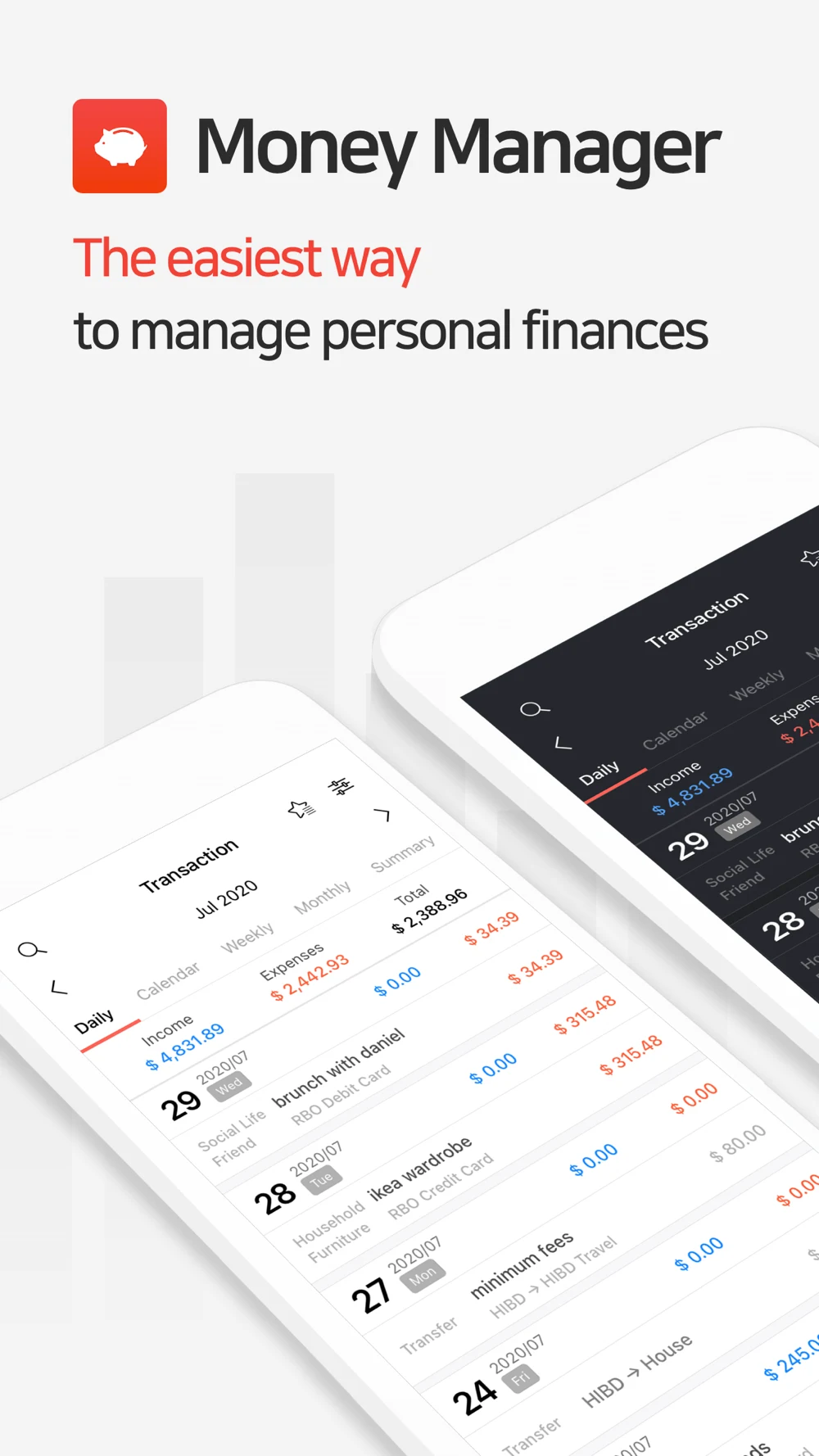
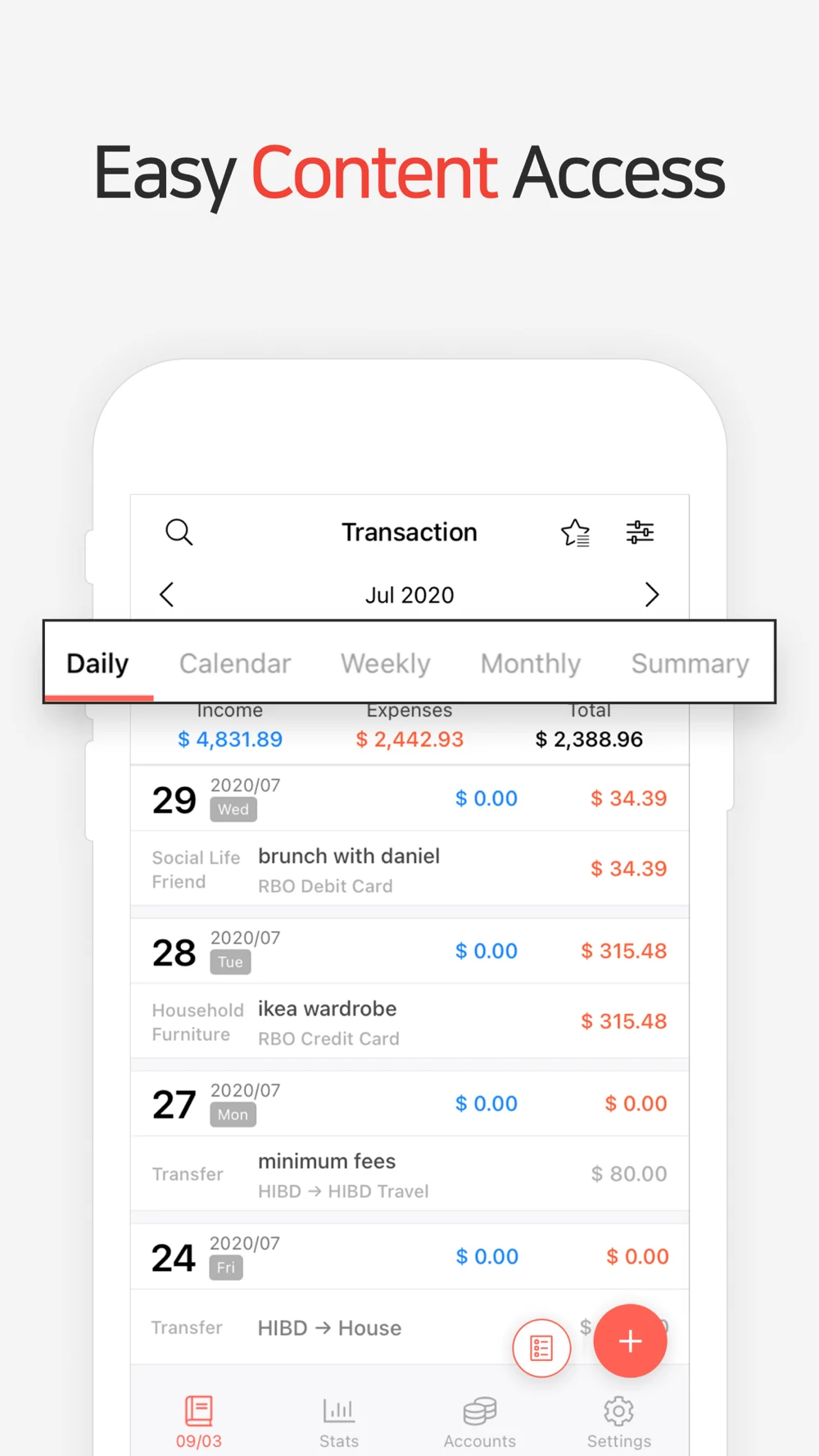
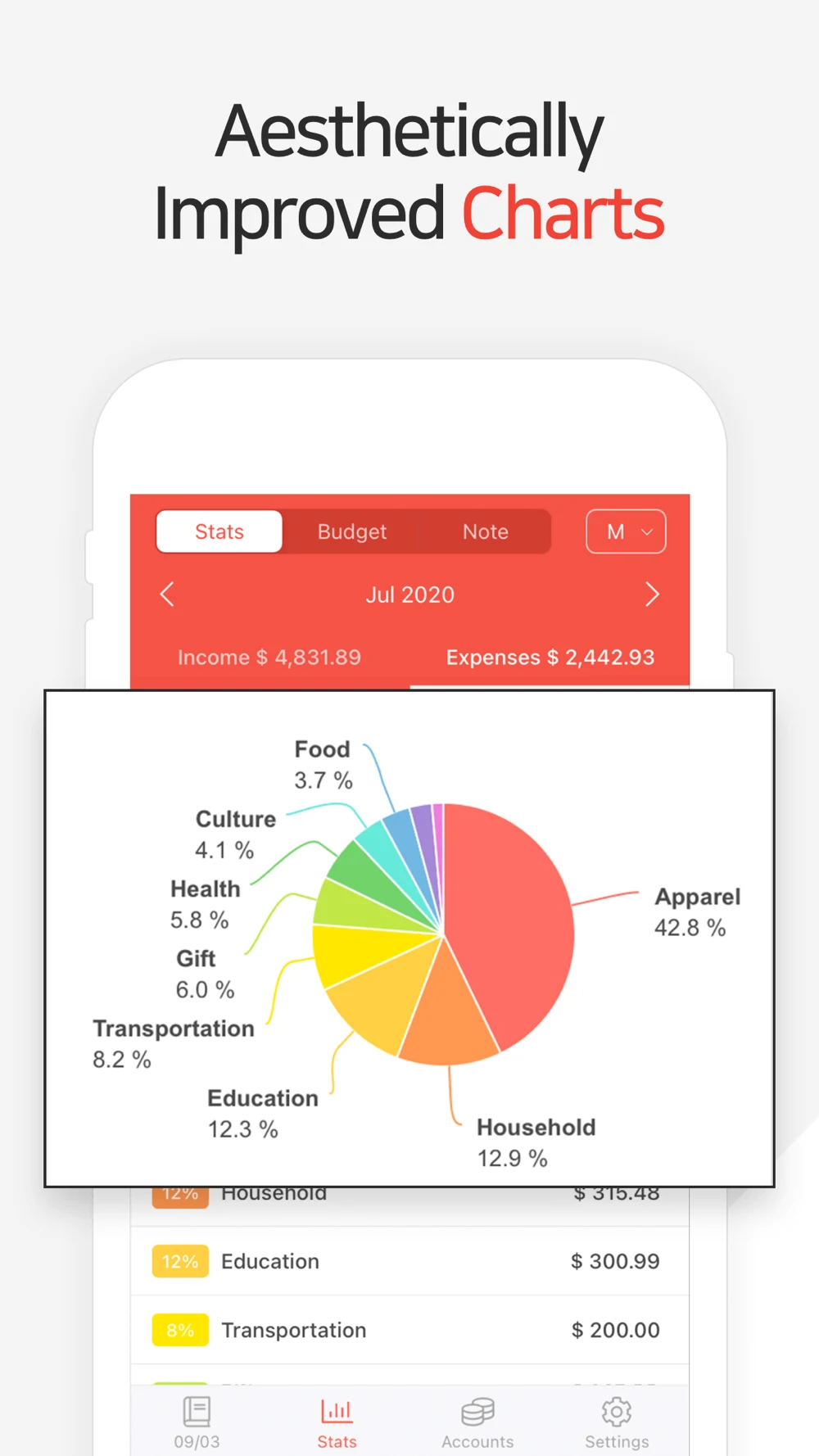
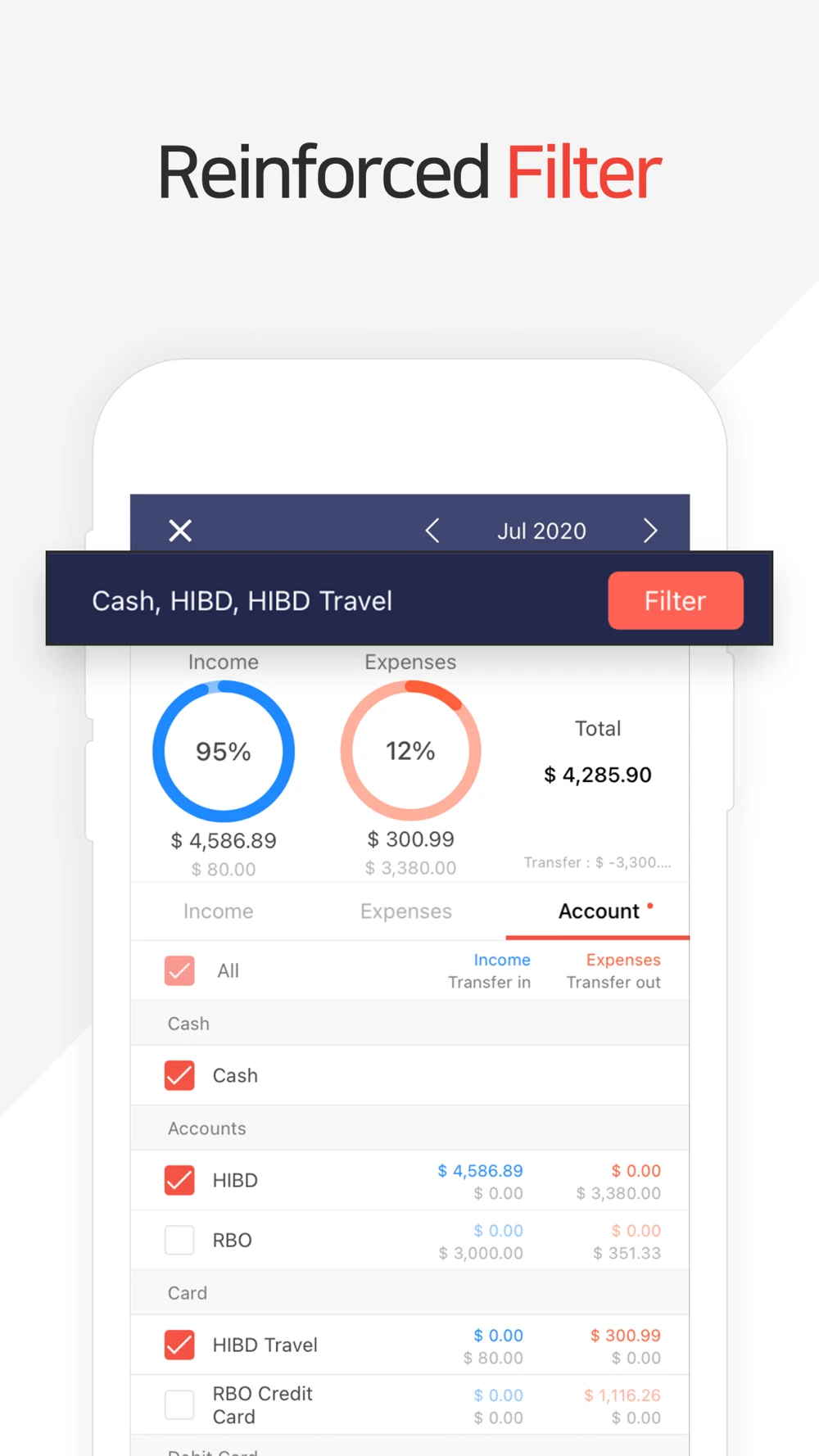
Money Manager: A detailed ledger is hidden behind broad benefit language.
Source: Money Manager on the US App Store · captured 27 October 2026.
What the screenshots show: The first panel uses two angled transaction views. Later panels enlarge period tabs, a spending pie and account filters. The numbers and controls provide concrete proof, but some pale labels become harder to read when reduced. The artwork contains July 2020 examples.
What I would test: Test an upright entry or filtered result as the opener, with a task-specific heading. Keep the selected period and accounts visible. Review demonstration dates and contrast; an older sample date is not evidence of stale live data.
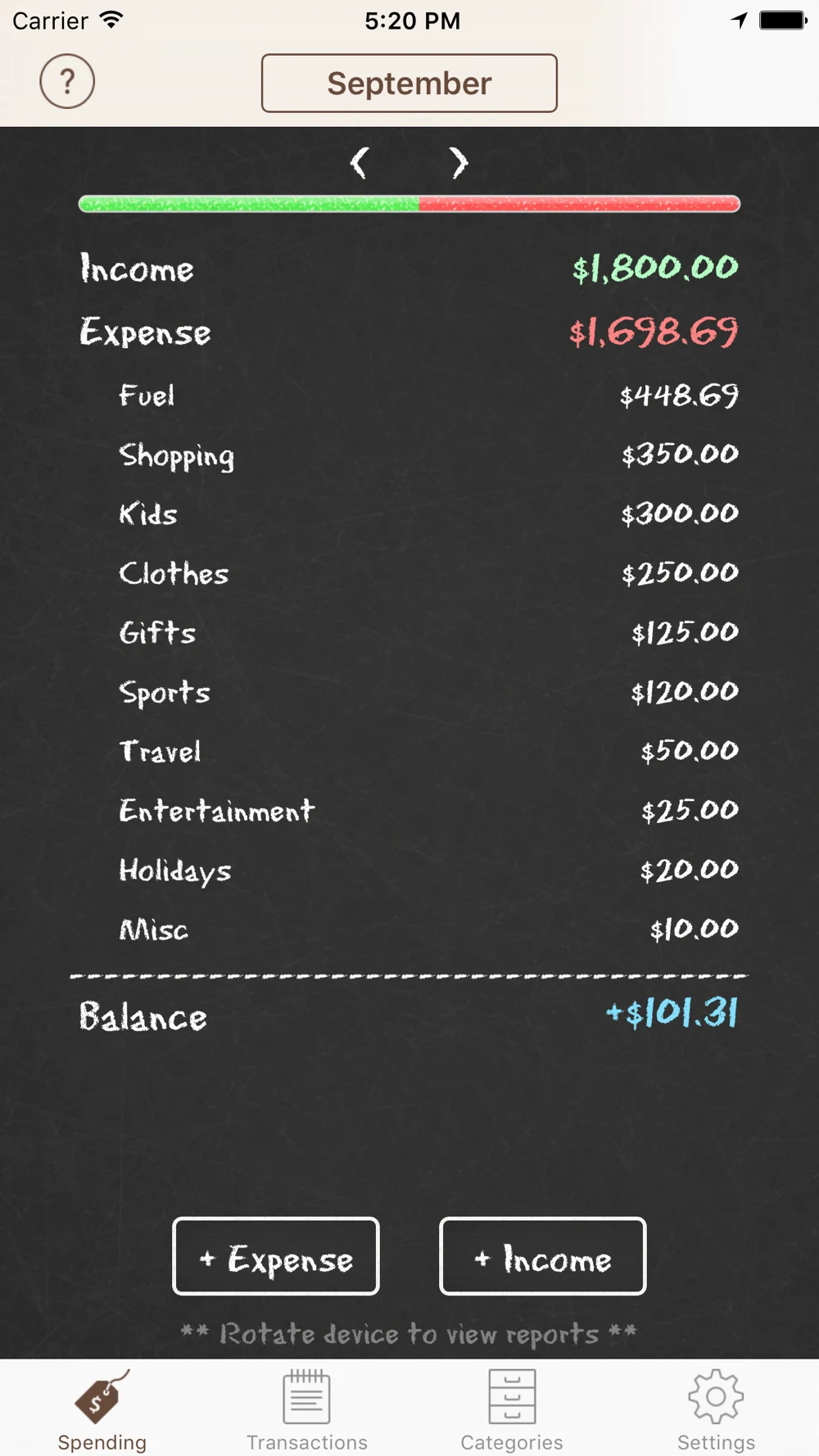
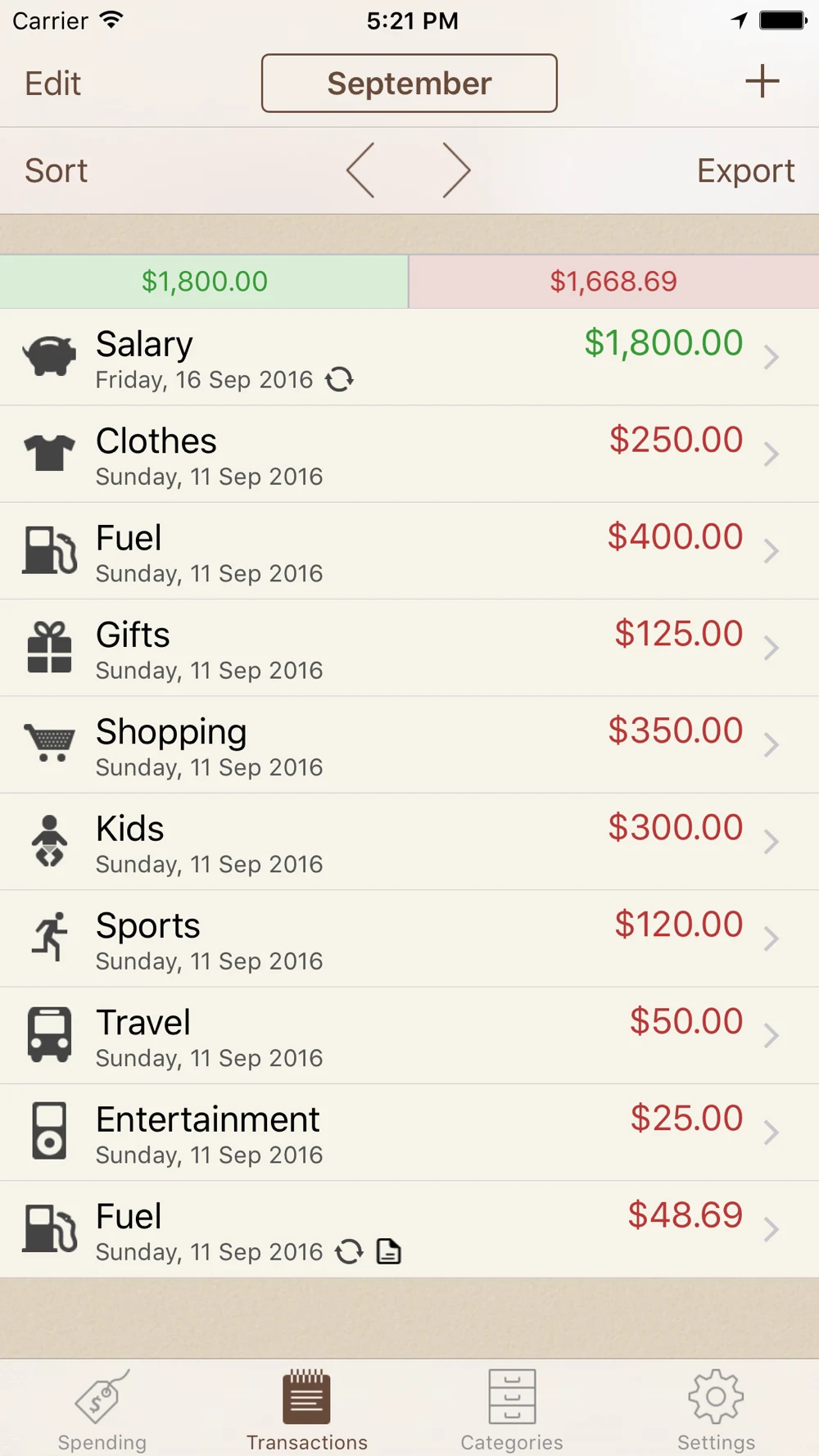
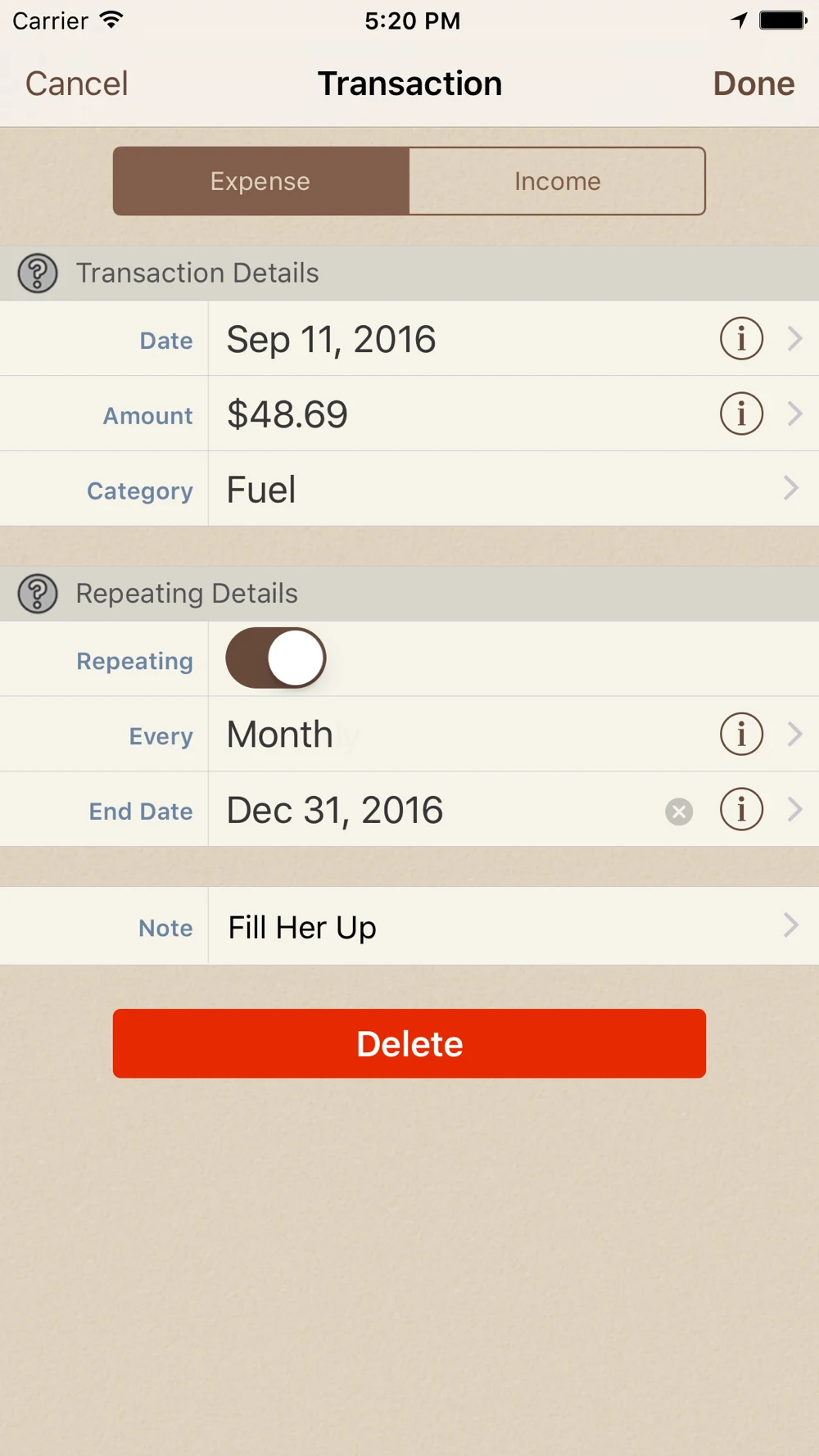
Spending Tracker: Direct UI shows the job, but the sequence changes orientation.
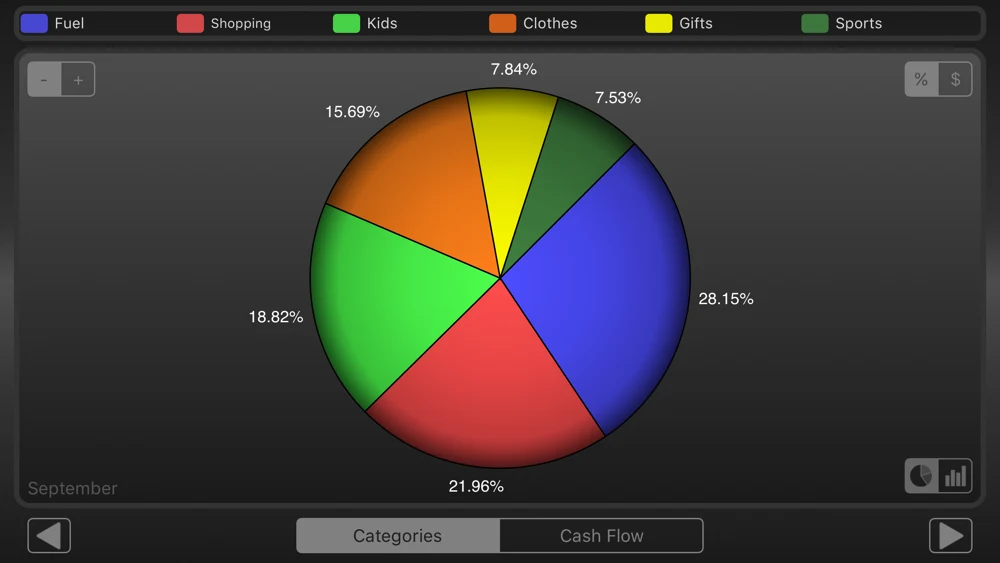
Source: Spending Tracker on the US App Store · captured 27 October 2026.
What the screenshots show: The set shows a chalkboard summary, a transaction list, an editable record and a landscape pie chart. The expense totals differ between the first two examples. A repeat-entry setting is visible in the editor. The report legend depends on small colored labels.
What I would test: Test a coherent example across entry, list and summary. Explain paid repeat/export access in supporting copy. Give the chart a readable portrait treatment where supported, without changing the original evidence shown here. Different sample totals do not prove a calculation bug.
Toshl: Currency is tangible; the conversion story is still implicit.
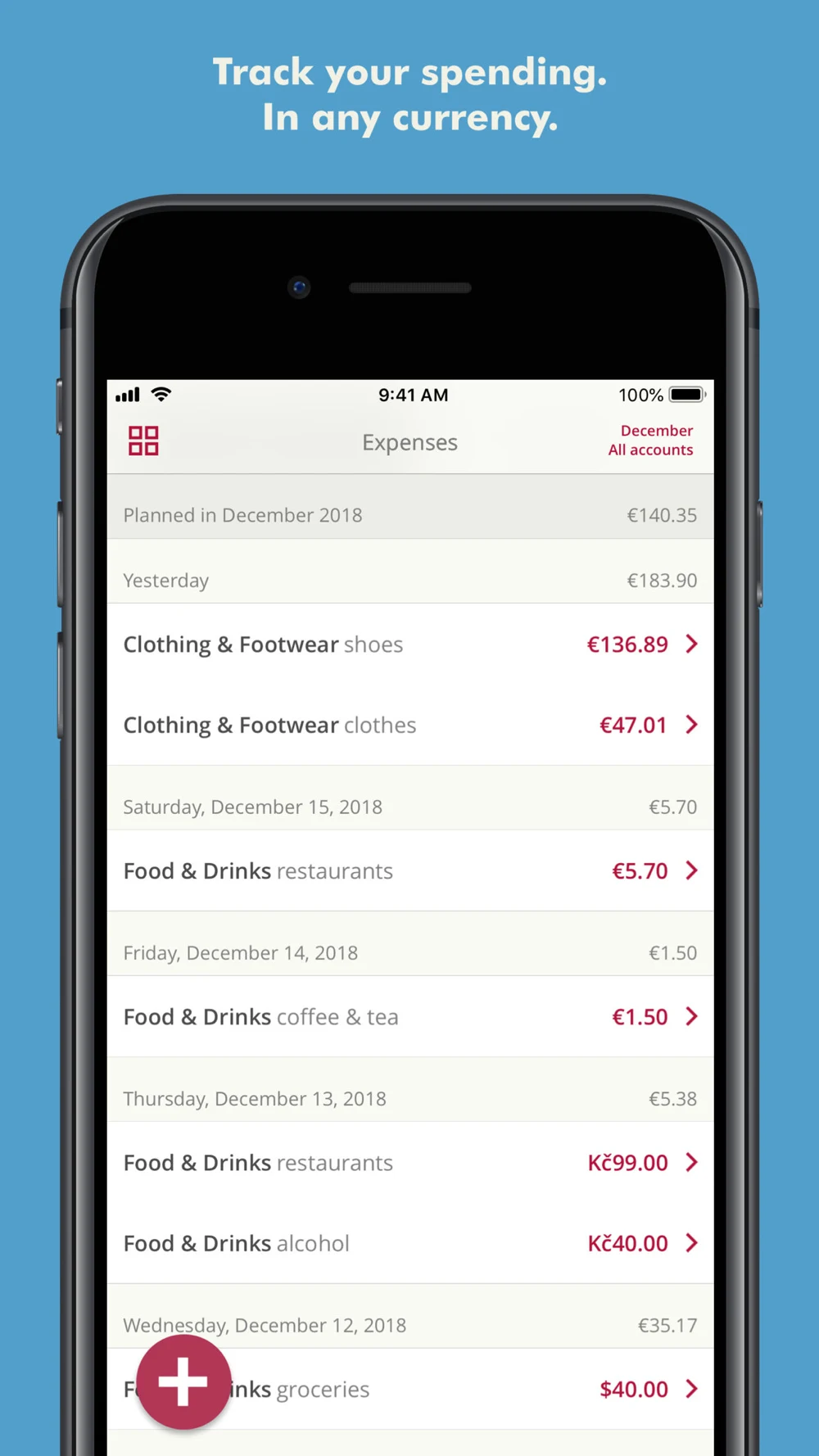
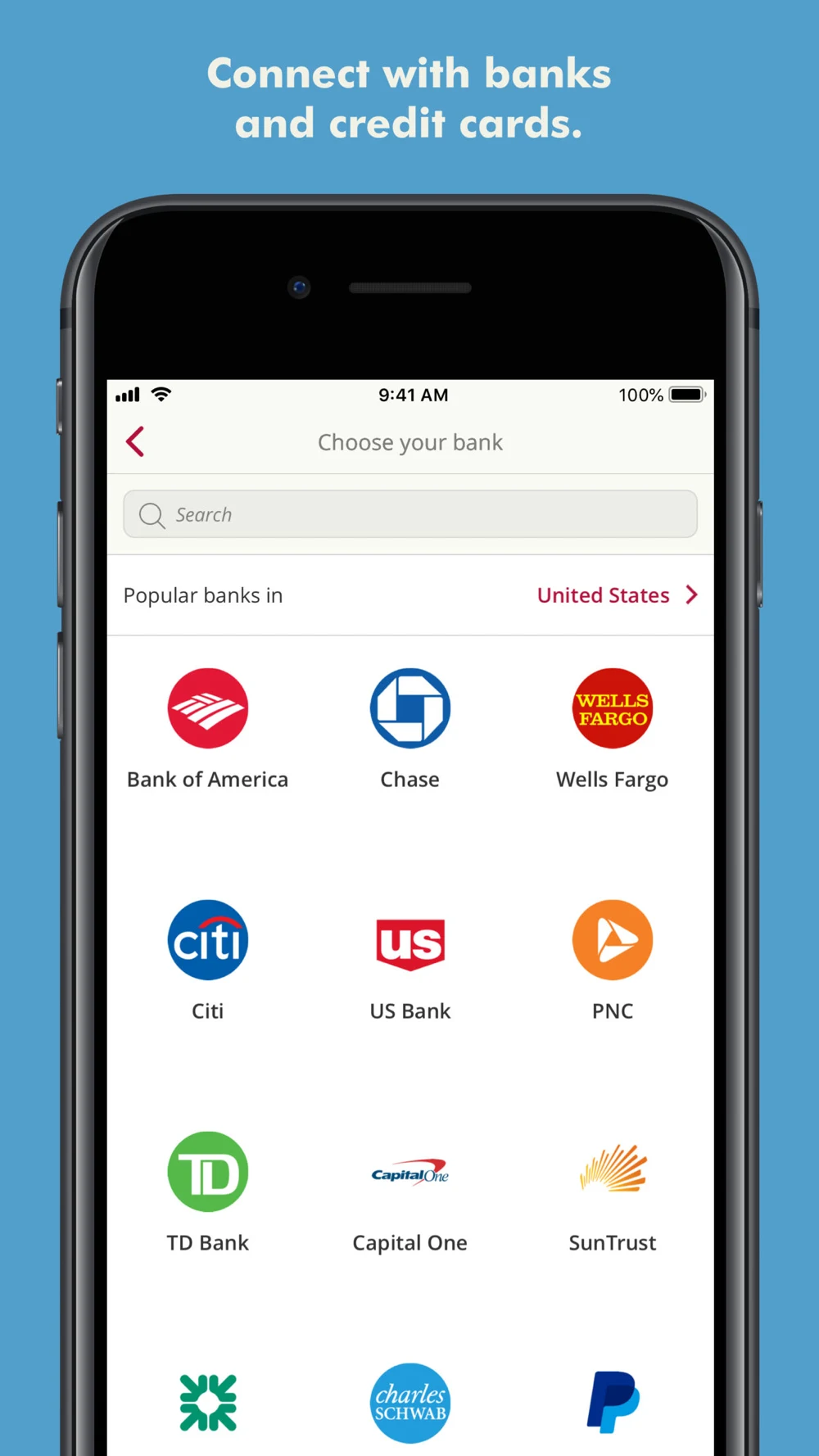
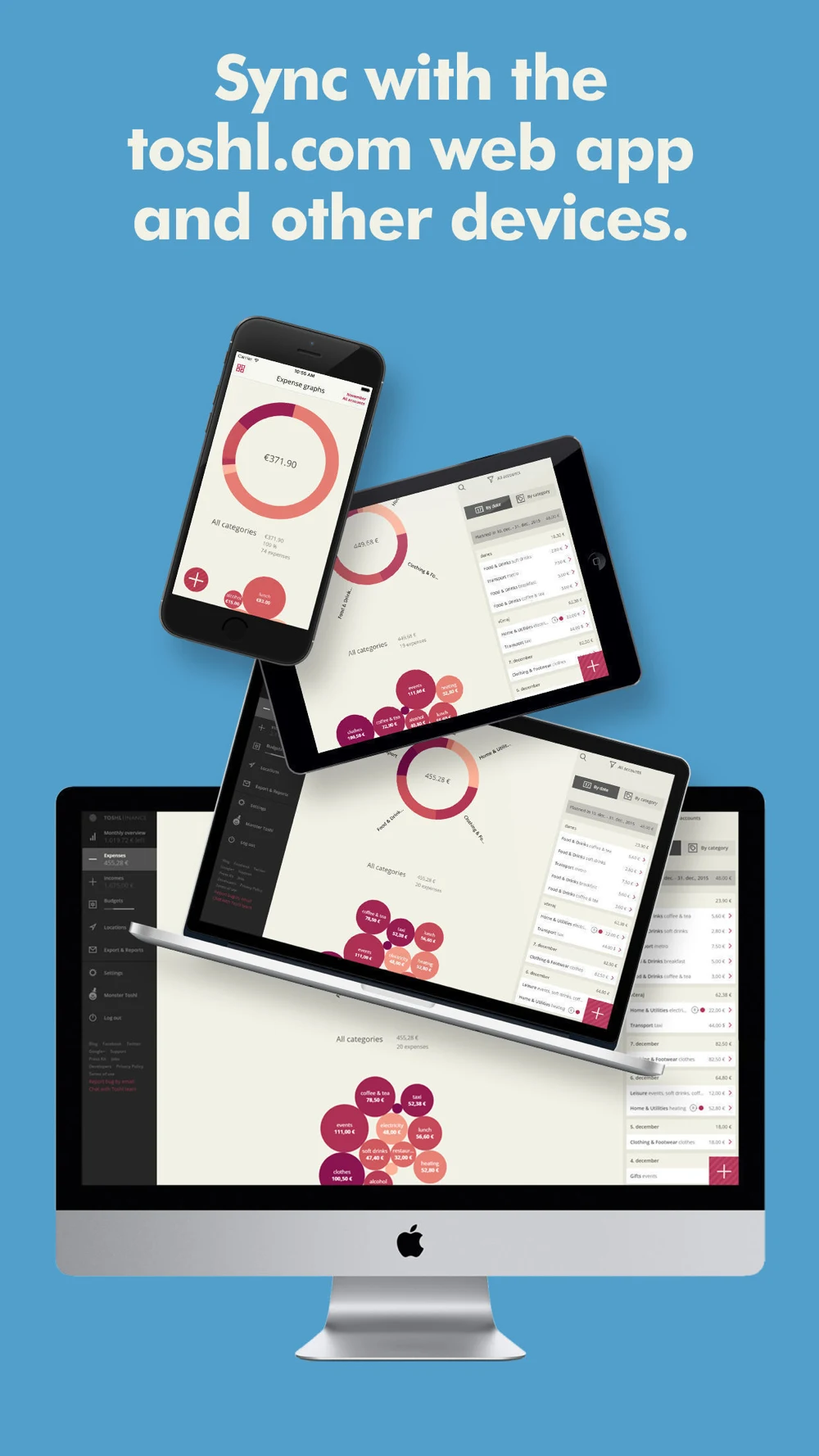
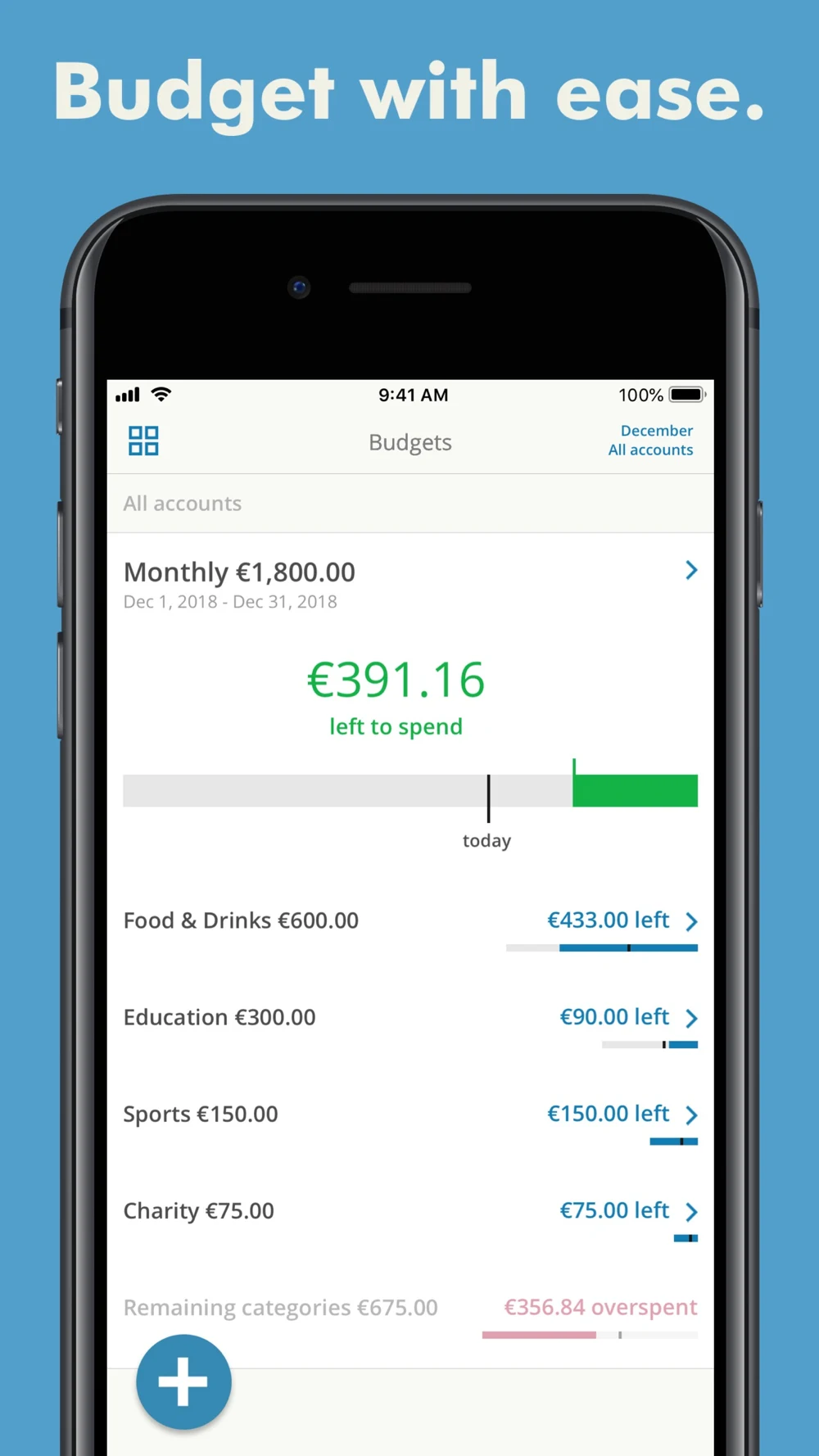
Source: Toshl on the US App Store · captured 27 October 2026.
What the screenshots show: The opening list mixes euro, Czech-koruna and dollar entries. The next panels show bank selection, a multi-device montage and budget progress. The bank screen names a US region, while the montage makes individual records small. The budget screen introduces a different planning job.
What I would test: Test a receipt-to-record sequence for expense intent, with original and reporting currency clearly distinguished. Put current institution coverage in the connection flow. A focused review on two devices may communicate continuity more clearly than a dense montage.
Expensify: The sequence moves from employee capture to manager actions.
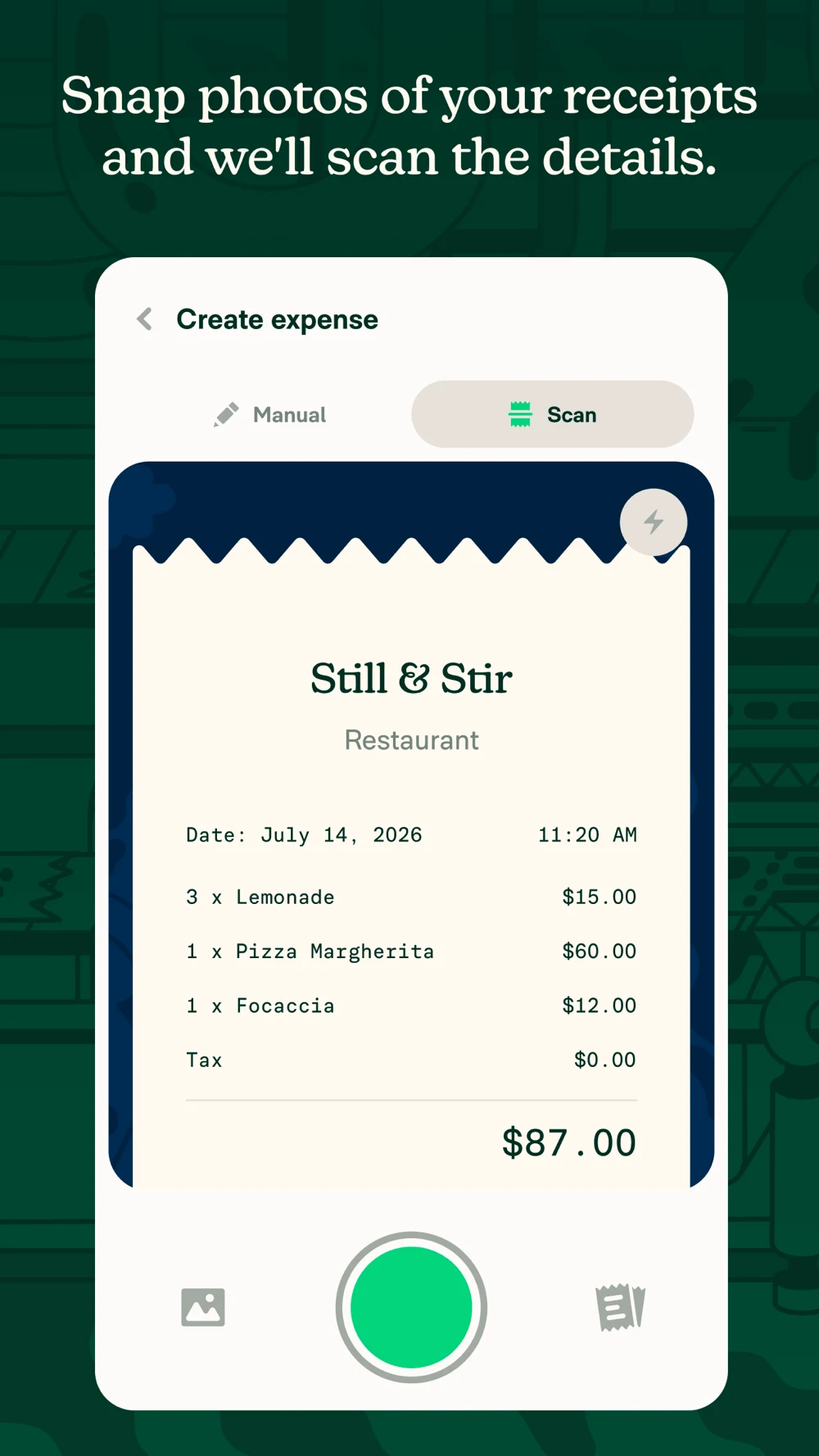
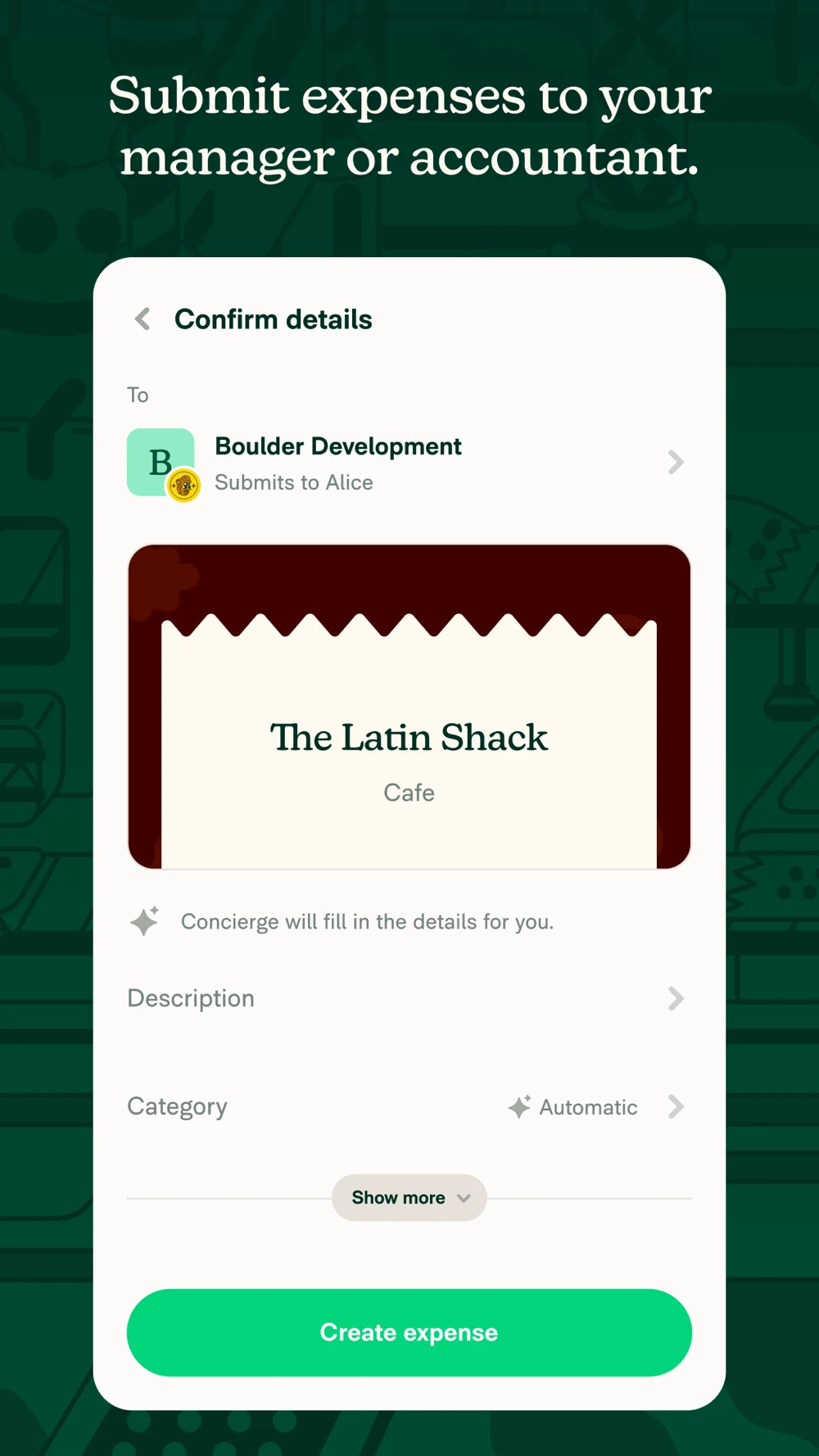
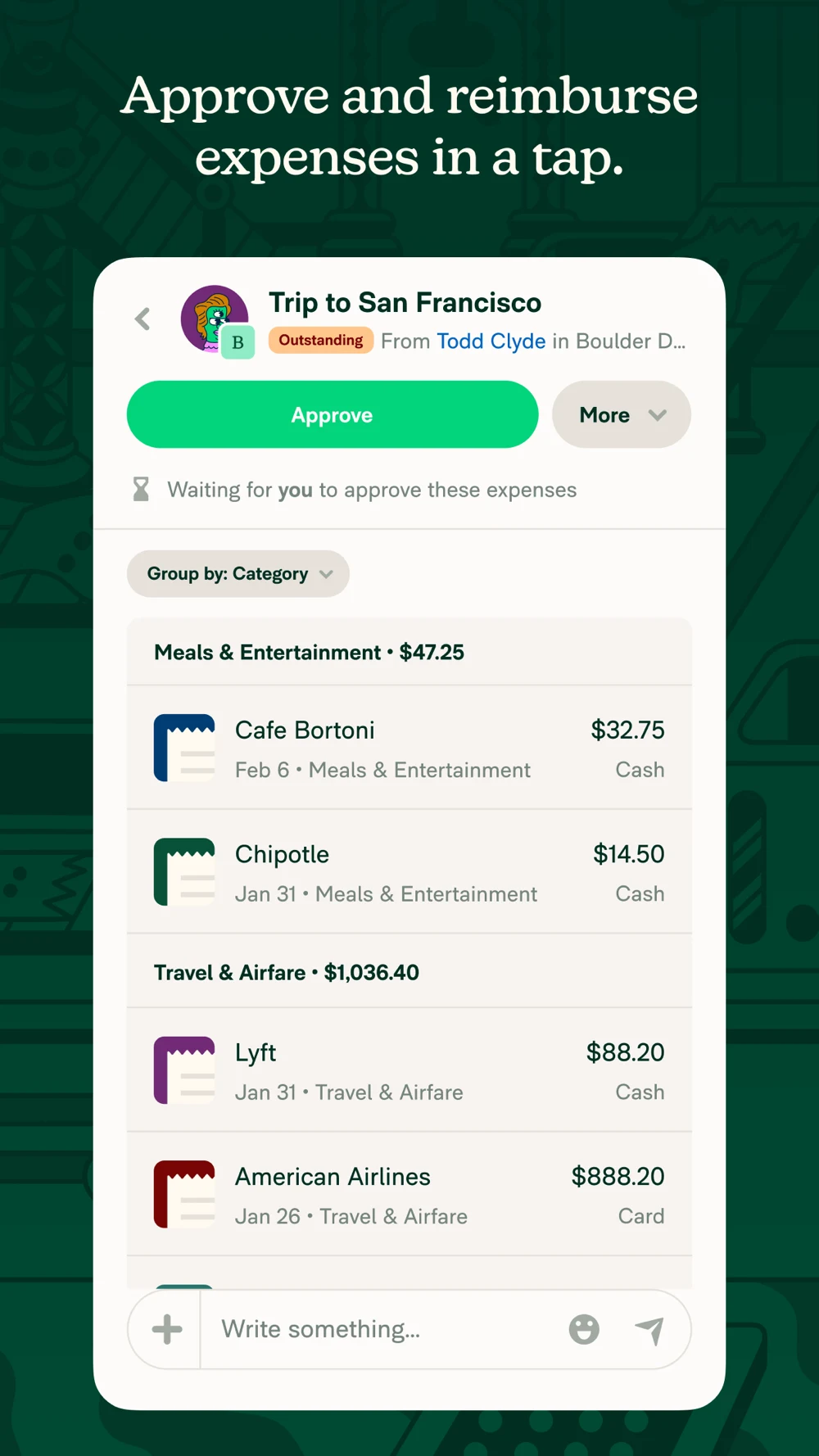
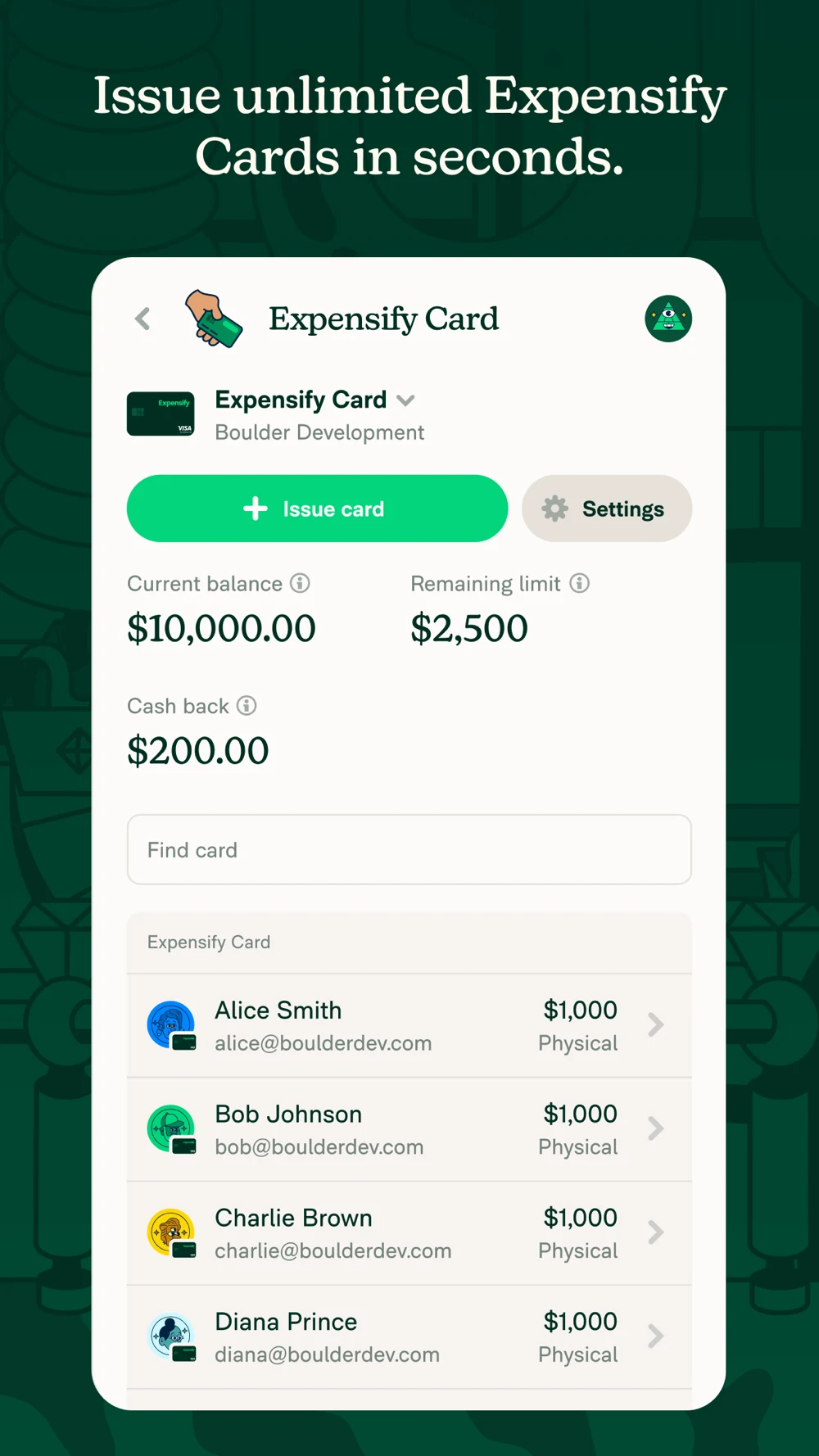
Source: Expensify on the US App Store · captured 27 October 2026.
What the screenshots show: The first panel fills the screen with a receipt capture. The second identifies a submission destination. The third presents an approval state, and the fourth introduces corporate cards. Strong contrast makes primary actions prominent, but the intended role changes through the sequence.
What I would test: Test a submitter-focused variant that follows one receipt to its report state. Build a separate approver story if supported. Explain the next actor and avoid treating approval as completed reimbursement. Keep card features relevant to the audience rather than assuming every receipt user needs one.
Zoho Expense: Business travel is clear before the actual receipt workflow appears.

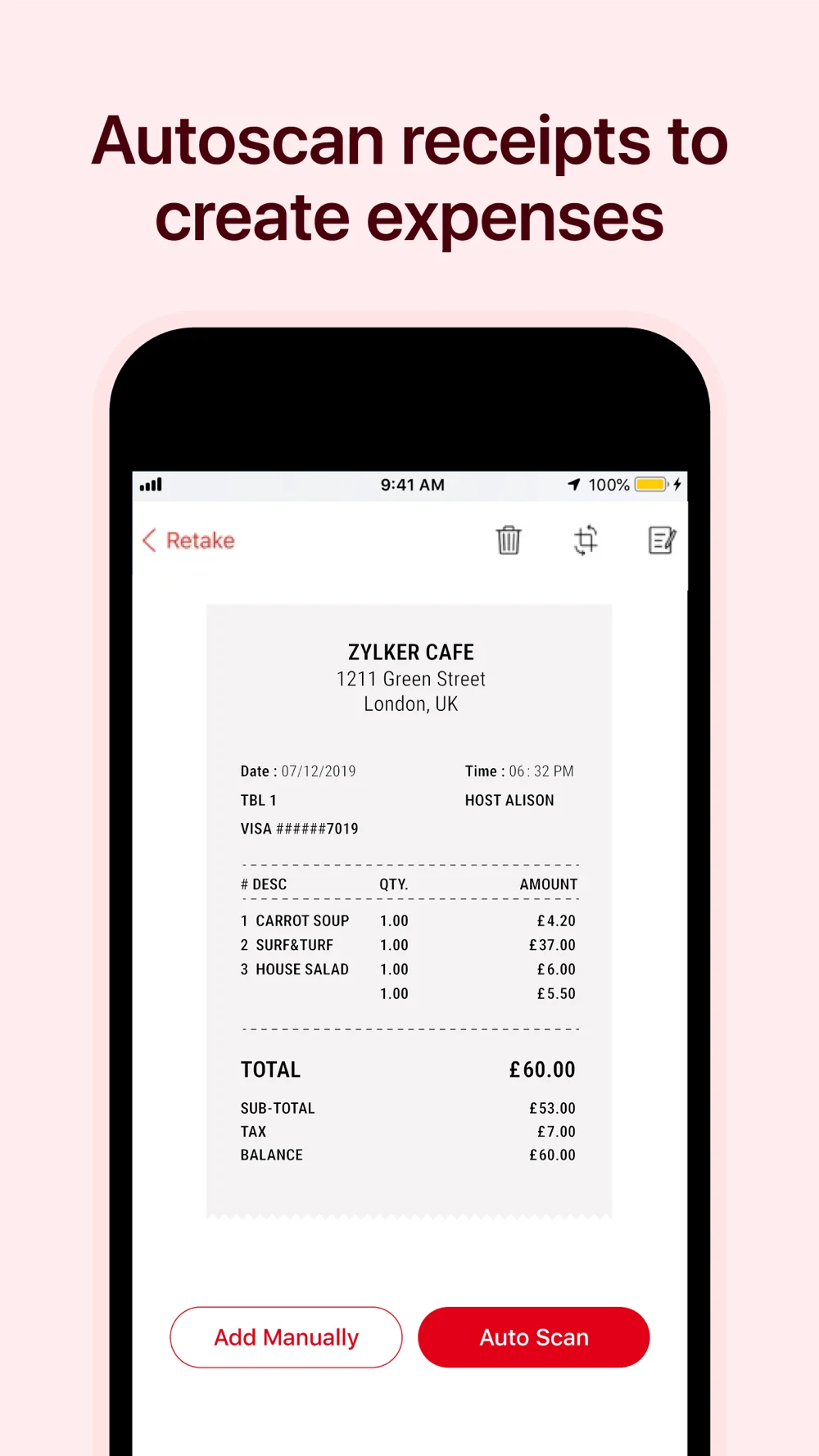
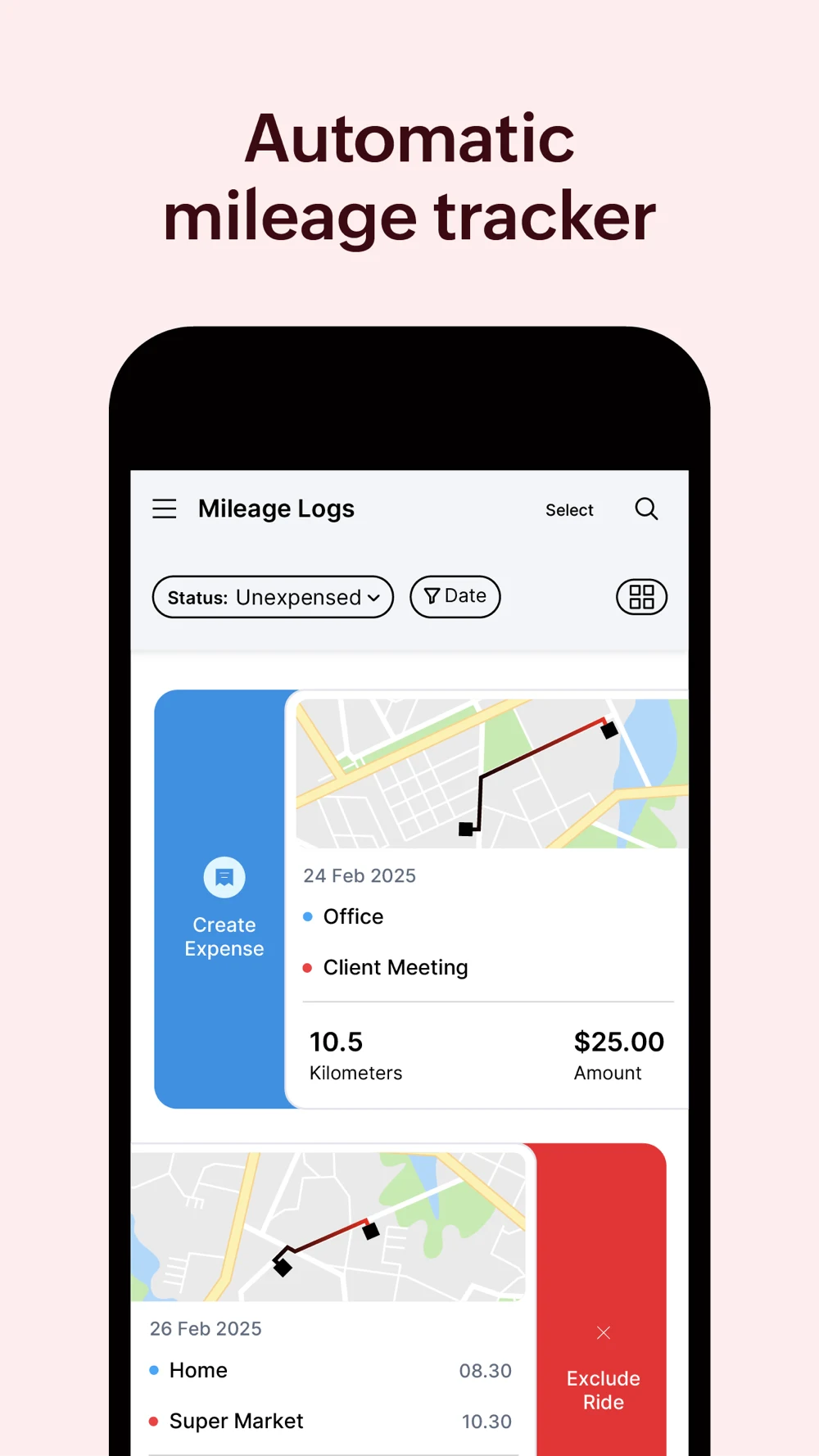
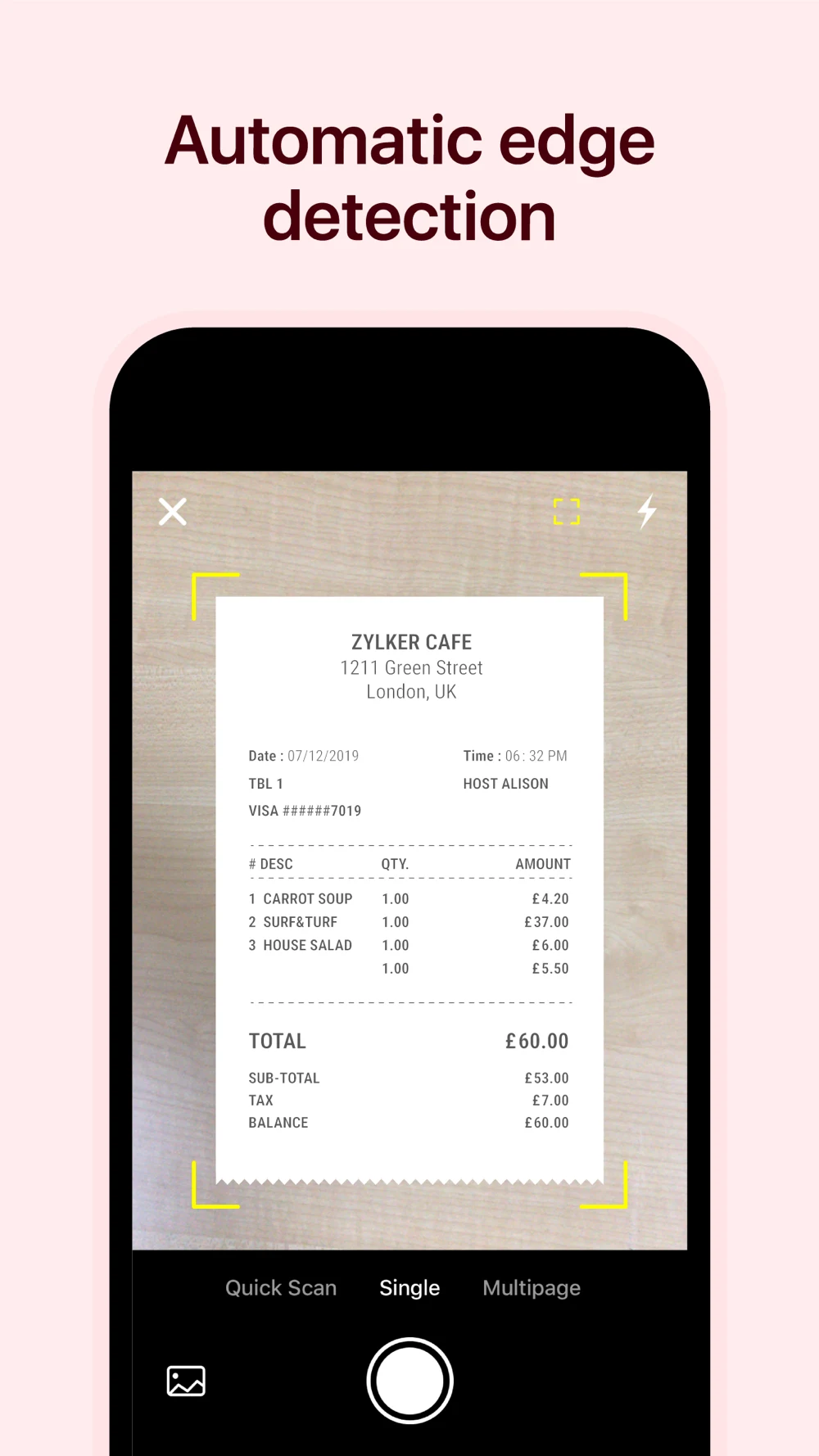
Source: Zoho Expense on the US App Store · captured 27 October 2026.
What the screenshots show: The opener is an airport illustration. The next frames show receipt capture, a mileage log and receipt-edge detection. The mileage example distinguishes a claimable-looking trip from an excluded ride, while receipt examples include earlier dates. Capture occupies two of the four panels.
What I would test: Test the checked expense record earlier, then show a report destination or status. For mileage intent, preserve the trip-review decision and explain actual policy requirements. Update sample dates deliberately; the artwork alone cannot establish how the current live workflow behaves.
Lesson 1 — Make the first frame answer whose expense it is.
A person looking for a cash-spending log and an employee trying to get a hotel receipt approved can use the same search words. Their next actions differ. Start with the intended job and test whether a visitor identifies it before you explain the product. A travel illustration can establish context; a report destination proves the workflow. If both audiences matter, use separate truthful acquisition stories rather than asking one overloaded first frame to explain every role.
- PERSONALRecord a purchase for yourself
- WORKSubmit evidence to an organization
- ROLEIdentify submitter or approver
- PROOFShow the action that role can take
Lesson 2 — Show the checked record after the scan.
A camera view proves that a receipt can be photographed. It does not prove that the right total, date or currency reached the ledger. In the fictional example, the receipt total is USD 37.80 and an initial reading of 31.80 is corrected before saving. Show the actual correction control, not a decorative checkmark. Test recognition of the review step as well as ease of entry; a faster misleading expectation is not the desired result.
- CAPTUREPhotograph or import a supported receipt
- EXTRACTTreat extracted fields as a draft
- REVIEWCheck merchant, date, currency and amount
- SAVEKeep a record linked to its source
Lesson 3 — Use the name for the product and the copy for the task.
The app name should establish what the product is. The subtitle can explain a supported method, and the screenshot can demonstrate it. Repeating expense tracker in every available field leaves little room for a useful distinction. Conversely, a poetic name with no category clue forces the first image to do all the work. Choose words based on product fit and live search research; the example is not a claim that any specific phrase has measured demand.
- IDENTITYLedgerLens: Expense Tracker
- METHODScan, Review & Split Receipts
- EVIDENCEOne inspected record with source
- NEXTSave record or preview export
Lesson 4 — Keep a split tied to the original total.
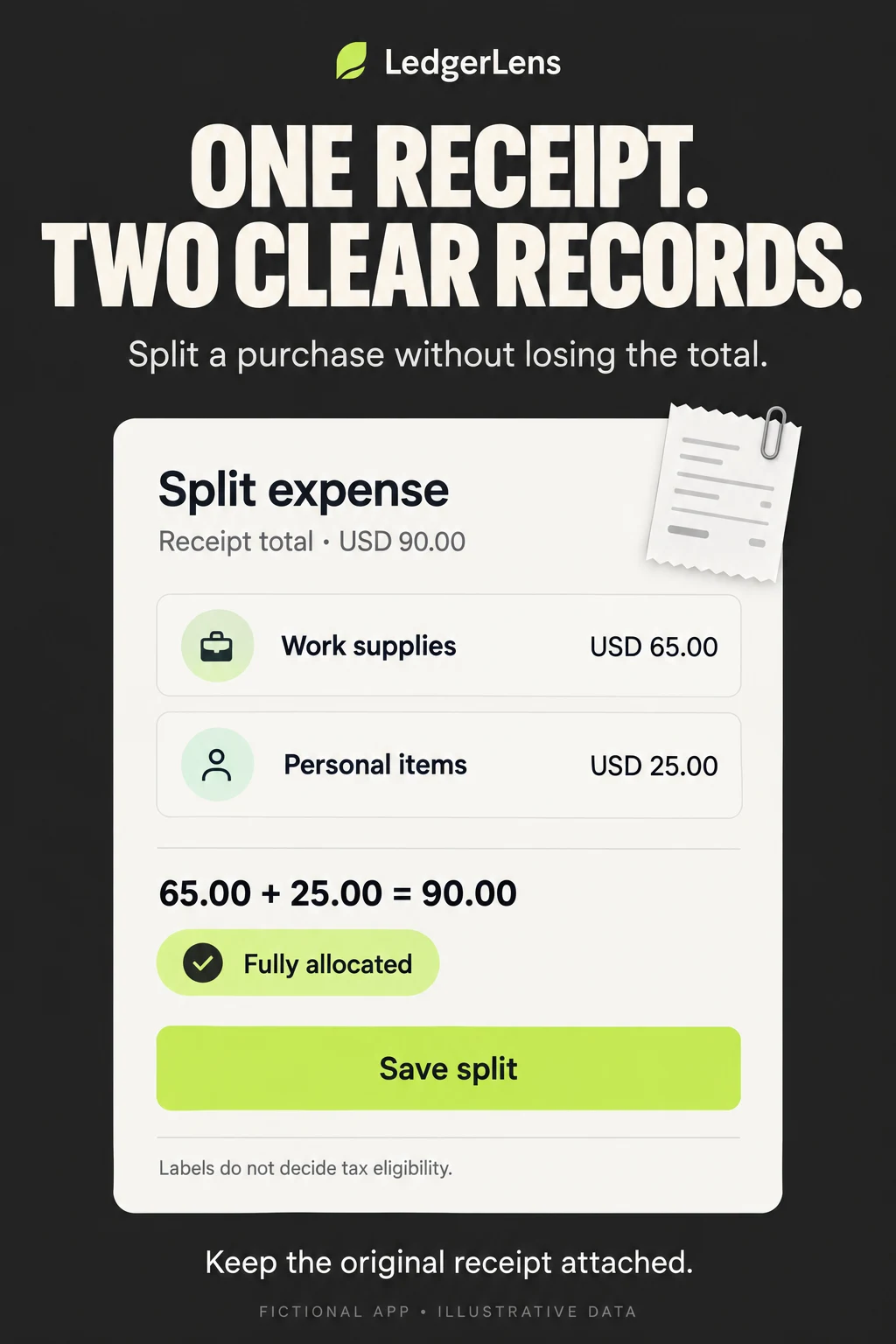
A split is useful only if the visitor understands what was divided. This example assigns two labels to one recorded purchase; it does not create two card payments or decide what is tax deductible. Show the source total and reconciliation together, and keep the attachment accessible. If a real app splits reimbursements between people instead, use that actual workflow. Do not borrow the same image for mathematically similar but operationally different features.
- SOURCEOne receipt: USD 90.00
- LABEL AWork supplies: USD 65.00
- LABEL BPersonal items: USD 25.00
- CHECK65 + 25 = 90; retain the receipt
Lesson 5 — Explain what a report includes before celebrating the total.
A category chart becomes useful when a reader knows which records produced it. A transfer between accounts can appear as an outflow without being a new purchase. A refund may change a previous expense or appear separately, depending on the product. Explain the actual method. The screenshot should expose period and source filters, while supporting copy explains exceptions. Do not label an incomplete manual record as everything the person spent.
- PERIODName the dates used
- SOURCESShow the selected accounts or records
- RULESExplain transfers, refunds and pending items
- DETAILLet the total lead back to entries
Lesson 6 — Separate saved, submitted, approved and paid.
Expense products often compress a long process into a short promise. Saving a receipt does not mean a manager saw it. Approval does not establish that money reached an account. For a work-expense campaign, show a real status and who acts next. If reimbursement is outside the app, say so. An employee may only be able to use the workflow after an employer sets up access; that requirement belongs in the acquisition story.
- SAVEDA record exists
- SUBMITTEDEvidence reaches the configured reviewer
- APPROVEDThe organization accepts the claim
- PAIDA separate reimbursement state
Lesson 7 — Keep original and converted amounts distinguishable.
Multiple currency symbols in a list make an international use case visible, but do not explain conversion. A traveler may need the actual card charge; a company may apply its own policy rate. Those are different requirements. Select a supported example, label the basis and test comprehension with people who use that workflow. A US storefront screenshot showing a foreign currency is useful creative evidence, not proof that every country or bank is supported.
- ORIGINALAmount and currency on the receipt
- REPORTINGThe account or report currency
- BASISRate, date and rounding when relevant
- REVIEWAllow the supported correction route
Lesson 8 — Measure a useful record, not only a download.
Define the event before choosing the headline. For a personal tracker, a useful first record needs enough fields to be found and interpreted later. For an employee tool, the appropriate milestone may be a valid report submitted to the correct workspace. Neither milestone is equivalent to opening the camera. Keep paid and organic cohorts, storefronts and first-time versus returning users separate, and avoid sending raw receipt contents into marketing analytics.
- PROMISEOne supported capture or review job
- FIRST VALUECorrect record saved and retrievable
- RETURNAnother useful entry or review
- OUTCOMERelevant export or completed workflow
Use screenshot strategy to choose the job, ordering to explain the sequence, and copy to name the action. Check readability at store size. The lesson graphics explain workflows and example arithmetic; none is a chart of measured performance.
EXPENSE TRACKING APP ASO
Worked metadata, copy and a complete screenshot story.
Fictional product brief: LedgerLens records personal and independent-work expenses. Assume it supports manual entries, receipt capture with editable extracted fields, attached originals, category splits, merchant/date/tag search and CSV export. It does not connect to banks, file taxes, approve company expenses, issue cards or send reimbursements. Storage, account requirements, offline behavior, pricing, supported languages and accessibility still need confirmation before production. The example is a communication exercise, not a real app.
The metadata chooses expense tracking as the main identity and receipt review as the differentiating method. It intentionally excludes unsupported company workflows. Validate the brand name’s availability and actual product fit before using anything from this example.
Swipe horizontally to compare all columns →
| Field | Worked copy | Characters / limit |
|---|---|---|
| iOS name | LedgerLens: Expense Tracker | 27 / 30 |
| iOS subtitle | Scan, Review & Split Receipts | 29 / 30 |
| iOS keywords | spending,cash,purchase,merchant,category,manual,log,export,csv,search,monthly,personal | 86 / 100 |
| Google Play title | LedgerLens: Expense Tracker | 27 / 30 |
| Google Play short description | Scan and review receipts. Split purchases, label expenses and export records. | 77 / 80 |
Opening description: Keep the record behind the purchase. LedgerLens helps you enter expenses, turn receipts into editable drafts and review the details before saving. Find a purchase later by its merchant, date or label, with the original receipt attached.
Capture without skipping the check: Photograph a supported receipt or add an expense manually. Review the merchant, purchase date, currency and amount. Correct a field when the scan needs help, then save a record you can inspect later. A scanned draft is not a guarantee that every field is correct.
Give mixed purchases useful labels: If one receipt contains work supplies and personal items, split the recorded amount between categories. Keep the original total visible and check that the allocations add up. Labels help organize the record; they do not determine tax eligibility or create separate payments.
Find the evidence again: Search the saved records and use the supported date or tag filters to narrow the result. Open the original receipt when you need to check a detail. A report reflects the entries you recorded, so missing purchases can leave an incomplete picture.
Take the records with you: Preview the CSV fields and selected period before exporting. Explain exactly which columns are included and whether original receipt files are exported separately. Do not promise that a CSV will automatically satisfy an employer, accountant or tax authority; their requirements may differ.
Finish the commercial explanation: Add the verified account, storage, retention, backup, deletion, pricing and support details. Specify which devices, currencies and receipt languages are supported. Manual use does not prove offline availability. Receipt extraction does not establish a security certification. A product team should sign off those statements before they become listing copy.
Swipe horizontally to compare all columns →
| Frame | Headline to test | Actual product evidence | Action to show |
|---|---|---|---|
| 1 | Scan it. Check it. Keep it. | Receipt beside reviewed amount and date | Save record |
| 2 | No receipt? Add the details. | Supported manual entry form | Add expense |
| 3 | One receipt. Two clear records. | Original 90 split into 65 and 25 | Save split |
| 4 | Find the purchase behind the number | Merchant or date search with attachment | Open receipt |
| 5 | Know what this report includes | Selected period and included records | Review report |
| 6 | Export the fields you need | Actual CSV preview and scope | Export CSV |
CTA discipline: A screenshot can show the real in-app action, but it is not a clickable button inside the store image. Prefer an action with an honest result: save a record, review a split, preview an export. “Get reimbursed” does not fit this fictional app. “Save money instantly” is not supported by a record-keeping feature.
Preview direction: Use a short sequence of real captured UI: enter or scan, inspect a field, correct it, save, then retrieve the record. Keep the important action understandable with sound off. Do not fake instantaneous extraction by hiding an essential waiting or confirmation step. Apple’s preview guidance allows videos up to 30 seconds; choose a concise story within the current requirements.
Work through the app name, subtitle and iOS keyword field separately. For Android, adapt the title, short description and long description to natural language and actual feature access. Use screenshot storytelling to connect the fields to visible proof.
EXPENSE TRACKING APP ASO
Fix misunderstandings before polishing decoration.
Swipe horizontally to compare all columns →
| Mistake to audit | Concrete example | Better direction | How to evaluate |
|---|---|---|---|
| Treating capture as accuracy | A camera screenshot under a perfect-record promise | Show editable extracted fields and original evidence | Can a person explain the review step? |
| Confusing personal and employer workflows | Private ledger shown under reimbursement language | Name the actual audience and next action | Can the visitor identify the required workspace? |
| Hiding the source of the total | A monthly pie with no period or account scope | Show date and source filters near the report | Can someone trace a number to its records? |
| Turning a split into a financial claim | Work label presented as tax approval | Explain record labels and retain source total | Do people infer eligibility that the app cannot establish? |
| Promising universal automatic coverage | A few bank logos under an all-accounts claim | Use verified institution and region scope | Can users find their actual supported connection? |
| Hiding feature access | Export or sync shown without the relevant tier | Explain actual access near the feature | Do people understand what requires payment or setup? |
| Mixing example data through the sequence | Entry, list and report show unrelated totals | Carry one coherent example through the story | Can viewers follow the same purchase? |
| Using unreadable charts as proof | Tiny legend and tilted transaction rows | Enlarge the record or one report decision | Can people read values at actual store size? |
| Equating approved with paid | A green approval badge under a money-arrived promise | Use actual state names and next actor | Can employees distinguish approval and reimbursement? |
| Letting automation hide repair | AI badge with no correction route | Show a supported edit or exception | Can the person recover from a wrong category? |
Prioritize mistakes that change the visitor’s understanding of the product. A color preference is usually less important than whether they think the app moves money, requires an employer account or checks every receipt automatically. Keep the existing control and write the expected behavior change before designing a treatment.
DOWNLOAD TEN WORKED TEST BRIEFS ↓
Each brief includes a hypothesis, control, treatment, measurement and guardrail. Use test prioritization to choose a manageable sequence. Do not change title, price, screenshots and onboarding simultaneously, then attribute every movement to the new headline.
EXPENSE TRACKING APP ASO
Turn keyword clusters into a controlled Apple Ads learning plan.
Use ASO research to define an Apple Ads search-results experiment, not to launch every candidate term. This is a planning blueprint only. No campaign or spend is created here. Begin with a supported job, an appropriate storefront, a useful activation event and a bounded learning budget the business has approved.
Apple’s campaign-structure guidance separates brand, category, competitor and discovery themes. The suggested implementation below uses that separation while keeping the fictional LedgerLens feature boundary explicit.
Swipe horizontally to compare all columns →
| Campaign / group | Candidate starting terms | Match approach | Creative destination | Meaningful event |
|---|---|---|---|---|
| Brand | Actual app and company names | Exact; Search Match off | Default truthful product page | Correct first saved record |
| Category: manual personal | manual expense tracker; cash expense tracker | Small validated exact set; Search Match off | Manual-entry custom page if configured | Valid manual entry later retrieved |
| Category: receipt review | receipt expense tracker; receipt organizer | Small validated exact set; Search Match off | Receipt review and correction page | Reviewed receipt saved with source |
| Category: split records | split expense categories; work and personal expense tracker | Exact only after relevance research | Split and original-total story | Correct allocation reconciled to source |
| Category: retrieval/export | expense CSV export; expense history search | Exact only where the product fulfills intent | Search and export evidence | Useful retrieval or export |
| Competitor research | Only genuinely substitutable products | Separate bounded exact group; Search Match off | Own product identity, no borrowed logos | Qualified use, not brand-query installs alone |
| Discovery: broad | A few supported expense or receipt themes | Broad keywords; Search Match off | Truthful relevant page | Search-term relevance and activation |
| Discovery: Search Match | No seed keyword list needed for this group | Separate Search Match group | Default page with clear scope | New relevant queries and qualified use |
Match types require query review: Current Apple match-type guidance says broad match can reach related searches. Positive exact match can still include close variants such as spelling changes, rearrangements and translations. Therefore exact does not mean a literal-only transcript of the typed keyword. Review the actual search terms and their outcomes.
Negative candidates for the fictional app: Employer approval, corporate cards, automatic bank sync, loan offers and tax filing describe jobs it does not perform. Evaluate the actual queries before excluding them. Apple’s negative-keyword guidance identifies exact as the default. Do not assume one negative excludes every related expression. Recheck query reports and the current account settings; avoid blanket exclusions that remove useful work-record intent.
A practical discovery loop: Review the matched query, classify the job and check the product can fulfill it. If a query attracts installs but few valid records, inspect expectation mismatch and onboarding before raising bids. Move a promising supported term into a controlled group for cleaner measurement, and add appropriate exclusions to reduce overlap. This is an editorial operating approach, not a promise of completely isolated traffic.
Custom pages: Apple’s custom product pages allow a supported feature to lead the story. Receipt traffic can see correction first; manual-entry traffic can see a bank-free record first. Both must remain accurate descriptions of the same app. Do not create an employer-reimbursement page for LedgerLens just because that phrase appears in the category research.
Swipe horizontally to compare all columns →
| Hypothetical input | Example | Implication |
|---|---|---|
| Contribution available for acquiring one paying customer | USD 24 after the costs the business chooses to include | A planning assumption, not revenue or an industry benchmark |
| Install-to-paying-customer rate | 5% | 24 × 0.05 = USD 1.20 modeled break-even acquisition cost per install |
| Tap-to-install rate | 40% | 1.20 × 0.40 = USD 0.48 modeled break-even cost per tap |
| Decision boundary | Uncertain retention, refunds and conversion | Use a margin below the estimate and an approved total learning cap |
Do not transfer these assumptions to an employer-sales product. Employee installs may not be the purchasing decision; an organization could buy many seats after a longer evaluation. Define that funnel separately. For the fictional personal product, distinguish a new installation, a valid first record, a later return and a paying customer. A free scan alone is not a paid outcome.
Before testing, document the total spend cap, daily ceiling, review dates, minimum evidence needed for a decision and stop conditions. Stop for broken tracking, unsupported intent or serious product-expectation mismatch. Avoid declaring a winner from a few conversions or repeated daily peeking. Where a narrow term has too little traffic, retain an inconclusive result rather than manufacturing certainty.
Reconcile Apple Ads reporting with privacy-respecting product events, clearly naming attribution windows and denominators. Do not send merchant names, receipt images, amounts or employee identities into acquisition reports unnecessarily. Use conversion definitions, ASO KPIs and source separation to keep paid learning distinct from organic effects.
Feed the evidence back into ASO only after checking fit. A supported query that repeatedly produces useful review behavior may deserve clearer copy or a test in metadata. Paid conversion does not prove organic rank improvement. Record the decision in monthly reporting, including the inconclusive and excluded terms.
EXPENSE TRACKING APP ASO
Use current product signals without inventing market trends.
These are dated signals from the reviewed listings and official platform pages, not estimates of market growth or consumer preference. They suggest what to investigate next. A feature promoted by a publisher is not proof that it improves conversion.
Swipe horizontally to compare all columns →
| Signal checked 27 October 2026 | Primary evidence | ASO implication to test |
|---|---|---|
| Receipt automation is promoted in personal tracking | Spendee’s description includes AI receipt entry | Show the checked fields and repair path instead of relying on an AI badge |
| Entry methods extend beyond typing into a form | Money Lover’s listing and release notes describe widget and receipt-related workflows | Test the supported shortcut with its setup and device limits visible |
| Work expense products span several roles | Expensify’s description covers capture, submissions and approvals | Use role-specific entry stories rather than a universal expense claim |
| Store variants can emphasize different supported jobs | Apple custom pages and Google custom listings | Match the first proof to the incoming intent and verify routing |
A useful creative direction is automation with visible control. That is an editorial hypothesis derived from the workflow, not a quantified trend. Compare a speed-led camera image with an equally polished review-led image and ask whether the person understands what is automatic and what remains their responsibility.
Another hypothesis is that retrieval deserves more attention. Many teams spend the first three frames on adding a record, while the eventual job may be finding a receipt for a report or checking a disputed amount. Test a search-and-retrieve story with people who already capture receipts, rather than assuming all prospects are first-time record keepers.
Record which version and storefront you reviewed. A release note can change the product scope, while old screenshot assets may remain in a feed. Recheck the live app and listing before production changes. Use conversion improvement as a test process, not a reason to copy a fashionable visual treatment.
EXPENSE TRACKING APP ASO
Two AI concepts, with an honest critique and a production test plan.
These two original AI-generated images are fictional LedgerLens concepts. They are neither real competitor screenshots nor tested improvements. They show two different communication problems: checking an extracted receipt and explaining a mixed-purchase split. Use them as creative briefs, then rebuild the selected approach with actual supported UI.
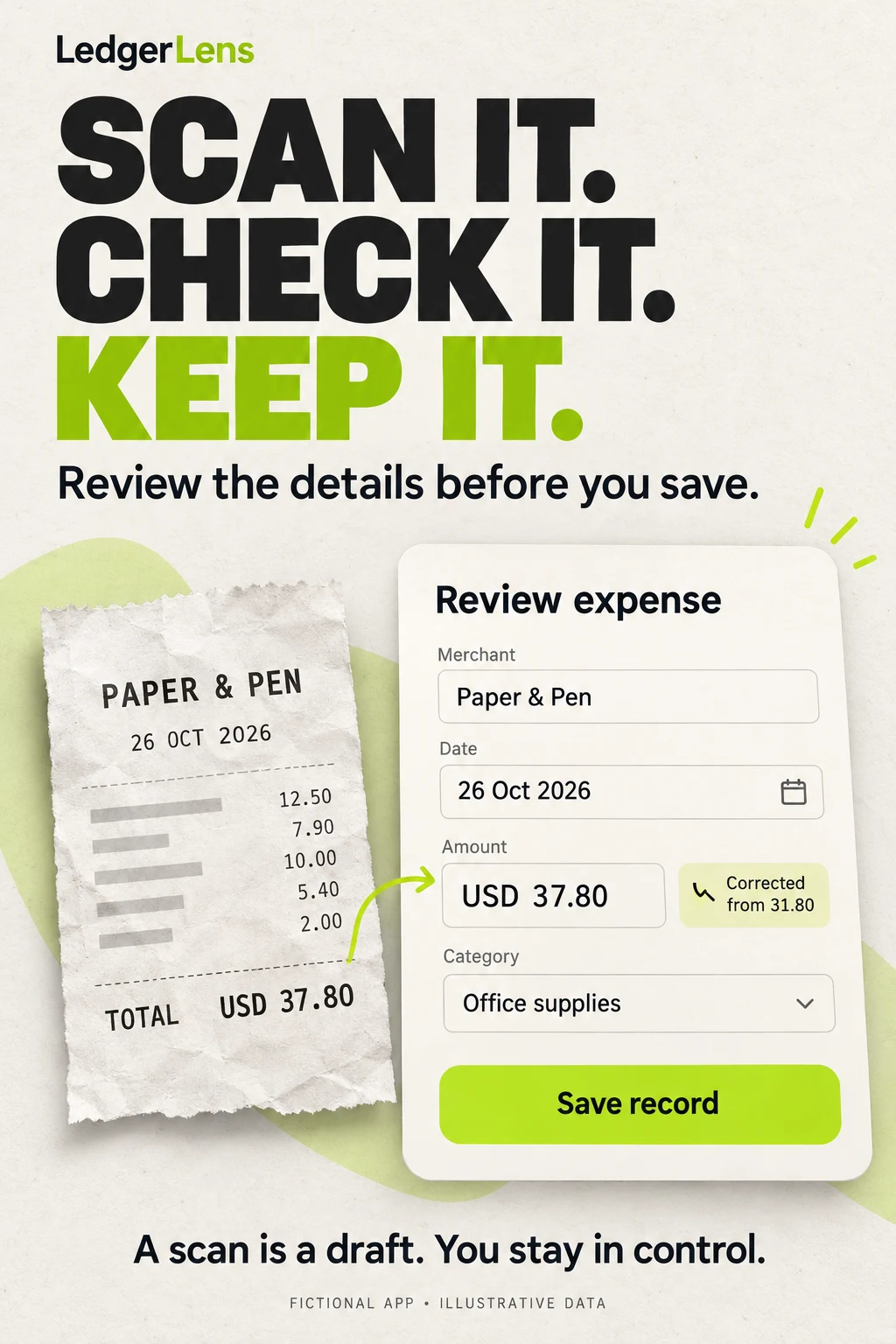
Concept A: what works. The source total and editable record agree at USD 37.80, and the correction from 31.80 makes human review concrete. The save action follows the check. This is more specific than a receipt floating over an unrelated chart. The generated receipt line values also sum to 37.80, which matters when the visual is teaching accuracy.
Concept A: what still needs work. The receipt contains unlabeled item lines, and the correction annotation and footer become small in a reduced image. The bright lime word on ivory needs a contrast check at store size. Production should use a real, redacted or synthetic-but-complete receipt captured through the actual app. Do not imply the app remembers a correction history unless that capability exists.
Concept B: what works. The total is visible before the allocations, and 65 plus 25 reconciles to 90. The text explains that labels do not decide eligibility. The original-receipt reminder helps keep the evidence attached to the record. It is a different task and layout from the scanning concept.
Concept B: what still needs work. The leaf logo differs from Concept A’s wordmark treatment; a designer should apply one approved identity. The paper icon suggests an attachment without demonstrating how to open it. Replace that decoration with the actual attachment control. A fully allocated badge should only mean the arithmetic reconciles, not that an accountant or employer approved the expense.
Swipe horizontally to compare all columns →
| Workshop step | Approved input | Useful instruction | Human check |
|---|---|---|---|
| Choose the job | Confirmed product feature list and redacted demonstration data | Write three headings for reviewing a receipt before saving; do not promise perfect recognition | Does each heading describe a real action? |
| Build the sequence | Actual capture, edit, save and retrieval screens | Order these screens around one purchase without adding controls | Can the example be reproduced in the product? |
| Clarify the split | One source total and verified split rules | Explain 65 work plus 25 personal equals 90, without tax or payment claims | Does the math reconcile and the meaning remain correct? |
| Check accessibility | Actual store-size exports and text requirements | Identify small labels, ambiguous color states and unclear next actions | Test with people and supported assistive settings |
| Prepare a treatment | Existing control plus one documented hypothesis | Change the lead proof while holding unrelated variables stable | Do not present a proposed layout as a measured result |
Reusable prompt: “Using only these confirmed features and fictional receipt data, propose one store screenshot that shows the source amount, editable extracted fields and a save action. Preserve all amounts exactly. Mark uncertainty and do not invent bank sync, reimbursement, tax eligibility, security certifications, pricing or conversion results. Explain what a designer must rebuild with real UI.”
Test plan: First ask people to explain the source amount, correction and result of saving. Compare the current asset with a production-ready treatment using the appropriate store experiment. Track valid-record activation and later retrieval alongside acquisition. Keep a guardrail for users mistakenly expecting payment, tax approval or perfect extraction. A comprehension improvement can guide the next test; it does not establish an install uplift by itself.
Do not upload unredacted customer or employee receipts into a creative workflow without the necessary authorization and data handling. Fictional merchants and amounts are sufficient for the teaching examples here. Store the final prompt, selected asset and human review notes so the creative decision is reproducible.
EXPENSE TRACKING APP ASO
Release a story that still makes sense after the first receipt.
Swipe horizontally to compare all columns →
| Release check | What to verify | Why it changes ASO |
|---|---|---|
| Language and merchant text | Receipt scripts, long merchant names and local vocabulary | A translated heading does not prove the scanner reads that language |
| Dates and periods | Day/month order, timezone and reporting boundaries | The same purchase must stay in the intended reporting period |
| Currency | Original amount, reporting value, rate basis and rounding | A symbol alone cannot explain a converted total |
| Work rules | Workspace access, role, required evidence and actual states | Employer policies and user permissions can change the next action |
| Manual and connected sources | Which sources are supported and what remains missing | Automatic does not imply universal or current coverage |
| Exports | Columns, attachment handling, selected dates and access tier | Portability claims need a reproducible output |
| Creative evidence | Real UI, coherent sample data, readable labels and no exposed private details | The story must remain truthful at actual store size |
| Measurement | Defined event, denominator, source, observation window and exclusions | A download is not proof of a usable expense record |
Localize the job, not only the headline. “Expense report” can imply an employer workflow, while a personal spending log has a different vocabulary. Ask native speakers who use the relevant method to review titles and screenshots. Investigate local keywords, choose markets based on actual feature support, and adapt screenshots before localization QA.
For a receipt example, test long names, decimal separators, different date orders and a correction after a failed extraction. For a company tool, test a new employee who has no workspace yet and an approver viewing a returned report. For a personal manual tracker, test missing records and a partial refund. Those cases expose misleading acquisition promises more effectively than another perfect dashboard.
Measure the actual sequence: acquisition, valid record, useful return and the intended downstream task. Compare like-for-like periods and storefronts, and document payday, month-end, business-travel seasonality and paid-traffic changes as possible context rather than automatic explanations. Keep a result inconclusive when the evidence is weak.
First action: Choose one acquisition job, map its supported steps, and audit the first three screenshots against it. Use the keyword CSV to narrow the research and the ten test briefs to select one change. An ASO audit can connect the evidence, while ASO services can coordinate research, copy, creative and measurement.
Scope: Public US iOS competitor listings and original screenshot assets, with official iOS and Google Play implementation guidance. No Android competitor screenshot audit, private-account testing, measured keyword demand, financial or tax recommendation, independent security certification or conversion results. Audience segments, keyword opportunities and creative improvements are explicitly proposed research and tests.
TAX PREPARATION APP ASO
Explain who prepares the return and what happens next.
Explore 100 keyword candidates, eight filing apps, two adjacent tools and 20 original screenshots and worked filing, document and Search Ads strategies.
Read the tax-preparation ASO playbook ↗BANKING APP ASO
Make the account, the action and the state clear.
Compare 100 banking keyword ideas, eight apps, 20 original screenshot panels and worked copy for account access, deposits, cards and acquisition.
Read the banking-app ASO playbook ↗