CATEGORY PLAYBOOK / BUDGETING
ASO FOR
BUDGETING APPS.
Show how the plan works when life changes. Turn envelopes, pay cycles and bill plans into keywords, screenshots and copy people can actually understand.
BUILD A CLEARER BUDGET STORY ↓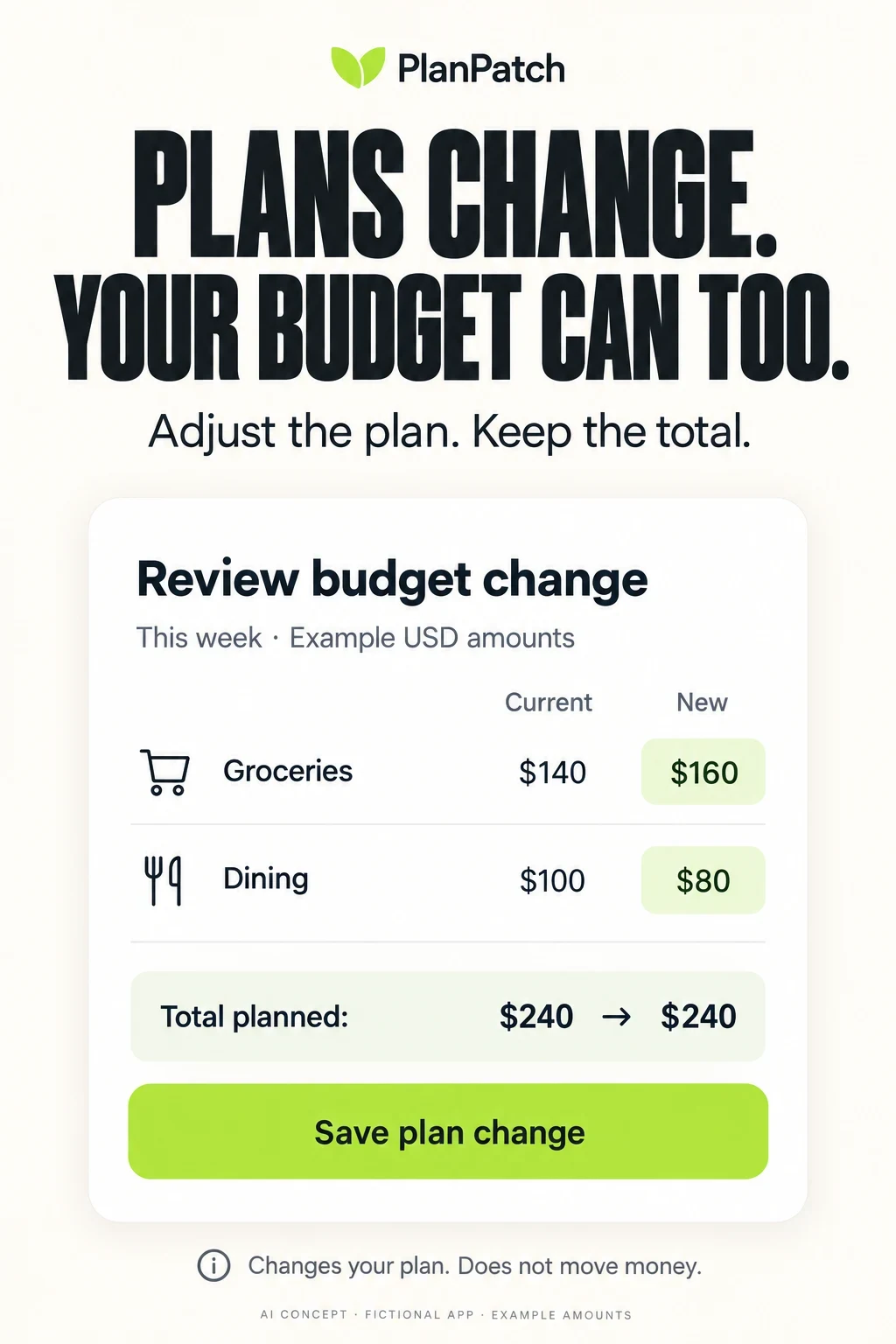
BUDGETING APP ASO
Sell a planning method people can recognize.
A budgeting app has to answer a practical question before it earns attention: “How will this help me make my next spending decision?” A net-worth graph can look impressive without answering it. A long list of financial features can obscure whether the app uses envelopes, category limits, a flexible allowance or a plan built around payday.
This guide focuses on acquiring people who want to make, adjust and review a budget. It goes deeper than the finance category overview. Expense recording is included where it feeds a plan; banking, investing and tax filing are different search jobs. The examples are communication analysis, not a recommendation of budgeting methods or financial products.
Potential audiences · 100 keyword candidates · Narrow opportunities · Eight competitors · Real screenshot critiques · Worked copy · Apple Ads
Swipe horizontally to compare all columns →
| Planning position | What the visitor needs to see | Misunderstanding to prevent | Opening test |
|---|---|---|---|
| Envelope or zero-based allocation | Money assigned to named purposes and an unassigned remainder | Zero unassigned does not mean zero in the bank | A small allocation task before a broad dashboard |
| Flexible category limits | Editable limits and what happens when spending changes | A category adjustment does not create income | One before-and-after change with a constant total |
| Paycheck or period planning | Start/end dates and received versus expected income | Twice-monthly is not the same as every two weeks | An actual pay-period setup |
| Manual budgeting | A useful plan and expense entry without account connection | Manual does not automatically mean offline or anonymous | An honest no-bank-link route |
| Connected budgeting | A supported source, transaction state and last update | Imported is not necessarily current, complete or correctly categorized | A review-and-correct task |
| Shared household budgeting | The real shared plan and access boundaries | Shared does not necessarily mean separate private records | An invitation and permission explanation |
| Annual-cost planning | A future target divided across a defined period | Planned contributions are not verified savings deposits | A monthly plan for one dated bill |
Choose one lead promise: Write “For people who need [planning task], this app lets them [actual action] using [supported method].” If the last clause cannot be shown in real UI, the positioning is still too vague. A multi-method app can use different entry stories, but each must remain truthful about the same product.
The opportunity is often in the correction. Show what happens when groceries cost more, a paycheck arrives late or an annual bill changes. A perfect green dashboard hides the very reason someone needs a flexible tool. Connect this brief to ASO strategy, search intent and a concrete value proposition.
BUDGETING APP ASO
Find the planning constraint behind the demographic.
These are audience hypotheses and recruitment questions, not demographic market shares. Compare life stage, household structure, pay schedule, financial literacy, language and access needs. Do not assume students have the same income, older adults dislike automation or couples want identical privacy settings. The task should explain the creative choice.
For example, recruit adults managing their first independent household alongside experienced planners switching tools. Include regular-pay and variable-pay households, solo and shared plans, different device sizes and accessibility needs. Ask about the workflow they already use; a person can prefer paper envelopes without being unfamiliar with technology.
Swipe horizontally to compare all columns →
| Potential audience | Planning job | Variation to research | Comprehension question | Proof to show |
|---|---|---|---|---|
| First-time planners | Make a small plan without learning a financial vocabulary | Compare adults starting work, changing household roles or returning to budgeting | Can they describe an envelope without assuming money moved? | Three named categories and an editable amount |
| Variable-income households | Work with known money and uncertain future pay separately | Freelancers, shift workers and seasonal earners across ages | Can a projected payment be removed without corrupting the plan? | Received versus expected income and date controls |
| Regular-pay planners | Align spending plans with actual pay dates | Weekly, fortnightly, twice-monthly and monthly schedules | Do they understand where the period starts and ends? | A visible date range and next-period rule |
| Couples with separate accounts | Coordinate joint costs without assuming identical access | Different account ownership and collaboration preferences | Who sees, edits and receives notifications? | The actual invitation and access settings |
| Roommates and extended households | Keep the shared plan distinct from individual money | Household composition and language; not only married couples | Does shared mean everyone sees every purchase? | Supported shared categories and permissions |
| Manual-entry users | Start without connecting financial accounts | Cash users, unsupported banks and people preferring manual records | Can they make a useful plan before any connection prompt? | Manual setup and an honest data-completeness note |
| Spreadsheet switchers | Preserve a familiar period, category or export workflow | Different spreadsheet experience and data formats | Which fields survive import and how are duplicates reviewed? | A real mapping or export preview |
| People planning irregular bills | Remember an annual cost during ordinary months | Renters, homeowners, students and retirees; no assumed wealth | Does a planned contribution mean money has been saved? | Due date, planned contribution and recorded amount labels |
| People using accessible interfaces | Read and edit a plan reliably | Larger text, screen readers, reduced vision and shared devices | Can they understand a deficit without relying on red? | Actual supported text and non-color labels |
| People returning after a gap | Restart without shame or a misleading fresh balance | Different tracking habits and gaps in transaction history | What remains uncertain after missing records? | An honest reconciliation or new-period workflow |
Show the first three store panels without explaining them. Ask: “What does this app do?”, “Is that amount planned, spent, available or predicted?”, “What happens when you tap the button?”, “Must you connect a bank?” and “What would another household member see?” Record exact misunderstandings rather than treating every hesitation as dislike.
Use synthetic examples instead of requesting actual bank statements or household balances. A small study can expose confusing labels; it cannot establish market demand. Compare comprehension within the intended task and supported region before drawing conclusions about a demographic. Use the readability guide and a documented test hypothesis.
BUDGETING APP ASO
100 budgeting keyword candidates, grouped by the job they imply.
These 100 distinct candidates are a research starting point. None has verified search volume, difficulty or conversion data here. Each cluster names the feature required to target it honestly. The full list covers different budgeting products; it is not a recommendation that one app put every term into its metadata.
Core planning
Product requirement: A working editable budget, not just a balance dashboard
Swipe horizontally to compare all columns →
| Keyword candidate | Research decision |
|---|---|
| budget planner | Unmeasured · check real feature, store results and locale |
| budgeting app | Unmeasured · check real feature, store results and locale |
| personal budget app | Unmeasured · check real feature, store results and locale |
| monthly budget planner | Unmeasured · check real feature, store results and locale |
| weekly budget planner | Unmeasured · check real feature, store results and locale |
| spending plan app | Unmeasured · check real feature, store results and locale |
| budget maker | Unmeasured · check real feature, store results and locale |
| category budget planner | Unmeasured · check real feature, store results and locale |
| household budget planner | Unmeasured · check real feature, store results and locale |
| simple budget tracker | Unmeasured · check real feature, store results and locale |
Envelope and allocation methods
Product requirement: Actual envelope or allocation controls and clear definitions
Swipe horizontally to compare all columns →
| Keyword candidate | Research decision |
|---|---|
| envelope budgeting app | Unmeasured · check real feature, store results and locale |
| digital cash envelopes | Unmeasured · check real feature, store results and locale |
| virtual envelope budget | Unmeasured · check real feature, store results and locale |
| zero based budget app | Unmeasured · check real feature, store results and locale |
| cash stuffing budget app | Unmeasured · check real feature, store results and locale |
| budget allocation app | Unmeasured · check real feature, store results and locale |
| budget category limits | Unmeasured · check real feature, store results and locale |
| flexible budget app | Unmeasured · check real feature, store results and locale |
| 50 30 20 budget planner | Unmeasured · check real feature, store results and locale |
| budget reallocation app | Unmeasured · check real feature, store results and locale |
Pay cycles and uneven income
Product requirement: Supported start dates and income assumptions; no forecast presented as received pay
Swipe horizontally to compare all columns →
| Keyword candidate | Research decision |
|---|---|
| paycheck budget planner | Unmeasured · check real feature, store results and locale |
| biweekly budget app | Unmeasured · check real feature, store results and locale |
| fortnightly budget planner | Unmeasured · check real feature, store results and locale |
| weekly pay budget app | Unmeasured · check real feature, store results and locale |
| irregular income budget | Unmeasured · check real feature, store results and locale |
| variable income planner | Unmeasured · check real feature, store results and locale |
| budget for freelancers | Unmeasured · check real feature, store results and locale |
| multiple paycheck budget | Unmeasured · check real feature, store results and locale |
| budget by pay period | Unmeasured · check real feature, store results and locale |
| income based budget planner | Unmeasured · check real feature, store results and locale |
Manual control
Product requirement: Manual input works; offline, login and storage claims need separate verification
Swipe horizontally to compare all columns →
| Keyword candidate | Research decision |
|---|---|
| manual budget planner | Unmeasured · check real feature, store results and locale |
| budget without bank linking | Unmeasured · check real feature, store results and locale |
| cash budget planner | Unmeasured · check real feature, store results and locale |
| budget app no bank connection | Unmeasured · check real feature, store results and locale |
| manual expense budget | Unmeasured · check real feature, store results and locale |
| budget with custom categories | Unmeasured · check real feature, store results and locale |
| editable budget app | Unmeasured · check real feature, store results and locale |
| budget transaction notes | Unmeasured · check real feature, store results and locale |
| budget CSV import | Unmeasured · check real feature, store results and locale |
| offline budget planner | Unmeasured · check real feature, store results and locale |
Shared household planning
Product requirement: Real multi-user access with documented permissions and sync behavior
Swipe horizontally to compare all columns →
| Keyword candidate | Research decision |
|---|---|
| shared budget app | Unmeasured · check real feature, store results and locale |
| couples budget planner | Unmeasured · check real feature, store results and locale |
| family budget app | Unmeasured · check real feature, store results and locale |
| roommate budget app | Unmeasured · check real feature, store results and locale |
| budget with separate accounts | Unmeasured · check real feature, store results and locale |
| joint household budget | Unmeasured · check real feature, store results and locale |
| shared grocery budget | Unmeasured · check real feature, store results and locale |
| partner budget sync | Unmeasured · check real feature, store results and locale |
| household expense allocation | Unmeasured · check real feature, store results and locale |
| shared bills budget | Unmeasured · check real feature, store results and locale |
Irregular bills and future costs
Product requirement: Plans for future costs; distinguish a record from a payment or bank transfer
Swipe horizontally to compare all columns →
| Keyword candidate | Research decision |
|---|---|
| annual bill budget | Unmeasured · check real feature, store results and locale |
| irregular bills planner | Unmeasured · check real feature, store results and locale |
| sinking fund planner | Unmeasured · check real feature, store results and locale |
| yearly expenses budget | Unmeasured · check real feature, store results and locale |
| monthly bill set aside | Unmeasured · check real feature, store results and locale |
| car maintenance budget | Unmeasured · check real feature, store results and locale |
| holiday budget planner | Unmeasured · check real feature, store results and locale |
| school expenses planner | Unmeasured · check real feature, store results and locale |
| insurance renewal budget | Unmeasured · check real feature, store results and locale |
| quarterly bill budget | Unmeasured · check real feature, store results and locale |
Rollover and adjustment
Product requirement: Defined rules for carryover, deficits, edits and refunds
Swipe horizontally to compare all columns →
| Keyword candidate | Research decision |
|---|---|
| rollover budget app | Unmeasured · check real feature, store results and locale |
| carry over budget balance | Unmeasured · check real feature, store results and locale |
| move budget between categories | Unmeasured · check real feature, store results and locale |
| adjust monthly budget | Unmeasured · check real feature, store results and locale |
| cover overspent category | Unmeasured · check real feature, store results and locale |
| budget refund tracking | Unmeasured · check real feature, store results and locale |
| flexible spending categories | Unmeasured · check real feature, store results and locale |
| unused budget rollover | Unmeasured · check real feature, store results and locale |
| negative category budget | Unmeasured · check real feature, store results and locale |
| budget reset date | Unmeasured · check real feature, store results and locale |
Budget review and reporting
Product requirement: Actual plan-versus-record comparison with periods and sources
Swipe horizontally to compare all columns →
| Keyword candidate | Research decision |
|---|---|
| budget versus actual spending | Unmeasured · check real feature, store results and locale |
| monthly budget review | Unmeasured · check real feature, store results and locale |
| weekly spending review | Unmeasured · check real feature, store results and locale |
| budget progress tracker | Unmeasured · check real feature, store results and locale |
| category spending report | Unmeasured · check real feature, store results and locale |
| income vs expenses budget | Unmeasured · check real feature, store results and locale |
| budget forecast app | Unmeasured · check real feature, store results and locale |
| spending pace tracker | Unmeasured · check real feature, store results and locale |
| budget history export | Unmeasured · check real feature, store results and locale |
| budget comparison by month | Unmeasured · check real feature, store results and locale |
Connection and reconciliation
Product requirement: Supported institution and transaction lifecycle; not a promise of instant complete data
Swipe horizontally to compare all columns →
| Keyword candidate | Research decision |
|---|---|
| bank synced budget app | Unmeasured · check real feature, store results and locale |
| automatic budget tracker | Unmeasured · check real feature, store results and locale |
| budget bank transaction import | Unmeasured · check real feature, store results and locale |
| budget pending transactions | Unmeasured · check real feature, store results and locale |
| budget duplicate transactions | Unmeasured · check real feature, store results and locale |
| split transaction budget | Unmeasured · check real feature, store results and locale |
| budget credit card payments | Unmeasured · check real feature, store results and locale |
| cash and bank budget | Unmeasured · check real feature, store results and locale |
| budget account reconciliation | Unmeasured · check real feature, store results and locale |
| budget transaction rules | Unmeasured · check real feature, store results and locale |
Narrow life situations
Product requirement: The workflow genuinely fits; do not infer ability, income or distress from a demographic
Swipe horizontally to compare all columns →
| Keyword candidate | Research decision |
|---|---|
| student budget planner | Unmeasured · check real feature, store results and locale |
| first paycheck budget | Unmeasured · check real feature, store results and locale |
| budget for shift workers | Unmeasured · check real feature, store results and locale |
| retirement household budget | Unmeasured · check real feature, store results and locale |
| moving house budget planner | Unmeasured · check real feature, store results and locale |
| wedding budget app | Unmeasured · check real feature, store results and locale |
| single income household budget | Unmeasured · check real feature, store results and locale |
| multi currency budget app | Unmeasured · check real feature, store results and locale |
| budget planner with reminders | Unmeasured · check real feature, store results and locale |
| budget app with large text | Unmeasured · check real feature, store results and locale |
Separate the words from the promise: “Cash stuffing” may imply physical envelopes, a digital allocation system or an educational tool. “Budget forecast” requires genuine estimation logic; a historical chart is not enough. “Budget for couples” requires more than a photograph of two people. Inspect the live search results for each interpretation.
Prioritize relevance before volume estimates. Record the current result set, product fit, supported market and proposed proof in your research workflow. Then use prioritization to choose a smaller set to validate.
Do not use competitor brand names in your app title or keyword field as a shortcut to discovery. Competitor research tells you which promises need proof. It does not give another app permission to imply an affiliation. Keep paid competitor-query research separate from organic metadata and check applicable platform rules.
BUDGETING APP ASO
Make a narrow promise that the product can actually keep.
Swipe horizontally to compare all columns →
| Narrow opportunity | Why it is a different job | Proof required | Candidate phrase to investigate |
|---|---|---|---|
| Weekly pay with monthly bills | The planning calendar and due dates do not align | Actual period and bill-date controls | weekly pay budget with monthly bills |
| Variable income without forecasts | Only known money should be treated as received | Received/expected distinction and editable inputs | budget planner for irregular income without forecasts |
| Shared costs with separate accounts | Collaboration does not require joint banking | Actual shared-plan permissions | couples budget with separate bank accounts |
| Manual envelope changes | The user wants control without a bank connection | Manual allocation and reallocation | envelope budget without bank linking |
| Annual bills starting partway through a year | Remaining months change the required plan | Actual due date and existing planned amount | annual bill planner with custom start date |
| Rollover with overspent categories | A deficit needs an explicit rule | Visible negative carryover and correction | budget rollover for overspent categories |
| Cash purchases beside imported records | Missing or duplicate records affect the plan | Source labels and reconciliation | budget cash expenses alongside bank transactions |
| Shift workers with changing paydays | A fixed calendar month may not fit the workflow | Flexible dates, not just a generic calendar icon | budget planner for changing pay dates |
| Large-text category review | Important numbers must remain distinguishable | Actual accessible UI at larger text | budget planner with readable category balances |
| Restart after a tracking gap | A fresh-looking balance may conceal missing entries | Honest reset or review workflow | restart budget after missing transactions |
A useful narrow angle has a real constraint, a real workflow and a visible answer. It is not simply a core keyword with “best” or “for beginners” added. Some phrases above may have little store-search demand. That is a research result, not a reason to fabricate estimates.
Worked validation: For a weekly-pay app, inspect queries around weekly budgets and monthly bills in the supported country. Ask people to explain the period shown in your creative. If they understand the promise but the app cannot handle a bill crossing periods, fix the feature scope or stop targeting that query. If the feature fits, test the period-first creative against the current control.
Keep one clear long-tail opportunity per hypothesis. Use gap analysis to identify missing explanations, not to claim that a competitor lacks a feature merely because its first screenshot does not show it.
BUDGETING APP ASO
Eight budgeting apps, eight different ways to explain control.
Eight relevant budgeting competitors were checked against primary US App Store listings and Apple lookup data on 27 October 2026. The set spans allocation, flexible budgets, household planning and connected review. It is not a ranking by revenue, users, trustworthiness or financial outcomes. Legal sellers, titles and subtitles below match the captured listings.
Swipe horizontally to compare all columns →
| App and primary source | Listed seller | Current title | Current subtitle |
|---|---|---|---|
| YNAB ↗ | You Need A Budget LLC | YNAB | Never worry about money again |
| Monarch ↗ | Monarch Money, Inc. | Monarch: Budget & Track Money | Spending, Net Worth, Investing |
| Rocket Money ↗ | Rocket Money | Rocket Money - Bills & Budgets | Subscription & Expense Manager |
| EveryDollar ↗ | The Lampo Group Incorporated | EveryDollar: Budget Management | Track Income, Bills & Spending |
| Goodbudget ↗ | Dayspring Technologies, Inc. | Goodbudget Budget Planner | Money & Expense Tracker |
| PocketGuard ↗ | PocketGuard, Inc. | PocketGuard - Budget App | Plan Budget, Track spending |
| Spendee ↗ | CLEEVIO s.r.o. | Expense & Budget App: Spendee | Money Tracker & Planner |
| Copilot ↗ | Copilot Money, Inc. | Copilot: Track & Budget Money | Spending, investing, net worth |
Swipe horizontally to compare all columns →
| App | What the app promises | What you can learn |
|---|---|---|
| YNAB | Proactive allocation, goals, shared plans, manual records or imported transactions. | The method matters as much as the dashboard. Emotional and savings claims need their own evidence; do not borrow them. |
| Monarch | Account aggregation, flexible or category budgets and household collaboration. | For budget intent, show a planning decision before net worth. Explain what sharing allows. |
| Rocket Money | Monthly category budgets, recurring-charge management and tier-dependent assistant features. | Budgeting, monitoring and acting on a subscription are separate jobs; make the paid feature boundary clear. |
| EveryDollar | Monthly plans, expense records, household sharing and upgraded connection/paycheck tools. | Show the planning method and distinguish basic manual work from upgraded automation. |
| Goodbudget | Virtual envelopes, shared budgets, reports, scheduled transactions and subscriber bank sync. | A visible envelope balance is concrete proof. Shared records are not automatically private individual records. |
| PocketGuard | Custom categories, rollover, spending predictions, manual input and supported bank connections. | Separate a projection from recorded spending. The listing names US, Canadian and UK institutions; check the actual bank. |
| Spendee | Budgets, wallets, shared finances, multiple currencies and receipt-based records. | A receipt log becomes a budgeting story when it changes a category decision; explain currency and shared-wallet scope. |
| Copilot | Connected spending records, adaptive budgets, goals and cross-device review. | Teach the difference between remaining budget and pace. Its description limits financial institutions to the US. |
Compare the same job: YNAB and Goodbudget help frame allocation language. Monarch and Copilot help frame broad connected review. EveryDollar makes a useful comparison for the relationship between manual planning and upgraded features. PocketGuard provides a forecasting and rollover angle. Spendee and Rocket Money connect budgets to adjacent records and recurring costs. Verify each specific feature before making a head-to-head claim.
Claims about awards, popularity, savings, safety or privacy are publisher statements, not independent findings here. A successful-looking sample balance does not prove that the app created that outcome. The public listing can support analysis of the message; it cannot reveal private retention or conversion performance.
Keep the app ID, store, date, exact claim and screenshot source with your competitor research. Search snippets can lag behind primary listings: the captured PocketGuard name and subtitle differ from an older search result. Use the current primary capture for the report and preserve the difference in the research record.
BUDGETING APP ASO
Keep the planning promise consistent across stores.
Swipe horizontally to compare all columns →
| Decision | iOS | Google Play | Budgeting implication |
|---|---|---|---|
| Identity | Name up to 30 characters | Title up to 30 characters | Say what kind of planning product this is |
| Supporting copy | Subtitle up to 30; keyword field up to 100 characters | Short description up to 80; full description up to 4,000 characters | Use the extra space to explain method, input and scope |
| Creative tests | Product Page Optimization for eligible creative treatments | Store listing experiments for eligible assets and text | Test a clear planning action; keep unrelated changes stable |
| Intent-specific entry | Custom product pages with supported configuration | Custom store listings with supported targeting | Give envelope, manual and bill-planning intent relevant proof |
| Feature and financial claims | Review actual functionality against App Review Guidelines | Review Financial Services policy and declarations | A planning record is not a payment account; classify the actual features |
Sources: Apple product-page guidance, Google Play listing fields, Apple Product Page Optimization, Play listing experiments, Apple custom product pages and Play custom listings.
Apple directs developers to use actual app UI in screenshots and to make early frames communicate the core experience. For a budget app, a recognizable allocation or review task is stronger evidence of functionality than an invented bank balance. Use original concepts in this guide for discussion, then rebuild any production creative around the real product.
Google’s Financial Services policy requires a financial-features declaration for apps containing financial features. Review the actual functions and territory; do not assume every budgeting product has the same obligations as lending or trading. Apple’s review guidelines also require accurate product representations and include financial-service provisions. This is an ASO workflow, not an independent legal or security assessment.
An iOS-only screenshot audit cannot establish how Android competitors present themselves. The competitor evidence here is US iOS; the Android section explains platform implementation. Use the detailed guides for app names, subtitles, keyword fields, Play titles and short descriptions.
BUDGETING APP ASO
Five real screenshot sets, followed by eight practical lessons.
These are 20 original iPhone panels from Apple’s US lookup feed: the first four returned for each of five apps, captured and individually inspected on 27 October 2026. The live store may use a different device slot or order. Capture date is not artwork creation date. Open each panel at full size. Publisher balances, awards, testimonials and claims are not verified results.
Read the sequence in two passes. First, identify the promise and product action. Then check whether the numbers, dates, labels and next steps support that promise. A visually polished frame can still leave a basic question unanswered.
Monarch: The budget story arrives after the broad financial overview.
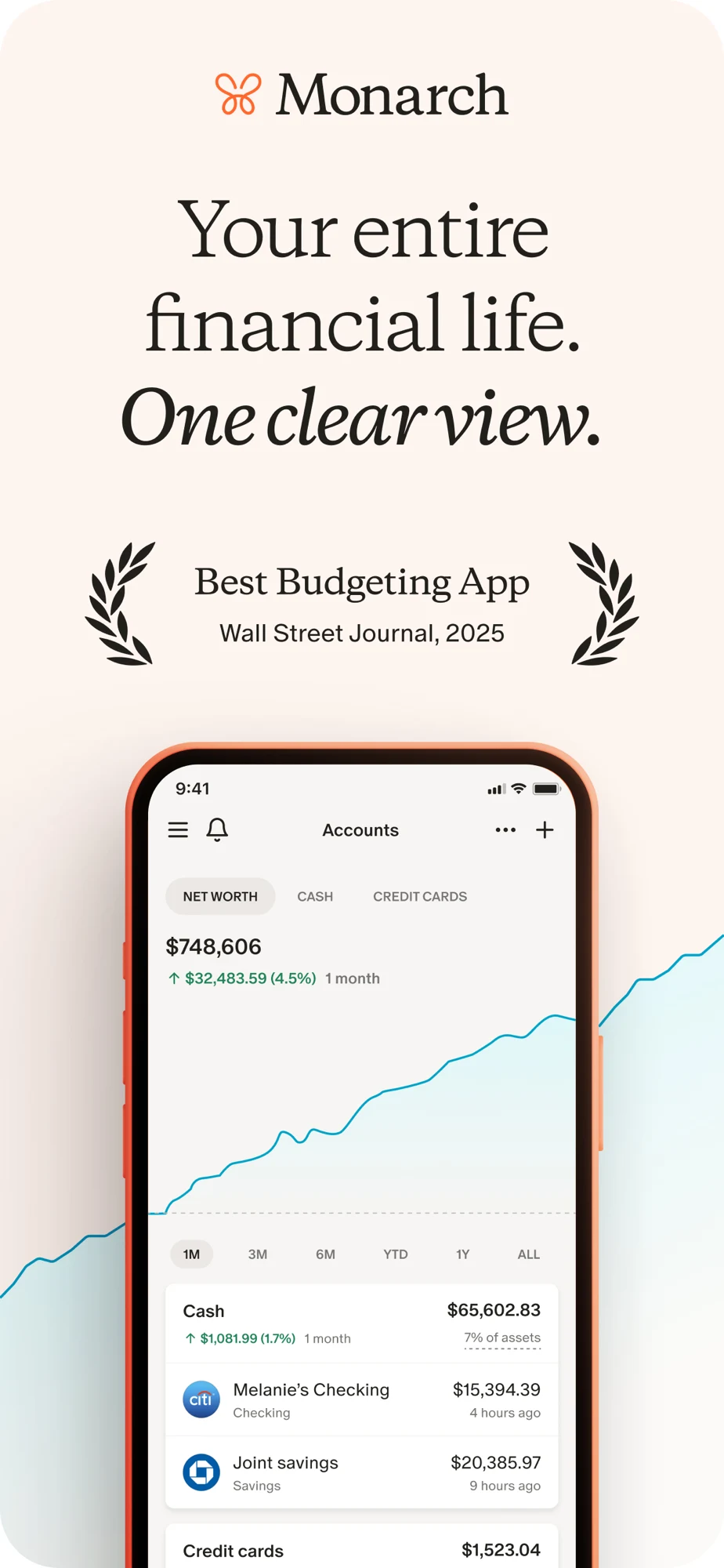
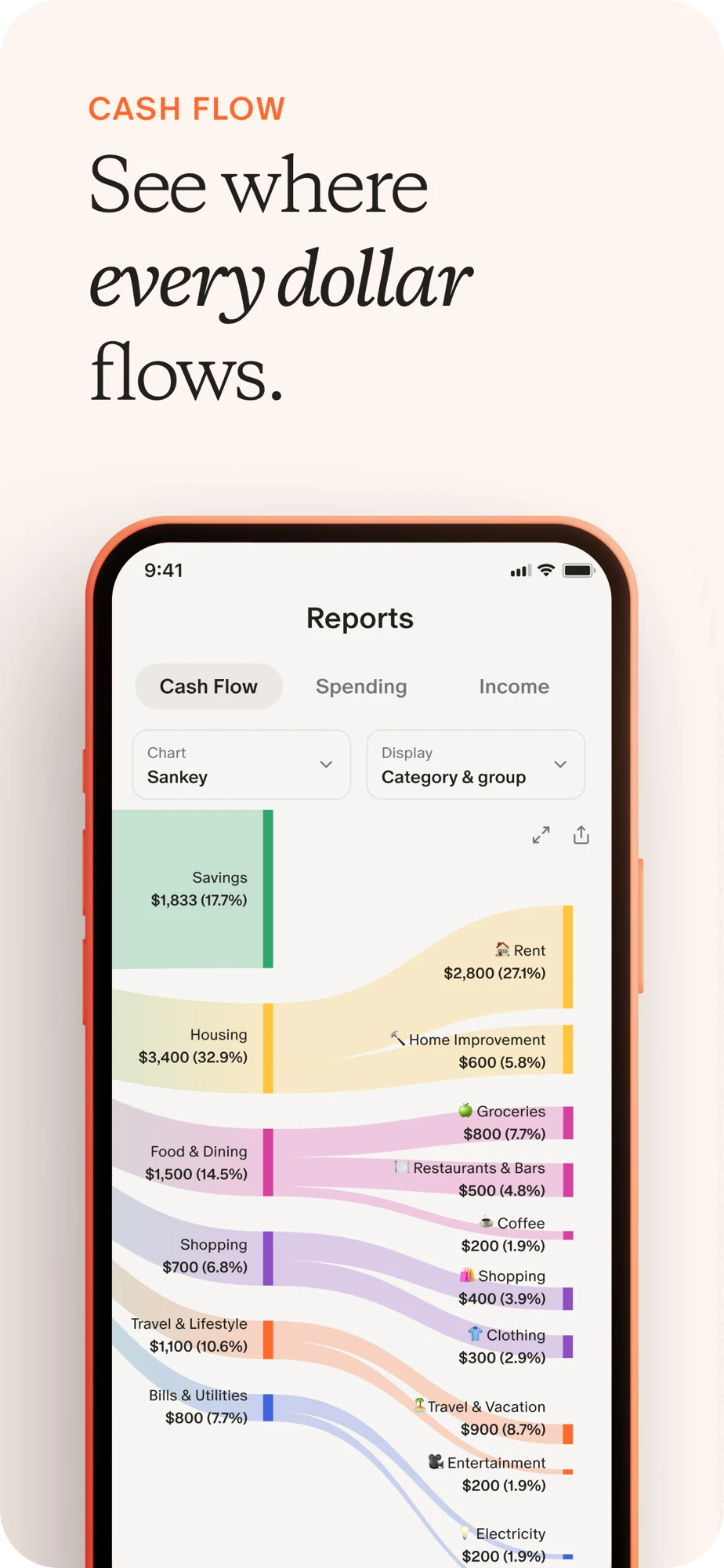
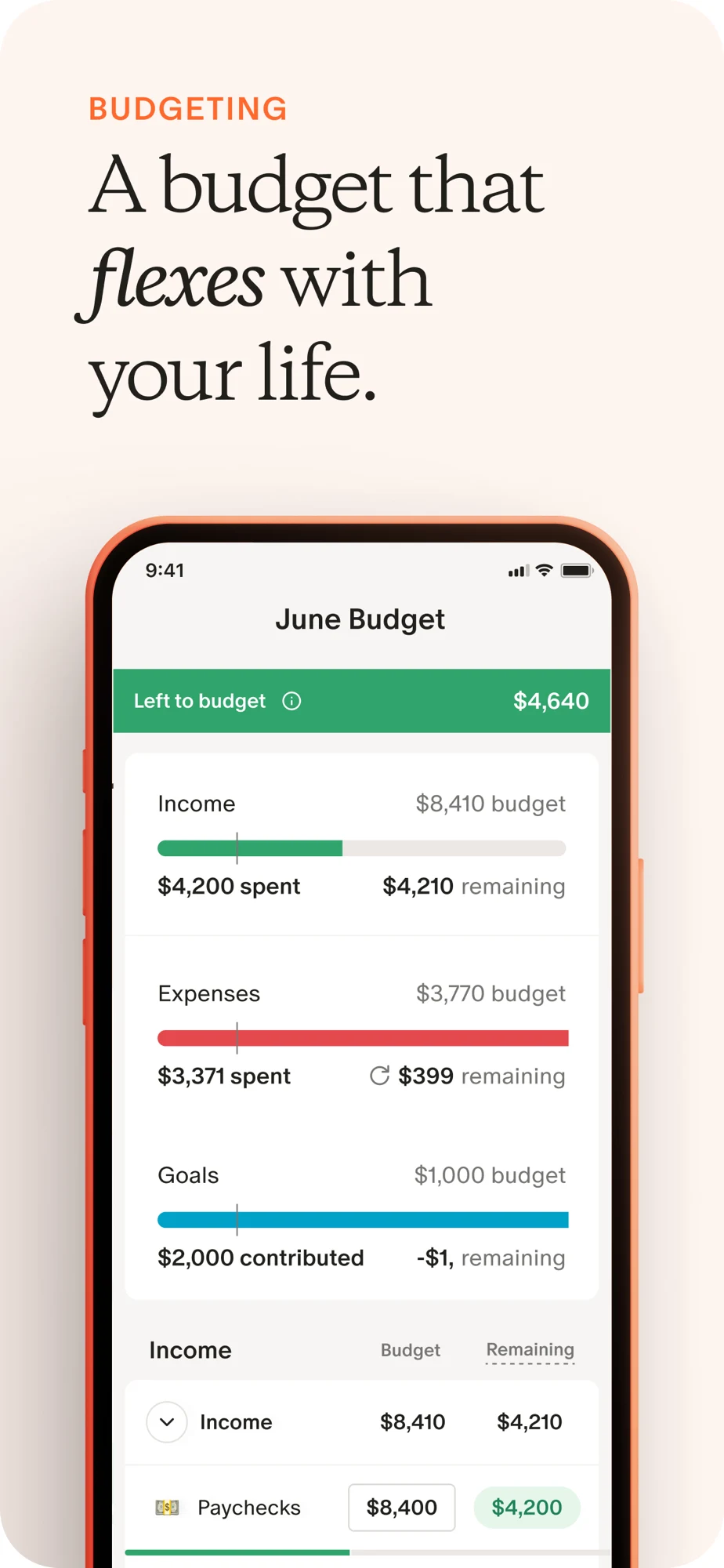
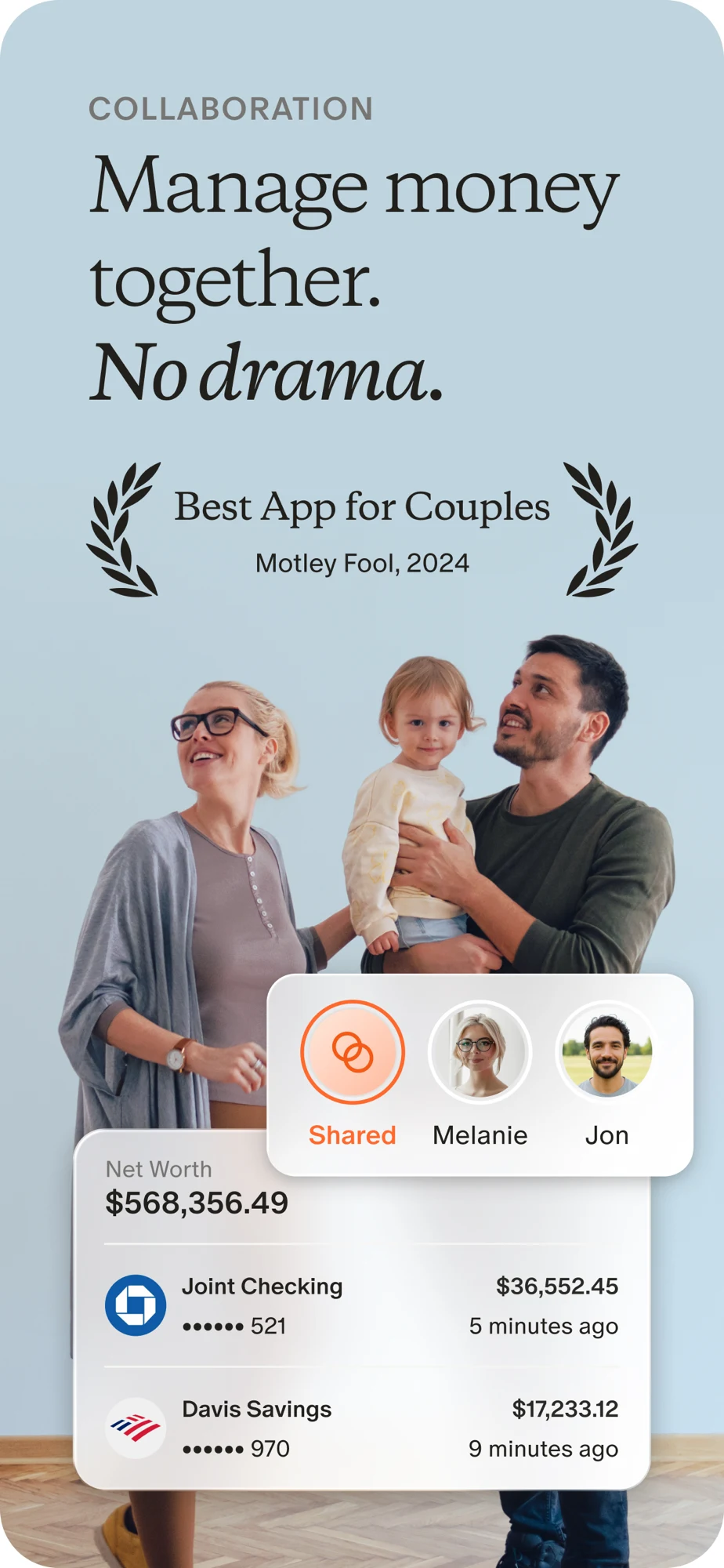
Source: Monarch on the US App Store · captured 27 October 2026.
What the screenshots show: The opener combines net worth with an award claim. A cash-flow diagram follows, then the budget panel, then household imagery. The budget screen uses several amount labels; the income row also carries a spending label. Those relationships need careful explanation for someone new to the method.
What I would test: For budget-intent traffic, test an upright category adjustment first. Label each amount and period explicitly. Use the household panel to explain actual permissions, not just togetherness. Review sample labels before exporting; the artwork alone does not establish a defect in the live app.
EveryDollar: The transaction panel explains a limitation worth keeping visible.
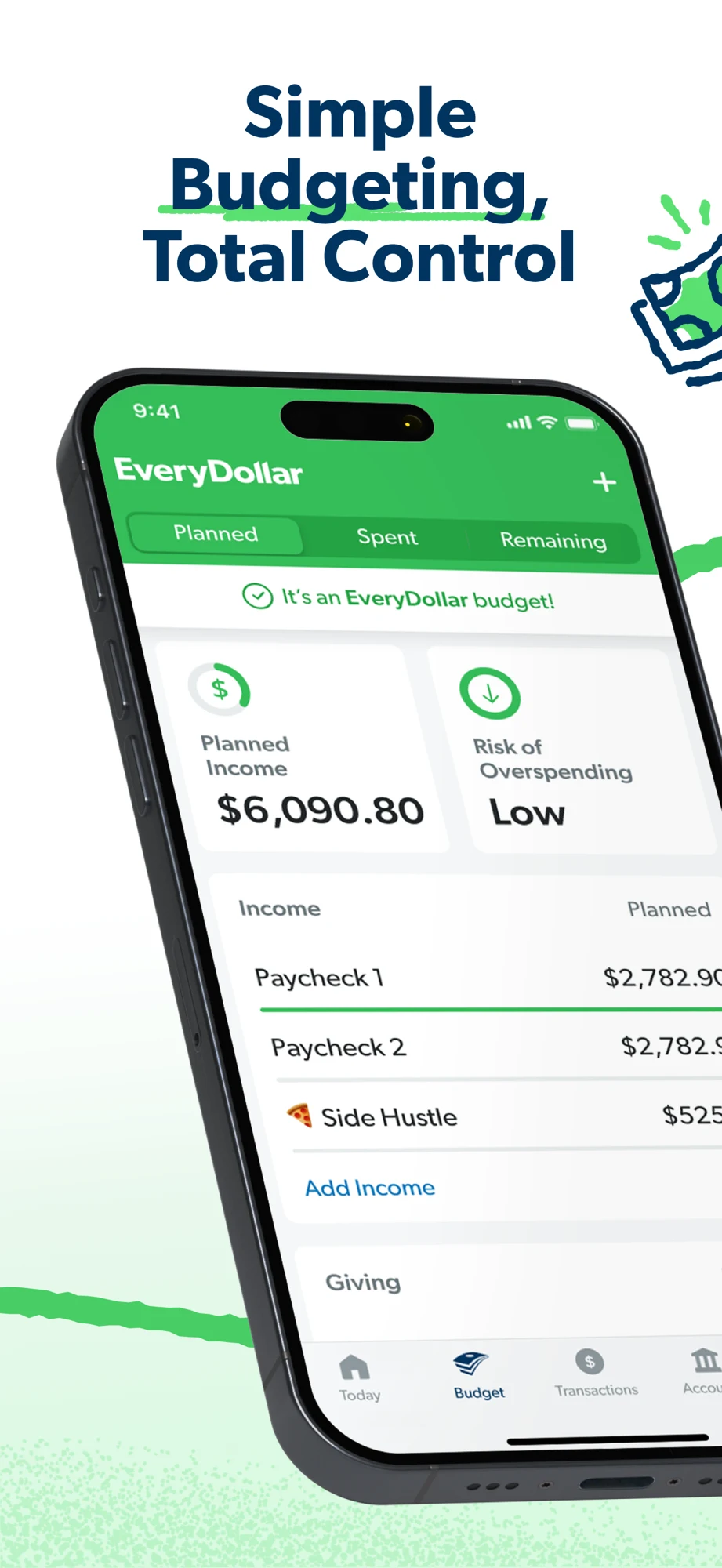
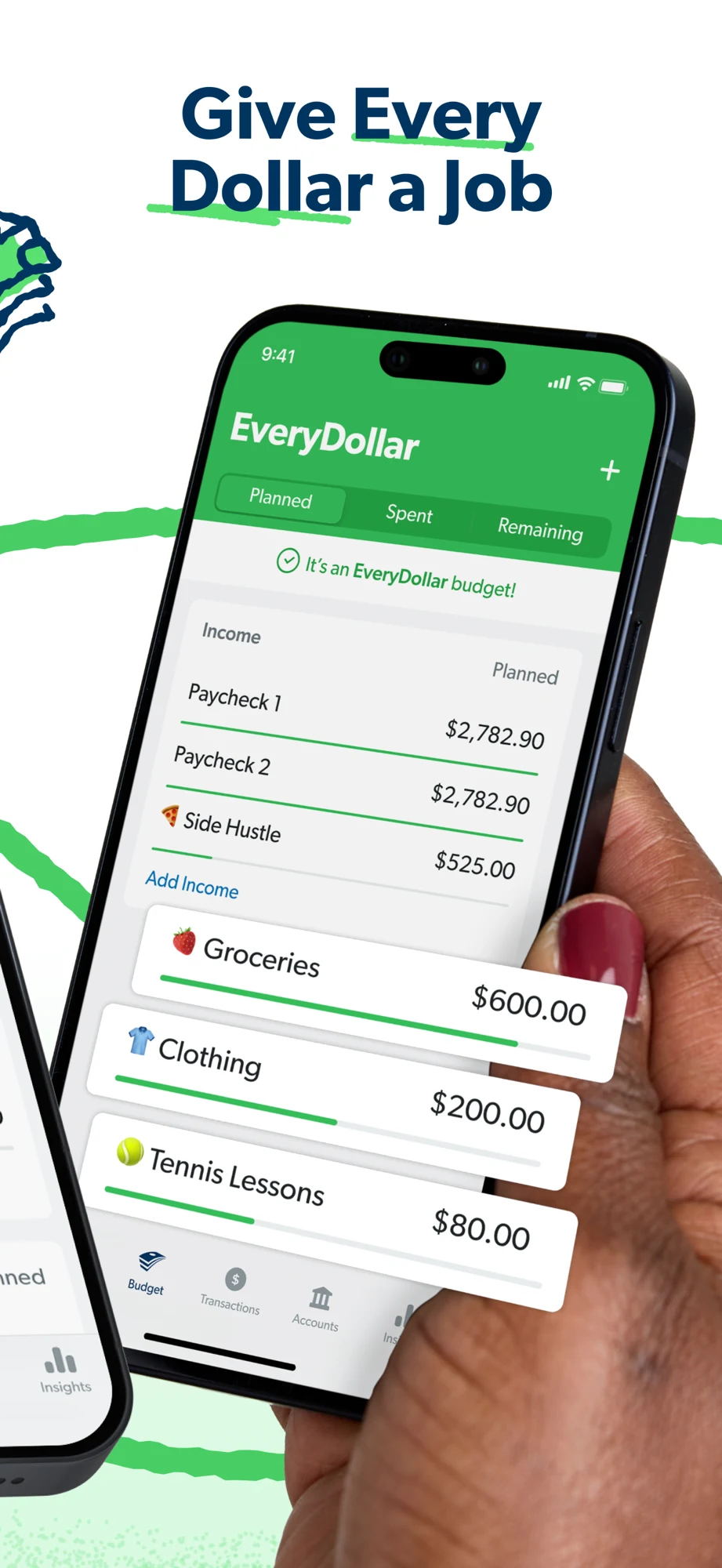
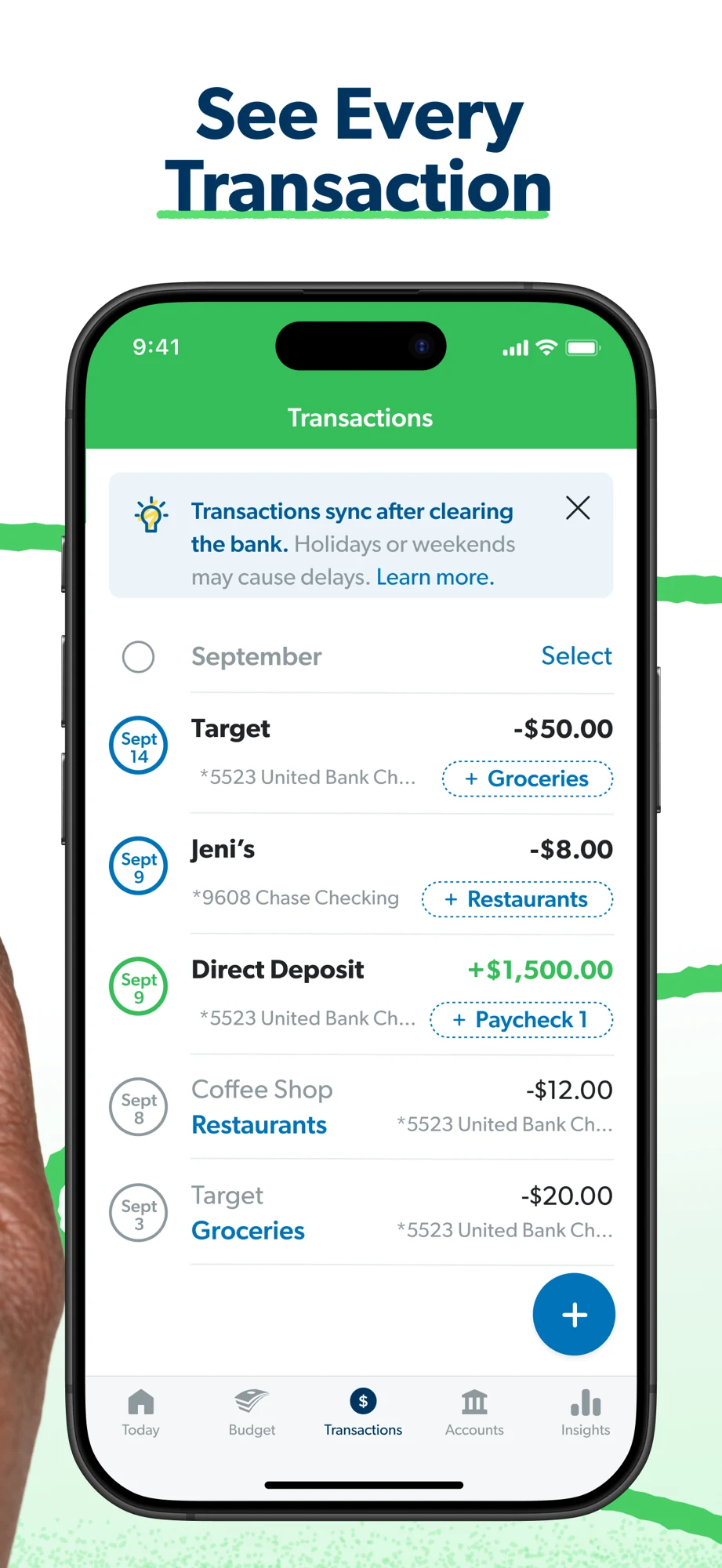
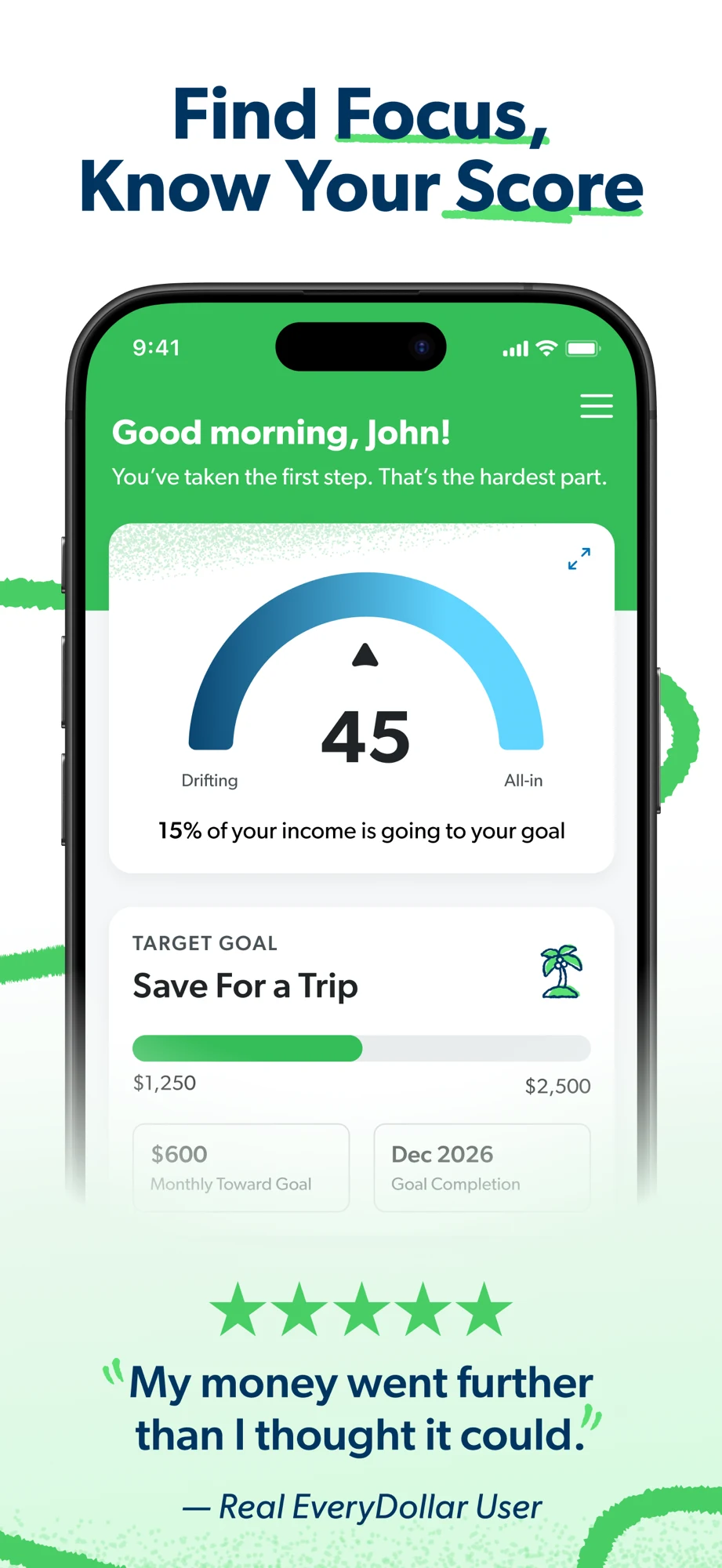
Source: EveryDollar on the US App Store · captured 27 October 2026.
What the screenshots show: The first two panels use angled phones to show planned income and categories. The third is upright and explicitly explains bank-clearing delays. The fourth introduces a score, goal progress and a testimonial. The large headings are easy to scan, while some early numbers are cropped.
What I would test: Test the planning action in an upright first frame, retaining the distinction between planned and recorded money. Keep sync timing visible for connection searches. Explain what a proprietary score means rather than letting it resemble a credit score. Testimonial results are not an expected outcome for everyone.
Goodbudget: Direct UI makes envelopes inspectable; sharing still needs its own proof.
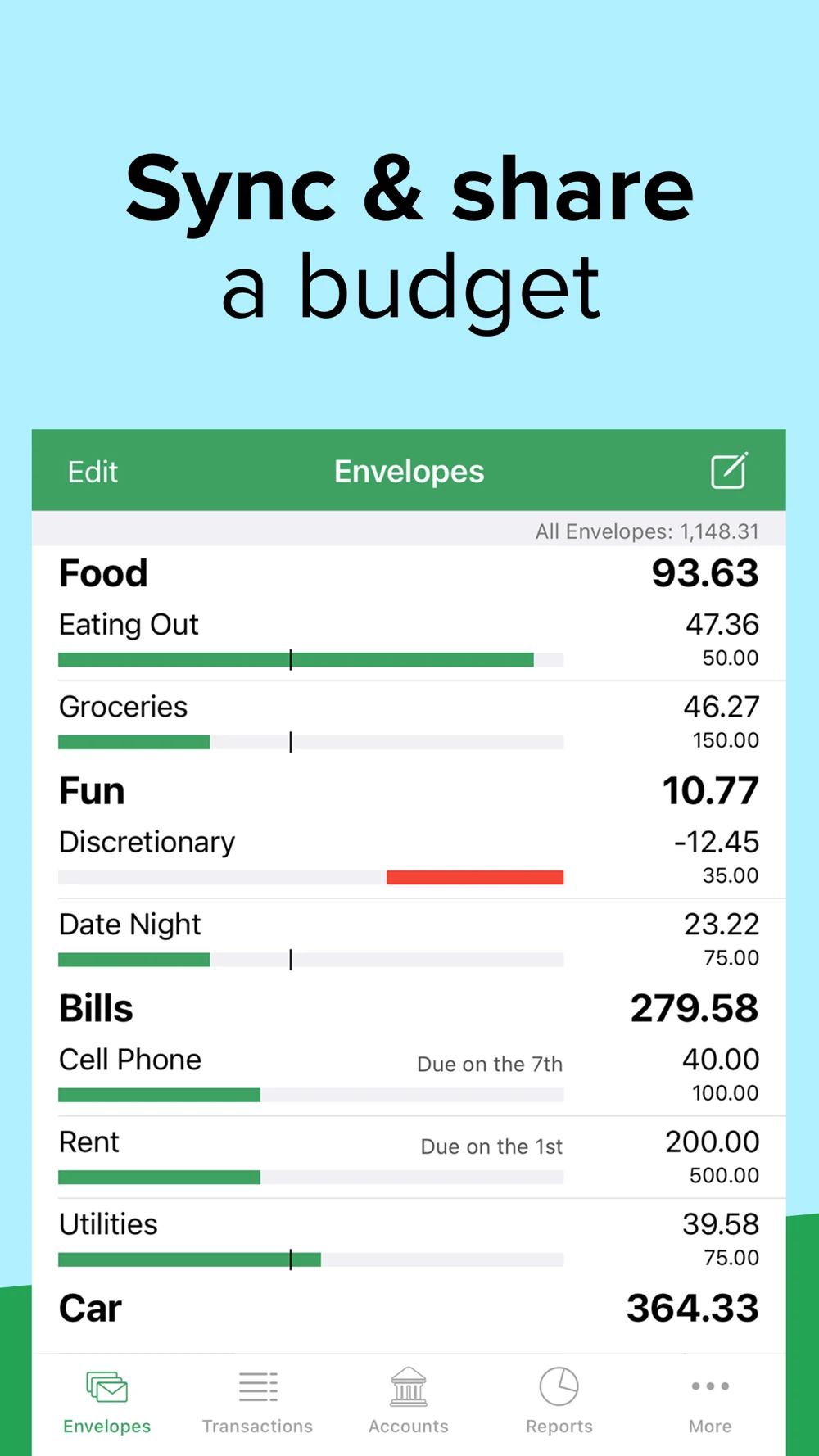
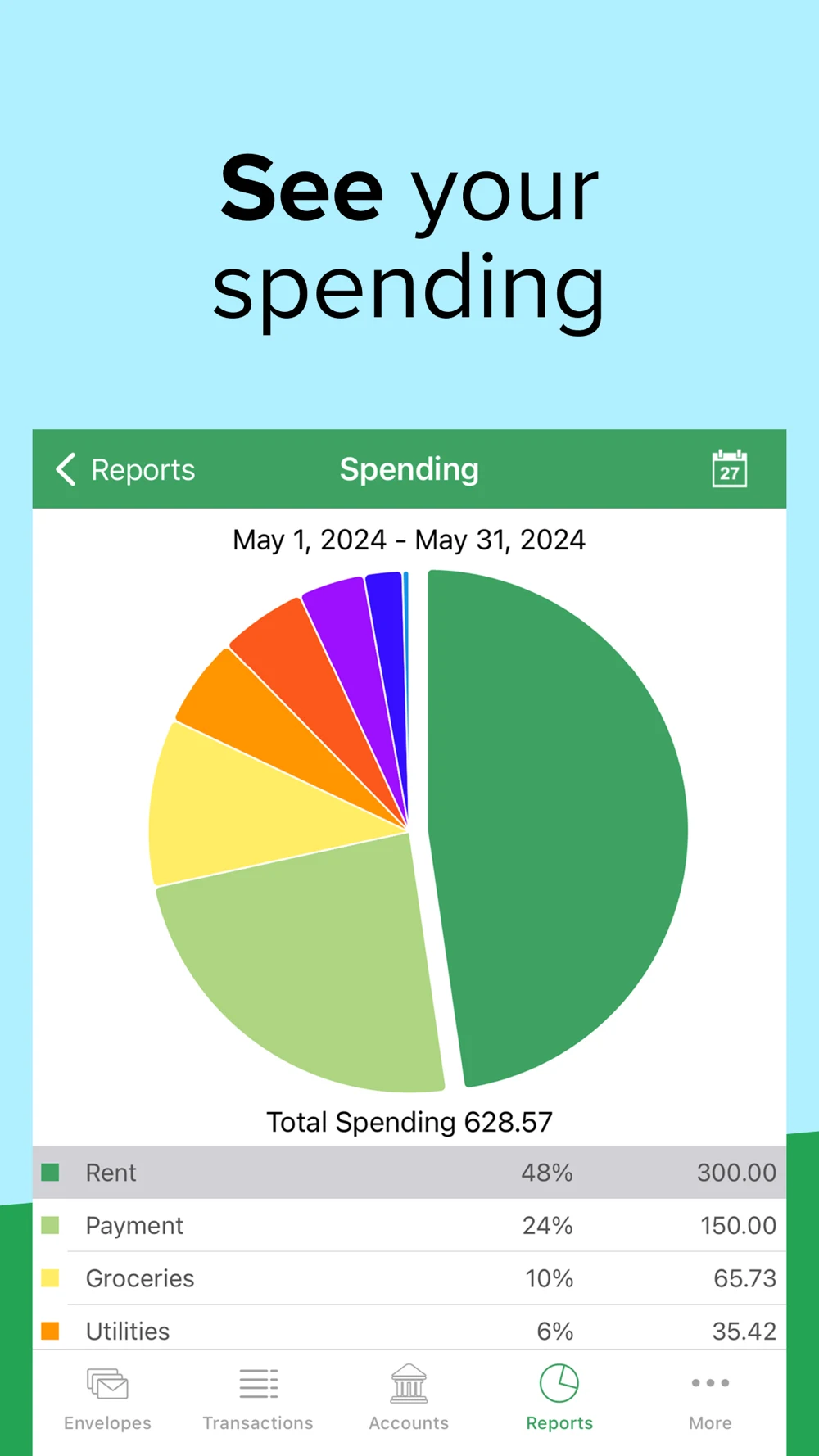
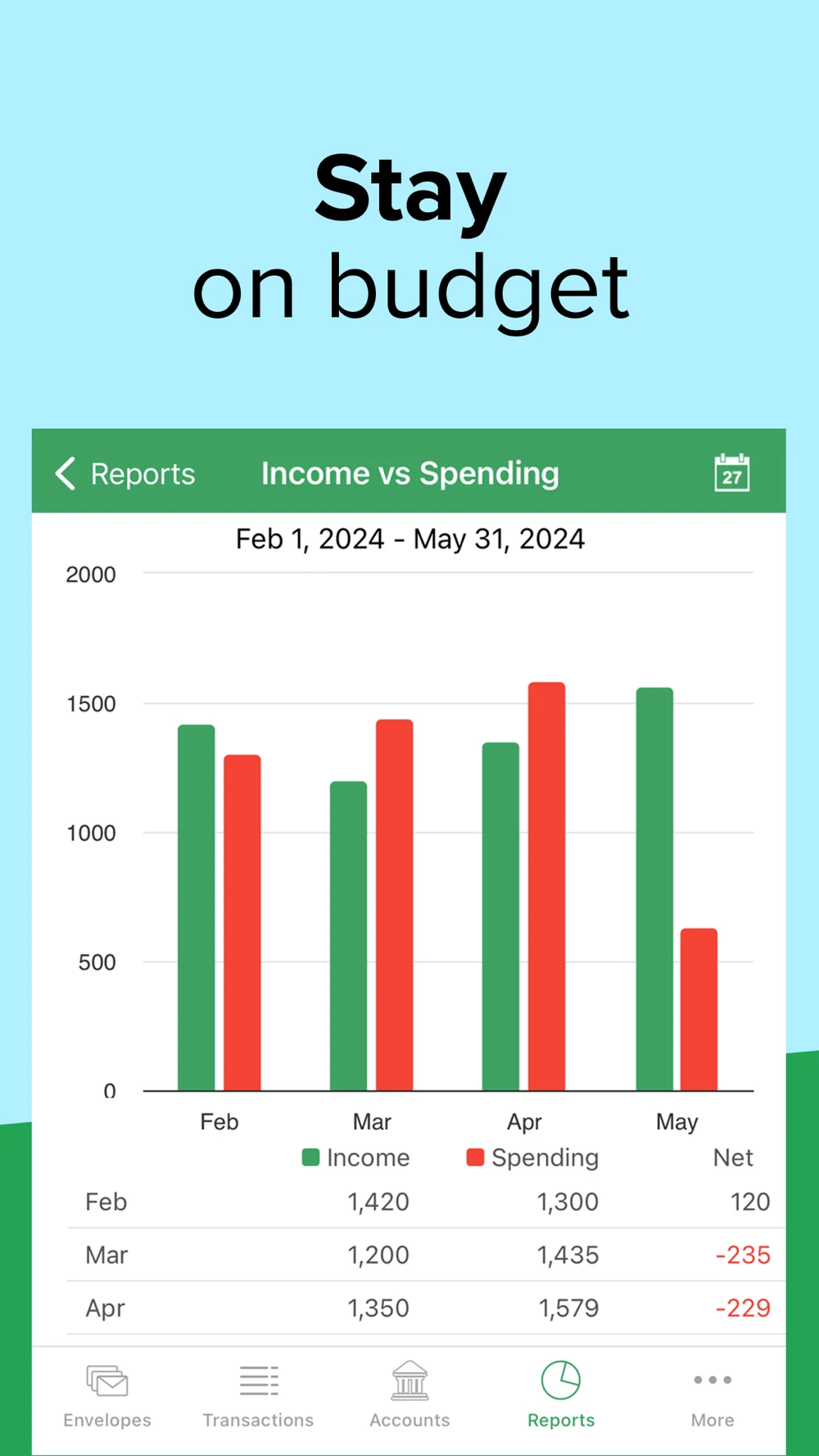
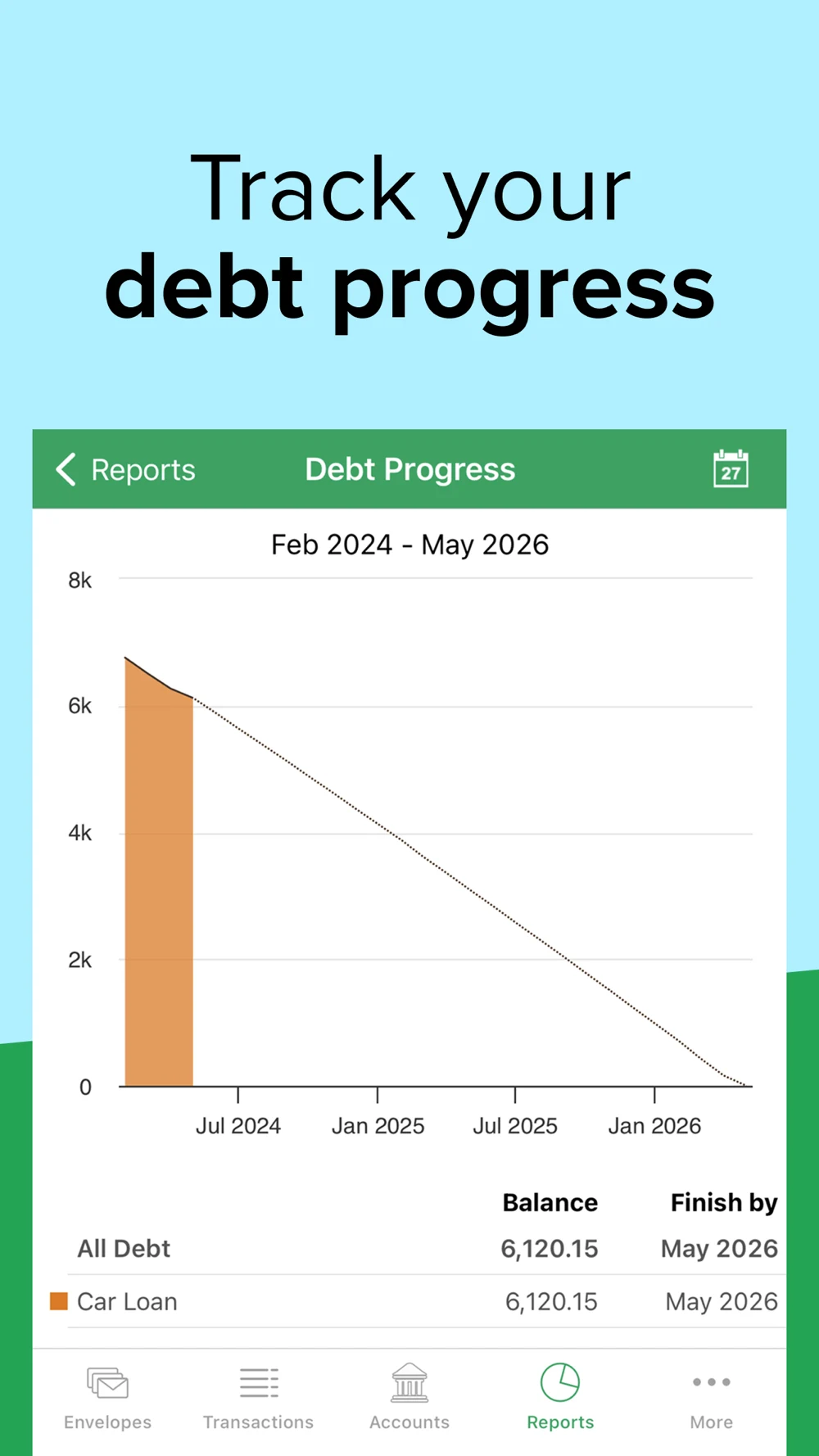
Source: Goodbudget on the US App Store · captured 27 October 2026.
What the screenshots show: The opening shows envelope balances under a sharing message. Next come spending by category, income-versus-spending bars and debt progress. Flat UI and large type make the records accessible. The visible examples include earlier dates, and the debt chart uses a dotted continuation.
What I would test: For envelope intent, demonstrate filling or adjusting one envelope before reports. For household intent, show who shares the plan and what they can change. Label recorded history versus a projection clearly, and update demonstration dates deliberately. Earlier dates in artwork do not prove stale live data.
PocketGuard: The planning panel is more specific than the opening account promise.
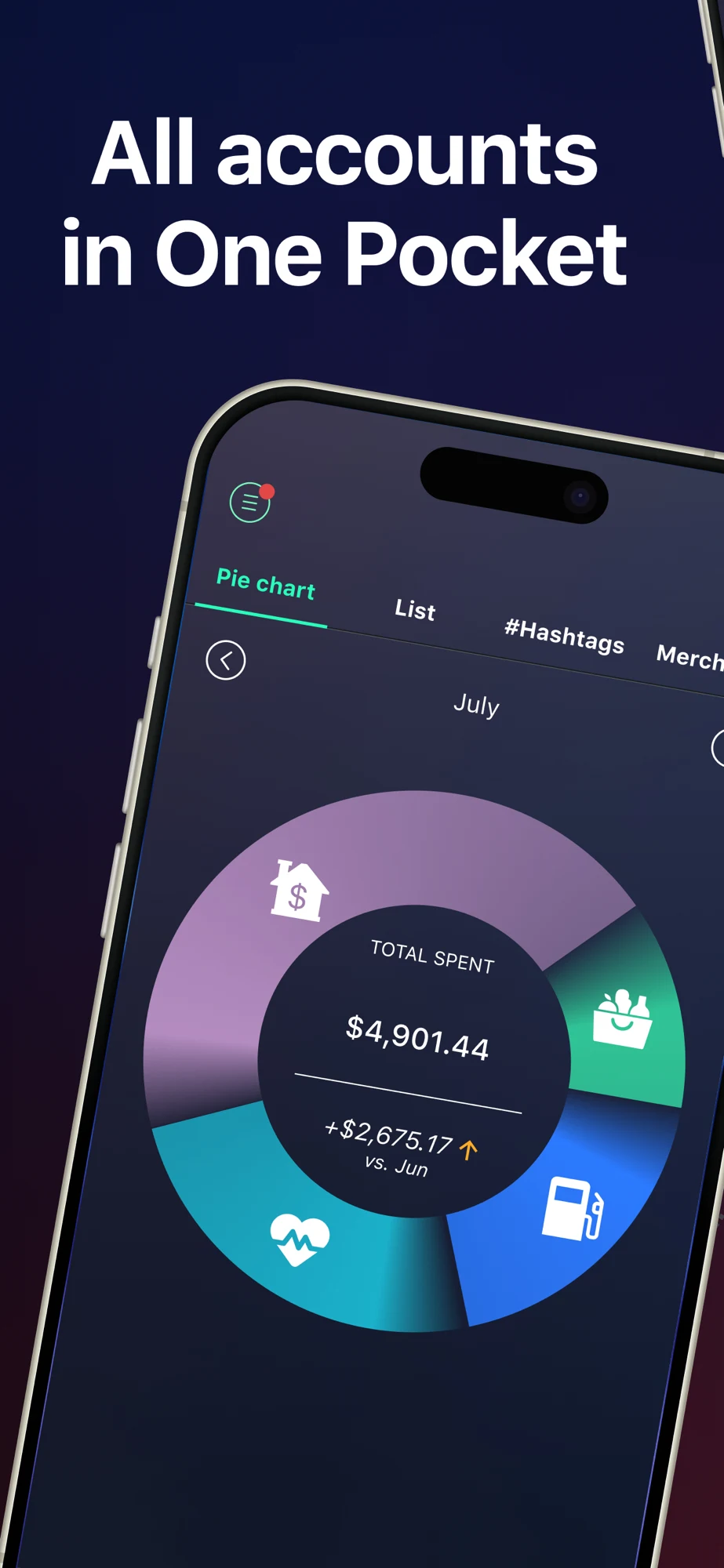
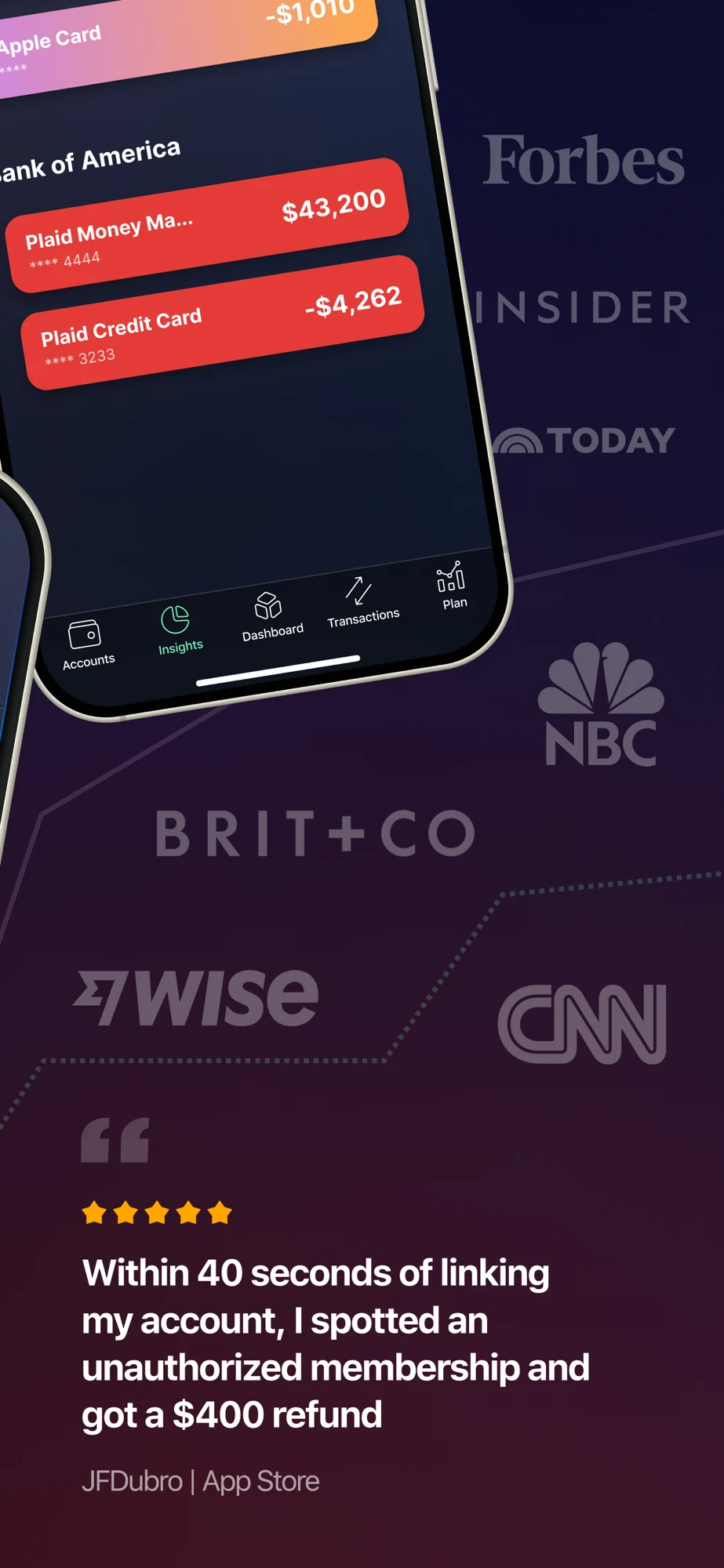
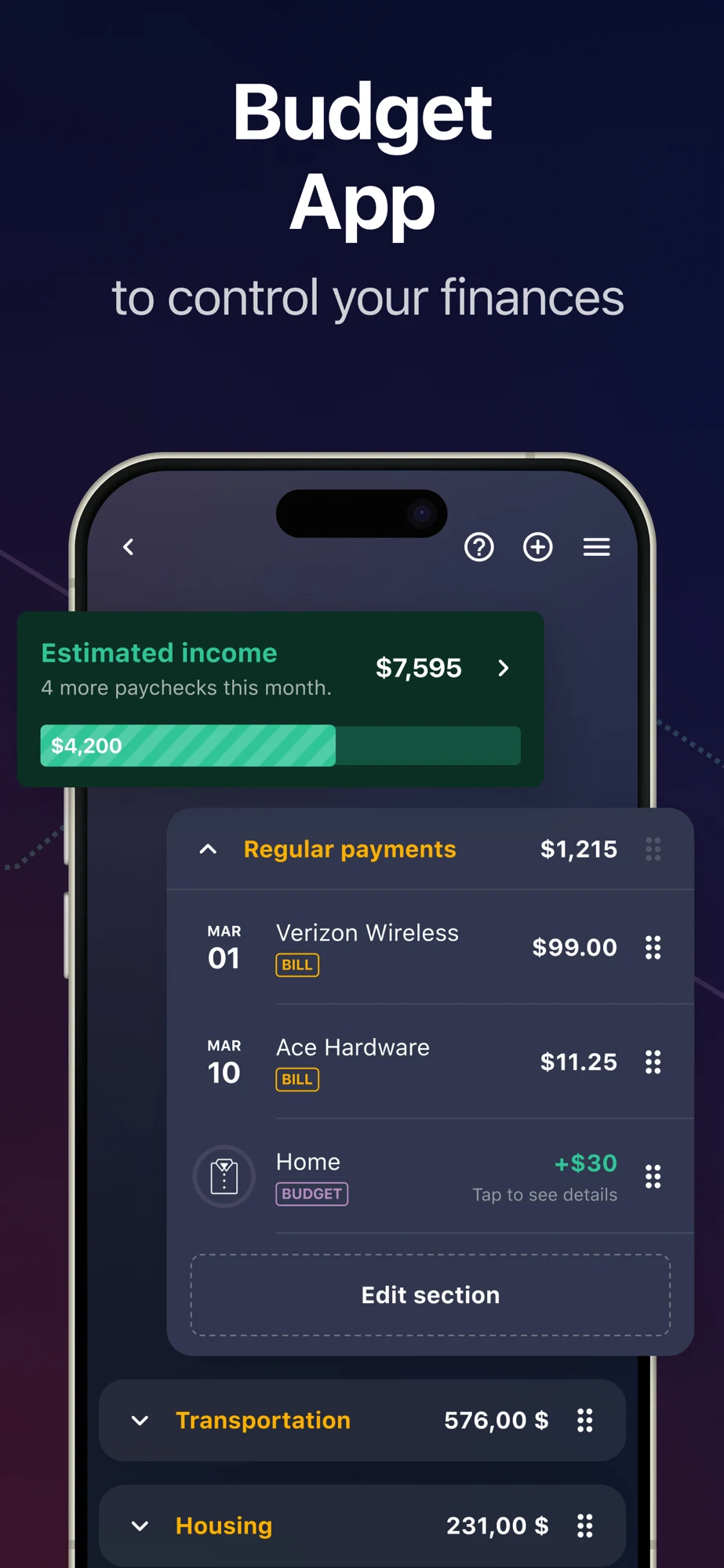
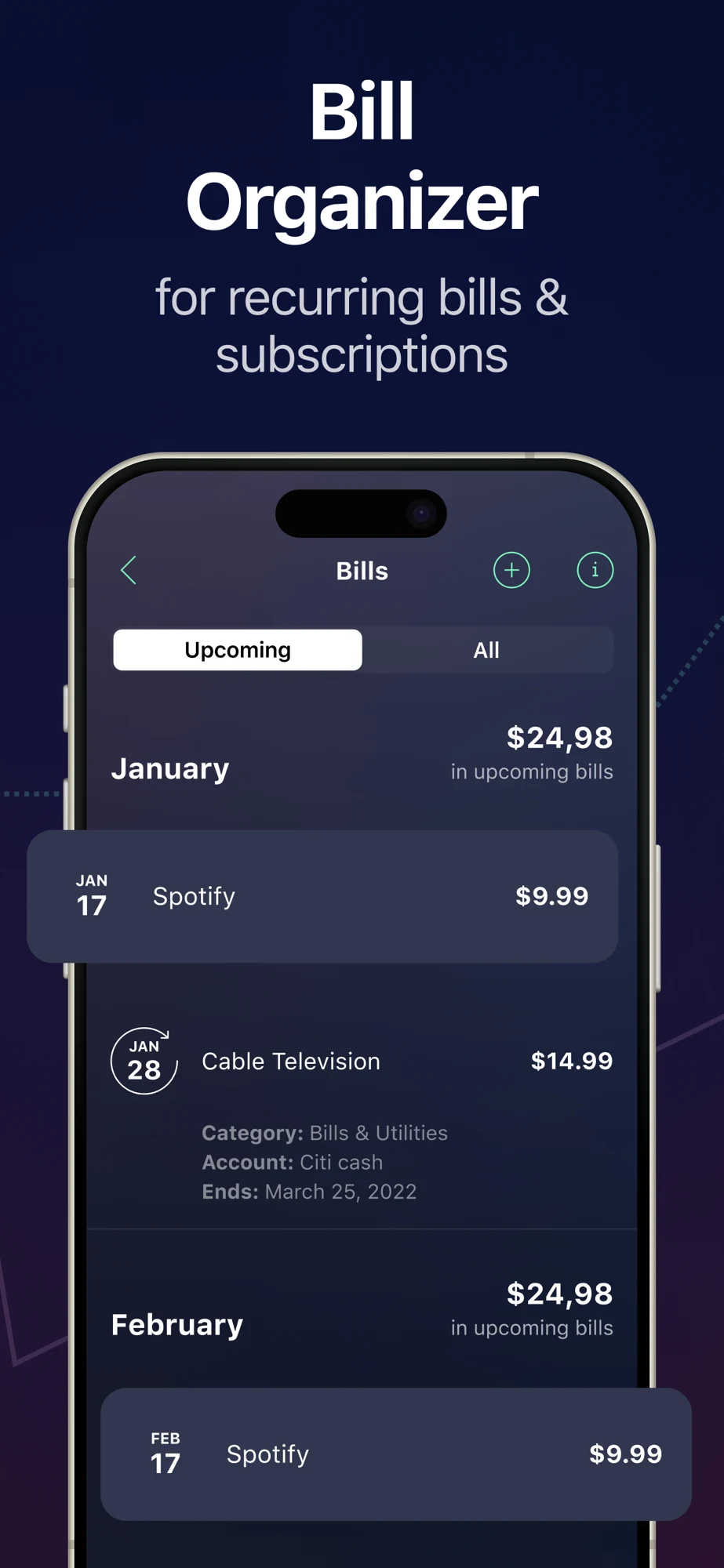
Source: PocketGuard on the US App Store · captured 27 October 2026.
What the screenshots show: The sequence begins with a tilted spending chart, then logos and a testimonial, then estimated income and planned categories, then recurring bills. The planning and bill examples mix decimal or currency formatting. The bill panel includes an older end date. Large headlines identify the tasks.
What I would test: For budget queries, test the planning view earlier with a visible period and estimate label. Keep logos secondary to a useful action. Audit currency separators and date context throughout an export. Clarify that listing a bill does not pay it; a publisher testimonial is not proof of typical savings.
Copilot: Readable hierarchy needs enough contrast and unambiguous number labels.
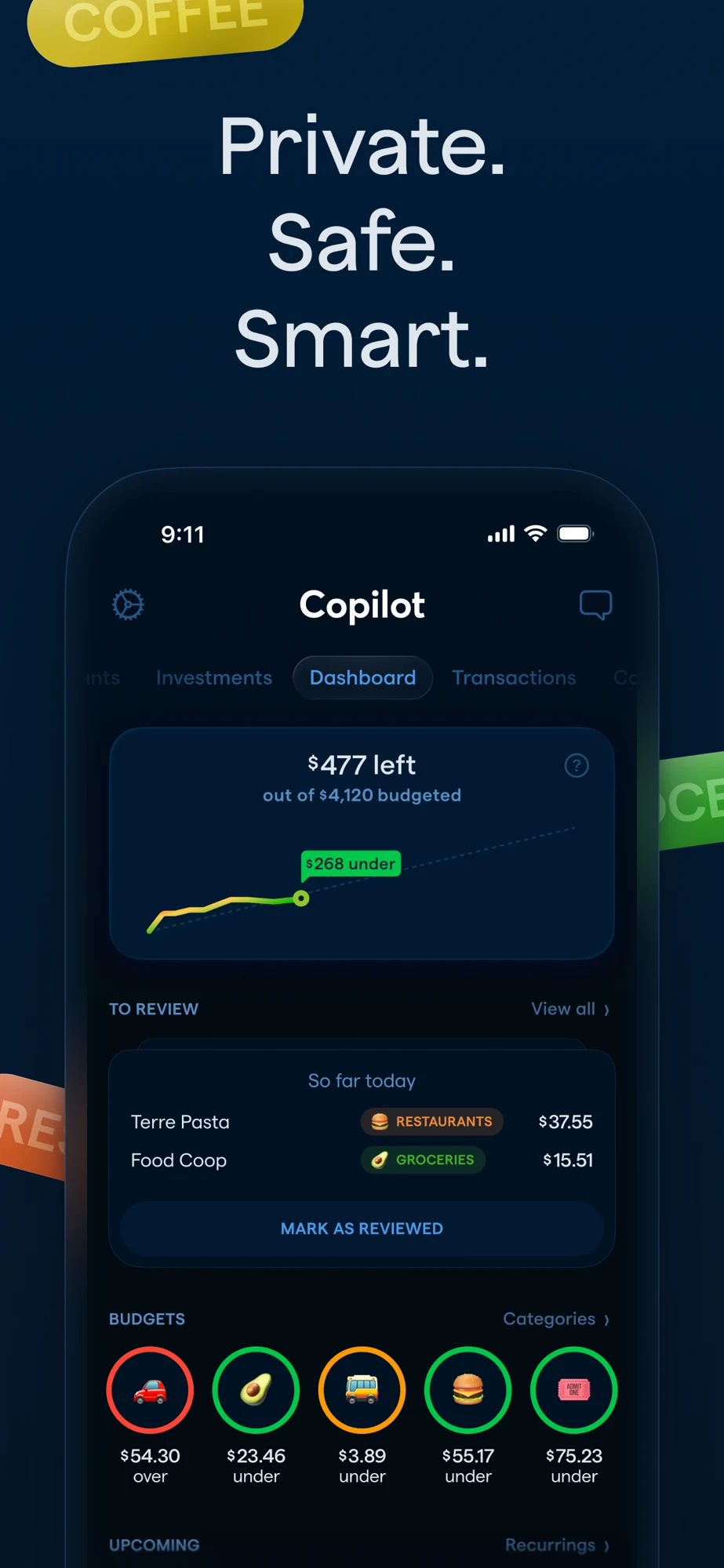
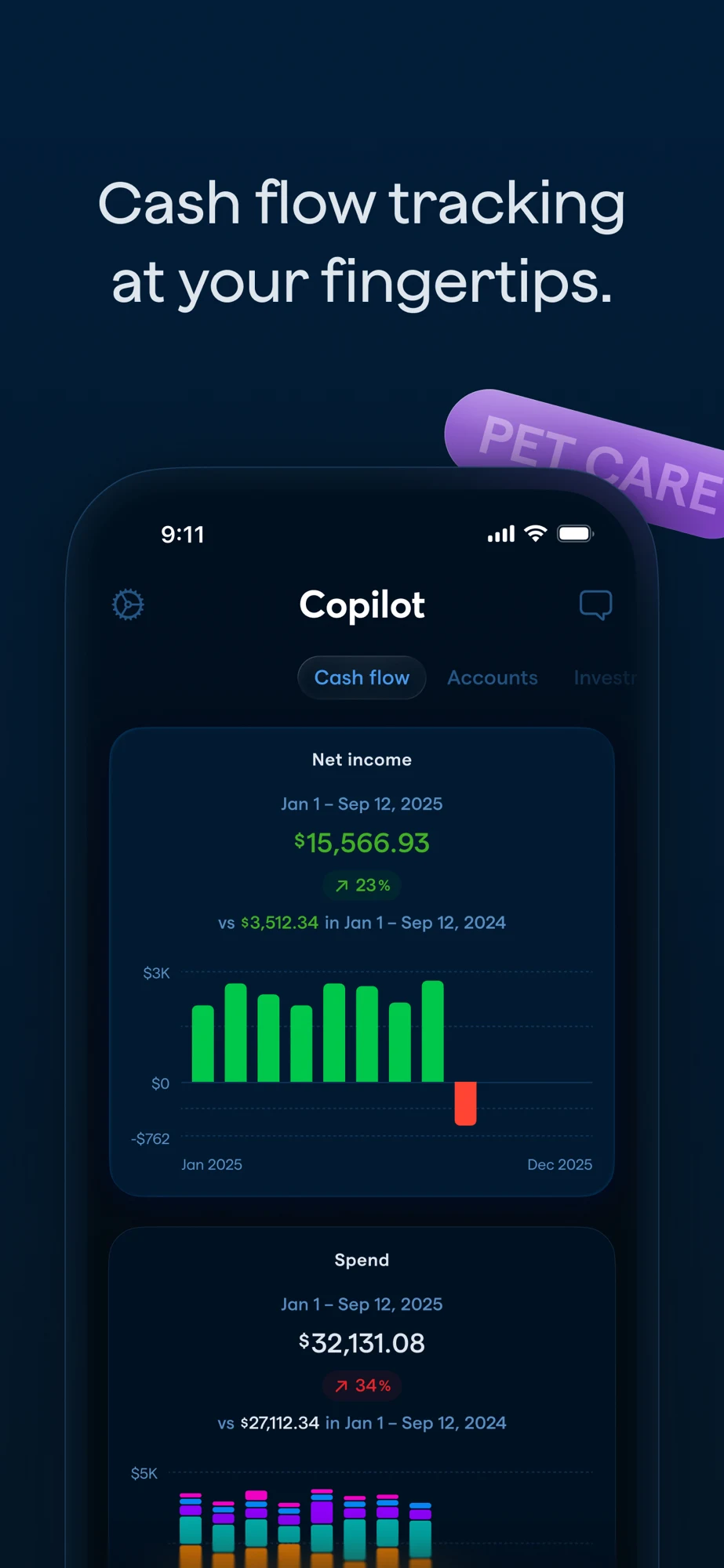
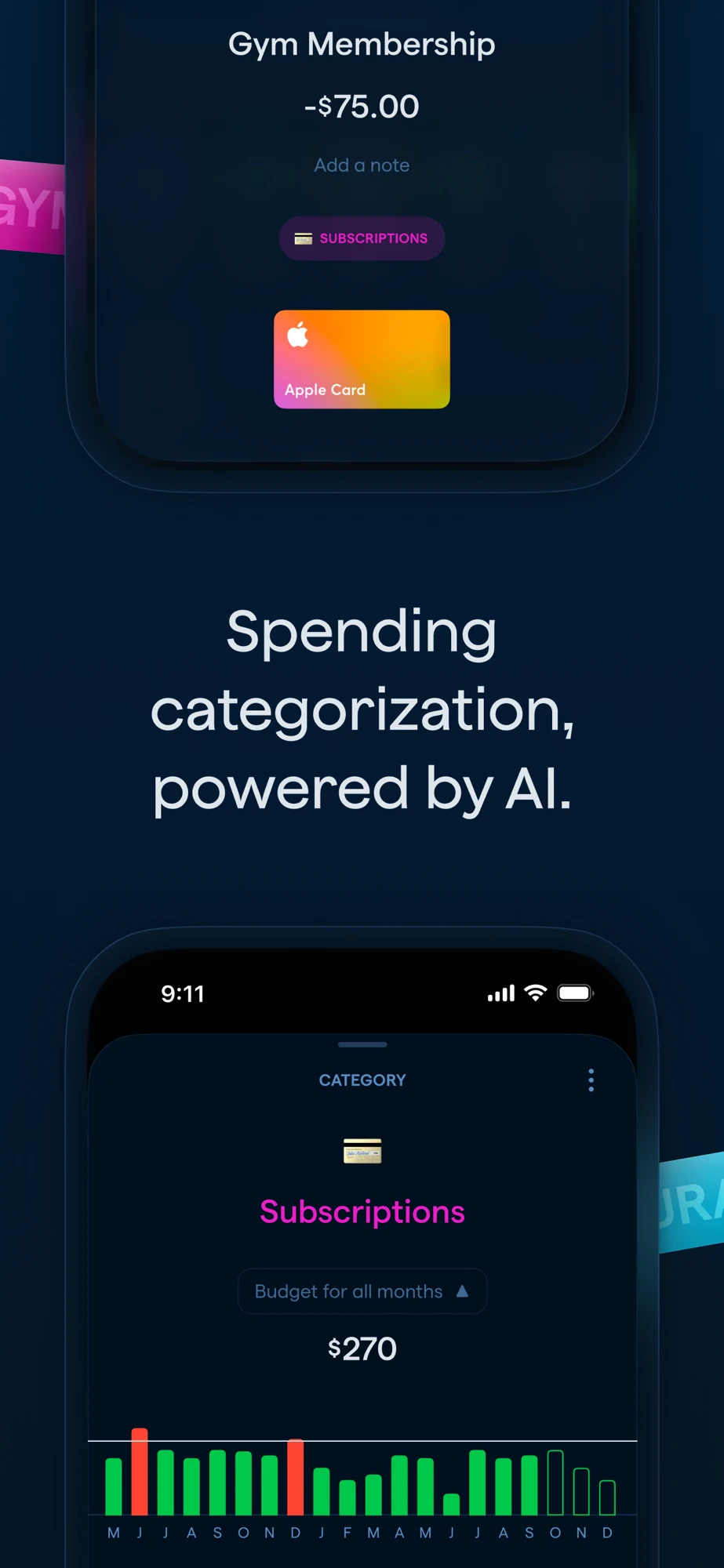
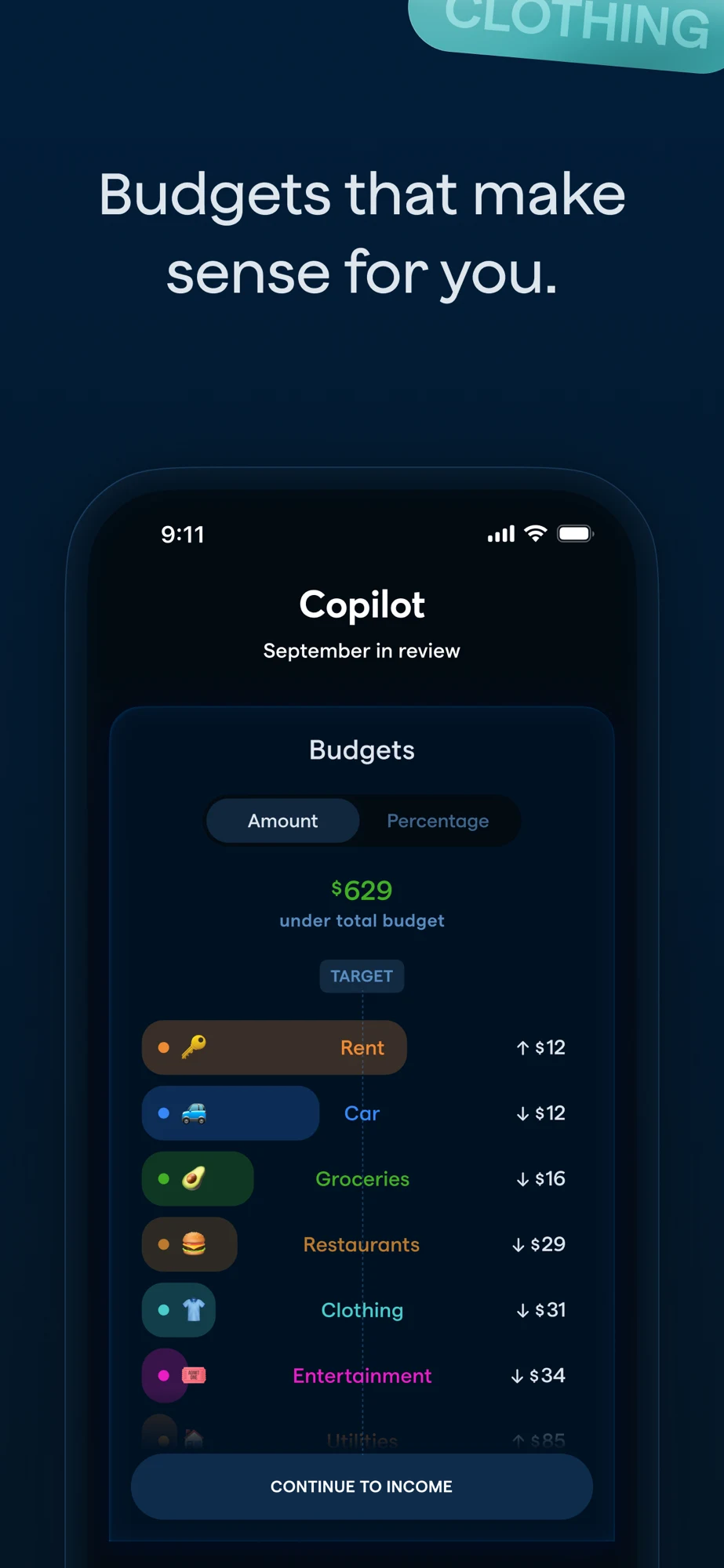
Source: Copilot on the US App Store · captured 27 October 2026.
What the screenshots show: The dark opening combines trust words, remaining budget, spending pace and transaction review. Later panels cover cash flow, AI categorization and a monthly review. Some secondary labels are dark blue on a dark background. The cash-flow artwork includes a percentage comparison that deserves an arithmetic check.
What I would test: Test brighter secondary labels and one clear planning decision per panel. Explain remaining budget separately from pace. Verify the comparison basis behind every percentage instead of treating demonstration arithmetic as a live-app finding. Show how a category can be corrected; an AI label alone does not explain user control.
These are proposed tests, not measured conversion findings. The source panels are retained unchanged. A questionable label or sample calculation should trigger an artwork review, not a claim about the company’s live financial calculations or service quality.
Lesson 1 — Show the method before the dashboard.
An envelope search asks for allocation, not merely a history of transactions. A paycheck search asks for dates and income assumptions. A broad brand can test different entry stories, but the product must support each one. In a comprehension session, let the person name the method before you explain it. If they can only say “money app,” the first frame has not established the useful distinction.
- SEARCHEnvelope, paycheck, flexible or manual?
- CONTROLShow the matching planning action
- BOUNDARYName the period and source
- PROOFCan a person explain the next step?
Lesson 2 — Give every amount a name and a period.
For a simple fictional category, 160 planned minus 45 recorded leaves 115 under that definition. The result says nothing about the bank balance, pending transactions or future bills unless the product explicitly includes them. A forecast adds assumptions about future activity. Put the correct label beside the amount and show the relevant date range; a footnote far below the number is easy to miss.
- PLANNEDThe amount assigned to a category
- RECORDEDExpenses entered or imported
- REMAININGThe defined difference for that period
- FORECASTAn estimate with visible assumptions
Lesson 3 — Use the title for identity and the copy for value.
The name should establish the product. Supporting text can explain manual envelopes or a bill plan. Screenshot copy then proves one action. Do not spend every field repeating budget, budget planner and best budget app. Use the limited space to answer different questions, and keep keyword selection tied to actual functionality rather than a competitor’s broad feature list.
- TITLEPlanPatch: Budget Planner
- SUPPORTManual Envelopes & Bill Plans
- SCREENSHOTReview a category change
- DETAILExplain limits, storage and price
Lesson 4 — Show what changes and what stays the same.
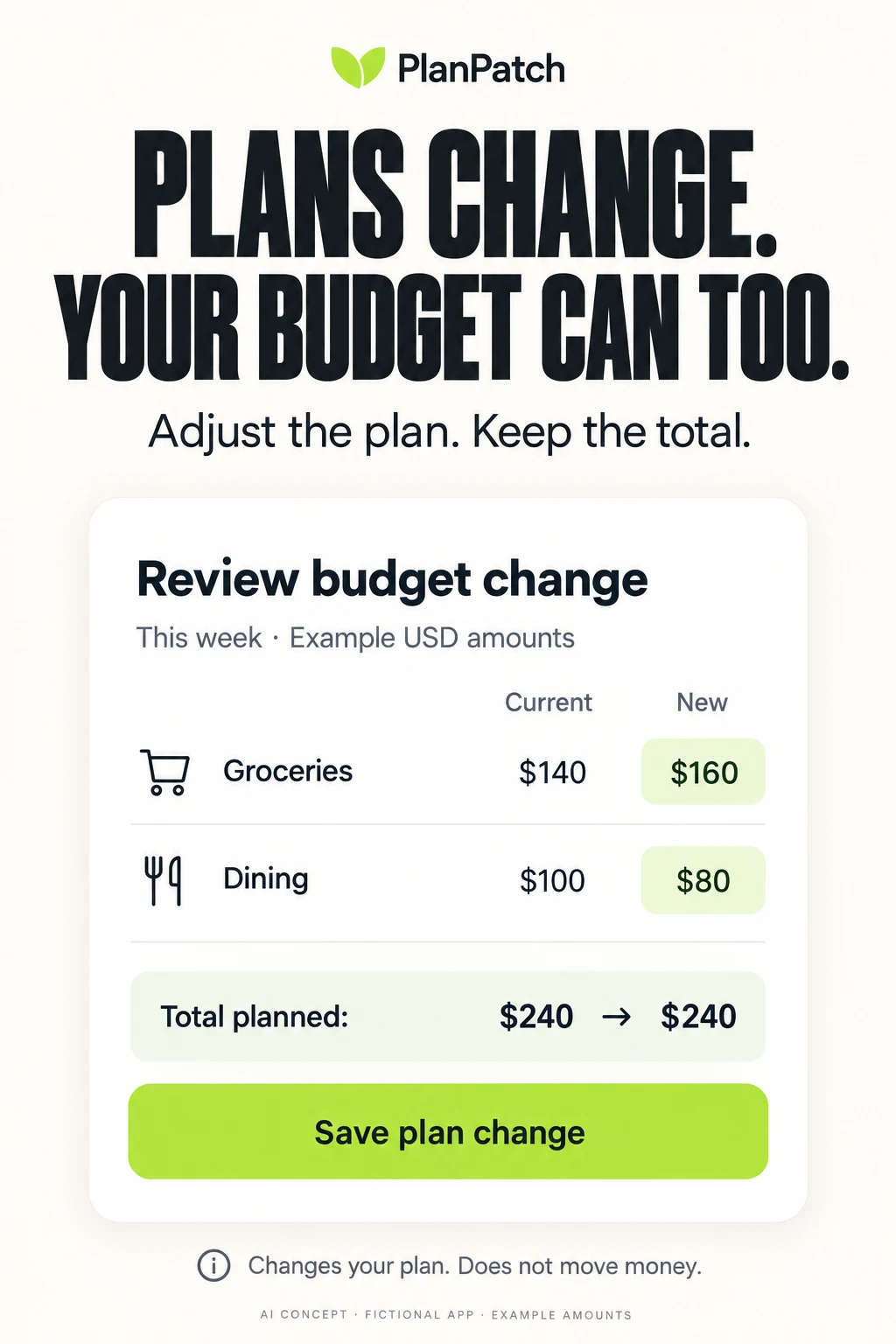
The fictional reallocation moves 20 of planned spending from dining to groceries. Both versions total 240. A clear before-and-after view demonstrates flexibility without suggesting more money appeared. Use the actual review or save control. If your product instead changes a limit independently, show that real behavior rather than borrowing a constant-total example.
- BEFOREGroceries 140 + dining 100 = 240
- EDITReassign 20 inside the plan
- AFTERGroceries 160 + dining 80 = 240
- BOUNDARYNo bank transfer or payment
Lesson 5 — Separate a future bill from money already saved.
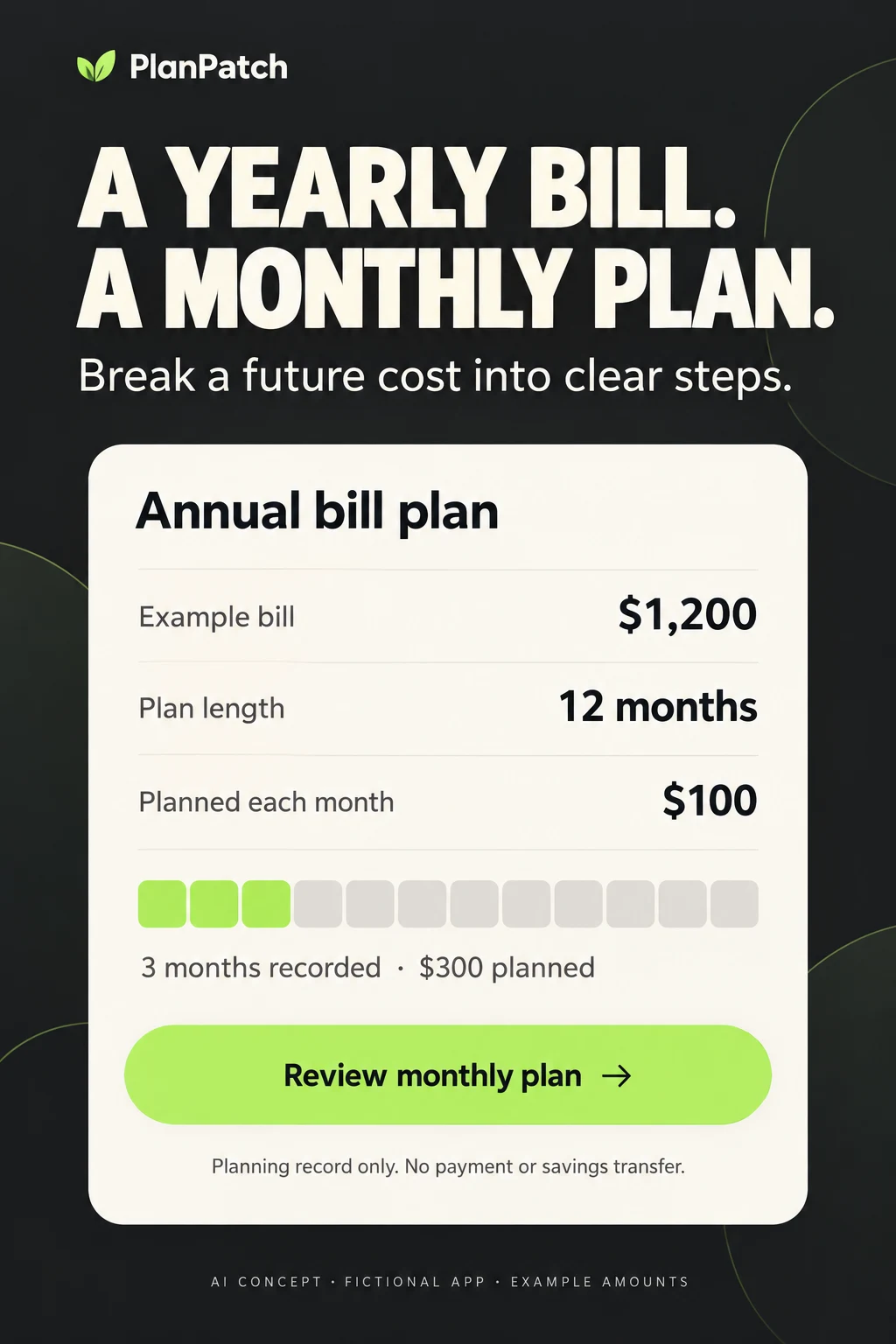
The 1,200 divided by 12 example assumes a full twelve-month planning period and no previous planned amount. Starting later changes the calculation. Marking three monthly amounts produces 300 in the planning record, not proof that a bank account contains 300. A production example needs a due date, remaining periods and any existing recorded amount.
- TARGETExample future bill: 1,200
- SCHEDULE12 planning months: 100 each
- RECORD3 months marked: 300 planned
- LIMITA planning record is not a bank balance
Lesson 6 — Make household access visible.
A joint plan, a joint bank account and a private individual view are separate capabilities. A family photograph can establish relevance but cannot prove permissions. Show the real invite and access scope. If everyone sharing the budget can see every transaction, say so; do not illustrate private views the product does not support.
- WHOIdentify the invited person
- SCOPEWhich plan or accounts are shared?
- RIGHTSView, edit and notification controls
- EXITWhat happens when access ends?
Lesson 7 — Explain the record before calling it automatic.
Automation changes the amount of manual work; it does not remove the need to explain source and state. Pending transactions may behave differently from cleared transactions. A category rule can be wrong. Show the actual correction or reconciliation task and avoid promising instant completeness unless it is supported for the exact source and situation.
- SOURCEManual entry or supported institution
- STATEPending, cleared, reviewed or corrected
- TIMELast successful update
- REPAIRDuplicate, missing or wrong category
Lesson 8 — Measure a useful plan after the install.
An install is not a usable plan. Define activation around the actual product: for example, a period selected, categories assigned and the plan saved with the user understanding its meaning. A later review or adjustment can help distinguish curiosity from useful adoption. Define an observation window before launch, and do not turn a single favorable cohort into proof of financial benefit.
- PROMISEOne supported planning method
- COMPREHENSIONCorrect meaning of money and action
- ACTIVATIONA usable plan created and understood
- FOLLOW-UPA relevant review or correction later
Use screenshot strategy to choose the task, ordering to introduce it and copy to explain the action. Check readability at actual store size, not only on a large design canvas. These lesson graphics illustrate states and decisions; they are not performance charts.
BUDGETING APP ASO
A complete worked listing for one clearly defined budgeting product.
Fictional product brief: PlanPatch is a manual envelope and category planner. Assume it supports weekly and monthly plans, expense entries, category adjustments and records for annual bills. It does not connect to banks, transfer funds, pay bills, import receipts, share household access or offer debt advice. Storage, account requirements, pricing, accessibility and export behavior still need product confirmation. The example is not a real app or a template for claims your product cannot support.
Swipe horizontally to compare all columns →
| Field | Worked copy | Characters / limit |
|---|---|---|
| iOS name | PlanPatch: Budget Planner | 25 / 30 |
| iOS subtitle | Manual Envelopes & Bill Plans | 29 / 30 |
| iOS keywords | payday,weekly,monthly,income,spending,categories,annual,cash,goals,tracker,expense | 82 / 100 |
| Google Play title | PlanPatch: Budget Planner | 25 / 30 |
| Google Play short description | Plan by week or month. Adjust categories and record annual bill set-asides. | 75 / 80 |
Opening description: Make a plan you can change. PlanPatch lets you divide a weekly or monthly amount between your categories, record expenses and adjust the plan when priorities move. You enter the records. No bank connection is required.
Explain allocation: Start with the amount you want to plan and name the categories you need. Review what is assigned and what remains unassigned before saving. A category is a planning record, not a separate bank account. Changing it does not transfer money.
Explain adjustment: If groceries need more room, review an adjustment from another category. See the old and new amounts together before saving. Your records should explain which period changed. PlanPatch does not know about purchases you have not entered, so an incomplete record can produce an incomplete picture.
Explain future costs: Add an annual bill to a planning record and review the monthly amounts you intend to assign. Keep the bill amount, planning period and amounts already recorded visible. This does not pay the bill, move funds to savings or guarantee that money will be available on its due date.
Explain review: Compare your plan with the expenses you recorded for that period. Correct a category or missing entry when needed. Return to the plan at a useful point in your routine; the goal is a comprehensible record rather than a perfect-looking streak.
Complete before release: Add the actual account and data-storage explanation, supported devices, price or subscription terms, backup behavior and support path. Manual input is not evidence of local-only storage. A free download is not proof that every feature is permanently free. Use the product’s real details, not reassuring phrases borrowed from another listing.
Swipe horizontally to compare all columns →
| Panel | Headline to test | Product proof | Relevant action |
|---|---|---|---|
| 1 | Plans change. Your budget can too. | Two categories before and after an adjustment | Review plan change |
| 2 | Give this period a clear plan | Actual weekly/monthly dates and allocation | Save this plan |
| 3 | Record what the plan needs to know | Date, amount and category in a real manual entry | Add expense |
| 4 | A yearly bill. A monthly plan. | Bill target, period and planned contributions | Review monthly plan |
| 5 | See planned and recorded side by side | Same category and period with distinct labels | Review category |
| 6 | Correct the record and keep going | Actual edit or missing-entry recovery | Save correction |
CTA discipline: “Save plan change” describes a record change. “Pay now,” “Move money” and “Start saving automatically” would misrepresent this fictional product. The store’s install control is platform-owned; screenshot CTA text should demonstrate the real in-app step, not imitate a tappable store button.
Preview direction: Capture the actual app allocating a small plan, reviewing a category change and recording a bill plan. Use captions so the task is understandable without sound. End with the correct saved state. Do not splice a planning screen into bank-transfer footage or show AI-generated controls as actual product footage. Apple’s preview guidance describes device footage and the current duration limits.
A different product needs different copy: A connected app might lead with reviewing imported records, while a shared app might lead with access to a household plan. A forecast app needs assumption labels. Do not apply the manual/no-bank-link subtitle to those products by default. See long-description structure and screenshot storytelling for the relationship between promise and proof.
BUDGETING APP ASO
Fix misleading meaning before optimizing the visual treatment.
Swipe horizontally to compare all columns →
| Common mistake to check | Why it confuses the offer | Better direction |
|---|---|---|
| A giant balance without a label | The viewer cannot tell bank money from a plan or forecast | Name the amount and date range beside it |
| A method keyword with no method proof | Envelope and paycheck users need different controls | Show the relevant allocation or period setup |
| A perfect all-green plan | It hides adjustment and recovery, which may be the useful feature | Show a truthful correction without shame |
| An automatic headline with no source or timing | The viewer may assume complete instant records | Show the actual connection and record state |
| A shared-budget image with no permissions | People cannot infer which purchases others can see | Use actual invite and access UI |
| A future goal presented as saved cash | A planning record is mistaken for a deposit | Separate target, planned and actually recorded amounts |
| One free message across different tiers | The visitor may expect a paid feature at no cost | Explain the scope using current approved terms |
| Tiny chart labels and all-color signals | The important difference disappears at store size | Use readable text and explicit positive/negative states |
| Unsupported locale examples | Currency, pay cycle or bank access may not match the user | Adapt the whole example and verify availability |
| A chart percentage without a reconciled basis | The artwork may contradict itself even when the app works | Check arithmetic and distinguish sample from current data |
An error in a screenshot brief should be corrected before an experiment. Do not test a misleading financial promise against an accurate one merely to see which gets more installs. Use experiments to choose between truthful explanations, not to decide whether accuracy matters.
Swipe horizontally to compare all columns →
| Test | Hypothesis | Control → treatment | Measurement | Guardrail |
|---|---|---|---|---|
| Method-first opener | Showing allocation improves method comprehension | General money dashboard → One upright envelope allocation | Method comprehension; first saved plan | No claim that allocation transfers funds |
| Period clarity | Dates reduce mistaken pay-period assumptions | This month without dates → Actual start/end and reset behavior | Period comprehension; correct setup | Do not imply every pay schedule is supported |
| Manual route | Visible manual setup reduces unnecessary connection expectations | Connect-first screenshot → Actual manual entry before connection | Manual-route recognition; useful plan | No invented offline or anonymous claim |
| Reallocation | Before and after values explain flexibility | Flexible budget headline → Two categories before/after with unchanged total | Correct interpretation; saved edit | No invented extra money |
| Annual bill | A dated plan clarifies future cost handling | Generic savings goal → Target, months, monthly plan and record | Plan-vs-saved comprehension; bill plan | No payment or savings-transfer implication |
| Shared access | Showing permissions explains household scope | Couple lifestyle photo → Actual shared-plan access view | Rights comprehension; appropriate invite | No fictitious private-account boundary |
| Connection state | Freshness context clarifies data completeness | Automatic everywhere claim → Supported source plus update state | Freshness comprehension; useful reconciliation | No guarantee of instant complete sync |
| Forecast | Assumptions prevent forecast-as-balance confusion | Large projected remainder → Estimate label and underlying period | Forecast comprehension; appropriate review | No safe-to-spend guarantee |
| Paid feature boundary | Feature-tier clarity reduces mismatched installs | All features presented together → Actual manual/connected tier scope | Tier comprehension; retained paid use | No implied permanent free premium features |
| Recovery | A neutral correction story helps explain continued use | Perfect all-green dashboard → Real correction after a missed entry | Recovery comprehension; later review | No shame or guaranteed financial outcome |
Choose the most consequential misunderstanding first, using test prioritization. A wrong interpretation of remaining money deserves attention before a decorative color preference. Keep a record of the control, intended audience and changed element in the change log.
BUDGETING APP ASO
Turn budgeting research into a controlled search-results campaign.
Use the keyword research to build a small, interpretable Apple Ads search-results test. The worked example below is PlanPatch, the fictional manual planner. It does not provide account sync, shared budgets or debt advice, so those candidate clusters are excluded from its campaign plan. A different real app should select its own supported clusters.
Start with one supported country and language, one clear planning task and one truthful creative hypothesis. The following is a setup blueprint, not a live campaign or a recommendation to spend. Apple’s campaign-structure guidance separates brand, category, competitor and discovery themes; a new product can validate a narrower supported subset first.
Swipe horizontally to compare all columns →
| Campaign / group | Candidate seeds | Creative entry | Useful outcome |
|---|---|---|---|
| Brand — exact | PlanPatch and verified own-brand variants | Recognizable product identity | Relevant first plan, reported separately from generic traffic |
| Category — manual envelopes | manual budget planner; envelope budgeting app; budget without bank linking | Actual allocation without a connection prompt | A comprehensible saved manual plan |
| Category — period planning | weekly budget planner; monthly budget planner | Real period setup and date range | Correct period selection and plan creation |
| Category — annual bills | annual bill budget; sinking fund planner | Target, months and planned contribution | A correctly understood bill-planning record |
| Discovery — broad | A bounded set of supported budget-method seeds | Accurate general manual-planning page | Relevant queries that lead to useful setup |
| Discovery — Search Match | Platform-discovered queries for the actual listing | Same accurately scoped product | Reviewed query relevance and downstream use |
| Competitor — optional, separate | Only genuinely comparable apps after policy and relevance review | Your own identity and method, never copied branding | Qualified switching interest, with costs reported separately |
Matching: Exact match can include close variants; it is not a literal-only search filter. Keep selected exact groups separate from bounded broad and Search Match discovery, and inspect the actual query report. Current details: Apple keyword match types. Avoid interpreting every query served against a seed as endorsement of its relevance.
Negative examples: For PlanPatch, investigate exclusions for “bank synced budget,” “joint account,” “instant loan,” “stock trading” and “pay bills” where queries ask for unsupported actions. Do not exclude all queries containing “bank”: “budget without bank linking” fits the product. Exact negatives are the default and block the specified term, not every close variant. Broad negatives require all their words to be present but do not automatically catch variations. Review the concrete query before choosing the scope. Source: negative keyword controls.
Swipe horizontally to compare all columns →
| Query found in discovery | Relevance decision | Next step | Evidence to retain |
|---|---|---|---|
| manual envelope budget | Fits if real allocation and manual input are supported | Test in the method group with relevant creative | Query, source group, creative and useful-plan outcome |
| budget without bank linking | Fits the fictional manual product | Keep the no-connection boundary visible | Comprehension and setup behavior |
| automatic bank budget | Does not fit PlanPatch | Exclude the actual mismatch and inspect variants | Unsupported feature and chosen negative scope |
| family budget | Ambiguous: single planner or multi-user sharing? | Inspect intent before adding or excluding | User interpretation and product access model |
| annual bill savings transfer | The transfer intent does not fit a planning record | Exclude or narrow; do not relabel a plan as savings movement | Exact promise gap |
Custom product pages: The envelope group should open on allocation; the annual-bill group on the actual future-cost plan. Each page must preserve the same manual-input and feature boundaries. Use supported custom-page configuration; test the actual post-install route before using a deep link. Do not send someone into an empty bill screen without the setup required to use it.
Budget and stopping rules: Before any authorized launch, define maximum spend, evaluation window, primary metric, minimum evidence requirement and guardrails. A misleading claim or broken onboarding flow is a reason to stop immediately. For performance decisions, use a predefined statistical plan instead of repeatedly checking for a favorable result. Avoid changing keyword mix, pricing, onboarding and the first screenshot in the same test.
Hypothetical economics: Suppose a product’s documented contribution economics allow $30 to acquire one retained paying customer. If an assumed 6% of installs become retained paying customers, the example install ceiling is $1.80. If an assumed 40% of taps install, the corresponding tap ceiling is $0.72. These are invented teaching assumptions, not budgeting-app benchmarks or recommended bids. Real ceilings require refund, churn, margin, uncertainty and cohort definitions.
Measure the planning job: Separate impression, tap, download, first useful plan, later review, paid conversion and retention. Define “useful plan” for the actual product; do not count a bank-permission grant as proof that someone understands their budget. If one group gets cheap installs but produces unsupported-feature complaints, investigate the mismatch before scaling.
Attribution: Use approved aggregate reporting and first-party events with clear definitions. Do not put balances, account numbers, merchant details or household transaction descriptions into ad parameters. A paid query that converts is a useful research signal, not proof of organic ranking ability. Reconcile conversion definitions, choose ASO KPIs and separate search and browse traffic.
Feed findings back into ASO: A recurring misunderstanding belongs in the product brief or screenshot copy. A relevant query family can inform a later metadata hypothesis after organic research. A supported task with poor activation may need onboarding work. Keep the decision and evidence in monthly reporting; do not treat paid performance as an automatic instruction to stuff new words into the title.
BUDGETING APP ASO
Current patterns worth explaining more clearly.
Swipe horizontally to compare all columns →
| Dated pattern in primary listings | What the evidence supports | ASO opportunity to investigate |
|---|---|---|
| Several apps describe more than one planning approach | Monarch describes flexible/category options; PocketGuard describes several methods | Explain the chosen method before promising universal simplicity |
| Manual and connected routes coexist | YNAB and PocketGuard describe manual input alongside connections; Goodbudget lists subscriber sync | Show the intended entry route and feature tier clearly |
| Shared planning appears across different products | Goodbudget, EveryDollar and Monarch describe household collaboration | Replace vague togetherness with actual access proof |
| Automation is moving beyond importing records | Copilot describes categorization, Spendee describes receipt scanning and Rocket Money describes assistant workflows | Explain correction, approval and the exact scope of automation |
| Planning screens mix different kinds of numbers | Reviewed panels show budgets, balances, progress and estimates | Make the most relevant number interpretable at store size |
These are current communication patterns in the reviewed set, not evidence of market growth, feature adoption or higher conversion. The opportunity is to clarify what a feature actually changes. Adding “AI” to a title does not explain whether the app reads a receipt, categorizes a transaction, forecasts a balance or carries out an action.
Keep a dated claim register for bank coverage, tiers, free features, device support and named integrations. A new feature can make old screenshots inaccurate even if the design still looks good. When a release changes the planning model, update the title, supporting copy and first-use route together, using the release and metadata log.
BUDGETING APP ASO
Use AI to make the budgeting decision visible, then check its meaning.
The following two original AI-generated concepts are fictional PlanPatch examples. They are not screenshots of a real app, competitor redesigns or proven improvements. They demonstrate two different budgeting decisions: changing a category plan and preparing a record for a future bill. Both should be rebuilt using actual supported UI before any production store use.
Swipe horizontally to compare all columns →
| Improvement task | Approved input | Prompt direction | Human verification |
|---|---|---|---|
| Explain adjustment | Real reallocation workflow and synthetic amounts | Show before and after categories with a constant total | Both sums reconcile and the real control has the same effect |
| Explain an annual bill | Actual period/date rules and sample bill amount | Show target, remaining periods and planned monthly amount | Dates, rounding and existing records are represented correctly |
| Make a forecast understandable | Actual model inputs and approved uncertainty language | Distinguish recorded activity from an estimate | No predicted number appears as guaranteed available cash |
| Clarify household sharing | Actual access model and invitation UI | Show who sees which plan and who can edit | No invented private view or permission switch |
| Improve connection copy | Supported institutions and real sync states | Show source, last update and correction route | No universal-bank or instant-sync promise |
| Rewrite a dense opener | Current truthful control and one audience question | Focus the first frame on one understandable decision | Same product scope and important conditions remain |
Concept A review: The arithmetic works: 140 plus 100 and 160 plus 80 both equal 240. The unchanged total makes the adjustment visible. The generator included the fictional brand and a clear save action. The lower explanatory line becomes smaller when reduced, so test it at actual store size. A production version should use the real date range rather than only “this week,” real category controls and a review state that matches the app.
Concept B review: The arithmetic works for the stated example: 1,200 divided by 12 is 100; three records total 300. The image contains three highlighted segments out of twelve. However, “recorded” and the progress strip could still be mistaken for money actually saved. Test that interpretation explicitly. The design lacks a due date and does not explain starting partway through a year. A real version needs those details and any existing planned amount.
What to keep: Large type, one upright task, readable amounts and an explicit boundary between planning and money movement. What to replace: Invented UI, fictional branding and assumed features. Do not generate a production screen around real account statements, personally identifiable purchases or private household information.
Comprehension test: Ask whether Concept A moves money between bank accounts. Ask whether Concept B proves 300 has been deposited anywhere. Ask what changes when the bill is due sooner. If answers reveal the wrong model, rewrite the labels or use a clearer real workflow before comparing store conversion.
Experiment after correction: Compare one task-first opener with the existing truthful control while keeping the rest of the sequence stable. Track interpretation, relevant first-plan completion, later review and support complaints. No uplift is predicted. The hypothesis guide and conversion guide help connect the design decision to a measurable question.
BUDGETING APP ASO
Release a budget story that stays clear after the install.
Swipe horizontally to compare all columns →
| Area | Specific budgeting release check | Evidence to retain |
|---|---|---|
| Method | Every envelope, rollover and paycheck claim matches real behavior | Product walkthrough and approved feature matrix |
| Amount meaning | Planned, recorded, remaining and predicted have distinct labels | Calculation examples and screenshot review |
| Calendar | Start date, end date, reset and carryover rules are clear | Period-boundary scenarios and actual device captures |
| Connections | Country, institution, pending/cleared state and timing are accurate | Supported-source list and sync-state review |
| Sharing | Who can view and edit matches the actual household model | Permission walkthrough |
| Price | Manual, connected, trial and paid features use current terms | Current tier matrix and localized purchase path |
| Locale | Currency, decimal separators, date format and pay-cycle vocabulary agree | Native-language review and complete example arithmetic |
| Accessibility | Amounts remain readable; deficits and forecasts do not rely only on color | Large-text and assistive-mode checks for claimed support |
| Analytics | First useful plan and later review have explicit definitions | Approved event dictionary and cohort window |
| Maintenance | A named owner checks changing coverage, tiers, dates and claims | Release checklist and next review trigger |
Localization example: Replacing a dollar sign does not localize a paycheck plan. Check whether the language means every two weeks or twice a month, whether the example dates fit that schedule, and whether the bank route is available. Annual bill examples need a useful local cost category without pretending to recommend a household allocation. Research local phrases, select markets, adapt screenshots and run localization QA.
Compare like with like: Payday, month-end, seasonal expenses and changes in paid traffic can affect who reaches the page. Record those conditions before attributing a conversion movement to the creative. A visually successful test should also preserve correct product expectations and relevant activation.
What to do first: Pick the most important planning method. Audit the opening panels for period, amount meaning and the next action. Use the keyword worksheet to select supported intent clusters, then the test briefs to choose one truthful improvement. An ASO audit can connect those decisions; ASO services can coordinate research, copy, creative and measurement.
Scope and limits: US iOS public competitor listings and original screenshot assets, with official iOS and Google Play implementation guidance. No Android competitor screenshot audit, private-account access, measured keyword demand, financial recommendation, independent privacy/security audit or conversion results. All audience segments, creative tests and unit economics are explicitly hypotheses or teaching examples.
EXPENSE TRACKING RESEARCH
Turn a receipt into a useful record.
Explore personal and work expense journeys through 100 keyword candidates, eight competitors, real screenshots and practical copy tests.
Read the expense-tracking ASO playbook ↗