HEALTH / TELEHEALTH
ASO FOR
TELEHEALTH APPS.
Can I use it? When can I see someone? What will I pay? Your store page should answer those questions before it promises convenience.
BUILD A CLEARER VISIT STORY ↓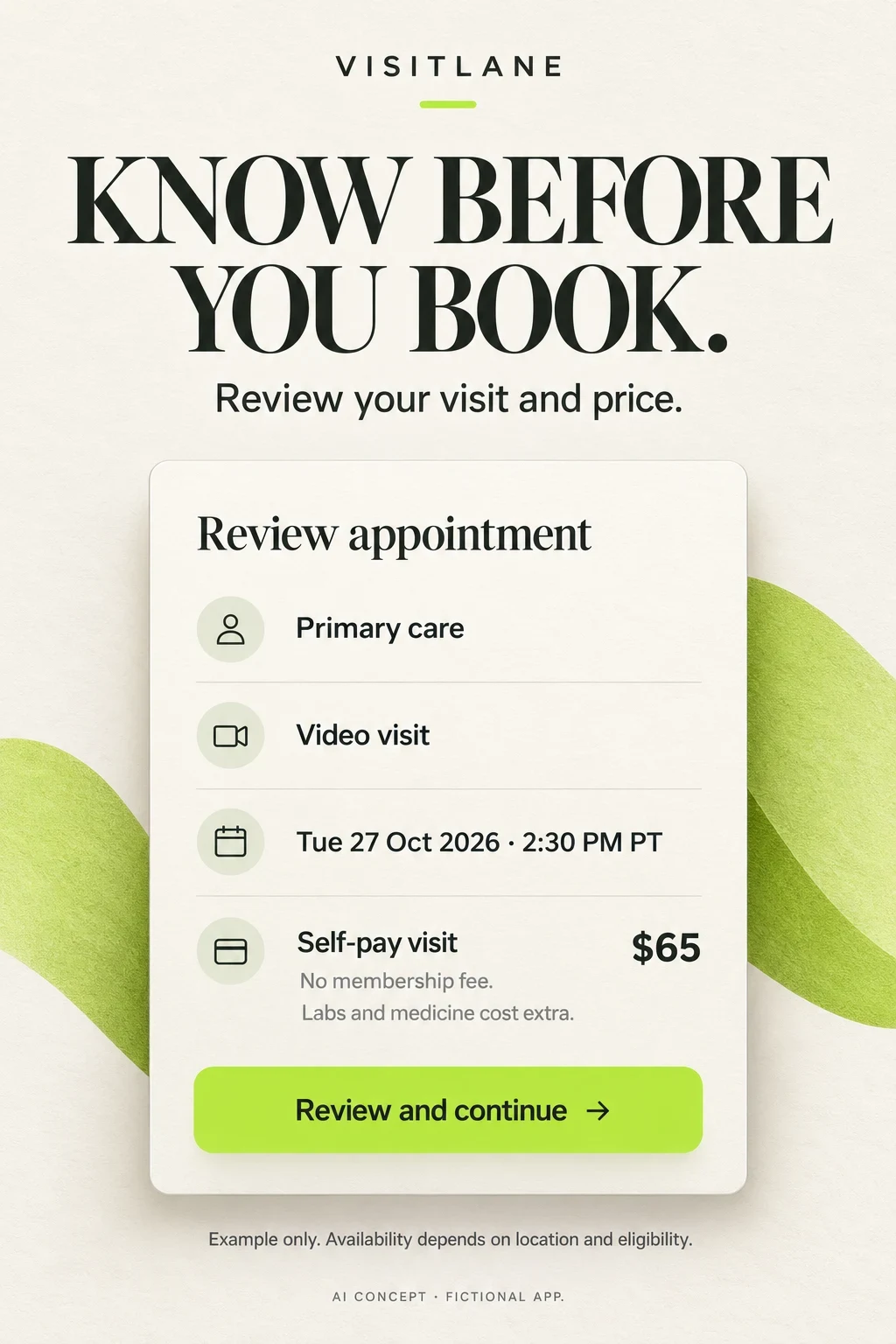
TELEHEALTH APP ASO
An online doctor visit is not one universal product.
Telehealth is a delivery method. It does not tell a visitor whether your app offers a one-off consultation, an ongoing primary-care relationship, specialist appointments or a marketplace. That difference changes the keywords, the first screenshot, the price explanation and the action a person should take. This guide is about app-store marketing and product communication, not choosing medical care.
Potential audiences · 100 keyword candidates · Niche opportunities · Eight competitors · Real screenshot analysis · Worked copy · Apple Ads blueprint
Swipe horizontally to compare all columns →
| Service model | Question to answer | Useful first proof | Do not imply |
|---|---|---|---|
| On-demand nonemergency visits | What service can I request now? | Eligible service and truthful queue state | Every specialty is available immediately |
| Scheduled primary care | Can I choose and return to a clinician? | Clinician choice and appointment calendar | The same clinician is always on call |
| Doctor marketplace | Which provider, service and price am I comparing? | Comparable appointment cards with total visit fee | Every listing has the same terms |
| Asynchronous consultation | What do I submit and when can I expect a reply? | Photo or message submission and real response window | A live call or continuous monitoring |
| Specialist service | Is this service suitable and available for me? | Exact specialty, eligible market and appointment flow | A general consultation guarantees specialist treatment |
| Benefit-based access | Does my plan or employer provide this service? | Benefit verification and eligible options | A pictured member price applies to everybody |
Choose one primary acquisition job per page variant. A marketplace can still serve several jobs, but a person arriving from a self-pay query should not need to decode an employer-benefit message. Begin with ASO strategy and the health-app category guide; use this report for the narrower booking, access and visit story.
A strong creative brief completes this sentence: “For people searching for ___, show ___ so they understand ___ before they install.” Example: for self-pay video-visit searches, show an itemized appointment review so visitors understand the visit fee and separate costs. This is a hypothesis to test, not a claim that price-led creative always wins.
- SEARCHAn appointment, ongoing care or a specialist?
- SERVICESelect the actual available visit type
- PROOFShow its booking or consultation workflow
- LIMITKeep eligibility and service boundaries visible
TELEHEALTH APP ASO
Research the access problem, not a demographic stereotype.
These are recruitment hypotheses, not measured demographic shares. Age, income, location or insurance status alone cannot tell you which message will work. Recruit around the actual access problem, then compare how language, device, prior telehealth experience and affordability affect understanding. Do not infer diagnoses from search behavior or use sensitive patient records to build ad audiences.
Swipe horizontally to compare all columns →
| Potential audience | What they want to understand | Research variation | Question to test | Screenshot proof |
|---|---|---|---|---|
| Time-constrained adults | Find an eligible nonemergency appointment around work or caring duties | Recruit across work schedules, ages and household roles | Can they find the next real slot and its time zone? | Actual appointment choices, not a stopwatch |
| People without insurance | Understand the visit charge and possible extra costs | Compare income constraints and prior self-pay experience without assuming either from age | Can they tell the visit fee from medication, lab or membership costs? | An itemized example with a clear payment route |
| People with high deductibles | Compare their options without assuming insurance makes a visit cheaper | Recruit by reported coverage and cost questions | Do they understand an estimate versus a confirmed charge? | Coverage check and self-pay path, if supported |
| Employer-benefit members | Confirm access to the service included in their benefit | Different employers, dependents and benefit familiarity | Can they tell whether the pictured price applies to them? | Benefit check before a member-price promise |
| People seeking continuity | Return to a clinician with useful visit history | First-time telehealth users and experienced patients | Can they distinguish the same clinician from first available? | Return-visit booking with records |
| Parents booking for dependents | Know who is eligible and whose record will be used | Different dependent ages and caregiver permissions | Can they switch profiles and check the relevant age rules? | Named patient profile and service eligibility |
| People with constrained connectivity | Know the actual supported call format and setup requirements | Urban and rural contexts; different devices and connection quality | What happens if video fails? Is another format truly supported? | Real setup check and honest fallback instructions |
| Adults with accessibility needs | Read booking details and complete the visit independently | Recruit by vision, hearing, motor and cognitive access needs, not age stereotypes | Can users complete the flow with their access technology? | Readable text and verified accessibility behavior |
| Traveling users | Check availability where they will physically be during the visit | Different travel patterns; do not equate account address with current location | Does changing location alter service eligibility? | Location check before appointment selection |
| People needing language support | Know whether the interface and the clinical conversation support their language | Research preferred language, literacy and interpreter needs separately | Is a translated app being mistaken for an interpreter service? | Verified clinician language or actual interpreter option |
A practical discovery study can use four tasks: identify the visit type, find an eligible appointment, explain the amount due, and describe what happens after booking. Record the words people use and where they hesitate. Start with a small deliberately varied sample, then investigate contradictions; do not convert interview counts into market-size estimates.
An older user may be highly comfortable with video calls. A younger user may have no private room or reliable connection. Test those constraints directly. Use keyword research to compare language and screenshot readability to make the resulting story accessible.
TELEHEALTH APP ASO
100 keyword candidates, grouped by the job behind the search.
The 100 phrases below are editorial candidates derived from the verified product models and booking tasks in this review. They have no invented volume, difficulty or ranking score. Some require services that a general telehealth app does not offer. The feature condition is a decision gate: reject a phrase when the product cannot truthfully serve it.
Core telehealth
Before targeting: Real clinician visits, with scope and availability explained
Swipe horizontally to compare all columns →
| Candidate phrase | Validation decision |
|---|---|
| telehealth app | Unmeasured · verify product fit, store language and demand |
| telemedicine app | Unmeasured · verify product fit, store language and demand |
| online doctor app | Unmeasured · verify product fit, store language and demand |
| virtual doctor app | Unmeasured · verify product fit, store language and demand |
| video doctor appointment | Unmeasured · verify product fit, store language and demand |
| online medical consultation | Unmeasured · verify product fit, store language and demand |
| virtual medical visit | Unmeasured · verify product fit, store language and demand |
| doctor video call | Unmeasured · verify product fit, store language and demand |
| remote doctor appointment | Unmeasured · verify product fit, store language and demand |
| online doctor consultation | Unmeasured · verify product fit, store language and demand |
Nonemergency access
Before targeting: Supported visit type and actual hours; no guaranteed immediate care
Swipe horizontally to compare all columns →
| Candidate phrase | Validation decision |
|---|---|
| online urgent care | Unmeasured · verify product fit, store language and demand |
| virtual urgent care | Unmeasured · verify product fit, store language and demand |
| non emergency online doctor | Unmeasured · verify product fit, store language and demand |
| same day online doctor | Unmeasured · verify product fit, store language and demand |
| evening doctor appointment | Unmeasured · verify product fit, store language and demand |
| weekend online doctor | Unmeasured · verify product fit, store language and demand |
| after hours telehealth | Unmeasured · verify product fit, store language and demand |
| book urgent video visit | Unmeasured · verify product fit, store language and demand |
| doctor appointment tonight | Unmeasured · verify product fit, store language and demand |
| on demand doctor visit | Unmeasured · verify product fit, store language and demand |
Ongoing primary care
Before targeting: Continuity and primary-care services genuinely available
Swipe horizontally to compare all columns →
| Candidate phrase | Validation decision |
|---|---|
| online primary care | Unmeasured · verify product fit, store language and demand |
| virtual primary care doctor | Unmeasured · verify product fit, store language and demand |
| ongoing online doctor | Unmeasured · verify product fit, store language and demand |
| book same doctor online | Unmeasured · verify product fit, store language and demand |
| primary care video visit | Unmeasured · verify product fit, store language and demand |
| online follow up appointment | Unmeasured · verify product fit, store language and demand |
| virtual primary care appointment | Unmeasured · verify product fit, store language and demand |
| family doctor online appointment | Unmeasured · verify product fit, store language and demand |
| primary care app | Unmeasured · verify product fit, store language and demand |
| return visit with doctor | Unmeasured · verify product fit, store language and demand |
Cost and coverage
Before targeting: Actual fee route and coverage check; no blanket insurance or price claims
Swipe horizontally to compare all columns →
| Candidate phrase | Validation decision |
|---|---|
| telehealth without insurance | Unmeasured · verify product fit, store language and demand |
| self pay online doctor | Unmeasured · verify product fit, store language and demand |
| online doctor visit cost | Unmeasured · verify product fit, store language and demand |
| telehealth insurance check | Unmeasured · verify product fit, store language and demand |
| virtual visit price | Unmeasured · verify product fit, store language and demand |
| online doctor no membership | Unmeasured · verify product fit, store language and demand |
| telehealth copay check | Unmeasured · verify product fit, store language and demand |
| pay per visit doctor app | Unmeasured · verify product fit, store language and demand |
| online doctor upfront price | Unmeasured · verify product fit, store language and demand |
| telehealth high deductible plan | Unmeasured · verify product fit, store language and demand |
Booking and choice
Before targeting: Real clinician selection and appointment availability
Swipe horizontally to compare all columns →
| Candidate phrase | Validation decision |
|---|---|
| choose doctor online | Unmeasured · verify product fit, store language and demand |
| book video consultation | Unmeasured · verify product fit, store language and demand |
| online doctor appointment booking | Unmeasured · verify product fit, store language and demand |
| telehealth appointment calendar | Unmeasured · verify product fit, store language and demand |
| find available online doctor | Unmeasured · verify product fit, store language and demand |
| virtual doctor appointment time | Unmeasured · verify product fit, store language and demand |
| reschedule telehealth visit | Unmeasured · verify product fit, store language and demand |
| compare online doctor appointments | Unmeasured · verify product fit, store language and demand |
| online doctor appointment reminders | Unmeasured · verify product fit, store language and demand |
| telehealth waiting room | Unmeasured · verify product fit, store language and demand |
Family and dependents
Before targeting: Age eligibility caregiver permission and dependent profiles verified
Swipe horizontally to compare all columns →
| Candidate phrase | Validation decision |
|---|---|
| online pediatric appointment | Unmeasured · verify product fit, store language and demand |
| virtual pediatrician visit | Unmeasured · verify product fit, store language and demand |
| child telehealth appointment | Unmeasured · verify product fit, store language and demand |
| family telehealth app | Unmeasured · verify product fit, store language and demand |
| book doctor for child online | Unmeasured · verify product fit, store language and demand |
| dependent doctor appointment | Unmeasured · verify product fit, store language and demand |
| parent managed doctor booking | Unmeasured · verify product fit, store language and demand |
| pediatric video visit | Unmeasured · verify product fit, store language and demand |
| family doctor video call | Unmeasured · verify product fit, store language and demand |
| telehealth child profile | Unmeasured · verify product fit, store language and demand |
Format and accessibility
Before targeting: Exact format and access support; language is not inferred from translation
Swipe horizontally to compare all columns →
| Candidate phrase | Validation decision |
|---|---|
| doctor phone consultation | Unmeasured · verify product fit, store language and demand |
| video appointment app | Unmeasured · verify product fit, store language and demand |
| telehealth camera check | Unmeasured · verify product fit, store language and demand |
| online doctor microphone test | Unmeasured · verify product fit, store language and demand |
| telehealth connection test | Unmeasured · verify product fit, store language and demand |
| telehealth large text | Unmeasured · verify product fit, store language and demand |
| accessible doctor booking | Unmeasured · verify product fit, store language and demand |
| online doctor interpreter | Unmeasured · verify product fit, store language and demand |
| Spanish speaking online doctor | Unmeasured · verify product fit, store language and demand |
| telehealth video visit setup | Unmeasured · verify product fit, store language and demand |
After the visit
Before targeting: Real records and follow-up tools; no continuous-monitoring implication
Swipe horizontally to compare all columns →
| Candidate phrase | Validation decision |
|---|---|
| online visit summary | Unmeasured · verify product fit, store language and demand |
| telehealth appointment notes | Unmeasured · verify product fit, store language and demand |
| doctor follow up messages | Unmeasured · verify product fit, store language and demand |
| virtual visit records | Unmeasured · verify product fit, store language and demand |
| download doctor visit summary | Unmeasured · verify product fit, store language and demand |
| online doctor lab order | Unmeasured · verify product fit, store language and demand |
| telehealth referral follow up | Unmeasured · verify product fit, store language and demand |
| doctor appointment question list | Unmeasured · verify product fit, store language and demand |
| telehealth patient records | Unmeasured · verify product fit, store language and demand |
| message doctor after visit | Unmeasured · verify product fit, store language and demand |
Pharmacy and refill consultations
Before targeting: Qualified clinical evaluation and real pharmacy workflow; no prescription guarantee
Swipe horizontally to compare all columns →
| Candidate phrase | Validation decision |
|---|---|
| online prescription consultation | Unmeasured · verify product fit, store language and demand |
| medication refill consultation | Unmeasured · verify product fit, store language and demand |
| doctor refill appointment | Unmeasured · verify product fit, store language and demand |
| virtual medication review | Unmeasured · verify product fit, store language and demand |
| telehealth pharmacy selection | Unmeasured · verify product fit, store language and demand |
| online doctor prescription review | Unmeasured · verify product fit, store language and demand |
| prescription renewal appointment | Unmeasured · verify product fit, store language and demand |
| pharmacy choice telehealth | Unmeasured · verify product fit, store language and demand |
| refill request doctor visit | Unmeasured · verify product fit, store language and demand |
| online medication consultation | Unmeasured · verify product fit, store language and demand |
Specialty access
Before targeting: Specific licensed service market and age eligibility verified before targeting
Swipe horizontally to compare all columns →
| Candidate phrase | Validation decision |
|---|---|
| online dermatology consultation | Unmeasured · verify product fit, store language and demand |
| skin concern photo consultation | Unmeasured · verify product fit, store language and demand |
| virtual therapy appointment | Unmeasured · verify product fit, store language and demand |
| online psychiatrist appointment | Unmeasured · verify product fit, store language and demand |
| virtual nutrition consultation | Unmeasured · verify product fit, store language and demand |
| online dietitian appointment | Unmeasured · verify product fit, store language and demand |
| telehealth second opinion | Unmeasured · verify product fit, store language and demand |
| specialist video consultation | Unmeasured · verify product fit, store language and demand |
| online mental health appointment | Unmeasured · verify product fit, store language and demand |
| virtual chronic care appointment | Unmeasured · verify product fit, store language and demand |
Begin with actual feature eligibility, then review store search results, relevant competitor language and permitted aggregate search-term evidence. Prioritize terms by intent and fit before adding demand estimates from your own tools. “Refill consultation” and “guaranteed prescription” are not interchangeable; do not stretch the product promise to chase the latter.
Use intent mapping, competitor keyword research and long-tail research to decide which candidates deserve testing. Keep discovery notes separate from the final iOS keyword field.
TELEHEALTH APP ASO
Narrow opportunities come from constraints you can genuinely solve.
Swipe horizontally to compare all columns →
| Narrow opportunity | Why the intent is different | Product requirement | Proof to show | Research question |
|---|---|---|---|---|
| Self-pay online doctor with upfront price | The person is comparing a financial commitment | Price shown before commitment with extra costs explained | An appointment review with itemized charges | Does the visitor distinguish visit fee from full care costs? |
| Book the same primary-care doctor online | Continuity matters more than the fastest queue | Return appointments and accurate clinician availability | A return-visit slot and relevant history | Is continuity understood without promising immediate access? |
| Evening video appointment after work | A concrete scheduling constraint | Actual evening supply in the eligible market | Date, local time and time zone | Is this a real available slot or just a marketing example? |
| Online doctor without a subscription | The user is avoiding a recurring commitment | A genuine pay-per-visit route | Visit fee and no recurring membership, if true | Are there other recurring costs or conditions? |
| Telehealth with a pre-visit connection check | Technical confidence is the barrier | Working device test and support route | Camera, microphone and connection states | Can the person join without assuming a clinician is already present? |
| Online doctor who speaks Spanish | Clinical communication, not merely translated buttons | Verified clinician language or a real interpreter service | Language filter and appointment result | Does the appointment deliver the language support shown? |
| Parent-managed pediatric video booking | The account holder and patient differ | Authorized caregiver flow and service-specific age limits | Dependent profile before the appointment | Does the right record receive the visit? |
| Follow-up message after a video visit | The person wants continuity after the call | Actual messaging entitlement, scope and response expectations | Follow-up channel and response guidance | Is asynchronous messaging mistaken for an urgent service? |
A longer phrase is not automatically easier to rank for or cheaper to acquire. It can be valuable because it lets you build a more specific promise. Validate the phrase and its close variants before putting it in metadata. Do not generate dozens of location pages when appointment availability, service scope and copy are identical.
Use local keyword research for language and market differences. Where a niche leads to a genuinely different promise, carry it into a custom product page and the actual booking experience.
TELEHEALTH APP ASO
Eight competitors, eight useful positioning decisions.
Eight relevant apps were checked against their US App Store pages and Apple listing data on 27 October 2026. This is a comparison of public positioning, not a ranking by downloads, care quality or conversion. The developer column is the listed seller; it does not establish which clinical entity treats a patient. Titles and subtitles below are the captured wording.
Swipe horizontally to compare all columns →
| App and primary source | Listed seller | Current title | Current subtitle |
|---|---|---|---|
| Teladoc ↗ | Teladoc, Inc. | Teladoc Health | Telehealth & Condition Mgmt |
| Amwell ↗ | American Well Corporation | Amwell: Doctor Visits 24/7 | Get Care with Telehealth |
| Doctor On Demand ↗ | Doctor On Demand, Inc | Doctor On Demand | Online doctor visits, 24/7 |
| MDLIVE ↗ | MDLIVE, Inc. | MDLIVE | Virtual Doctor Visits 24/7 |
| PlushCare ↗ | Accolade, Inc. | PlushCare: Online Doctor | Medical care & prescriptions |
| HealthTap ↗ | HealthTap | HealthTap Primary Care Doctors | Online Doctor & Primary Care |
| Sesame ↗ | Sesame, Inc | Sesame: Telehealth Care & More | Online Doctor & Weight Loss Rx |
| Circle Medical ↗ | Circle Medical Technologies Inc. | Circle Medical | A modern doctor's office |
Swipe horizontally to compare all columns →
| App | What the app promises | What you can learn |
|---|---|---|
| Teladoc | Combines on-demand visits, ongoing primary care and other services with different access conditions. | A service chooser can explain more than a broad convenience promise. Do not treat every service as immediately available. |
| Amwell | Offers on-demand visits alongside scheduled services including behavioral health. | Separate the service that is on demand from appointments that must be booked. Show the relevant payment path. |
| Doctor On Demand | An Included Health brand combining urgent access and scheduled mental-health care, with benefit and self-pay paths. | A benefit-funded example needs a visible eligibility context; it is not a universal price. |
| MDLIVE | Describes nonemergency medical visits, behavioral health, dermatology and virtual primary care. | Distinguish a consultation from continuous monitoring. Its description says shared device readings are not actively monitored. |
| PlushCare | Describes selecting a clinician and appointment, entering coverage and pharmacy details, then joining a video visit. | Show the choice-to-booking path. A consultation can lead to different clinical decisions; a prescription is not the purchase. |
| HealthTap | Emphasizes ongoing primary care, first-available urgent visits, membership and follow-up messaging. | Explain membership billing separately from visit charges. Educational answers, messages and consultations are different products. |
| Sesame | A provider marketplace with upfront cash prices, appointments and post-visit tools; its listing addresses uninsured and high-deductible users. | Doctor choice and visible price are distinct positioning angles. Match specialty-led creative to that service rather than the whole marketplace. |
| Circle Medical | Presents ongoing primary care with virtual appointments, insurance and self-pay access, subject to service availability. | Continuity can be the central promise. Explain where appointments are available and which coverage has actually been checked. |
The useful comparison is the acquisition model. Teladoc and Amwell must explain several service routes. HealthTap and Circle Medical foreground an ongoing relationship. Sesame must make provider and price choices understandable. Doctor On Demand must communicate benefit eligibility alongside public access. PlushCare demonstrates a scheduled consultation journey. MDLIVE illustrates why device-data sharing should not be presented as continuous monitoring.
Do not copy a competitor’s service list into your keyword plan. A regulated or eligibility-limited service is not yours because another app advertises it. Use competitor research to identify questions to answer, then verify your own feature and access conditions.
TELEHEALTH APP ASO
Small metadata fields still carry a substantial promise.
Swipe horizontally to compare all columns →
| Decision | iOS | Google Play | Telehealth consequence |
|---|---|---|---|
| Identify the product | 30-character name | 30-character title | Online doctor, primary care or appointment marketplace must match the service |
| Support the promise | 30-character subtitle and 100-character keyword field | 80-character short description and 4,000-character full description | Use complementary terms, then explain eligibility and access in readable copy |
| Test creative | Product Page Optimization for eligible creative treatments | Store listing experiments for eligible variants | Compare one visit-story hypothesis with stable controls |
| Match intent | Custom product pages with supported configuration | Custom store listings with supported targeting | Self-pay and continuity journeys may need different openings |
| Health functions | Medical-function and sensitive-data review requirements | Health declaration and health-content policy | The listing must accurately represent the clinical service and data handling |
| Service availability | Store country is not individual clinical eligibility | Store country is not individual clinical eligibility | Check patient location, age, service and payment route in the actual flow |
Official sources: Apple product pages, Product Page Optimization, custom product pages, Google Play listing fields, listing experiments and custom listings. Review the applicable Apple guidelines, Google health declaration and health-content policy before production.
A concrete US availability issue: HHS explains that cross-state practice requirements vary and that providers should verify patient location. For ASO, the implication is simple: a US store listing must not be treated as proof that every US visitor can book every service. Show the location check and verify the actual service map with the clinical operations team. Source: HHS cross-state telehealth guidance.
HHS also tells patients to check scheduling and insurance coverage, and providers to help patients prepare for the technology. Those are useful communication priorities, not evidence that a particular screenshot increases installs. Sources: scheduling a visit and preparing for an appointment.
Use the iOS name, subtitle, Google Play title and short-description guides for field-level work. A disclaimer does not repair an unavailable service or a false promise.
- INPUTThe person requests a supported consultation
- ASSESSMENTA qualified clinician evaluates the situation
- DECISIONPossible next steps depend on that evaluation
- COPYDo not promise a prescription or a particular result
TELEHEALTH APP ASO
Five screenshot teardowns and eight practical visual lessons.
These are 20 original iPhone screenshot assets: the first four returned by Apple’s US lookup feed for each of five apps, captured and inspected on 27 October 2026. The live store can show different device slots or sequences. Artwork may contain older interface examples; the capture date does not establish when the design was made. Prices, wait claims, ratings and availability inside publisher artwork are not independently verified offers. Open any image at full size.
Teladoc: The service chooser explains what the broad promise leaves open.
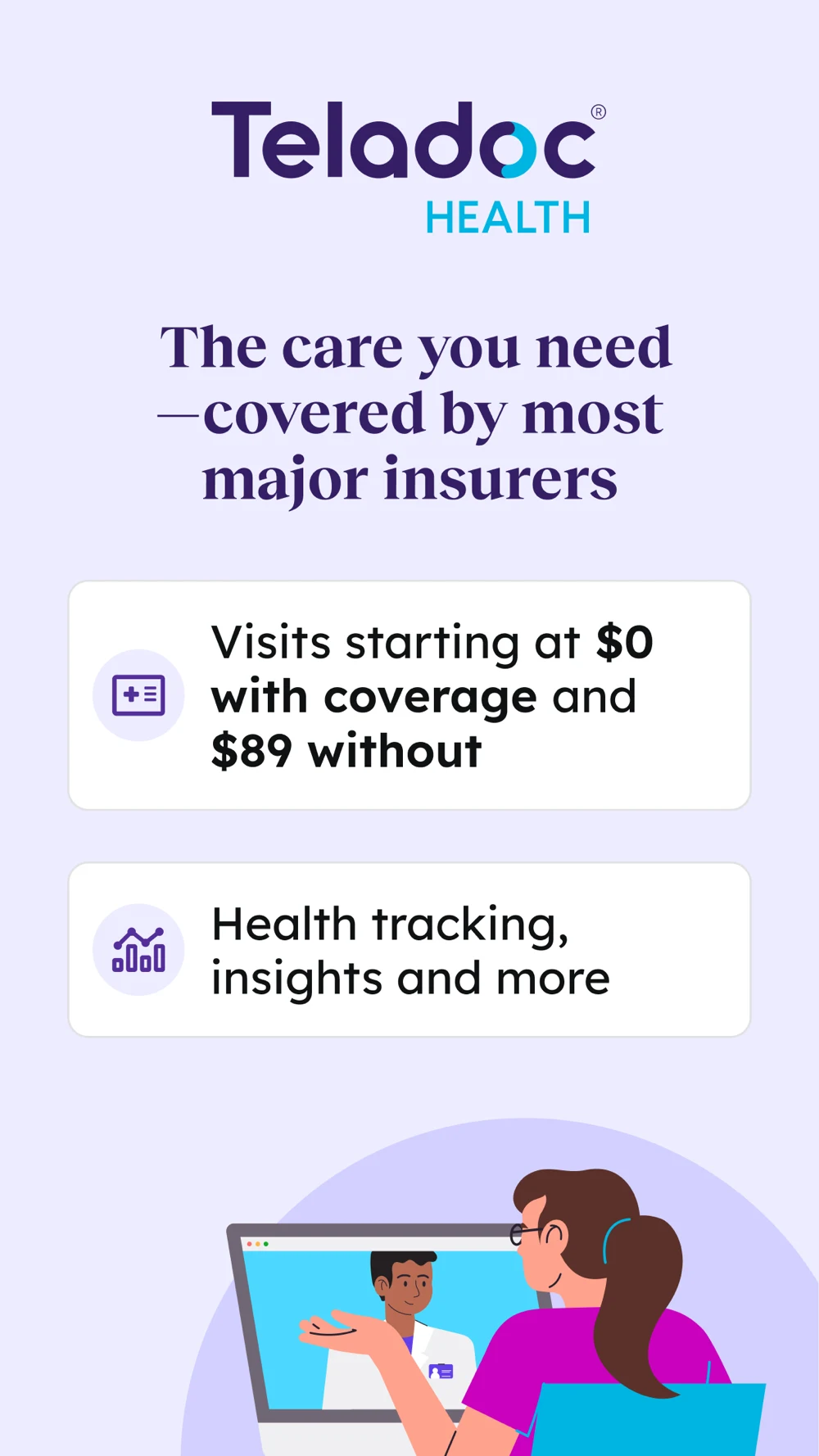

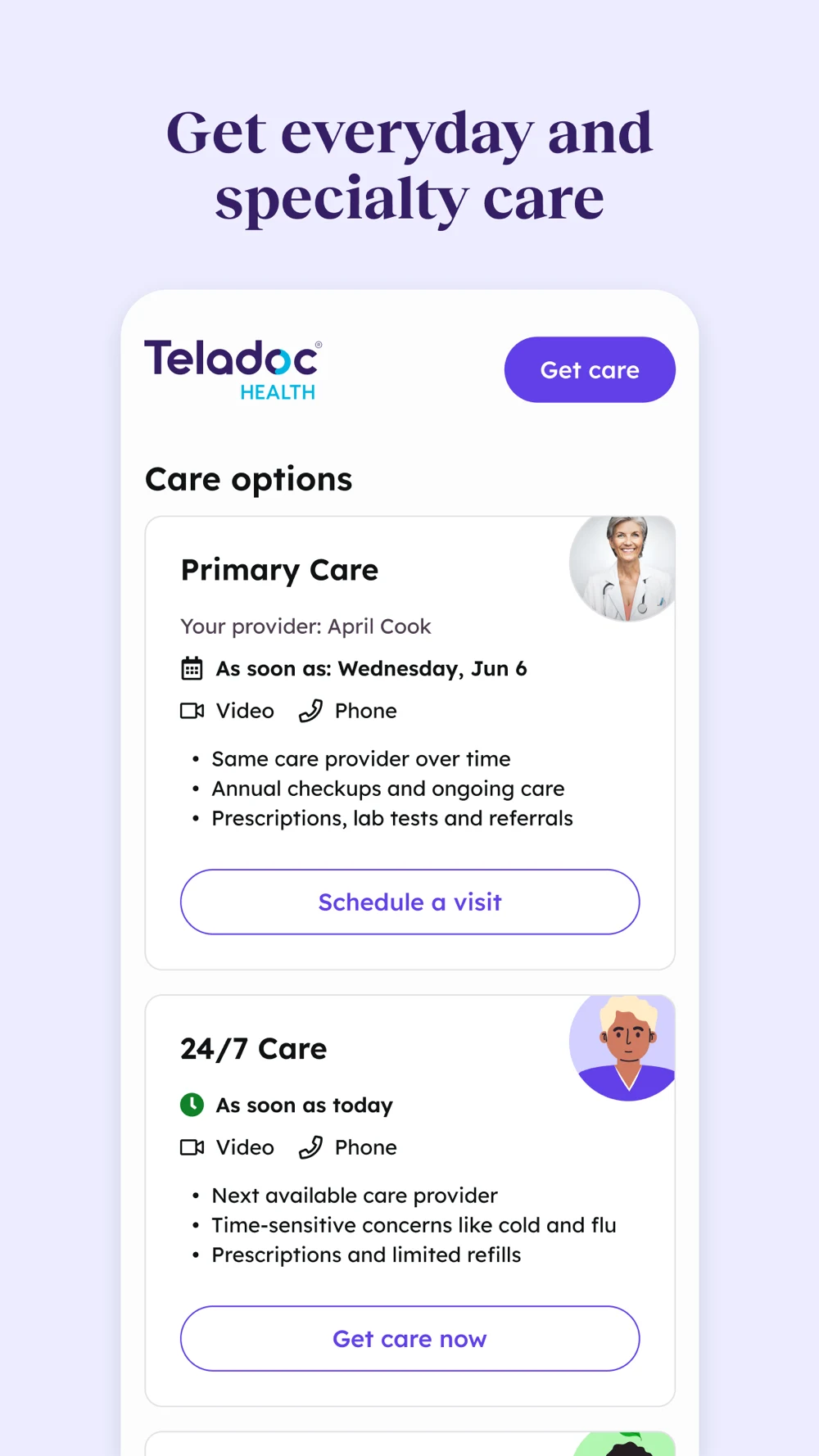
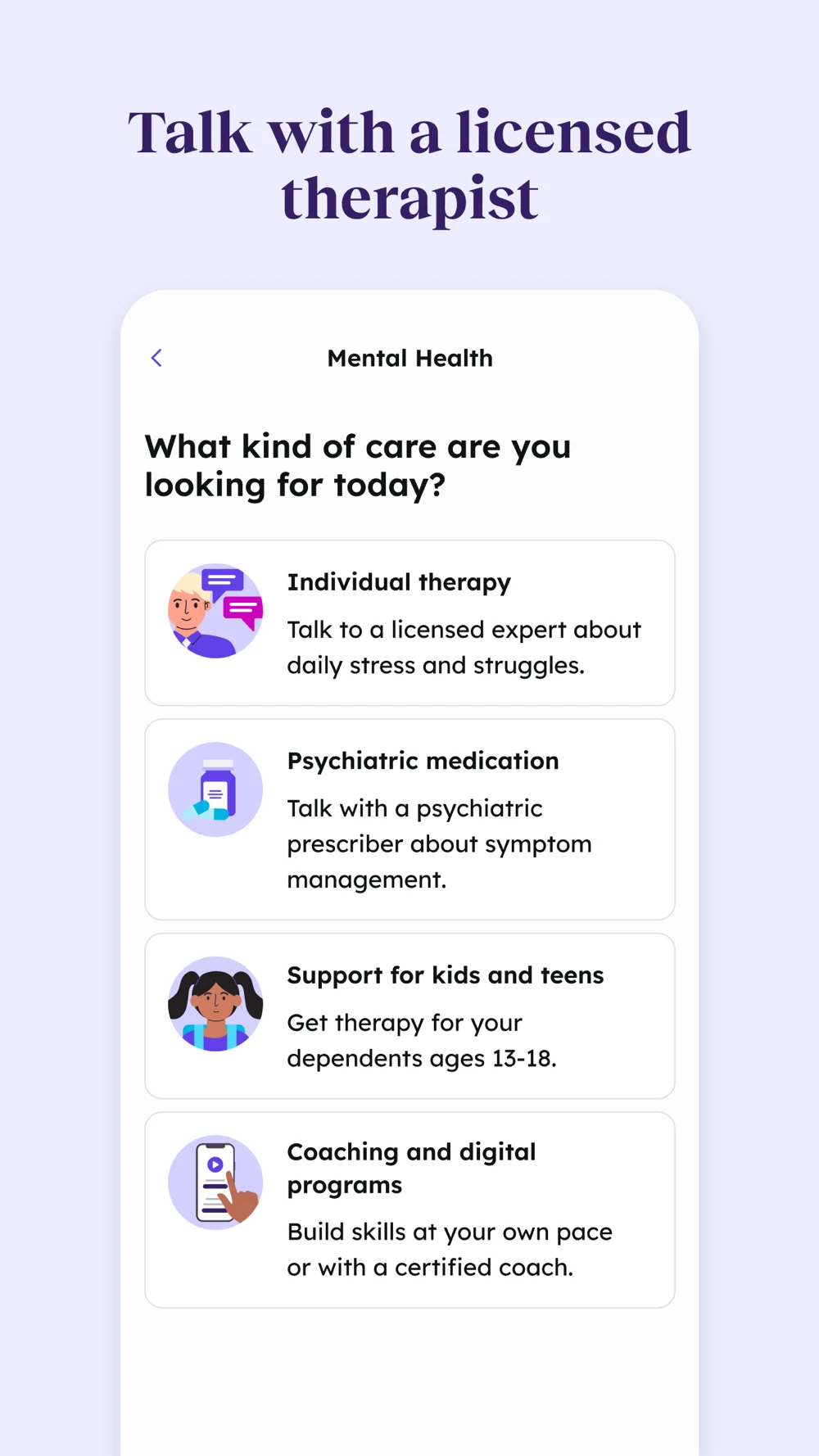
Source: Teladoc on the US App Store · captured 27 October 2026.
What the screenshots show: The first panel emphasizes coverage and self-pay options. A large video-call portrait follows. The third shows a useful distinction between ongoing primary care and on-demand visits, with different booking actions. The fourth moves to mental-health service choices. Headings are prominent, but the service distinctions arrive after the broad access story.
What I would test: For appointment-led queries, move the relevant service choice earlier. Show an eligible next step, then the coverage or price route. Keep different service hours and access rules visible; do not let a general availability heading imply that every service is immediate. These are editorial hypotheses, not measured performance findings.
Amwell: The next step is clearer than the general reassurance.
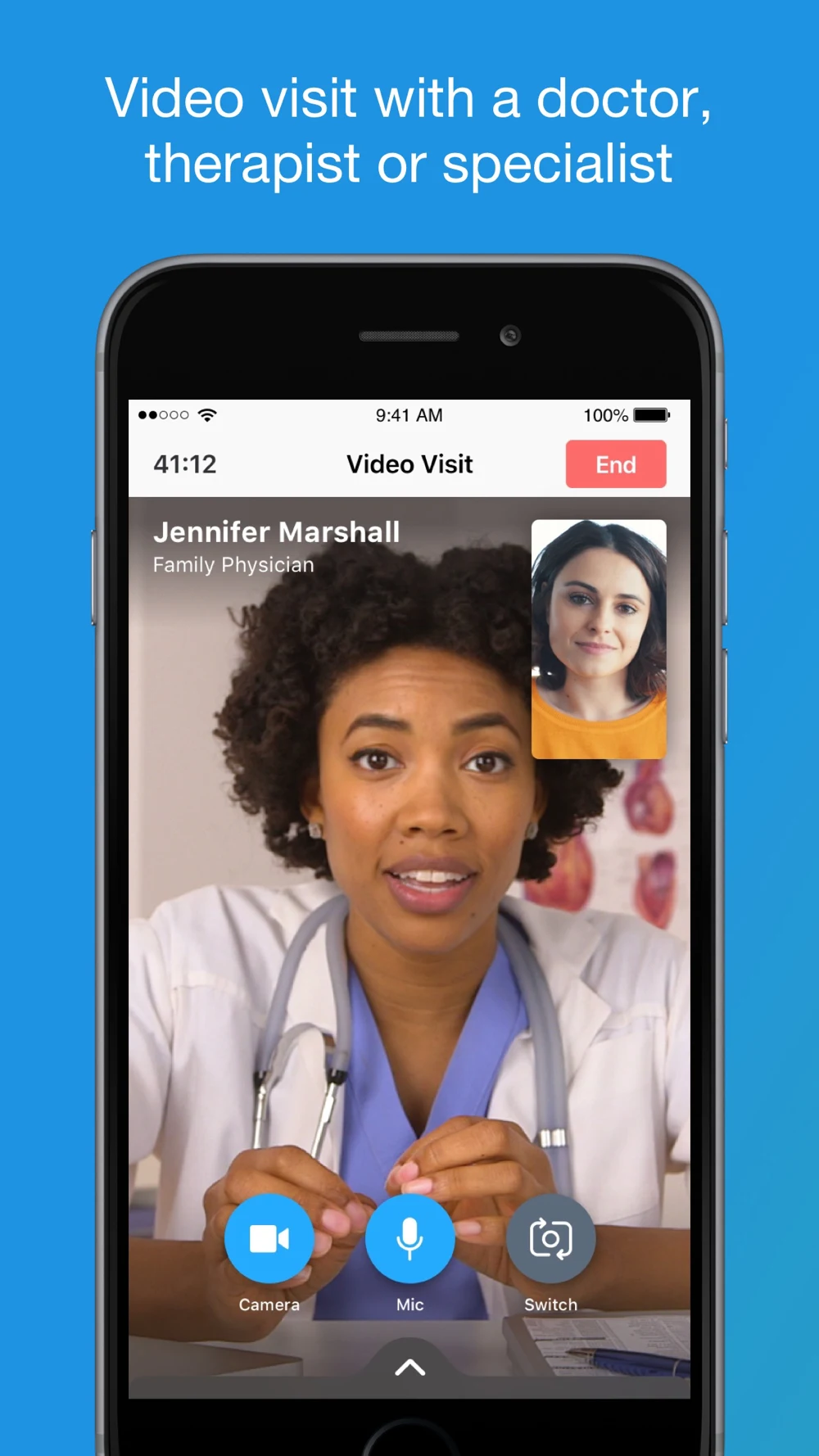
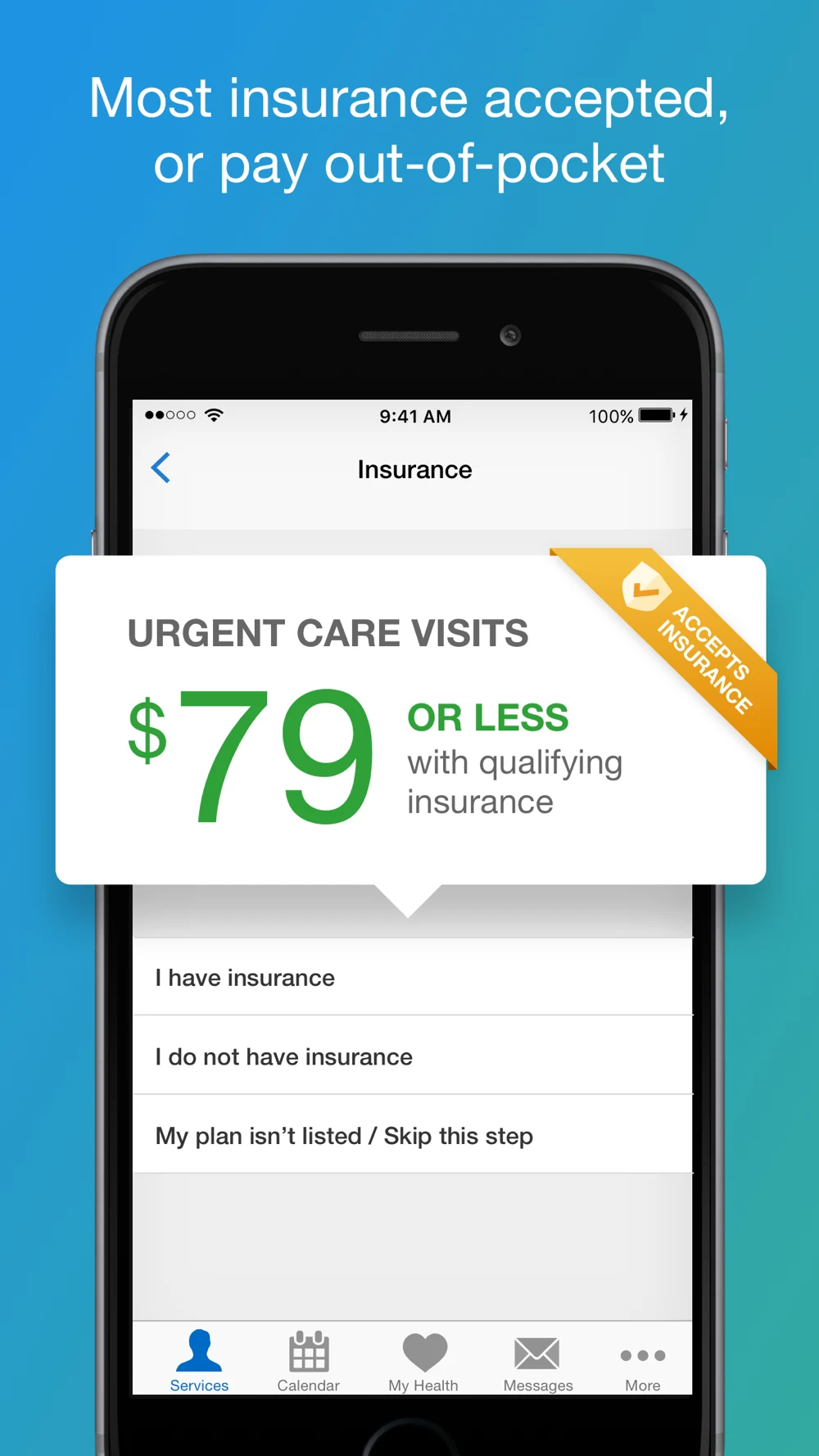
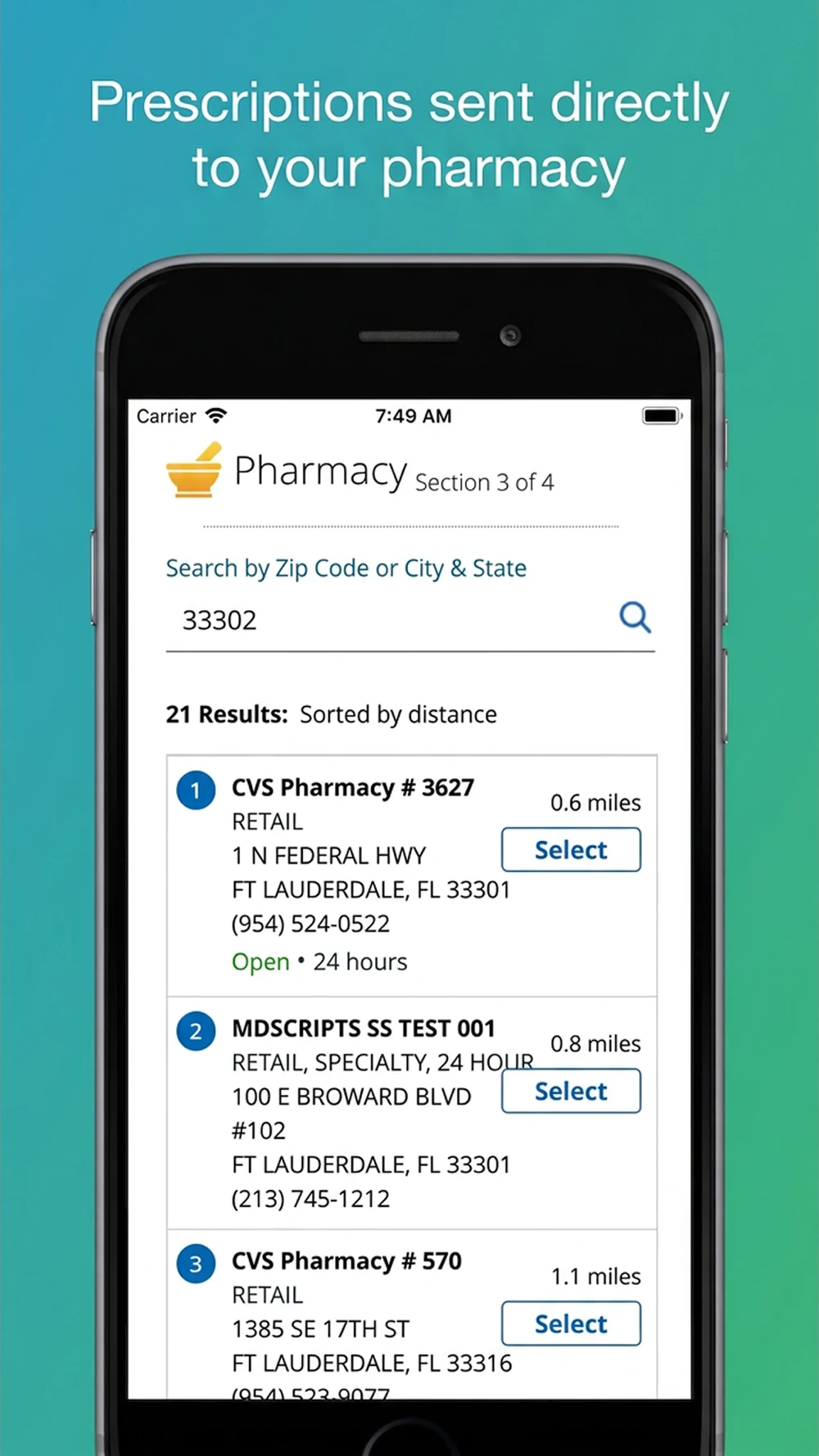
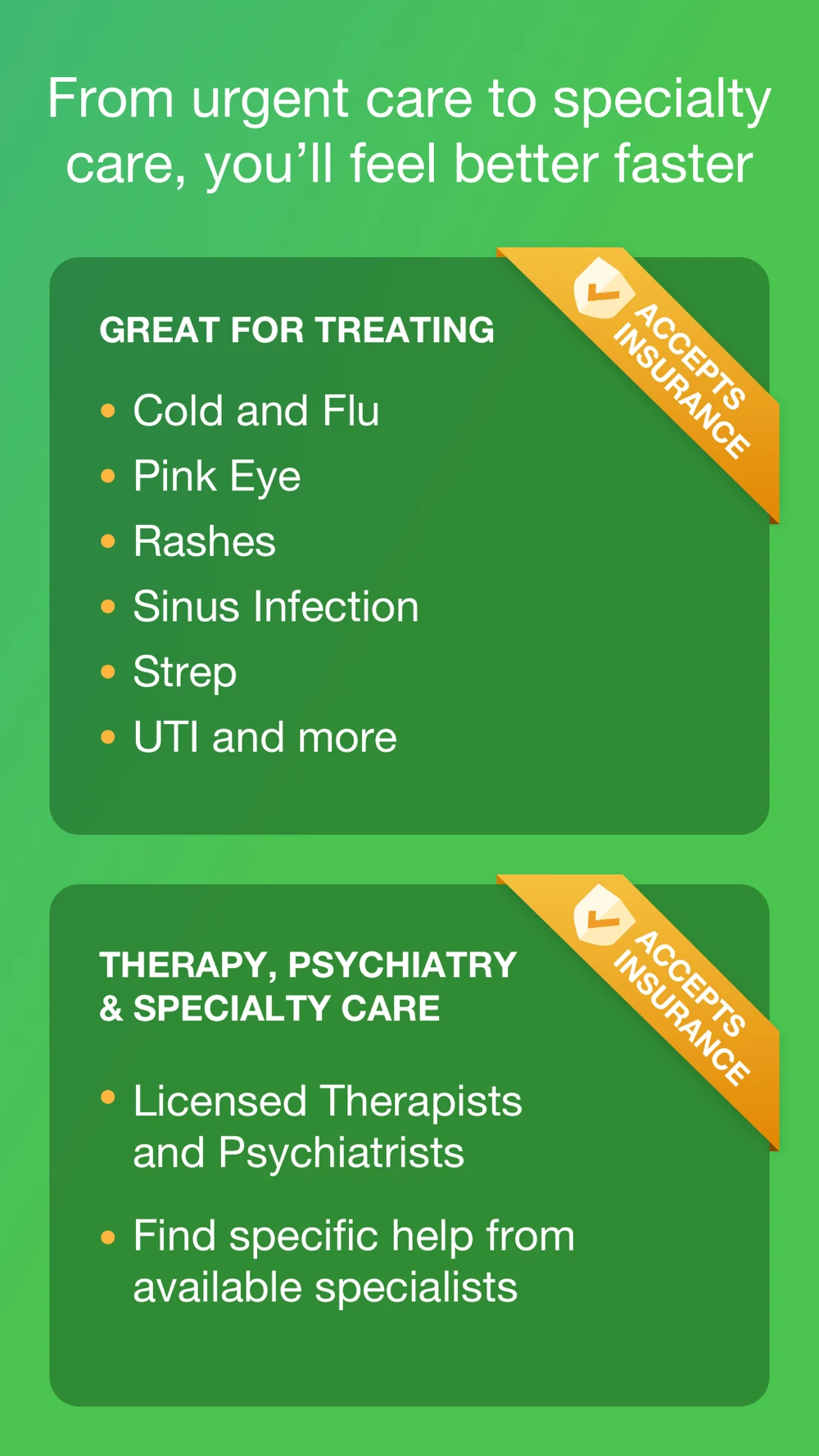
Source: Amwell on the US App Store · captured 27 October 2026.
What the screenshots show: The opener uses a large video-call interface with a clinician and call controls. The second introduces payment through a prominent price card and insurance choices. The third shows pharmacy search and selection. The fourth lists conditions and specialties. The pharmacy screen proves a specific interaction, while the broad final panel offers many ideas without a single next action.
What I would test: Test a service-specific booking and cost-review sequence. Keep prescribing subject to clinical evaluation instead of allowing pharmacy selection to sound like a guaranteed prescription. Make any price qualifications readable beside the amount, not only elsewhere in the listing. These are editorial hypotheses, not measured performance findings.
Doctor On Demand: Show the appointment before repeating the speed message.
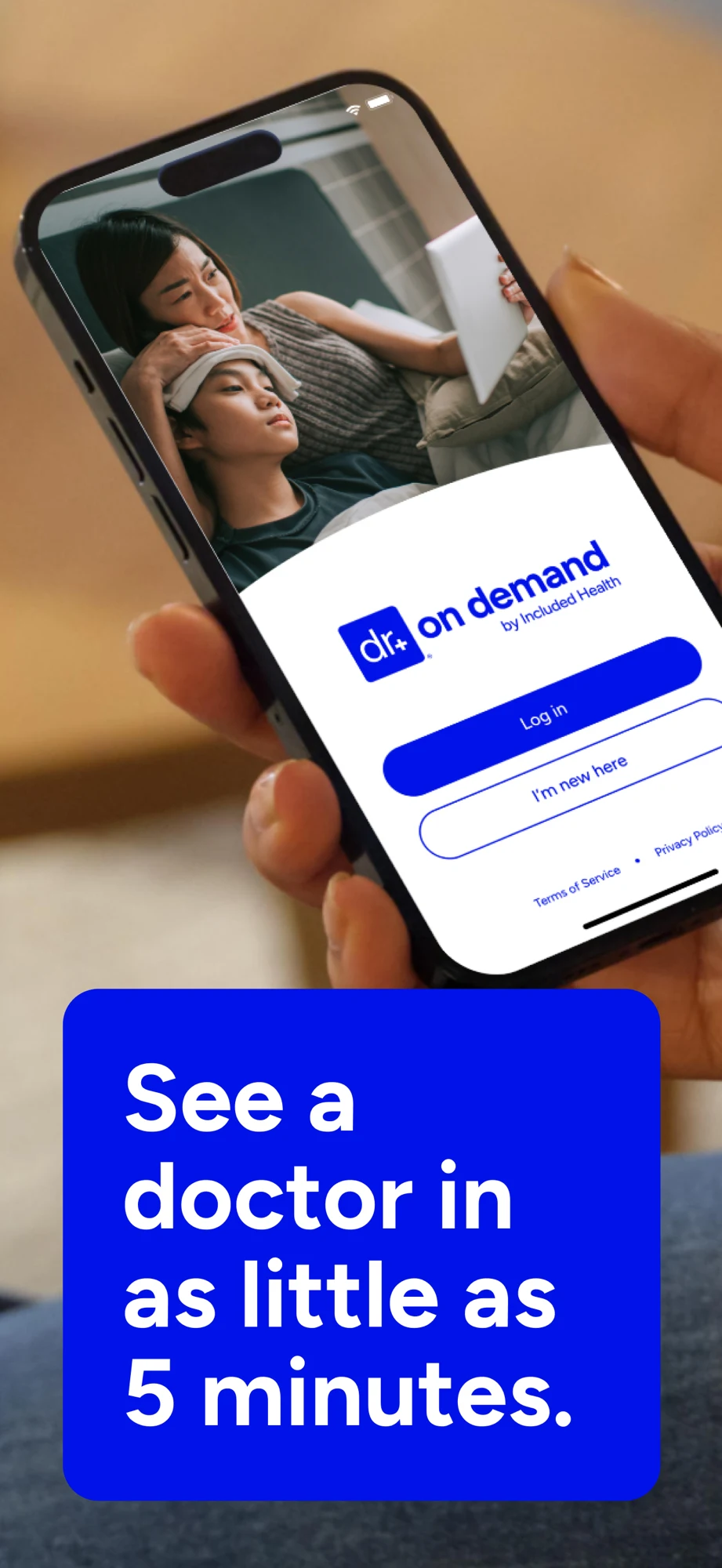
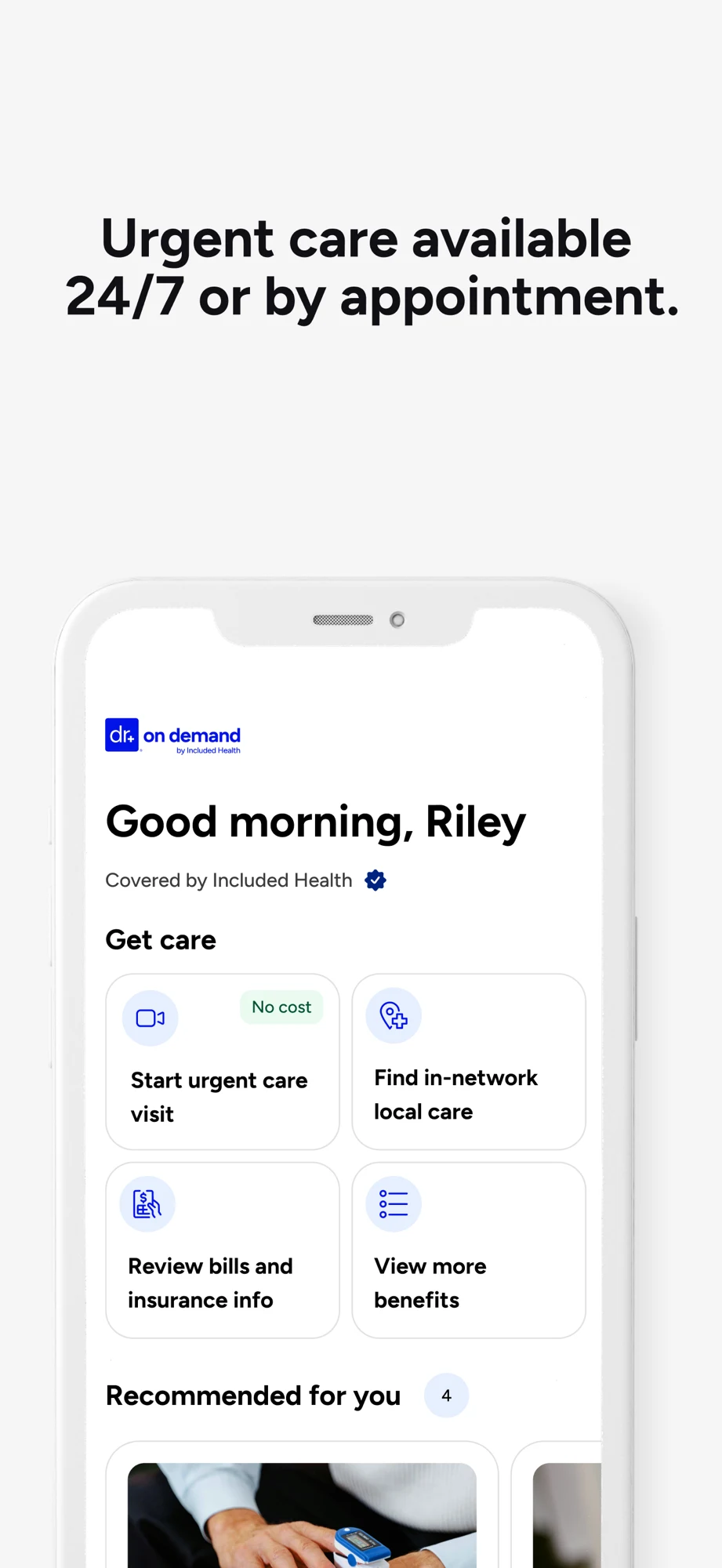
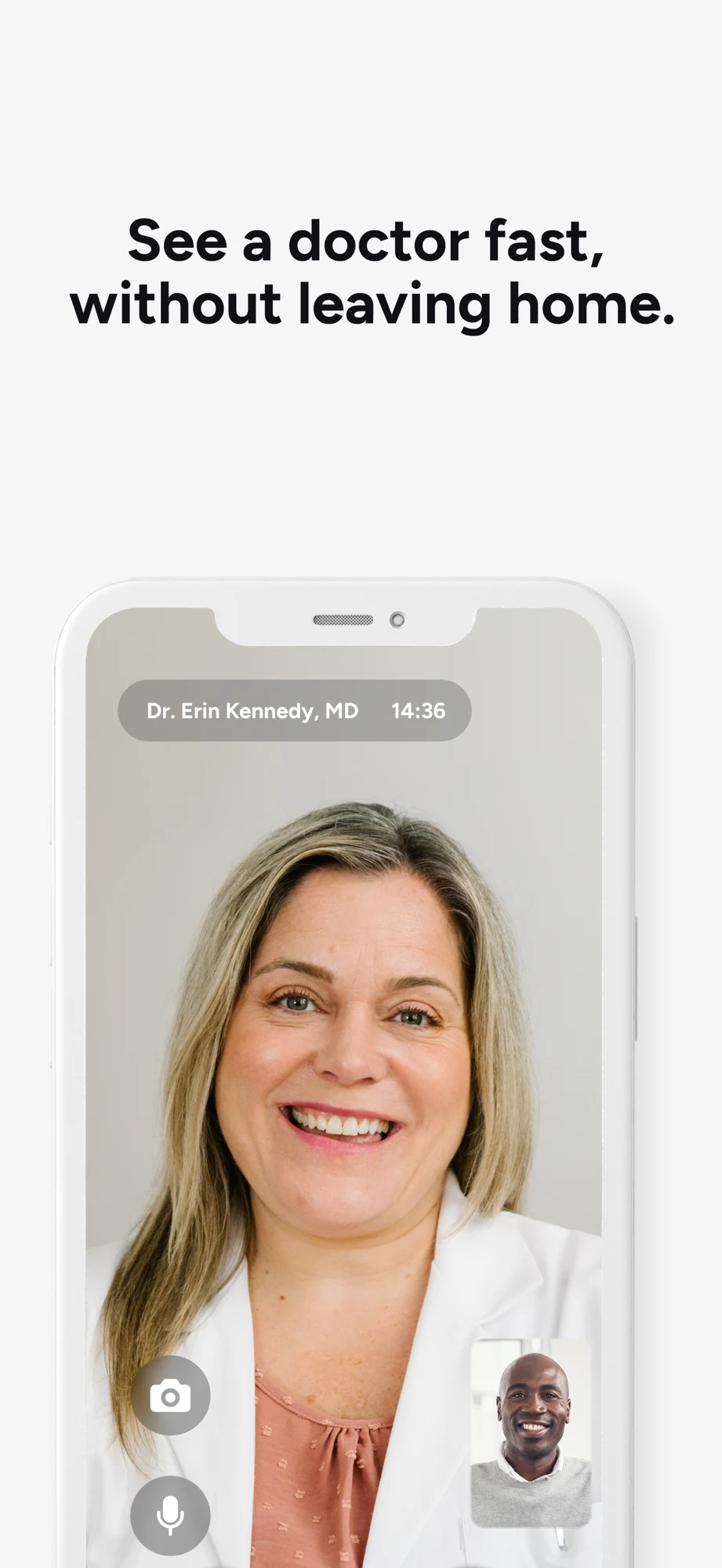
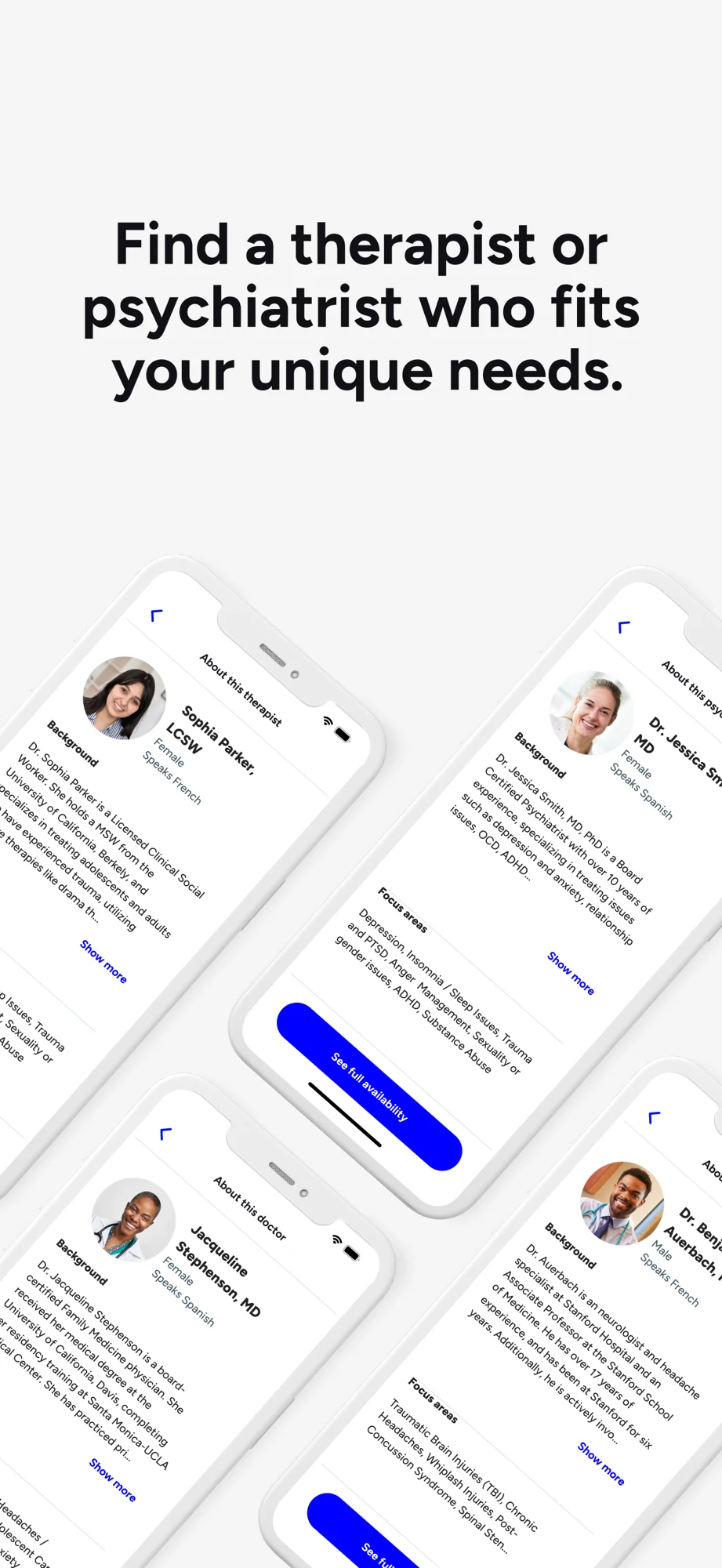
Source: Doctor On Demand on the US App Store · captured 27 October 2026.
What the screenshots show: The first panel shows a tilted login screen with a family image under a fast-access claim. The second displays a member home screen with benefit-funded pricing. The third repeats access through a large call image. The fourth uses several angled clinician profiles, making longer details harder to read. The member screen is concrete, but its cost context matters.
What I would test: Replace one repeated access frame with a single readable appointment, clinician or price-review screen. Label the benefit context. Ask viewers whether they believe the illustrated member price applies to everyone, and whether they understand scheduled services versus the next-available queue. These are editorial hypotheses, not measured performance findings.
HealthTap: Continuity is visible; the financial commitment needs its own explanation.

Source: HealthTap on the US App Store · captured 27 October 2026.
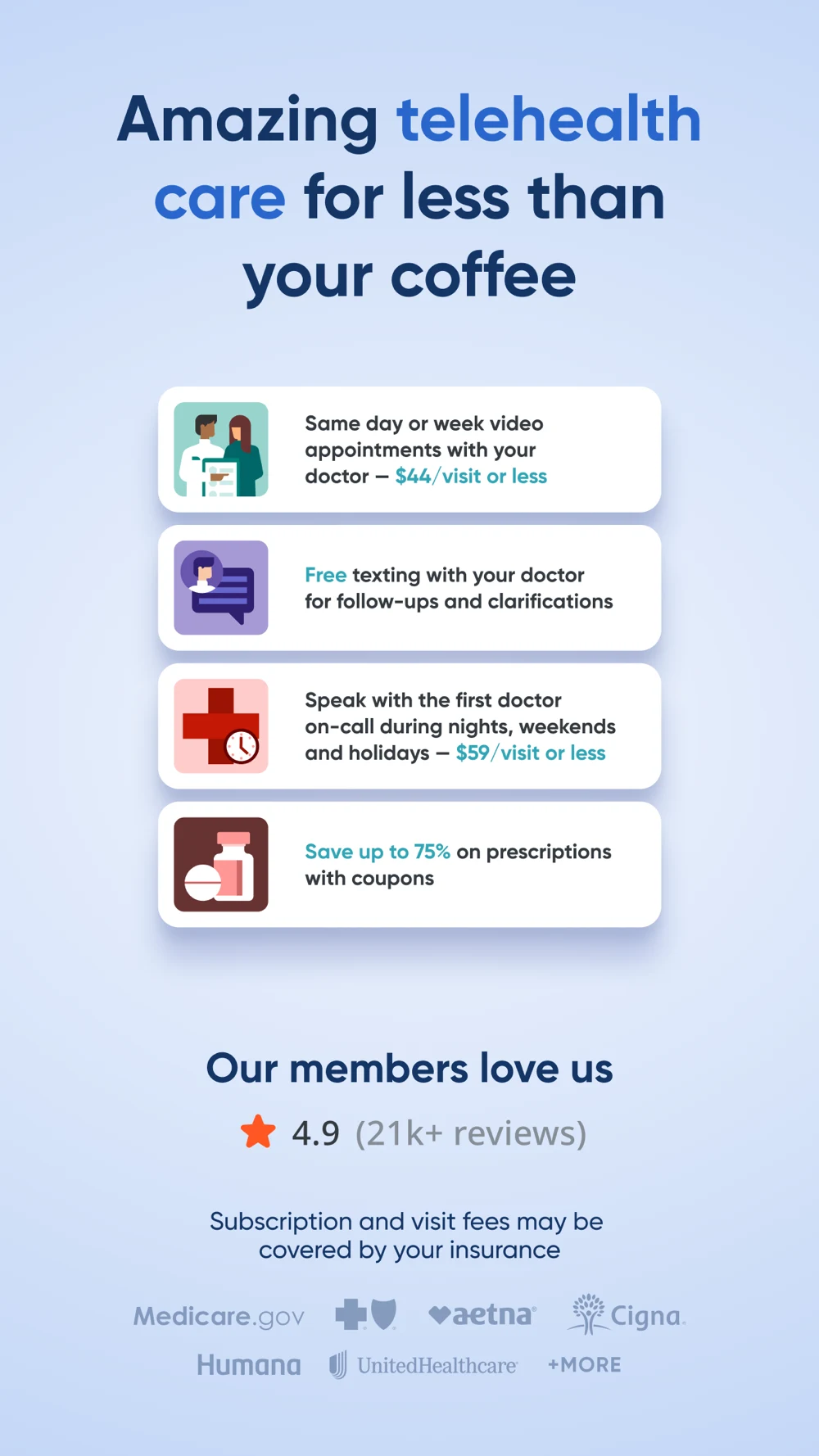
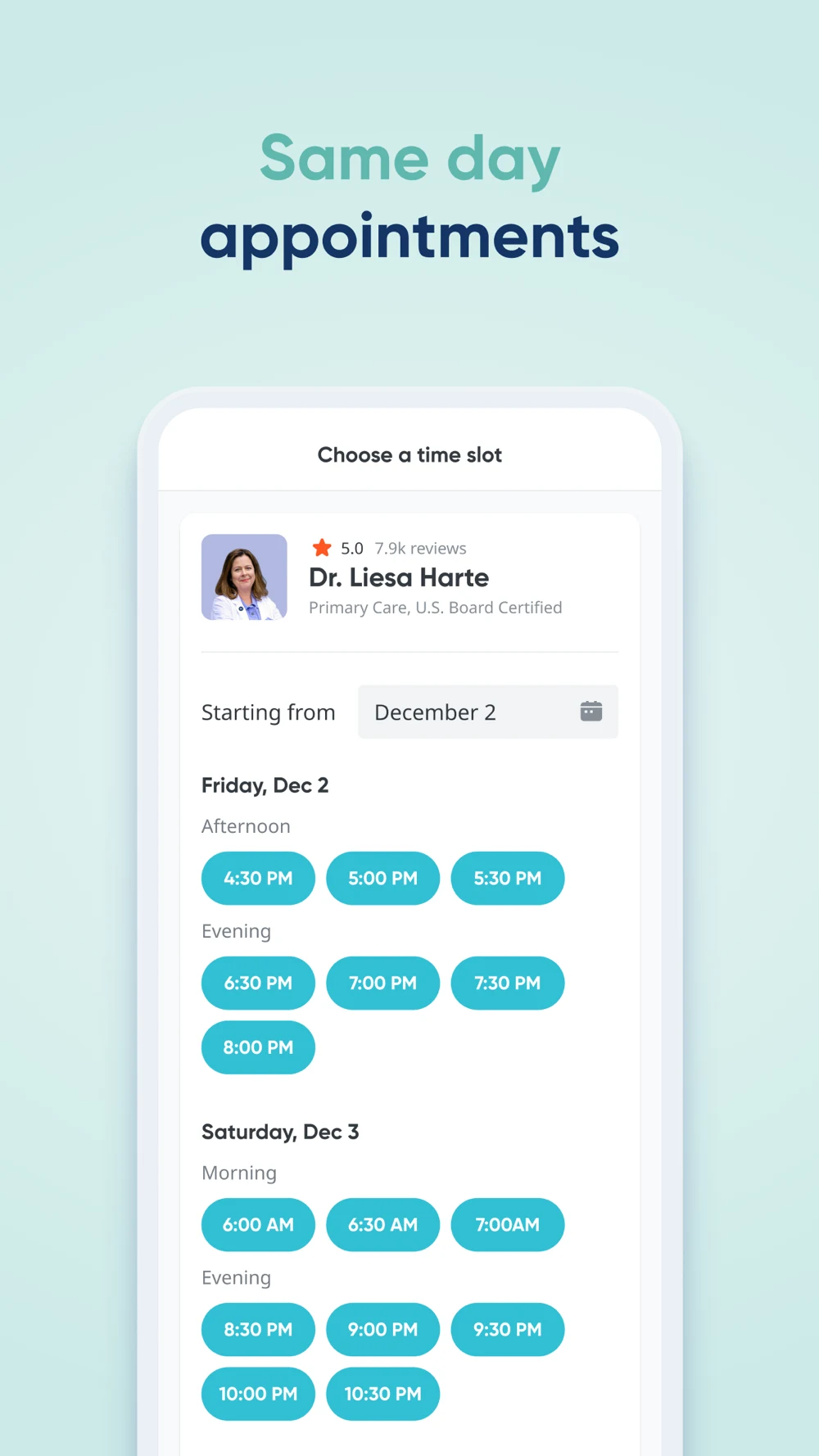
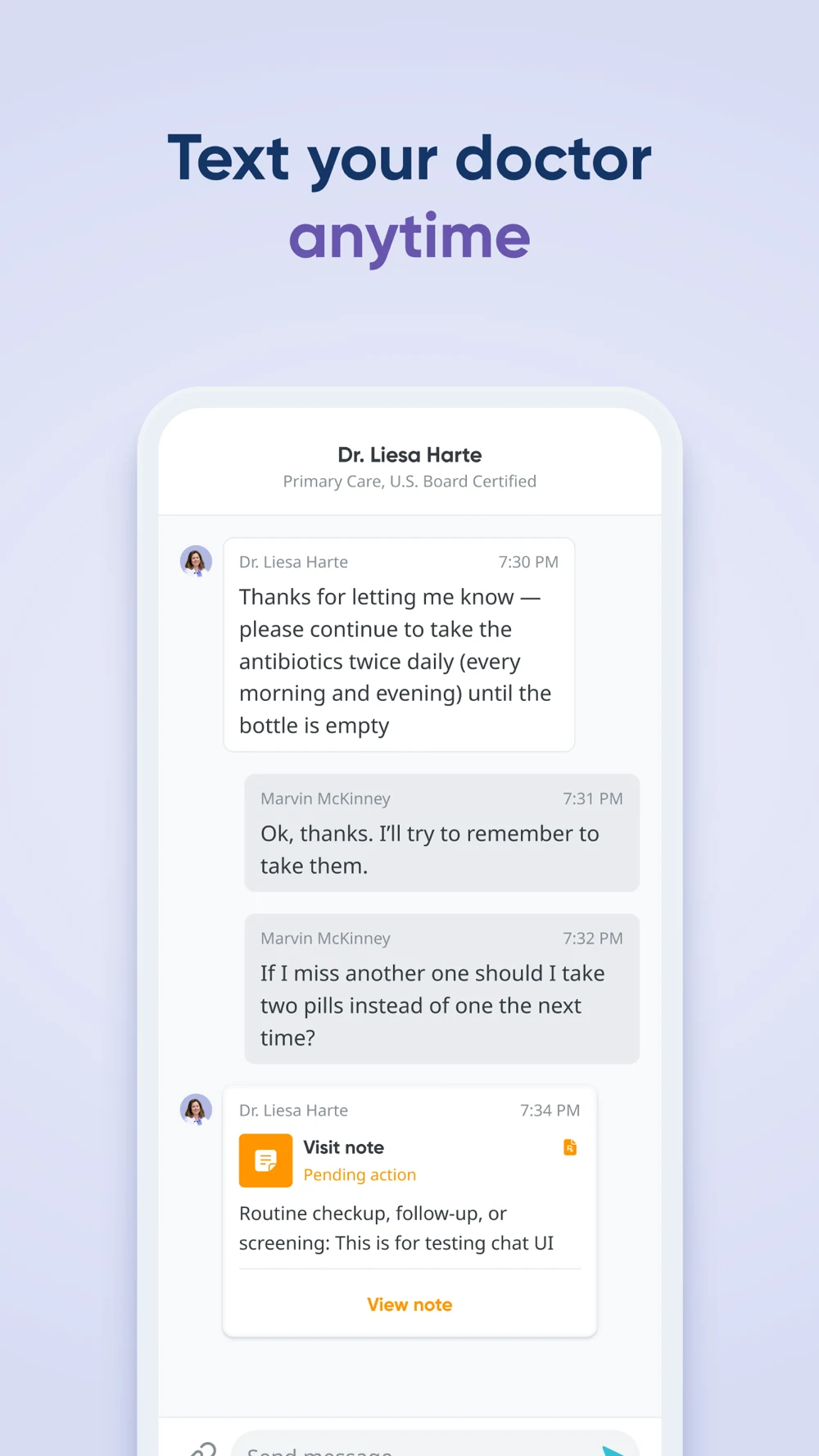
What the screenshots show: A clinician mosaic and call lead into a dense benefits-and-prices panel. The third frame shows readable appointment slots for one clinician. The fourth shows a message thread and visit-note card, including text that appears to be a UI-testing placeholder. The appointment screen gives the strongest concrete proof of choice; the cost panel mixes several kinds of benefit.
What I would test: Separate membership billing, visit fees and additional costs. Keep the useful appointment screen. Replace placeholder-looking demonstration text and unnecessary medication detail with a neutral follow-up task. Explain response expectations so sending a message at any time is not mistaken for receiving immediate care. These are editorial hypotheses, not measured performance findings.
Sesame: The follow-up screen is easier to understand than the tilted opening.
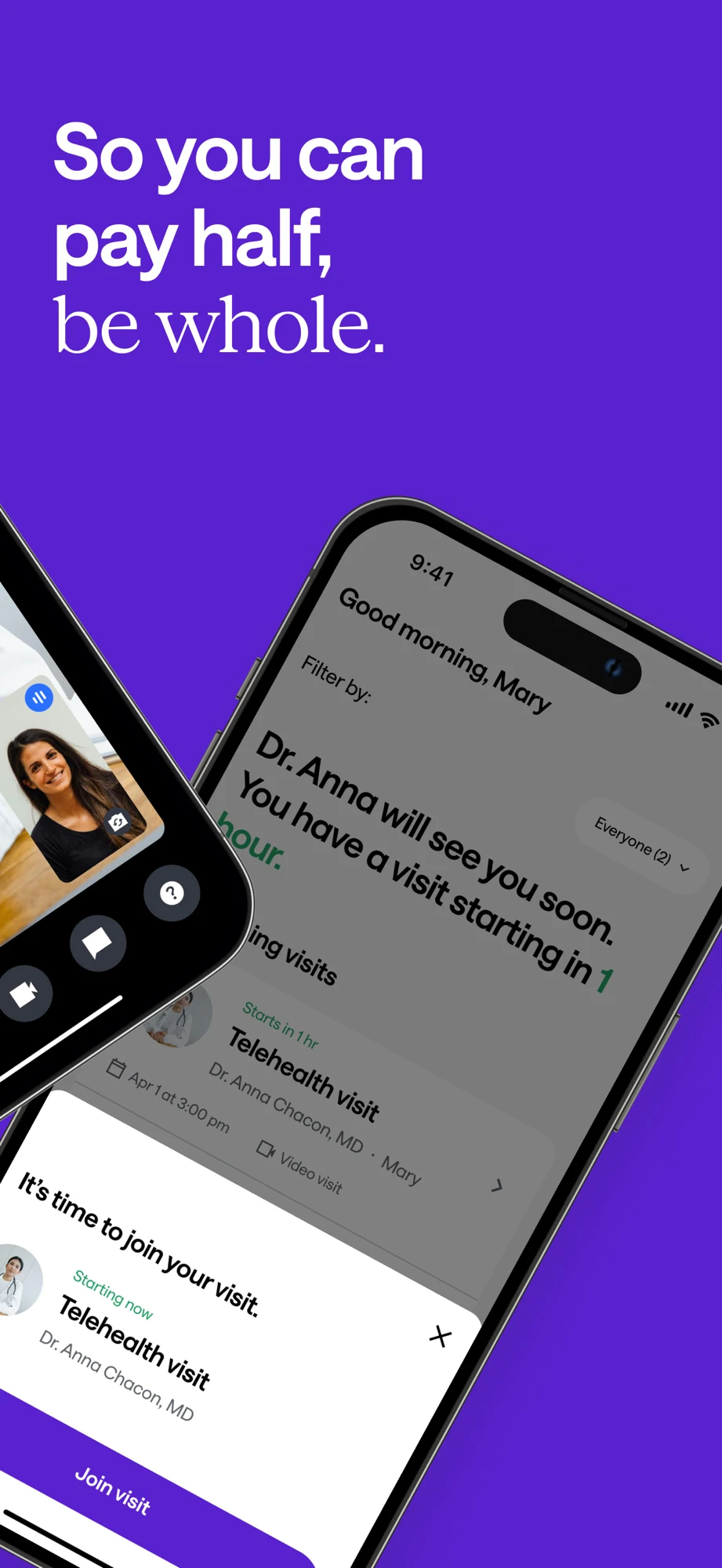
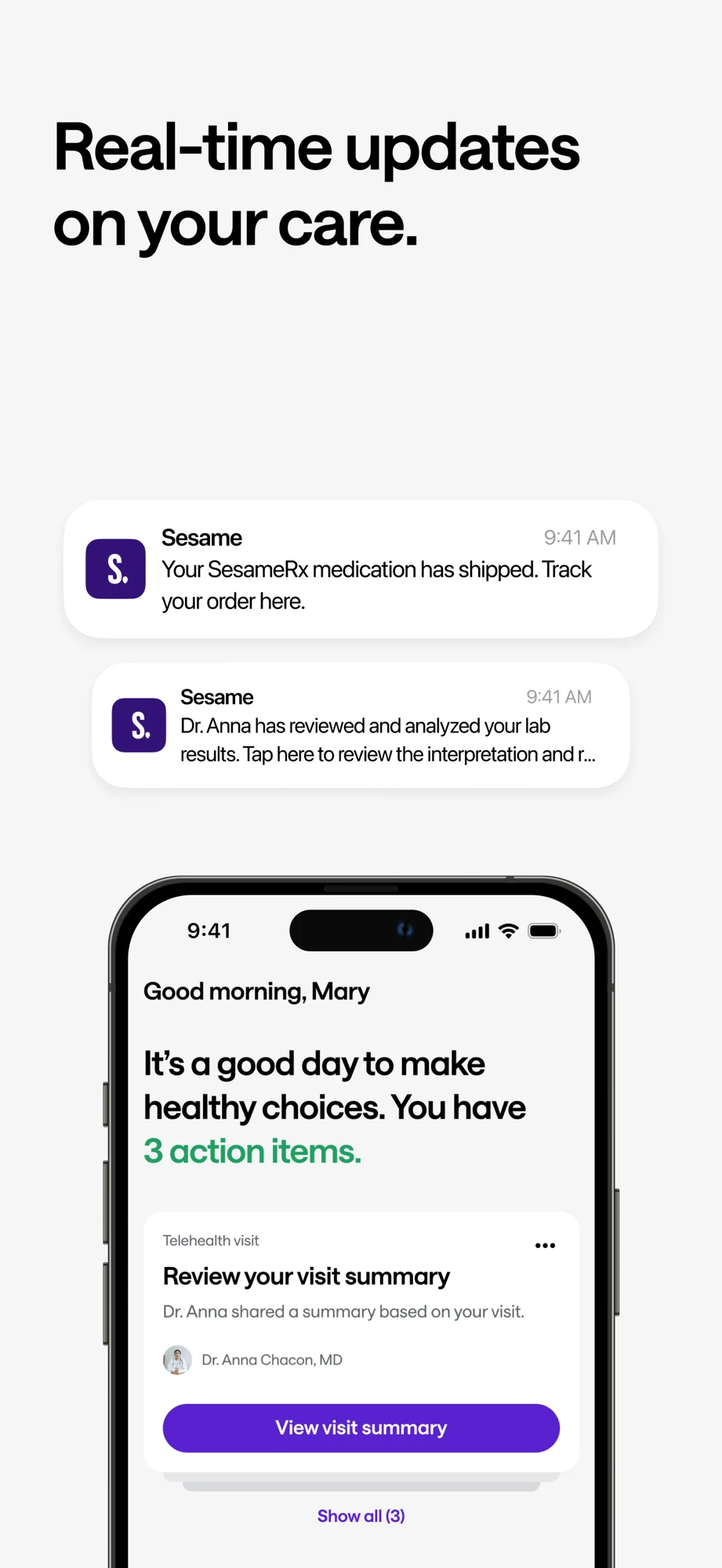
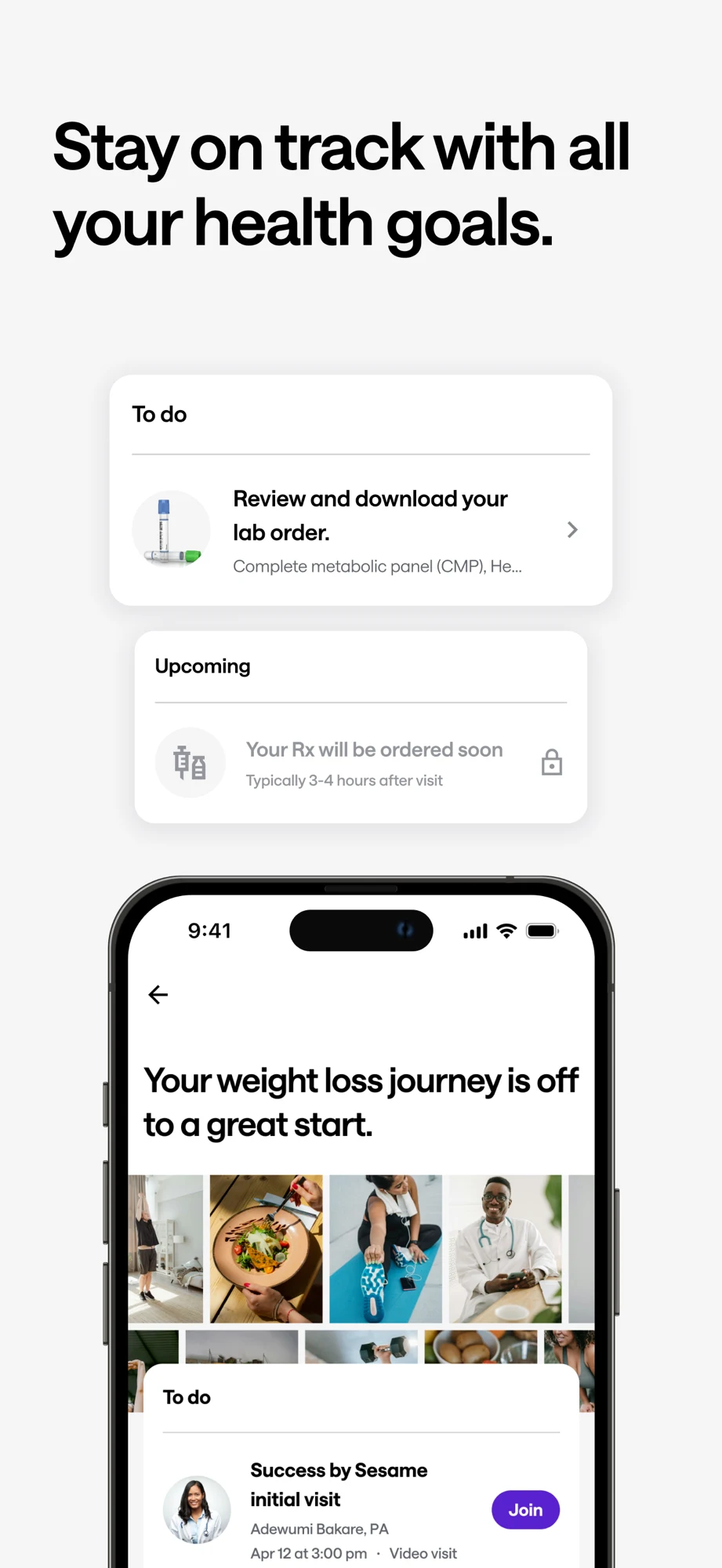
Source: Sesame on the US App Store · captured 27 October 2026.
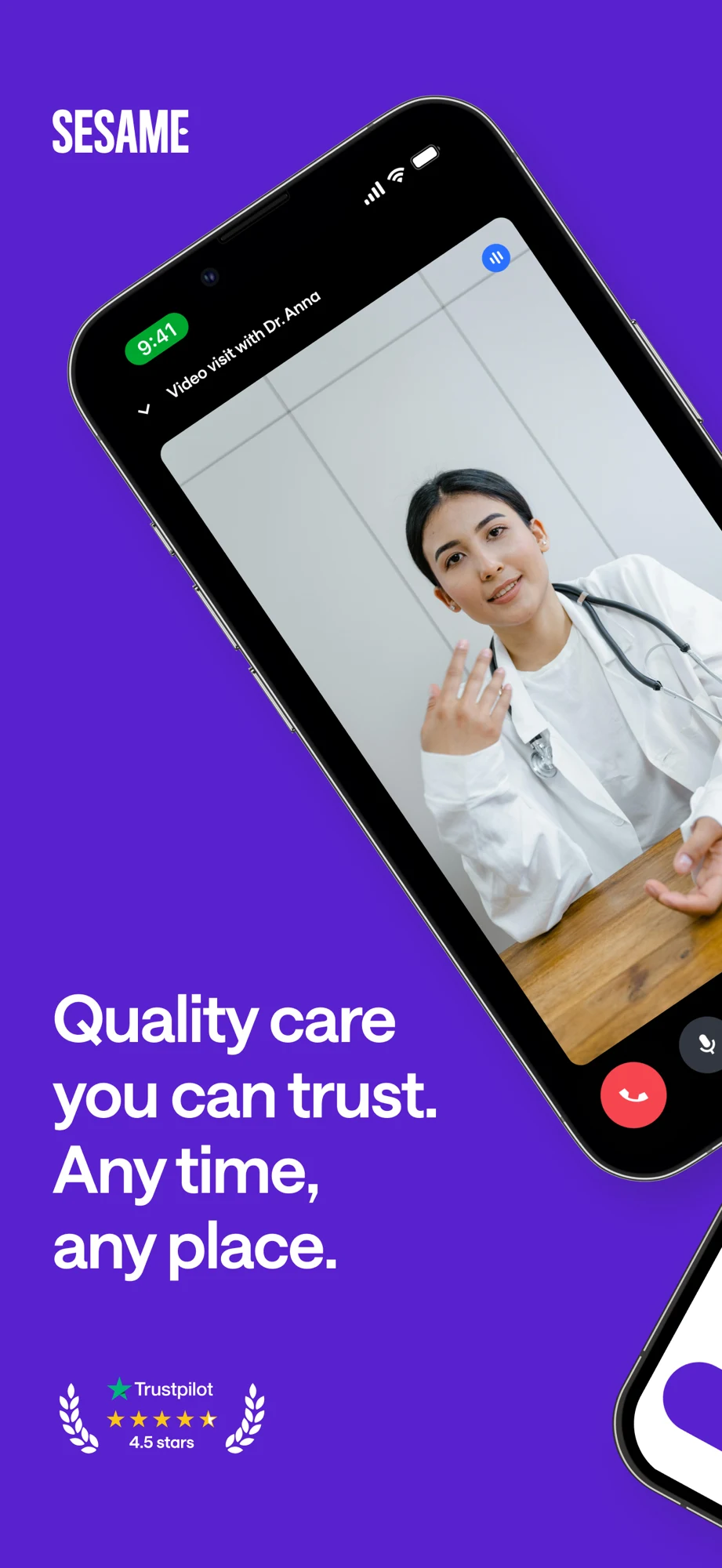
What the screenshots show: The first two panels use strongly angled devices around broad access and savings messages. The third turns upright and shows a visit summary with notification examples. The fourth combines lab and prescription tasks with a weight-management visit. The later task cards are more inspectable, while the opening savings claim is paired with joining a visit rather than a price comparison.
What I would test: For self-pay searches, test a straight-on provider and itemized-price comparison. For follow-up searches, lead with the summary task. Keep specialty creative separate when the general visitor is looking for primary care. Avoid implying that all visits lead to labs or prescriptions. These are editorial hypotheses, not measured performance findings.
Lesson 1 — Choose the care-access job before the headline.
- SEARCHAn appointment, ongoing care or a specialist?
- SERVICESelect the actual available visit type
- PROOFShow its booking or consultation workflow
- LIMITKeep eligibility and service boundaries visible
Lesson 2 — Distinguish a queue from an appointment.
- ON DEMANDNext available clinician, with a real queue state
- SCHEDULEDA chosen date, time and time zone
- ASYNCA message or photo review with a response expectation
- TESTCan a reader explain when and how care happens?
Lesson 3 — Let the title identify the product.
- TITLEVisitLane: Online Doctor
- SUBTITLEBook Video Visits & Follow-ups
- SCREENSHOTOne eligible appointment and its review step
- CTASee available appointments
Lesson 4 — Separate the visit price from the total journey.
- VISITSelf-pay fee or verified coverage estimate
- MEMBERSHIPAny separate recurring commitment
- EXTRASMedicine, tests and other charges if applicable
- REVIEWWhat is payable now and what is only an estimate?
Lesson 5 — Give the opening panels different jobs.
- 01 / FITName the supported visit
- 02 / ACCESSShow location and appointment choices
- 03 / PRICEExplain the actual payment route
- 04 / NEXTShow technical setup or follow-up
Lesson 6 — Sell the consultation, not a clinical outcome.
- INPUTThe person requests a supported consultation
- ASSESSMENTA qualified clinician evaluates the situation
- DECISIONPossible next steps depend on that evaluation
- COPYDo not promise a prescription or a particular result
Lesson 7 — Show what being ready actually means.
- DEVICECamera, microphone and connection checked
- PERSONPatient knows the time and how to join
- WAITINGThe room may open before the clinician arrives
- BOUNDARYTechnical readiness is not clinical assessment
Lesson 8 — Connect a keyword to an eligible visit.
- QUERYSelf-pay online doctor
- PAGEExplain the visit and actual price route
- BOOKINGLocation, service and cost checked
- REVIEWMeasure eligible attended visits, not prescription rates
These diagrams explain a decision rather than inventing performance data. Use screenshot strategy to select a story, ordering to assign each panel a job, copy to state the useful action and readability to check the result at store size.
TELEHEALTH APP ASO
Worked metadata, screenshot copy and CTAs for a specific visit model.
VisitLane is a fictional example, not a verified brand or a launched service. Assume it connects eligible adults in supported locations to scheduled primary-care video appointments, offers a genuine self-pay route without membership, displays visit charges before confirmation, provides a technical setup check and stores post-visit notes. Clinician selection, actual availability, fees and clinical decisions must be verified before using any of this copy. It is not an emergency service.
Swipe horizontally to compare all columns →
| Field | Worked example | Characters / limit |
|---|---|---|
| iOS name | VisitLane: Online Doctor | 24 / 30 |
| iOS subtitle | Book Video Visits & Follow-ups | 30 / 30 |
| iOS keywords | telehealth,telemedicine,primary,care,appointment,consultation,self,pay,medical,records | 86 / 100 |
| Google Play title | VisitLane: Online Doctor | 24 / 30 |
| Google Play short description | Book eligible video visits. Review your appointment, price and follow-up notes. | 79 / 80 |
Worked opening copy: Book a primary-care video appointment that fits your schedule. Check availability for your location, choose an appointment and review the self-pay visit fee before confirming. Your visit notes stay together for the next conversation.
Supporting copy: Before the call, check your camera, microphone and connection. Join the waiting room at the displayed time and review your notes after the visit. Availability depends on location and eligibility. Lab tests and medication, when clinically appropriate, may involve separate charges. A consultation does not guarantee a prescription or a particular treatment.
Why this distribution works as a brief: The title identifies online doctor access. The subtitle describes booking and follow-ups. The screenshot provides the appointment proof. Longer copy explains conditions that cannot fit in the title. This is an editorial rationale, not a measured ranking or conversion result.
Swipe horizontally to compare all columns →
| Panel | Headline to test | Real product proof required | Action or clarification |
|---|---|---|---|
| 1 | Book a primary-care video visit | A real eligible service and available appointment | See available appointments |
| 2 | Choose a time you can make | Date, time zone and truthful availability | Select an appointment |
| 3 | Review your visit and price | Self-pay fee, no membership if true, and separate costs | Review and continue |
| 4 | Check your setup before you join | Actual camera microphone and connection check | Join waiting room |
| 5 | Keep your visit notes together | Actual post-visit summary and access behavior | View visit notes |
| 6 | Plan the next conversation | Supported follow-up booking, not a guaranteed same-day reply | See follow-up options |
CTA choices: “See available appointments” is appropriate before selecting a slot. “Review and continue” belongs before final confirmation. “Join waiting room” should open the actual waiting state. Avoid “Get cured,” “Get your prescription” or “See a doctor instantly” when the action only starts an eligibility or booking process.
Preview direction: Use a short demonstration of location check → appointment choice → price review → technical setup. Let each state remain readable. A real app preview should use the actual interface and comply with the store’s current preview rules. Do not manufacture a smiling clinician, instant queue clearance or a successful medical result as product proof.
Develop the promise with value propositions, select the opener using first-screenshot strategy and check the sequence through visual storytelling. The fictional metadata is a worked starting point, not a keyword-stuffed final submission.
- TITLEVisitLane: Online Doctor
- SUBTITLEBook Video Visits & Follow-ups
- SCREENSHOTOne eligible appointment and its review step
- CTASee available appointments
TELEHEALTH APP ASO
Ten ways a telehealth listing can create the wrong expectation.
Swipe horizontally to compare all columns →
| Problem to investigate | Concrete example or visible risk | Better test |
|---|---|---|
| Broad access language hides the service | A multi-service app promotes general availability before explaining its routes | Open with the actual visit type and eligible next step |
| Coverage sounds universal | Doctor On Demand shows a benefit-funded member price | Add visible member context and a coverage-check action |
| A price promise lacks matching proof | Sesame pairs its early savings message with joining a visit | Show a meaningful price review for a price-led query |
| The commitment is hard to separate | HealthTap mixes visit prices and other membership benefits in one frame | Separate recurring billing, visit fees and extras |
| Angled phones shrink important choices | Doctor On Demand’s clinician profiles and Sesame’s opening devices are tilted | One large upright decision screen |
| A demonstration contains distracting leftovers | HealthTap’s visit-note card includes text that appears to describe UI testing | Use neutral, reviewed demonstration data |
| Pharmacy choice implies guaranteed prescribing | A pharmacy-selection screen can be mistaken for ordering a prescription | Explain the consultation and clinician decision before fulfillment |
| Message availability becomes response availability | Sending a message any time does not establish immediate response | Show the actual channel purpose and response expectation |
| App-store availability becomes care availability | A US download does not establish service eligibility in every state | Check location and service before a booking promise |
| Setup readiness sounds like clinician presence | A green connection check can be confused with a live consultation | Separate device-ready, waiting and clinician-joined states |
These are critiques of communication, not allegations about care quality or proven conversion loss. Named examples refer to the captured artwork. Recheck the listing before acting. Download the ten-test backlog and use test hypotheses and prioritization to choose the next experiment.
- VISITSelf-pay fee or verified coverage estimate
- MEMBERSHIPAny separate recurring commitment
- EXTRASMedicine, tests and other charges if applicable
- REVIEWWhat is payable now and what is only an estimate?
TELEHEALTH APP ASO
Turn keyword clusters into a service-aware Apple Ads plan.
Use Apple Ads search-results campaigns to test supported search intent. Any pediatric-service advertising must address eligible adult caregivers and comply with the platform’s adult-audience restriction; it is not permission to target children. This is a planning blueprint: no campaigns or spend have been created. For fictional VisitLane, start with scheduled primary care and self-pay video visits. Urgent, pediatric, specialist and prescription-related groups below are conditional options for products that genuinely offer those services.
Check eligibility before launch: Apple’s advertising policy restricts pharmaceutical and medical services to adults and applies region and placement conditions. Review the exact service, territory and placement with the current policy rather than assuming a published app can advertise everywhere. Source: Apple Ads policies, medical services.
Swipe horizontally to compare all columns →
| Campaign / ad group | Keyword family | Opening creative | Meaningful next step |
|---|---|---|---|
| Category exact — scheduled care | online primary care; primary care video visit | Eligible appointment and continuity story | Eligible appointment booked |
| Category exact — self-pay | self pay online doctor; online doctor upfront price | Itemized visit review with separate costs | Cost understood and eligible appointment booked |
| Category exact — continuity | book same doctor online; online follow up appointment | Return-visit availability and record | Supported return appointment |
| Conditional exact — urgent access | online urgent care; after hours telehealth | Actual service hours and queue | Eligible request and attended consultation |
| Conditional exact — family | virtual pediatrician visit; child telehealth appointment | Age eligibility and dependent profile | Authorized booking for the correct patient |
| Own brand exact | Actual brand and verified variants | Accurate default experience | Qualified new or returning access |
| Competitor exact — optional | Relevant alternative app names, reviewed separately | Your own genuine service distinction | Eligible visits at acceptable economics |
| Discovery broad | Only supported service seeds | Relevant default or configured page | Search terms that lead to eligible use |
| Discovery Search Match | Separate group with no manual keywords | Accurate store listing | Relevant query discovery and qualified visits |
Separate brand, category, competitor and discovery work, following Apple’s campaign structure guidance. Turn Search Match off in exact and broad groups; keep it in its own discovery group. Promote useful supported queries into exact groups, then use exact negatives in discovery to reduce overlap. Competitor brands belong in a separately reviewed optional advertising group, not in your organic title or keyword field.
Exact match can include close variants. Negative exact blocks the specified term; negative broad requires all the words, with variants needing separate review. For a scheduled adult-primary-care service, review irrelevant searches such as doctor jobs, medical school, veterinary doctor, emergency ambulance and any unsupported pediatric or specialist service. Do not broadly exclude a word such as doctor that also describes your core service. Sources: match behavior and negative keywords.
- QUERYSelf-pay online doctor
- PAGEExplain the visit and actual price route
- BOOKINGLocation, service and cost checked
- REVIEWMeasure eligible attended visits, not prescription rates
Build the matching page: A self-pay custom product page should show the genuine payment route. A continuity page should show return booking. Preserve location and age eligibility in both. Use supported deep links only when the destination works for the actual user, including someone with no account. Do not deep-link past essential eligibility or cost review.
Bound the experiment: Pick one market and one supported service. Agree a maximum budget, evaluation window, minimum evidence and stop conditions before launch. Pause a misleading promise immediately; do not keep paying to learn whether users notice it. For performance, use a predefined analysis plan rather than repeatedly stopping whenever the latest result looks favorable. No budget figure here authorizes spending.
Worked economics, entirely hypothetical: Suppose one attended first visit contributes $30 after relevant delivery costs. If the business permits $12 for acquisition per attended first visit, and 60% of booked eligible first visits are attended, the illustrative ceiling is $7.20 per booking. With 25% tap-to-install and 20% install-to-eligible-booking, that implies $0.36 per tap. Replace every assumption with your own documented cohort economics. This is neither a category benchmark nor a recommended bid.
Measure the right outcome: Keep tap, download, eligibility completion, booking, attendance, cancellation and refund denominators separate. Distinguish new downloads from redownloads and first visits from return visits. A low cost per install can hide unavailable services or appointment abandonment. Clinical treatment choices and prescription rates must not become acquisition success targets.
Keep health details out of ad feedback: Use a privacy-reviewed measurement design and aggregate operational outcomes. Do not pass symptoms, diagnoses, medication requests, visit notes or patient identities into ad parameters. Even operational events need appropriate review. Reconcile attribution windows and definitions with ASO KPIs and conversion-rate definitions.
Feed learning back to ASO: Promote relevant search language only after checking service fit and qualified outcomes. Test the clearest supported message in creative or metadata, keeping paid and organic results separate. A paid keyword result does not prove organic demand, ranking or clinical quality. Record changes in the metadata log and review traffic sources before attributing a movement to the edit.
TELEHEALTH APP ASO
Current patterns that can inform the next creative brief.
Swipe horizontally to compare all columns →
| Pattern visible in current sources | Evidence reviewed 27 October 2026 | Creative implication |
|---|---|---|
| Broad brands combine different access models | Teladoc, Amwell and MDLIVE descriptions distinguish several services | A service selector or named visit can outperform a vague story in comprehension; test it |
| Continuity is a distinct position | HealthTap and Circle Medical emphasize ongoing primary care | Show the next appointment and relationship workflow |
| Price and coverage need separate explanations | Captured coverage, self-pay and membership language varies across the apps | Segment the payment story without inventing a universal price |
| Post-visit tasks provide concrete product proof | Sesame shows summaries and task cards; several listings describe follow-up tools | Give a panel to what happens after the call |
| Specialty-led acquisition can change the store story | Some broad listings prominently include mental health or weight-management services | Use specialty-specific creative only for the actual available service |
| Technical preparation is part of access | HHS guidance describes helping patients prepare for a telehealth appointment | Show the supported device check and joining state |
These are dated category patterns, not measured growth trends. The primary listing links and HHS guidance above support the observations. There is no evidence here for market share, faster growth or higher conversion. Track changes over time with the change-log process; treat new service language as a research lead rather than proof of demand.
TELEHEALTH APP ASO
Use AI to explain the appointment, then inspect every promise.
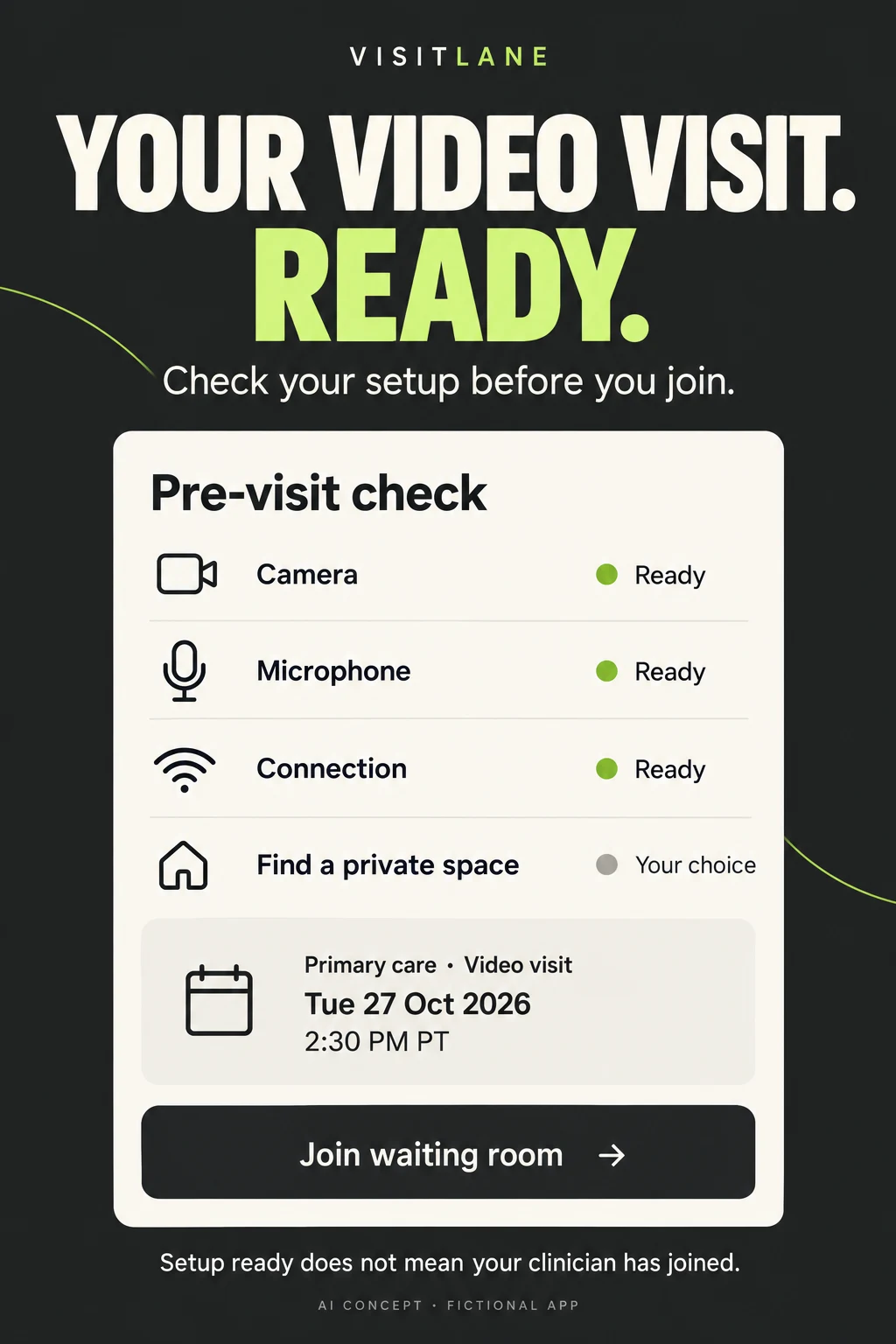
These two VisitLane artworks are original AI concepts for a fictional app. They are not competitor screenshots, a shipped interface, an actual fee quote or evidence of conversion improvement. The first explains appointment cost. The second explains technical preparation. They are intentionally different tasks, not two decorative versions of a video-call photo.
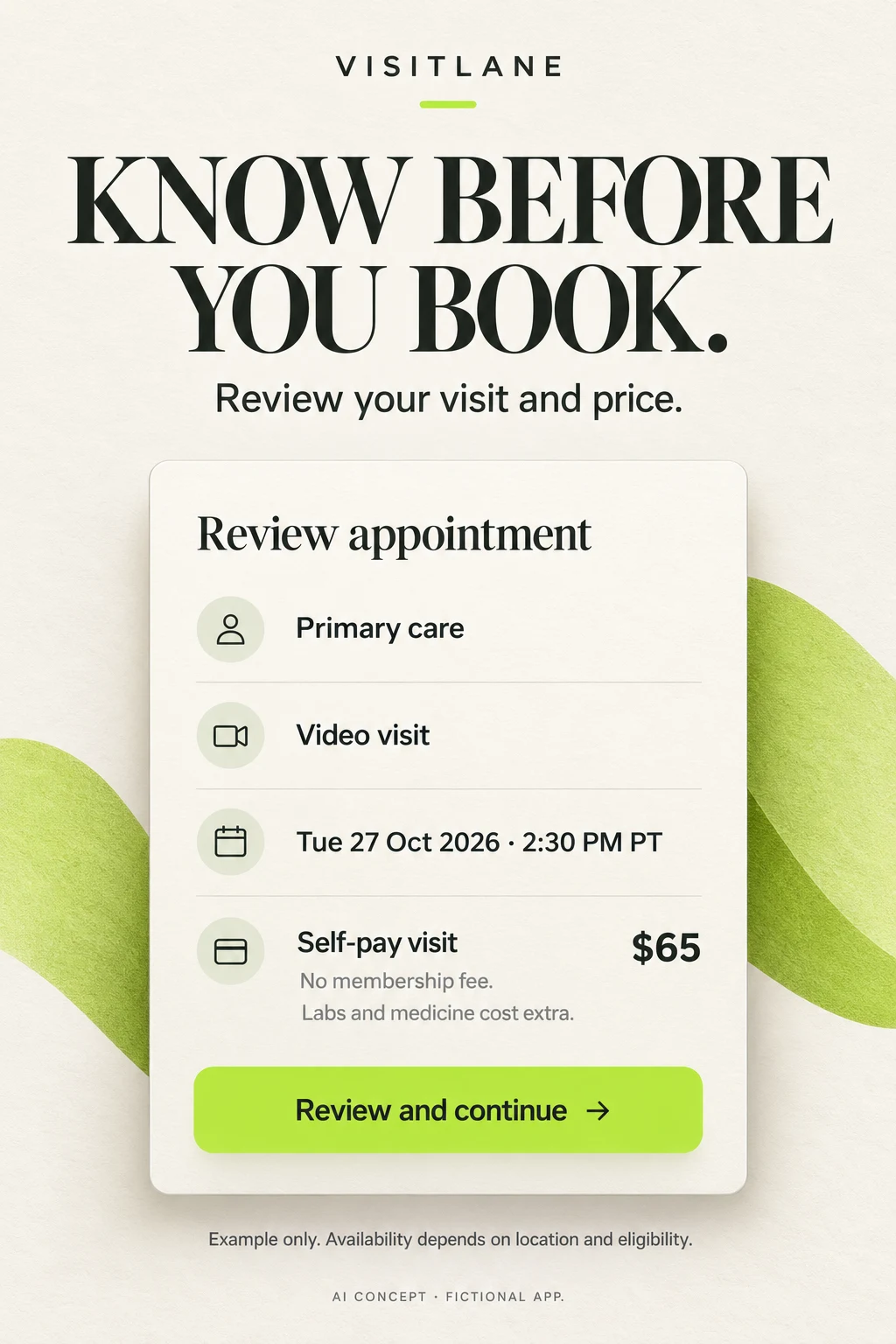
Swipe horizontally to compare all columns →
| Workshop step | Approved input | Useful prompt direction | Human review |
|---|---|---|---|
| Choose the service | Actual service model and eligible market | Explain one scheduled video visit, not universal access | Service and location claims match operations |
| Show price | Approved pricing structure and example account | Separate visit charge, membership and extras | Amount due versus estimate; all relevant fees |
| Clarify access | Real calendar and location workflow | Show one readable eligible appointment and its time zone | No invented slots or guaranteed wait time |
| Explain preparation | Actual device-test states | Separate technical readiness from waiting and clinician presence | States and fallback behavior match implementation |
| Rewrite pharmacy copy | Approved consultation and fulfillment workflow | Describe evaluation before any possible prescription | No treatment or prescribing guarantee |
| Plan the test | Current control and one hypothesis | Compare price review with the present opening | Comprehension plus eligible booking; no invented lift |
Concept A critique: The date, format and self-pay amount are easy to find, and extra charges are separated. The $65 is fictional. A production review also needs the actual clinician or selection state, relevant cancellation terms and a precise distinction between an estimate and a final charge. The decorative lime shapes do not provide product evidence. Test whether the smaller extra-cost text remains readable at store size.
Concept B critique: The technical checks are legible and separate from finding a private space. The caption correctly distinguishes setup from clinician presence. However, the oversized “ready” message could still imply the visit is immediately available. Test comprehension; if needed, lead with “Check your connection” and make the waiting state more prominent. Only show green states after real tests have passed.
A coherent design system still needs a human: The generator used different headline type styles and brand lettering between the two images. They are separate concept directions, not an approved final screenshot set. Choose one typography and wordmark treatment before production. Replace every fictional state with reviewed product UI, check contrast and translations, then test one revised opener against the current control.
Test order: First ask people to explain the visit fee, possible extras, appointment time and meaning of readiness. Correct misunderstandings. Then run an appropriate store experiment with stable remaining panels and a predefined analysis plan. Track eligible bookings and cancellations alongside store conversion. A prettier image is not a successful experiment by itself.
TELEHEALTH APP ASO
A release checklist for the visit your listing actually sells.
Swipe horizontally to compare all columns →
| Release area | Telehealth-specific verification |
|---|---|
| Service scope | Actual visit type, patient age, location and clinical entity; distinguish urgent nonemergency, scheduled and asynchronous routes |
| Payment | Covered service versus accepted insurer; actual benefit check; membership billing; visit fee; possible separate charges |
| Availability | Local date and time zone, actual clinician supply, queue state and rescheduling rules |
| Language | Interface language, clinician language and interpreter access verified separately; no invented translation of unavailable services |
| Creative | Large readable service, price and action; no unsupported prescription or immediate-care promise; neutral demonstration data |
| Joining | Device and connection requirements, waiting state, accessibility and real support route |
| After the call | Actual notes, messaging entitlement, response expectations and follow-up options; no implied continuous monitoring |
| Measurement | Declared denominators and attribution windows; new versus returning users; privacy-reviewed aggregate events |
| Experiment | One hypothesis, stable control, maximum spend if later authorized, minimum evidence, stop rule and rollback |
| Ongoing review | Recheck source listings, service availability, eligibility, pricing and platform rules before reusing an asset |
Localize the service, not just the headline. Use market prioritization, local keyword research, screenshot adaptation and localization QA. A translated interface does not create a local clinician network or insurance arrangement.
For adjacent workflows, the symptom-tracking guide explains records for appointments, while the medication-reminder guide separates reminders from clinical decisions. Use the women’s-health guide when a genuine specialist service needs a distinct audience and message.
Start an ASO audit with one real service and booking journey. Connect research, metadata, creative and measurement through ASO services. More keywords cannot solve an unclear price or an unavailable appointment.
Research limits: US iOS public listings and screenshot assets, with official iOS and Google Play guidance. No Android competitor screenshot audit, in-app clinical verification, independent pricing or insurance audit, privacy certification, measured search volume or conversion results. This report evaluates store communication; it does not rank medical providers or recommend treatment.
- DEVICECamera, microphone and connection checked
- PERSONPatient knows the time and how to join
- WAITINGThe room may open before the clinician arrives
- BOUNDARYTechnical readiness is not clinical assessment