ASOPROFESSIONALLET’S TALK ↗

HEALTH / WOMEN’S HEALTH

ASO FOR
WOMEN’S HEALTH APPS.

A period journal, a pregnancy guide and a menopause report answer different searches. Make the first screenshot prove the right promise.

FIND YOUR POSITIONING ↓
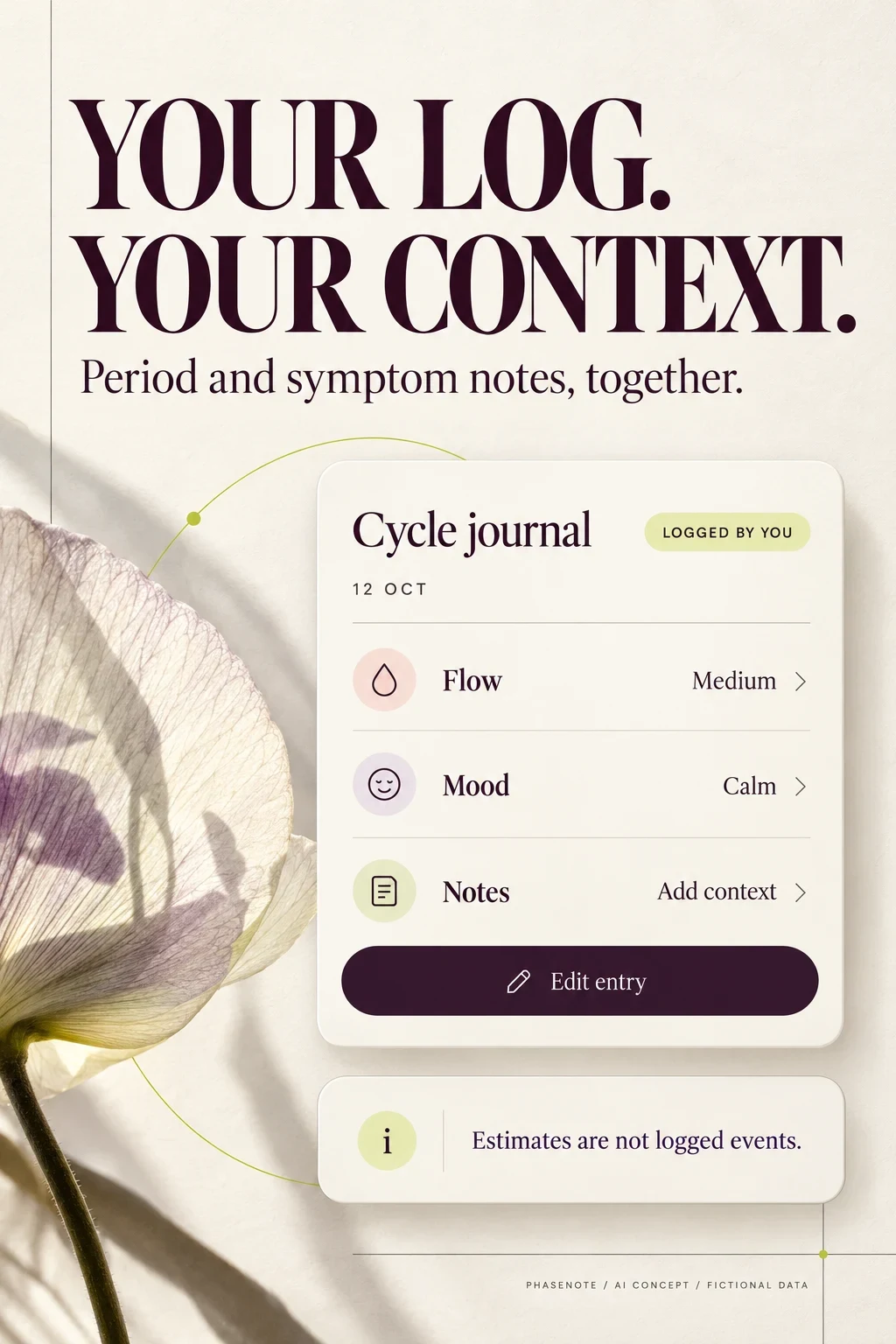
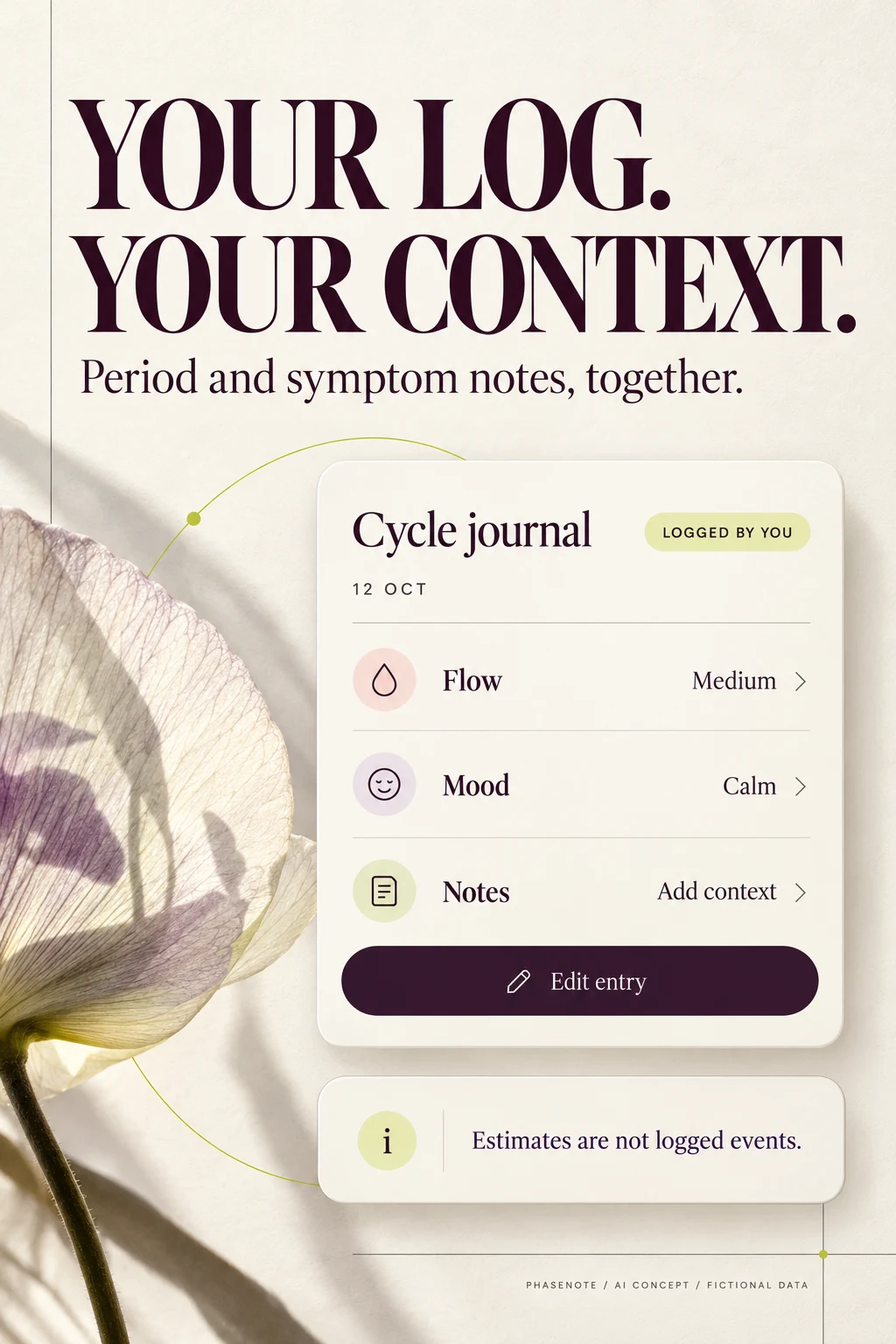
Fictional PhaseNote cycle journal creative showing one dated editable entry
AI CONCEPT · A CLEAR RECORD, A CLEAR PROMISE.

WOMEN’S HEALTH APP ASO

One category. Several completely different reasons to install.

“Women’s health” is a category, not a single search intent. A person looking for a period calendar may not want pregnancy messaging. Someone searching for menopause support needs a different opening from someone comparing fertility charting. Start with the task and actual product mode. This guide covers store positioning, metadata, screenshots and acquisition; it does not recommend health products or treatment.

Potential audiences · 100 keywords · Eight competitors · Screenshot analysis · Worked copy · Apple Ads · AI workshop

Swipe horizontally to compare all columns →

Illustrative editorial review
SubcategoryThe store page must explainStrong opening proofAvoid confusing it with
Period and cycle recordsWhat can be logged and correctedA dated entry and clear historyA diagnosis or reliable contraception
Conception planningSupported observations, estimates and intended useInput method and clearly labeled outputGuaranteed conception or pregnancy prevention
Contraceptive softwareExact eligible product, requirements and authorized useNamed mode with relevant limitationsA generic period-prediction calendar
Pregnancy educationWhich week-specific information and tools are availableEditable week view and useful planning taskAn individual scan or clinical assessment
Postpartum supportSupported records, mode changes and prompt controlsA voluntary check-in or question recordAn assumed goal to resume conception tracking
Perimenopause and menopauseEducation, symptom history and appointment preparationA bounded report with missing entries visibleAutomatic diagnosis or a treatment recommendation
Choose the job before the life-stage label
  1. QUERYIs the search about a record, a prediction or support?
  2. PRODUCTSelect the actual mode that serves that need
  3. PROOFShow a real task from that mode
  4. BOUNDARYState what the mode does not establish

Choose one primary story for the default listing. A broader app can support separate custom product pages for meaningful intents where the platform supports them. That does not justify six contradictory promises in one opening frame. The health-app ASO guide helps compare this category with adjacent health products.

WOMEN’S HEALTH APP ASO

Research the purpose behind the demographic.

These are potential research segments, not measured demographic shares. Recruit across age, tracking experience, language, accessibility needs, device, life stage and comfort with sharing. Age can help balance a study; it cannot tell you whether someone wants pregnancy, has a condition or identifies with a particular label. “Women’s health” is the editorial category name; product copy should respect the people the app actually serves.

Swipe horizontally to compare all columns →

Illustrative editorial review
Potential audienceMotivationSample considerationsQuestion to testCreative proof
People learning to record their cyclesSimple vocabulary, discreet reminders and a record they can correctAge-appropriate adult research first; evaluate any youth audience separately against actual eligibilityCan they explain logged dates versus estimates?One editable entry and a clear legend
Adults tracking periods without a pregnancy goalPlanning and remembering, without conception-led messagingDifferent ages, relationship situations, languages and prior tracking habitsDoes the listing wrongly assume everyone wants pregnancy?Period log, history and optional reminders
People with variable cyclesKeep the actual record visible when estimates changeRecruit by self-described needs, not inferred diagnosesCan they find missing data and understand uncertainty?Recorded dates beside clearly labeled estimates
Adults trying to conceiveUnderstand supported observations and planning toolsDifferent experience levels, devices and routes to conceptionWhich inputs are supported and what does the output mean?Input method, intended use and limits
People seeking contraceptive softwareUnderstand an eligible regulated product and its requirementsOnly the actual eligible population and authorized marketsDo users understand the mode and required behavior?Exact intended use and accessible instructions
Pregnant users and invited partnersFollow a week, prepare questions and organize plansFirst and subsequent pregnancies; solo and shared useWhich parts are educational and which come from the user?Week label, editable date and planning tools
Postpartum usersRecord changing routines without an assumed next fertility goalDifferent recovery experiences, feeding choices and support accessCan users change modes or pause unwanted prompts?Voluntary mode switch and control over notifications
People exploring perimenopause supportBring dated symptoms and questions to a conversationVary age and experience; do not assign a life stage from age aloneCan a user explain what the report does and does not conclude?Date range, missing entries and report preview
Menopause-focused usersEducation, records and practical support without a cycle-first screenDifferent devices, accessibility needs and content preferencesIs the first screen useful when period prediction is irrelevant?Symptom journal or appointment brief
People prioritizing privacy and inclusive languageUnderstand control over intimate records and sharingShared phones, differing identities, locales and comfort with trackingCan people identify recipients, storage and deletion choices?Actual sharing and data controls, not an unexplained shield

Use a short comprehension study before a conversion test. Show one opening frame and ask: What is this app for? What information did the user enter? What did the app estimate? What happens next? Then ask what would stop the person from trying it. A participant who expects a diagnosis from a journal screenshot has exposed a messaging problem, even if they say they would install.

For a small first study, deliberately contrast new and experienced trackers, personal-only and shared use, and cycle-first versus menopause-first needs. This is qualitative learning, not a population survey. Use consented recruitment and avoid collecting intimate information you do not need. Translate the findings into search intent and a focused value proposition.

Separate what was logged from what was estimated
  1. RECORDEDA user entered a date, symptom or measurement
  2. ESTIMATEDAn algorithm produced an estimate from inputs
  3. EXPLAINEDLabels and limits make the distinction visible
  4. TESTEDAsk users what they believe the screen tells them

WOMEN’S HEALTH APP ASO

100 candidates, organized by the job they promise.

The 100 phrases below are distinct research candidates, not a ranking of demand. Some are likely broad store searches; others are narrow language probes that may have little measurable volume. They do not all belong in one app’s metadata. Each cluster has a feature requirement, and unsupported intent must be rejected before targeting.

Period records

period tracker · period calendar · menstrual cycle tracker · menstrual calendar · period diary · cycle journal · period log app · period history tracker · menstruation tracker · period start date tracker

Required product support: Editable period dates and clear history.

Variable cycles and symptoms

irregular period tracker · variable cycle tracker · period symptom tracker · cycle symptom diary · PMS tracker · cramp tracker · period pain diary · period flow tracker · spotting tracker · cycle length history

Required product support: Supported records with qualified estimates; no implied diagnosis.

Conception planning

ovulation tracker · fertility tracker · ovulation calendar · trying to conceive app · fertility charting app · basal body temperature tracker · BBT chart app · LH test log · cervical mucus tracker · ovulation test tracker

Required product support: Verified conception features and intended use; not contraception by implication.

Pregnancy planning and education

pregnancy tracker · pregnancy week by week · pregnancy calendar · due date tracker · pregnancy journal · weekly pregnancy guide · pregnancy appointment planner · pregnancy questions journal · pregnancy milestone tracker · pregnancy checklist app

Required product support: Pregnancy mode with educational content and editable dates.

Postpartum records

postpartum journal · postpartum symptom tracker · postpartum recovery diary · postpartum mood journal · postpartum appointment notes · postpartum period tracker · postpartum sleep diary · postpartum check in app · postpartum questions planner · postpartum wellbeing journal

Required product support: Supported postpartum mode and controllable reminders.

Perimenopause

perimenopause tracker · perimenopause symptom diary · perimenopause journal · perimenopause period tracker · perimenopause sleep tracker · perimenopause mood tracker · perimenopause appointment report · perimenopause symptom log · perimenopause notes app · perimenopause education app

Required product support: Specific education and symptom logging without a diagnostic promise.

Menopause

menopause app · menopause tracker · menopause symptom tracker · menopause diary · hot flash tracker · night sweat diary · menopause sleep journal · menopause appointment planner · menopause symptom report · menopause education

Required product support: Menopause-relevant logging education or report tools.

Records for appointments

cycle report for doctor · period history PDF · symptom diary export · menstrual health report · cycle notes for appointment · period tracker with notes · women health journal · health appointment questions app · cycle log date range · symptom report for appointment

Required product support: Export preview with dates scope and missing-entry handling.

Data control and access

private period tracker · period tracker no account · offline period tracker · period tracker data export · period tracker delete data · discreet period reminders · cycle tracker large text · cycle tracker VoiceOver · period tracker without ads · cycle journal local storage

Required product support: Verify storage account deletion sharing and accessibility claims.

Devices and shared use

period tracker Apple Watch · cycle tracker iPhone · period tracker Android · cycle tracker widget · cycle tracker wearable sync · cycle tracker temperature import · period tracker partner sharing · pregnancy app for partners · cycle tracker sharing controls · period tracker reminder settings

Required product support: Exact device compatibility consent and real supported actions.

Download all 100 keyword candidates, with cluster, feature requirement, market, source/date and decision fields. Start with the keyword research process, expand seed terms, then apply prioritization. Validate demand separately by store and locale.

For the fictional journal example later in this guide, period records and appointment notes are plausible starting clusters. Conception, contraception and pregnancy-monitoring intent are excluded because the example does not have those functions. Device and privacy phrases require implementation evidence. Competitor names can inform research but should not be inserted into organic metadata.

WOMEN’S HEALTH APP ASO

Find a smaller promise you can prove exceptionally well.

Swipe horizontally to compare all columns →

Illustrative editorial review
Narrow angleCandidate phraseWhat the product must proveWhat to investigate
History over predictionperiod tracker for variable cycles with notesActual dates remain visible when estimates changeDo users want a record, a forecast or both?
Appointment preparationperimenopause symptom report for appointmentRange, logged coverage and editable exportDoes the output help organize questions without diagnosing?
Discreet personal useperiod journal without an accountVerified account and storage behaviorWhat still needs connectivity or backup?
Data portabilityperiod history PDF with date rangeActual export fields and previewCan users remove details they do not want to share?
Partner controlpregnancy app with optional partner sharingInvitation, field scope and access controlsCan the primary user explain what a partner sees?
Measurement inputBBT chart app with wearable importExact supported device, unit and sync behaviorCan users distinguish imported readings from estimates?
Non-cycle menopause usemenopause sleep and symptom journalUseful record without a fertility-focused home screenDoes the opener fit the intended use?
Accessible loggingperiod tracker with large text and VoiceOverVerified controls and spoken labelsCan users create, review and correct an entry?
Postpartum transitionpostpartum journal with reminder controlsVoluntary mode change and notification choicesCan users stop irrelevant prompts?
Pregnancy planning toolpregnancy questions journal by weekEditable week and user-authored questionsIs the practical tool clearer than generic reassurance?

A narrow phrase becomes an opportunity only when relevance, demand, creative proof and economics align. A longer query is not automatically easier to rank for. Use long-tail research to investigate these angles, and relevance checks to reject misleading fits. Do not build repetitive pages for minor word changes.

WOMEN’S HEALTH APP ASO

Eight verified competitors with different positioning choices.

These eight US App Store products were checked on 27 October 2026 using Apple’s listing pages and lookup feed. They span meaningful parts of the category, not a claimed top-eight ranking. This is an iOS listing review; Android guidance below comes from official platform documents. Publisher feature statements are not an in-app test, privacy audit or clinical evaluation.

Swipe horizontally to compare all columns →

Illustrative editorial review
App / primary sourceListed developerCurrent iOS titleSubtitle or supporting line shownWhat the app promises
FloFLO HEALTH UK LIMITEDFlo Cycle & Period TrackerOvulation & Pregnancy CalendarA broad cycle product with pregnancy and perimenopause modes, symptom records and optional partner access.
ClueBioWink GmbHClue Period & Cycle TrackerOvulation & Fertility CalendarCycle records, estimates, conception planning and other life-stage modes, with reports and education.
StardustStardust App LLCStardust Period TrackerTrack your cycle or pregnancyCombines cycle and pregnancy features with social connections, moon-related content and folklore.
OviaOvuline, Inc.Ovia Cycle & Pregnancy TrackerFertility, Ovulation, & PeriodSpans cycle records, conception, pregnancy, postpartum and menopause; some support depends on employer or health-plan access.
Pregnancy+Philips Digital UK LimitedPregnancy + | Tracker AppPregnant? Join over 80m moms!Weekly pregnancy education, illustrative development models, practical planning tools and community features.
Natural CyclesNaturalCycles Nordic ABNatural Cycles: Fertility AppOvulation Tracker・FDA-clearedDifferent modes cover contraception, conception planning and other stages, using supported temperature inputs.
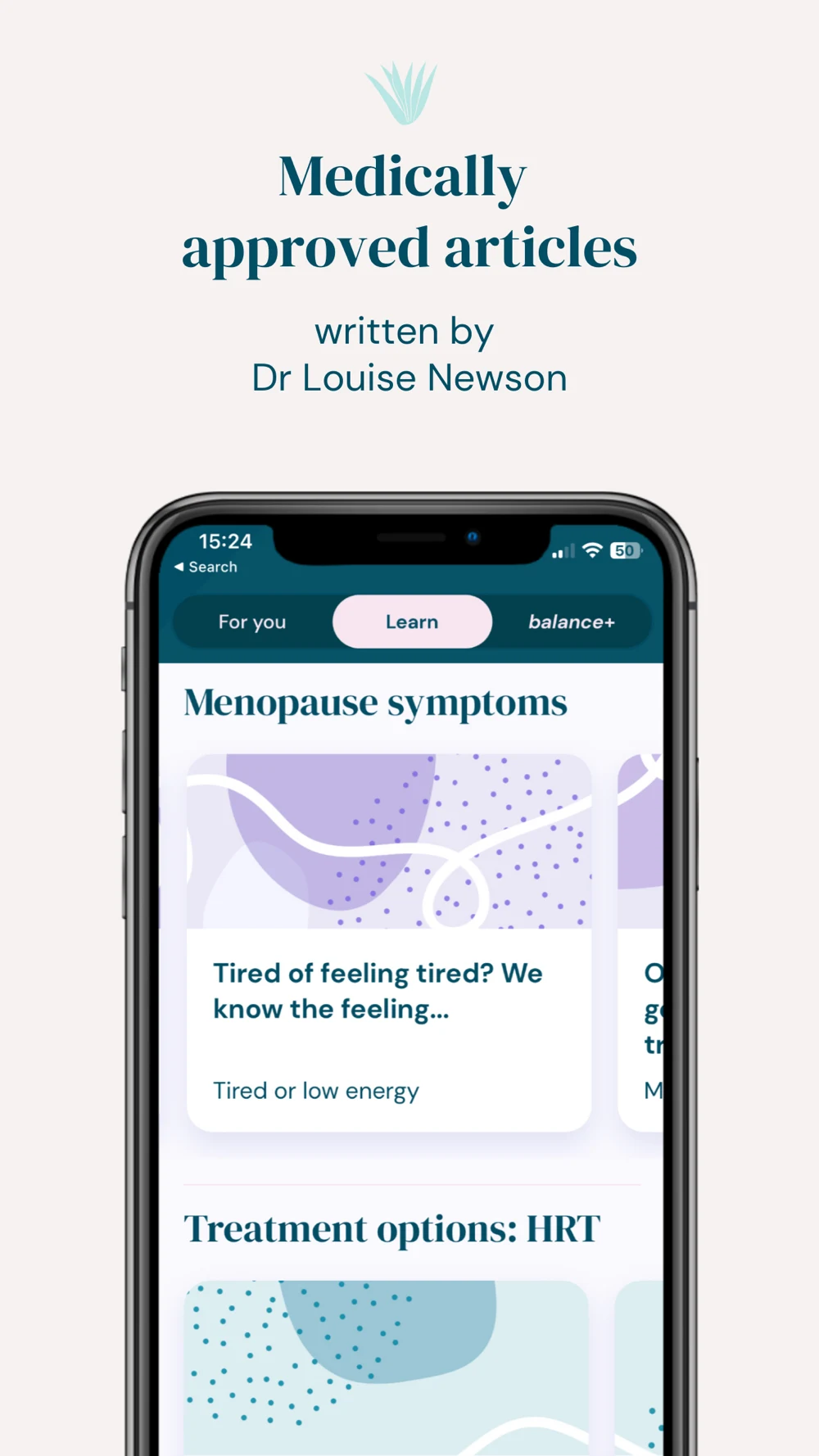
BalanceBalance App LimitedBalance - Menopause & HormonesBy Dr Louise NewsonMenopause and perimenopause education, symptom records, appointment reports and paid wellbeing content.
WomanLog ProPro Active App SIAWomanLog Pro CalendarHealth & Fitness — category line shown; distinct subtitle not confirmedA paid calendar edition with cycle and symptom records, reminders, charts, exports and additional modes.

Pregnancy+ includes a publisher popularity claim in its subtitle; it is reproduced as listing text, not independently verified. WomanLog Pro shows a category line where other listings show a subtitle, so no distinct subtitle is asserted. The paid Pro edition is the researched product. Regulatory language in a title applies to the named product and intended use; it cannot be transferred to another app.

Swipe horizontally to compare all columns →

Illustrative editorial review
AppWhat you can learn
FloChoose a mode before choosing an opening screenshot. A broad product does not need to explain every life stage at once.
ClueThe visible mode label helps explain which experience is being sold. Keep estimates distinct from recorded events.
StardustA distinctive voice can attract a specific audience. Keep entertainment content separate from evidence for medical or prediction claims.
OviaSeparate public features from benefit-dependent services. A coaching screenshot must explain who can actually use it.
Pregnancy+A week-specific interface identifies the product quickly. Make educational illustrations distinct from an individual scan.
Natural CyclesProduct mode, intended use, device requirements and market authorization are part of positioning—not fine-print decoration.
BalanceAppointment preparation is a different promise from period prediction. Show the useful record, not just expertise badges.
WomanLog ProName the edition and paid entitlements. Logging flexibility can be a credible distinction without predicting a health outcome.

Keep the numeric App Store identity, edition, country and capture date in your competitor research. Recheck titles and entitlements before using this comparison in a launch brief. A broad product’s description can mention a service that is unavailable to a new user in your target market.

WOMEN’S HEALTH APP ASO

The platform field is small. The product claim still matters.

Swipe horizontally to compare all columns →

Illustrative editorial review
DecisioniOSGoogle PlayCategory consequence
Product name30-character name30-character titleName the actual journal, tracker or support tool
Supporting metadata30-character subtitle; 100-character keyword field80-character short description; 4,000-character full descriptionDistribute intent naturally instead of cramming life stages into one line
Creative experimentsProduct Page Optimization for eligible creative treatmentsStore listing experiments for eligible variantsTest one understandable hypothesis with stable comparisons
Intent pagesCustom product pages can tailor creative and supported keyword associationsCustom store listings offer supported targeting optionsMatch a mode to a real feature and market
Health claimsReview medical-function and sensitive-data requirementsHealth declaration and health-content requirements applyA journal, prediction and medical function need different substantiation
Privacy storyActual implementation must support listing statementsActual handling must match data disclosures and policyAn anonymous mode, no account and local-only storage are different claims

Check Apple’s product-page guidance, Product Page Optimization, custom product pages, Google Play field limits, listing experiments and custom listings. Intent-specific pages do not by themselves establish a causal conversion result.

For health functions, review Apple’s review guidelines, Google’s Health Apps declaration and health-content policy. A disclaimer does not make an unsupported function truthful.

Why contraception needs its own positioning: The FDA database records a 2018 De Novo authorization for Natural Cycles as contraceptive software. The publisher’s current support page distinguishes countries where its contraceptive use is available from those where it is intended for fertility monitoring. Those sources establish a product-specific distinction; they do not establish a generic right for period trackers to make contraceptive claims. Check the exact current mode, labeling and market before production. Sources: FDA record and Natural Cycles market explanation.

Apply the detailed iOS name, subtitle, keyword-field, Google Play title and short-description guides to the supported promise.

Match the promise to the product and market
  1. MODEIdentify the exact function being promoted
  2. EVIDENCEVerify product support and any medical claim
  3. LOCALECheck eligibility, availability and authorized use
  4. CREATIVEUse wording and artwork that keep those limits clear

WOMEN’S HEALTH APP ASO

Five screenshot teardowns, with changes worth testing.

These 20 original panels were inspected at readable size. They are the first four iPhone assets returned by Apple’s US lookup feed for each selected app, captured 27 October 2026. Live store layouts and device slots can show different sequences. Claims, numbers and dates inside the artwork belong to the publishers; they are not measured results from this report. Open any panel for the full-size image.

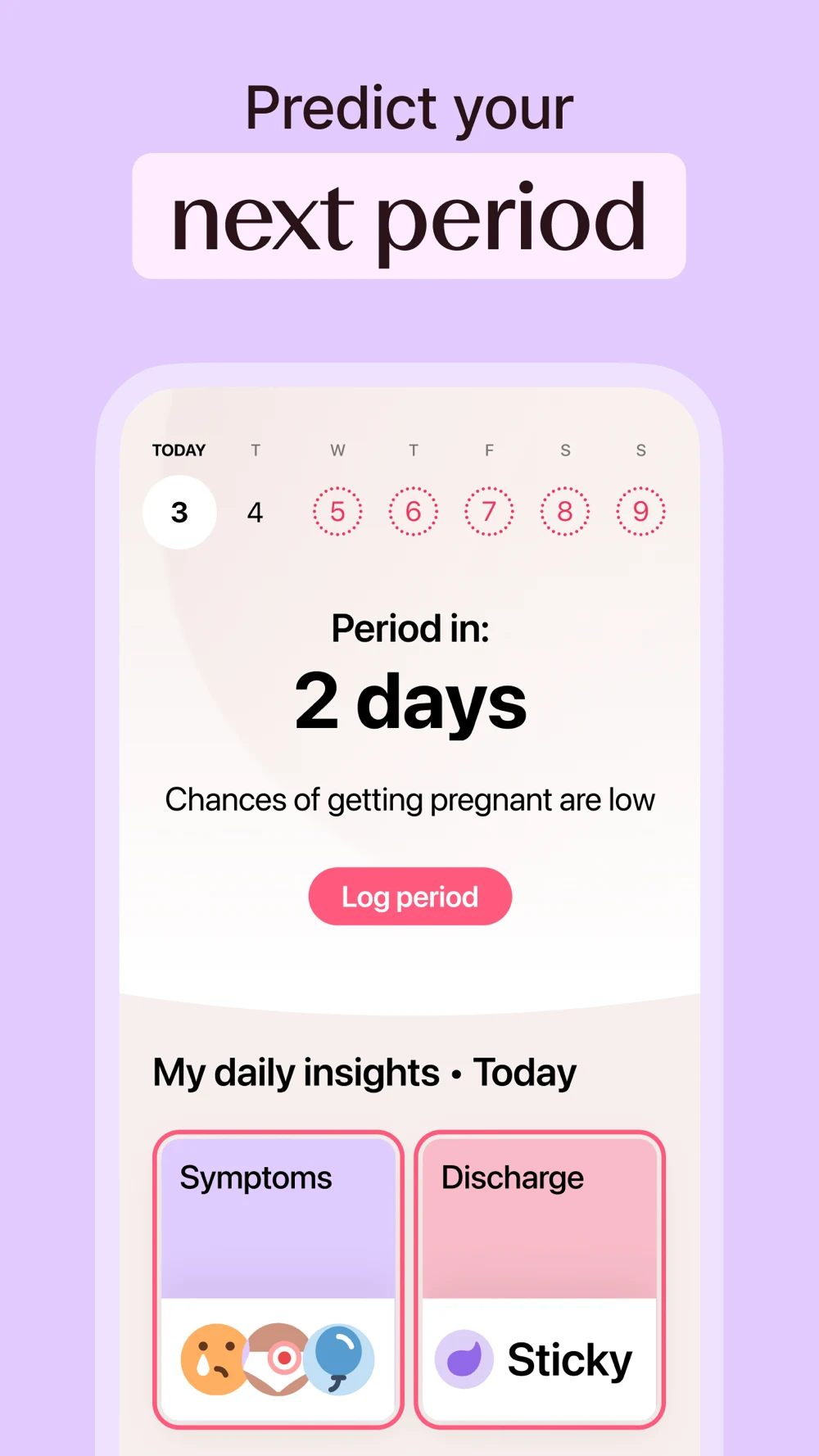
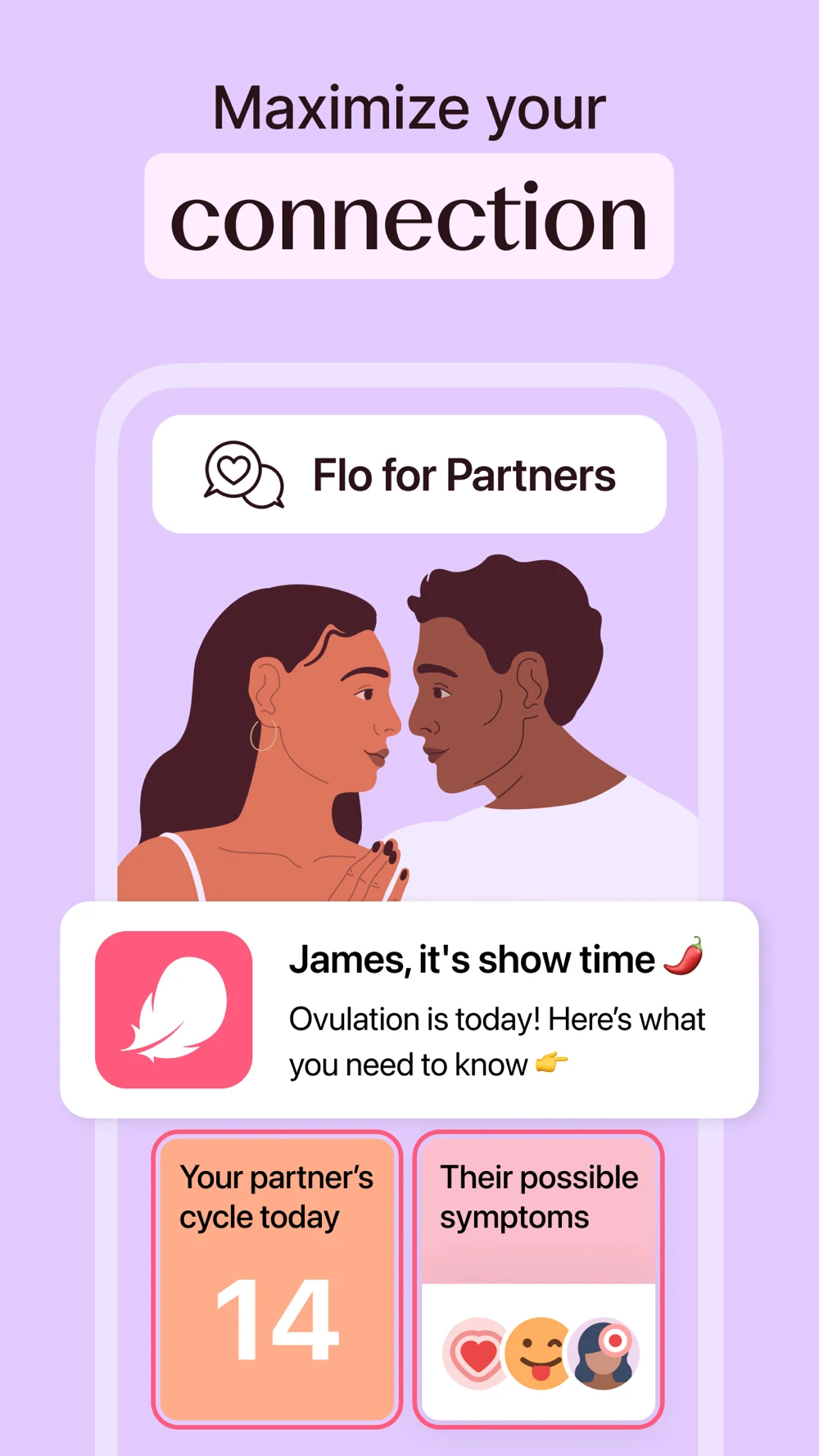
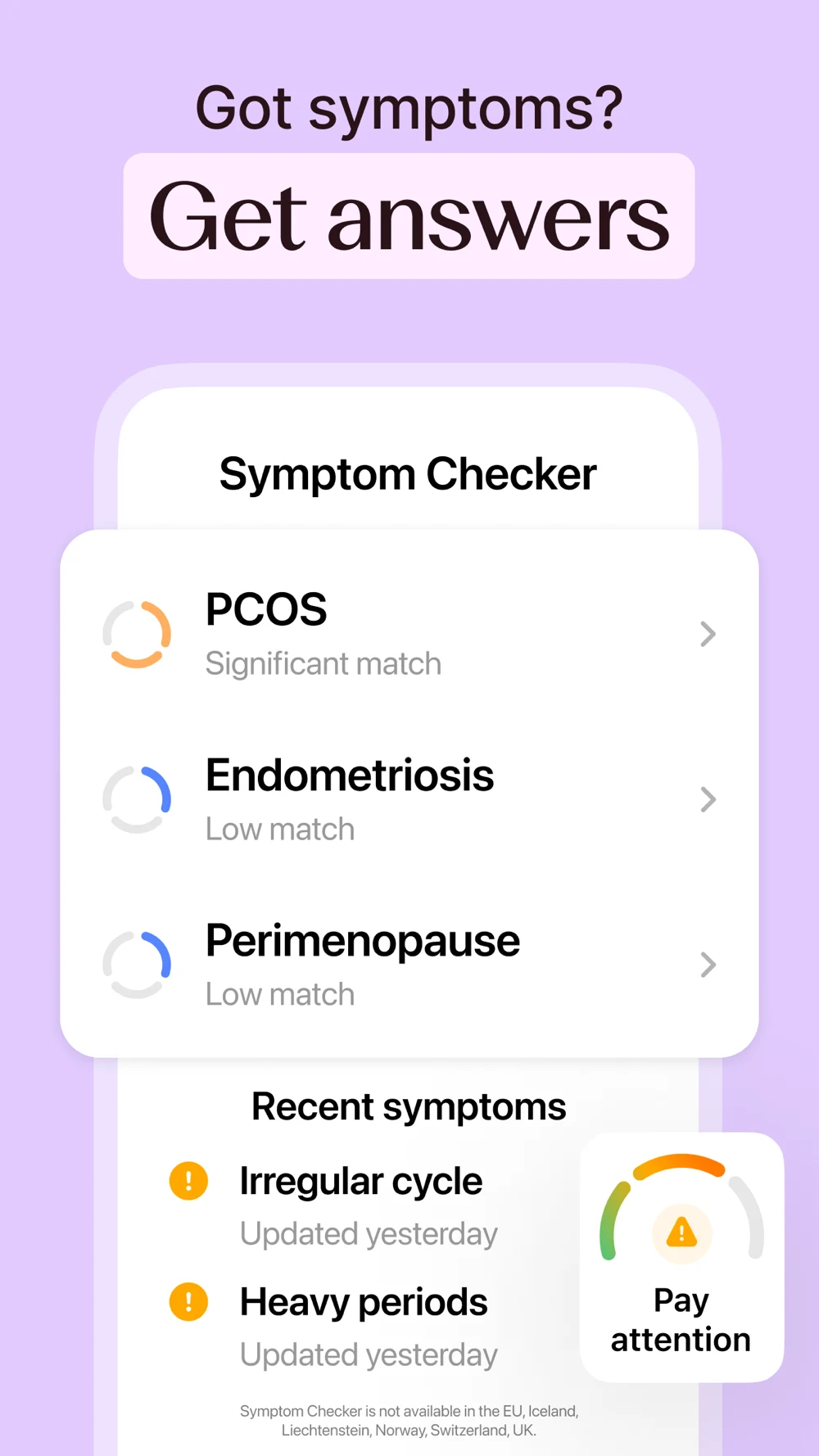
Flo: Large promises need equally clear boundaries.

Source: Flo on the US App Store · captured 27 October 2026.

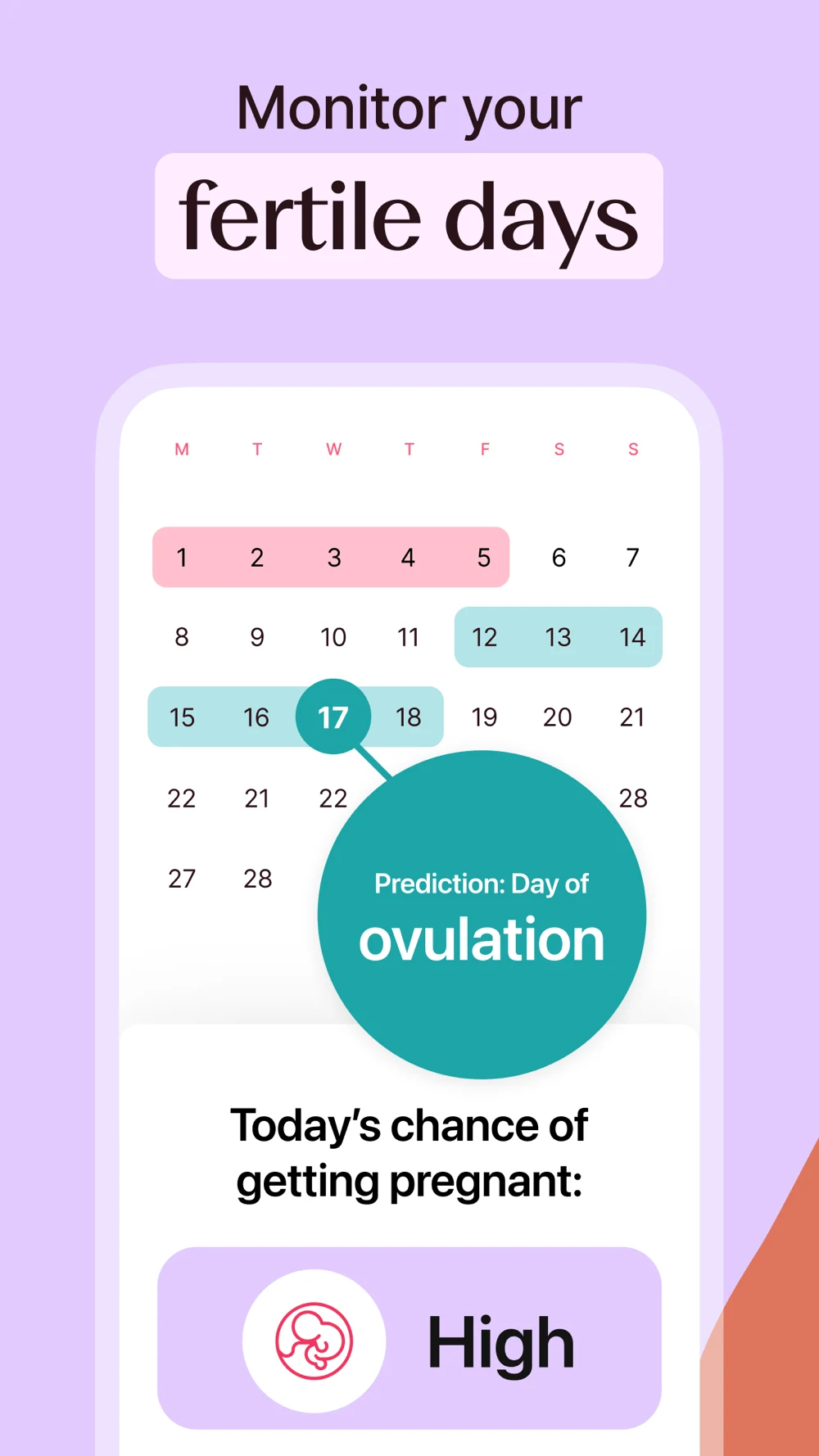
What the screenshots show: The first panel enlarges a period estimate and daily insight cards. The second switches to partner communication and an ovulation notification. The third presents symptom matching with condition labels and a small regional-availability note. The fourth returns to a fertility calendar and pregnancy-chance message. The headings are large, but the sequence moves between personal planning, sharing and condition-related interpretation very quickly.

What I would test: For period-record searches, test a tighter opening sequence: dated record, clearly qualified estimate, then optional insights. For partner searches, show what is shared and how permission works. Make regional exclusions and the meaning of symptom matching readable. Ask whether viewers mistake estimates or matching for confirmed findings; the screenshots alone cannot answer that. These are editorial hypotheses, not performance findings.

Clue: The mode label helps; the prediction language needs to stay consistent.

Source: Clue on the US App Store · captured 27 October 2026.

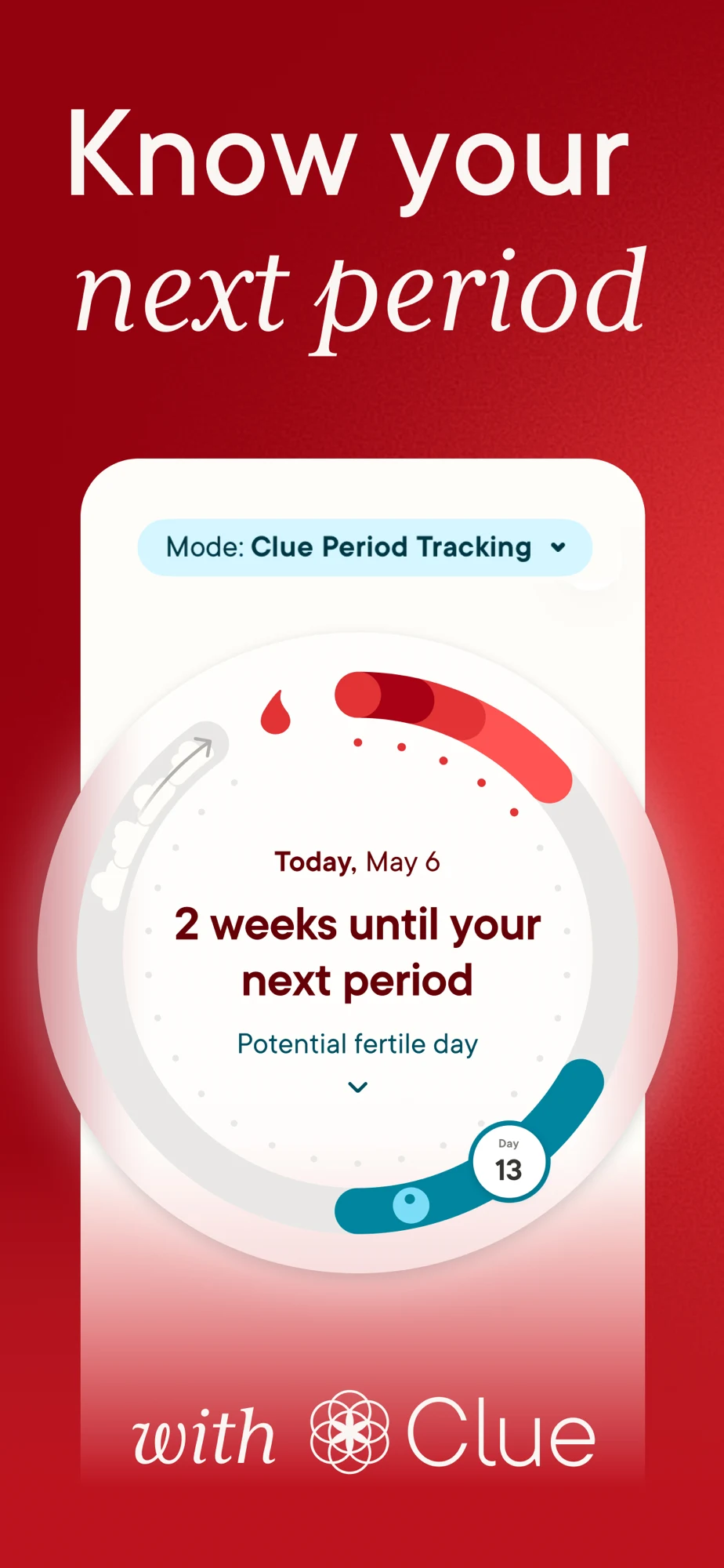
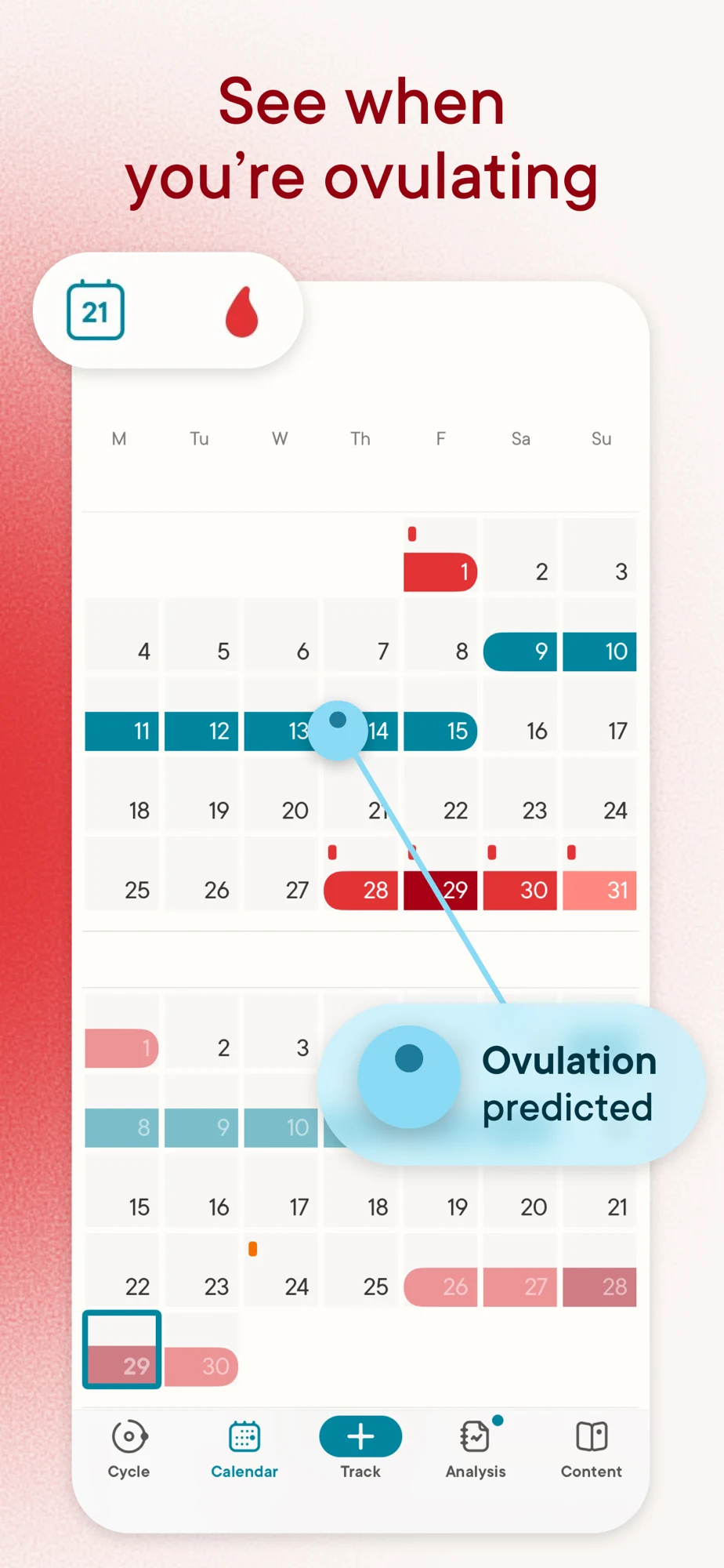
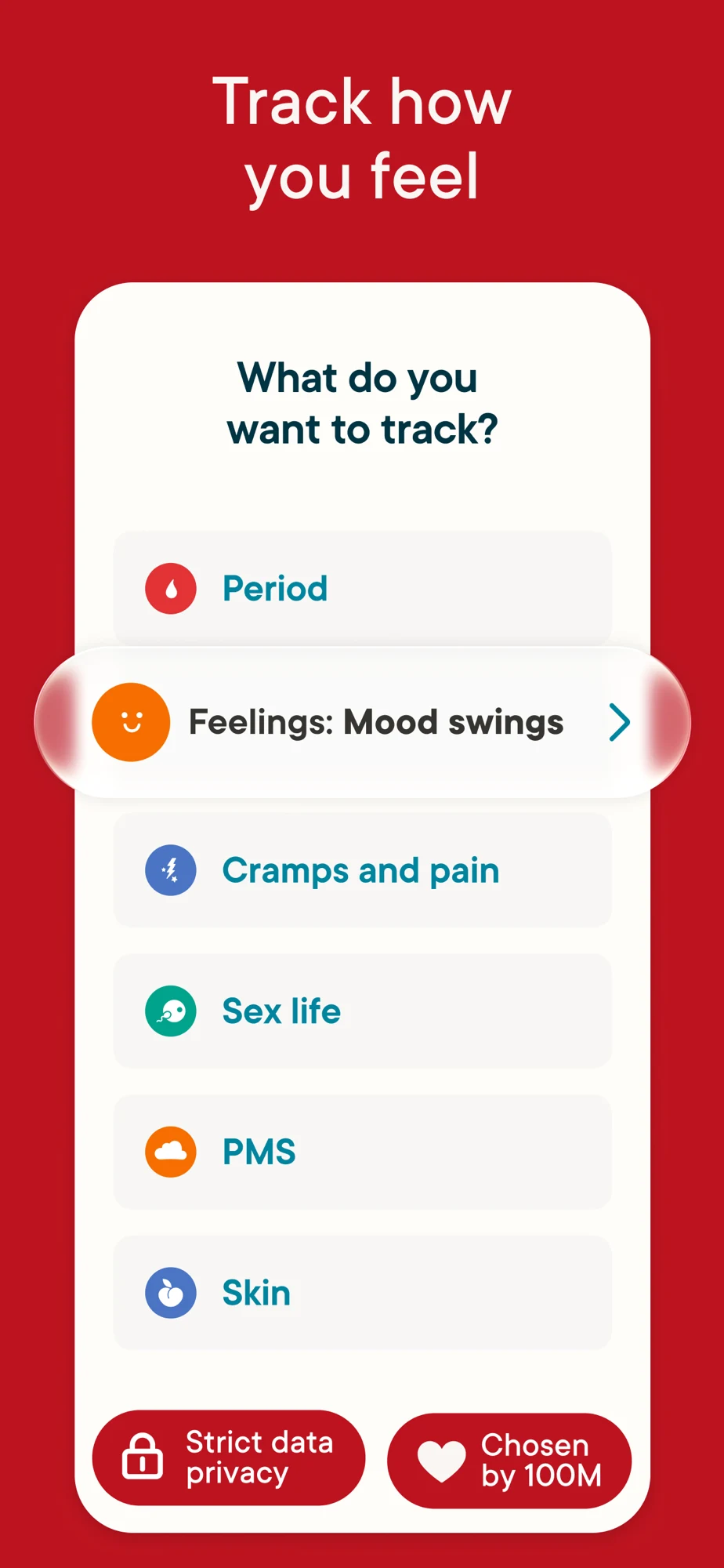
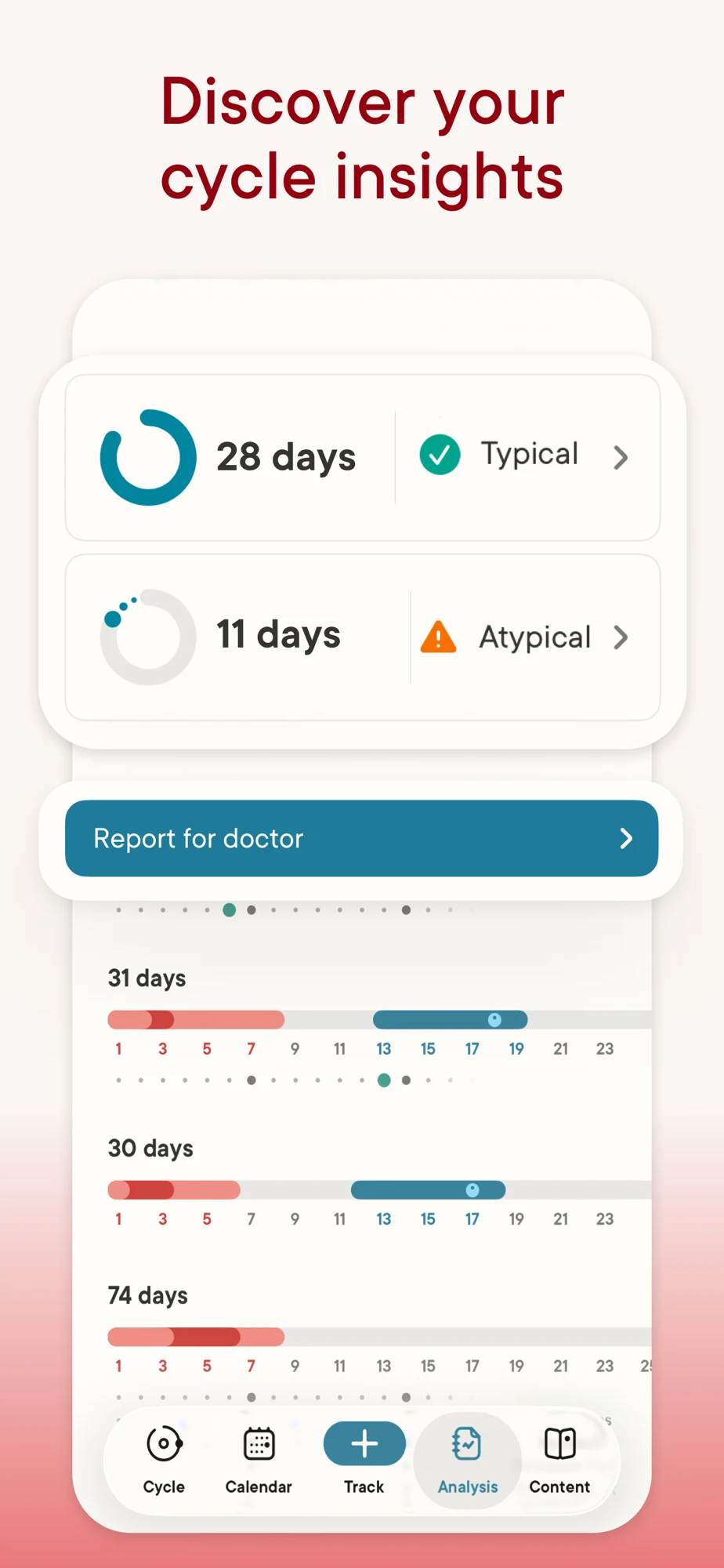
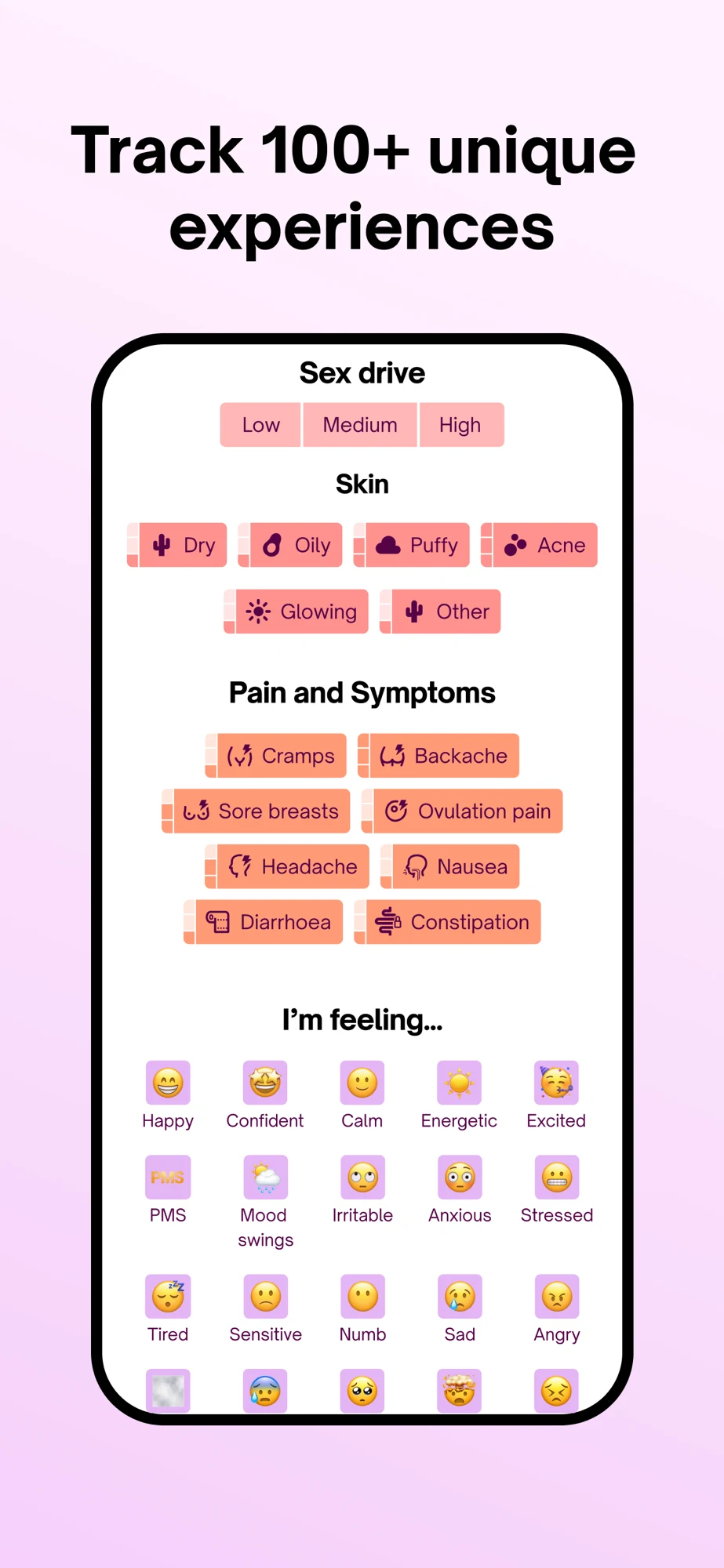
What the screenshots show: The opener visibly names the period-tracking mode and enlarges a cycle wheel. The second pairs a confident ovulation heading with a more qualified prediction callout. The third lists logging categories and places privacy and popularity claims at the bottom. The fourth shows cycle analysis and a report action, including normality-style labels. The cropped cards are readable, but a viewer must distinguish records, estimates and interpretation.

What I would test: Keep the useful mode label. Test consistent estimate wording from headline to callout, then show the report range and recorded coverage. Explain what an unusual-pattern label means rather than letting it look like a diagnosis. A privacy badge should lead to understandable controls and a substantiated explanation. These are editorial hypotheses, not performance findings.

Natural Cycles: A named mode makes the regulatory distinction visible.

Source: Natural Cycles on the US App Store · captured 27 October 2026.

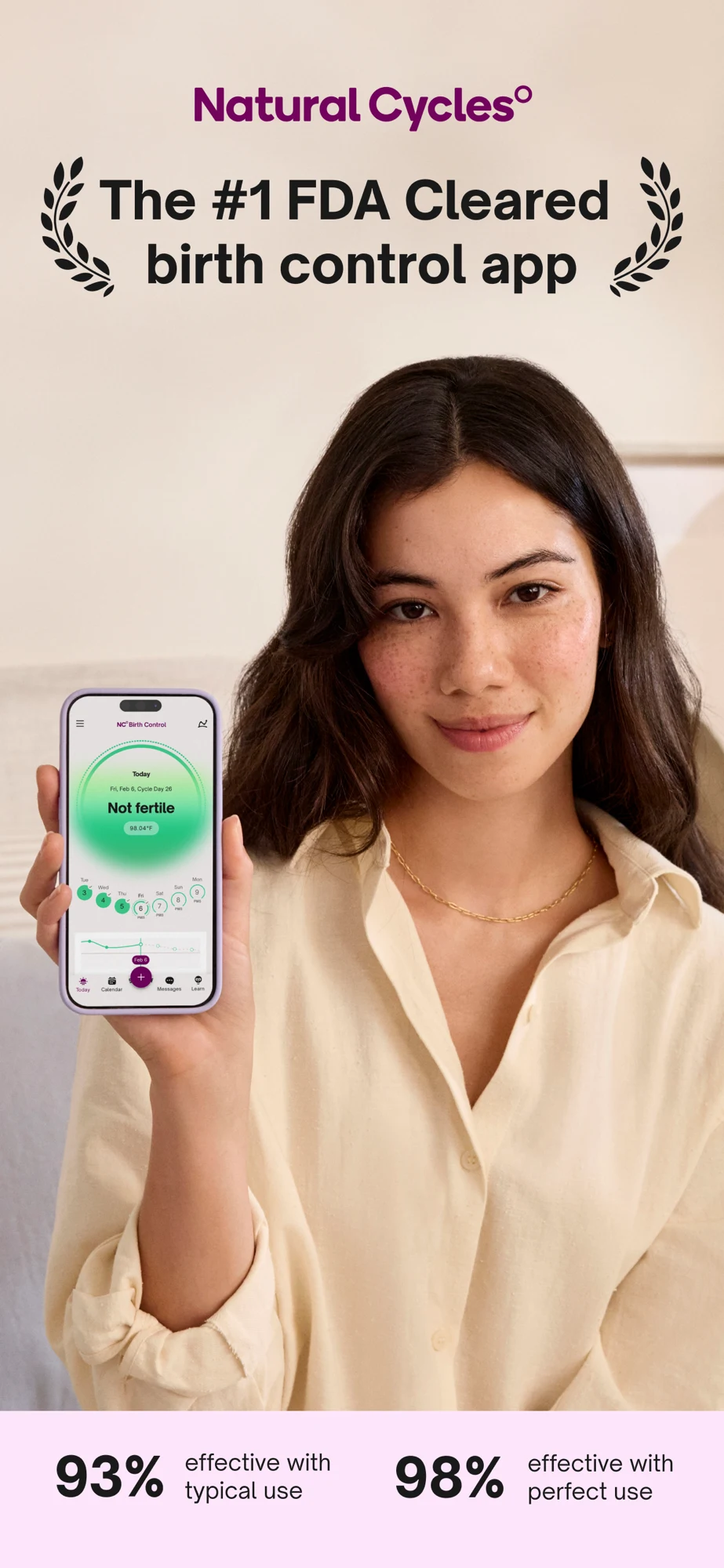
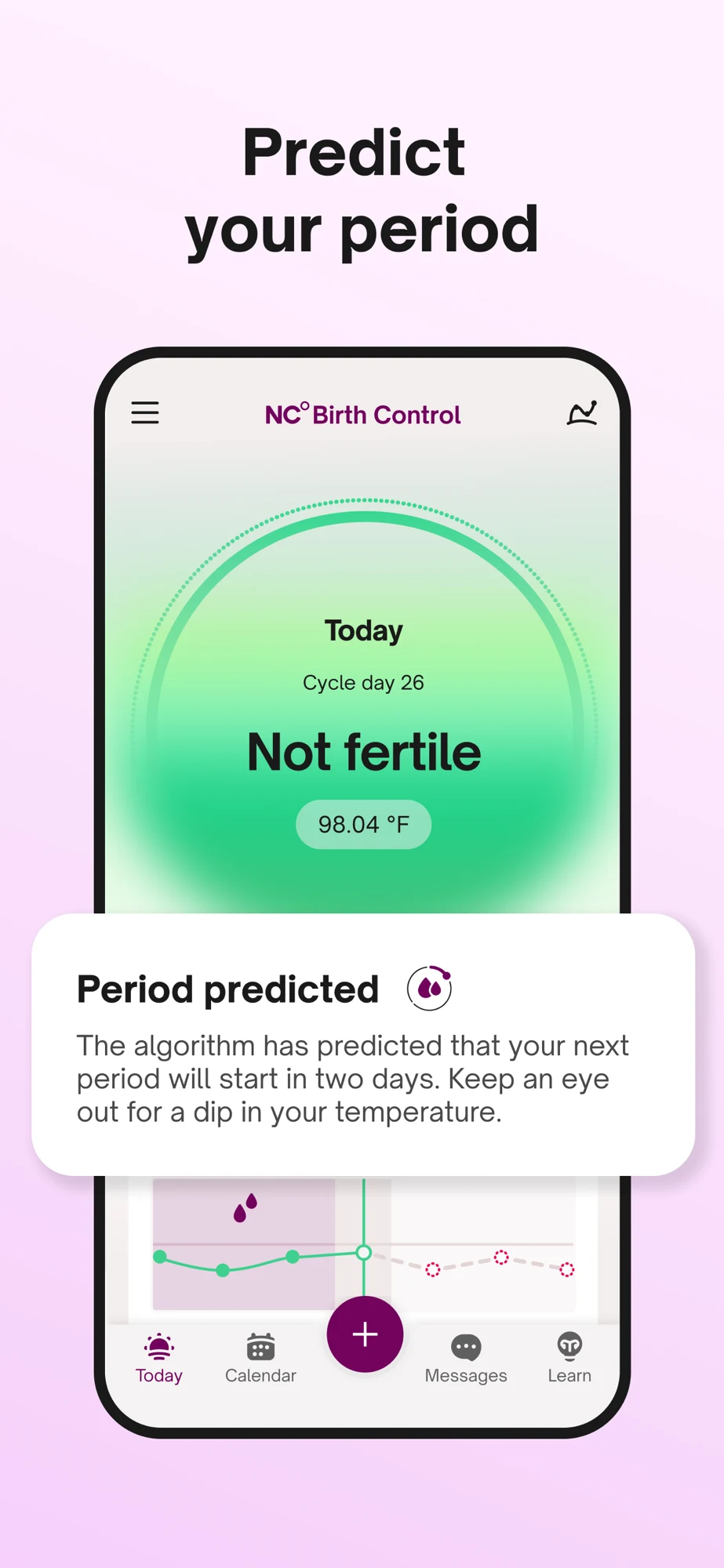
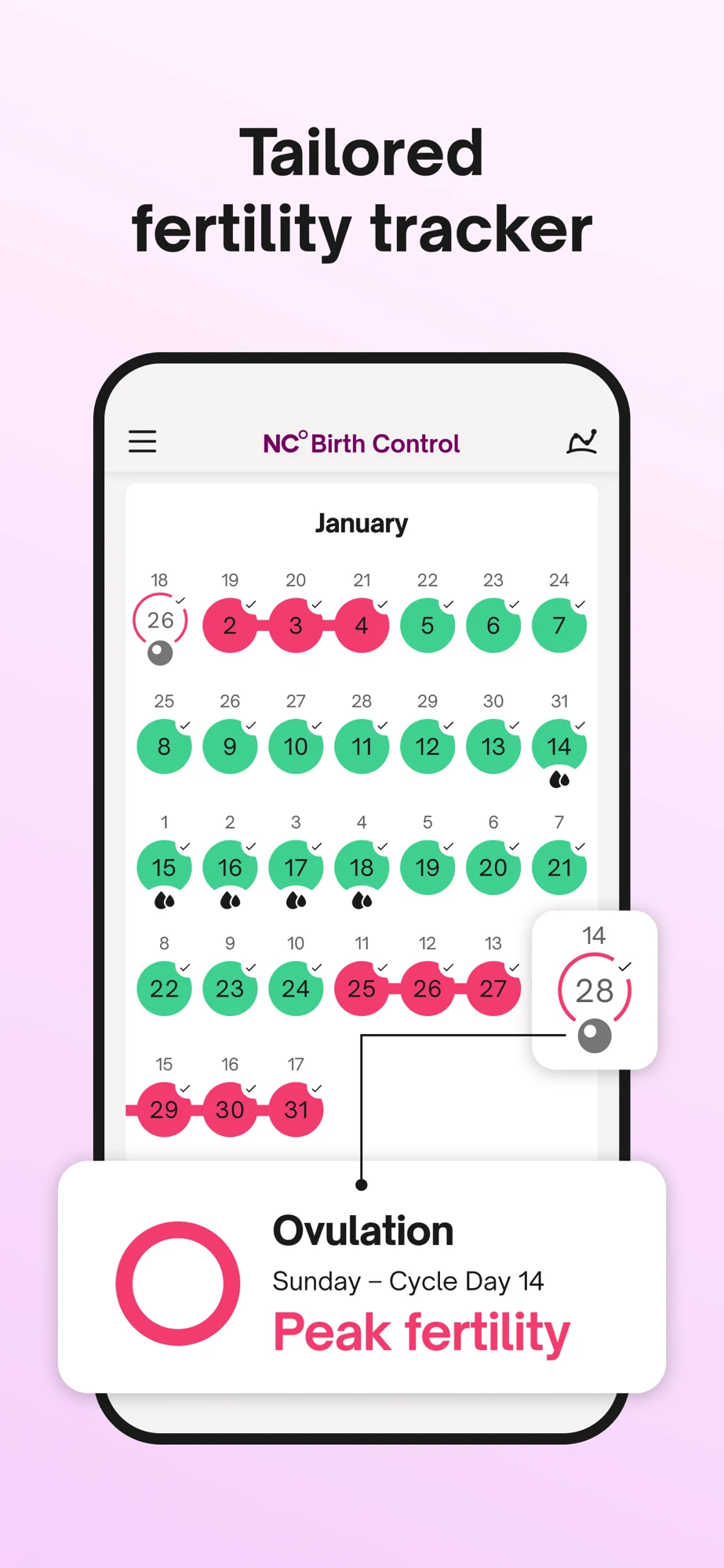
What the screenshots show: The first panel leads with contraceptive positioning, a person holding the app and effectiveness figures. The second enlarges the birth-control mode and a predicted period message. The third shows a fertility calendar and highlighted cycle day. The fourth changes to a dense selection of symptoms and feelings. The mode name is useful; the first phone interface is much smaller than the claim, and the last panel is crowded.

What I would test: For this specific product, test a larger explanation of the supported input-to-result workflow while keeping intended-use and effectiveness qualifications intact. Separate conception-led creative from contraceptive-led creative. Simplify the symptom panel to one readable interaction. Do not borrow this app’s regulatory language, numerical claims or green-day visual for an ordinary journal. These are editorial hypotheses, not performance findings.

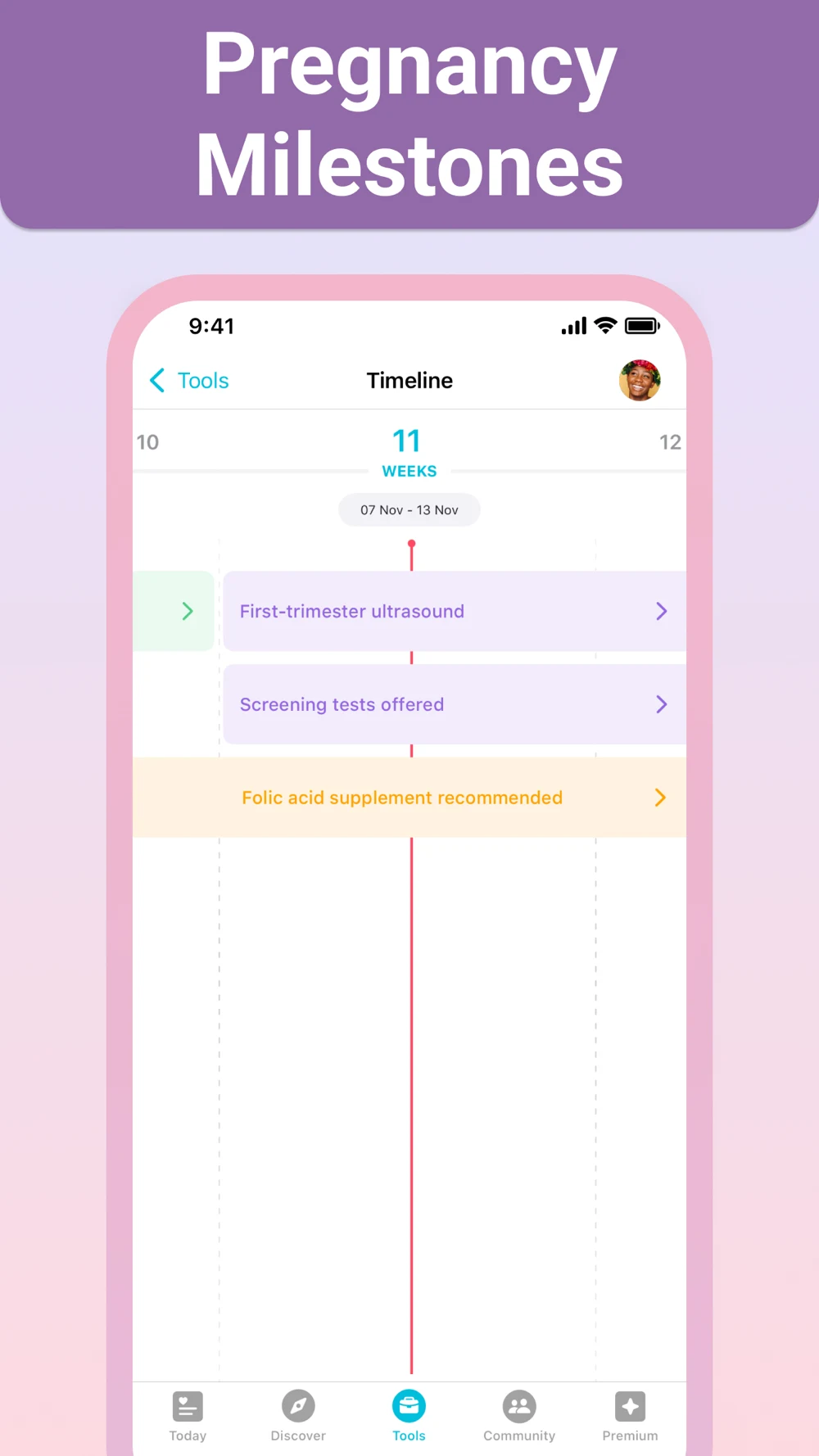
Pregnancy+: The week view proves more than the generic tool heading.

Source: Pregnancy+ on the US App Store · captured 27 October 2026.

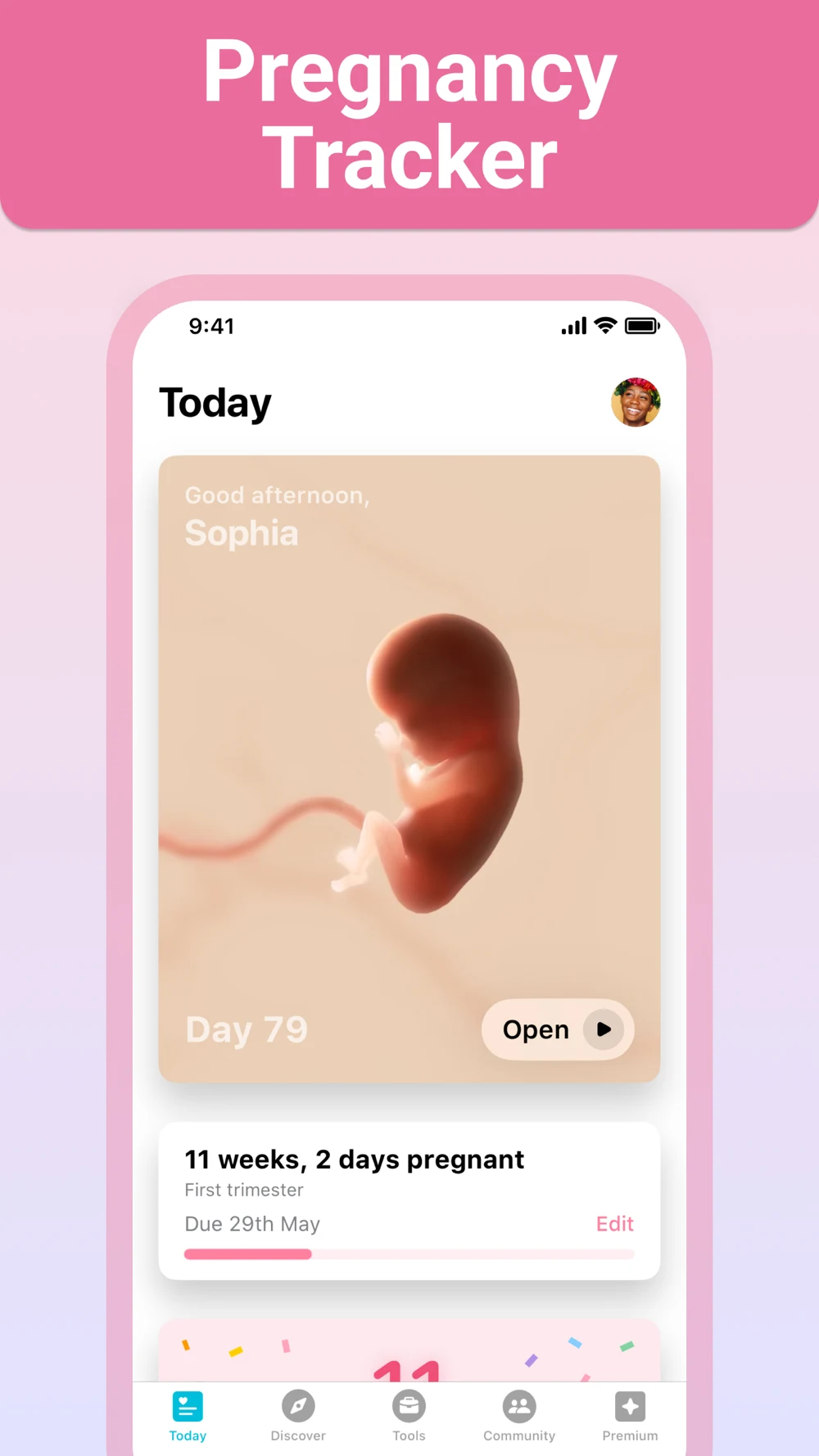
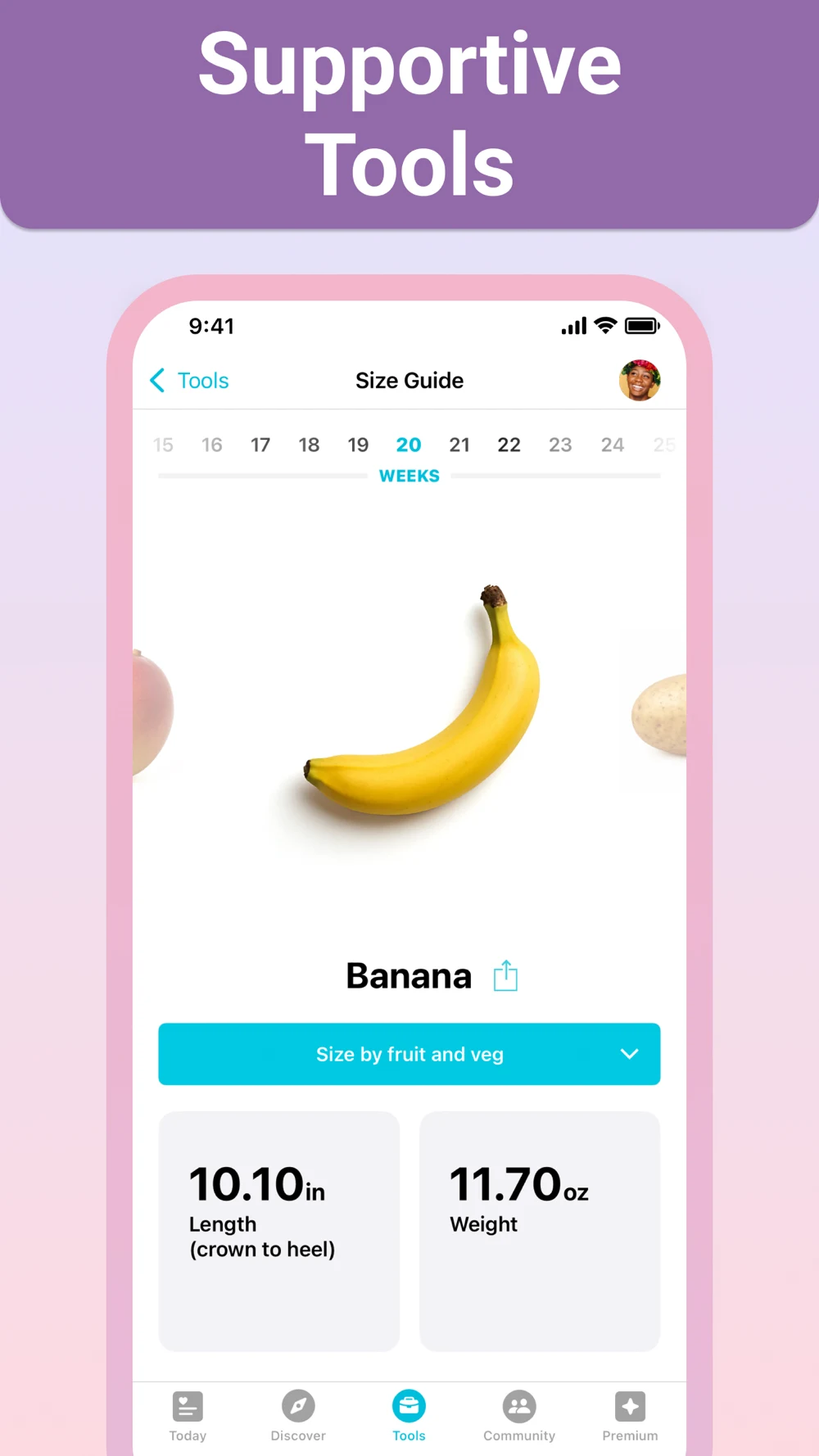
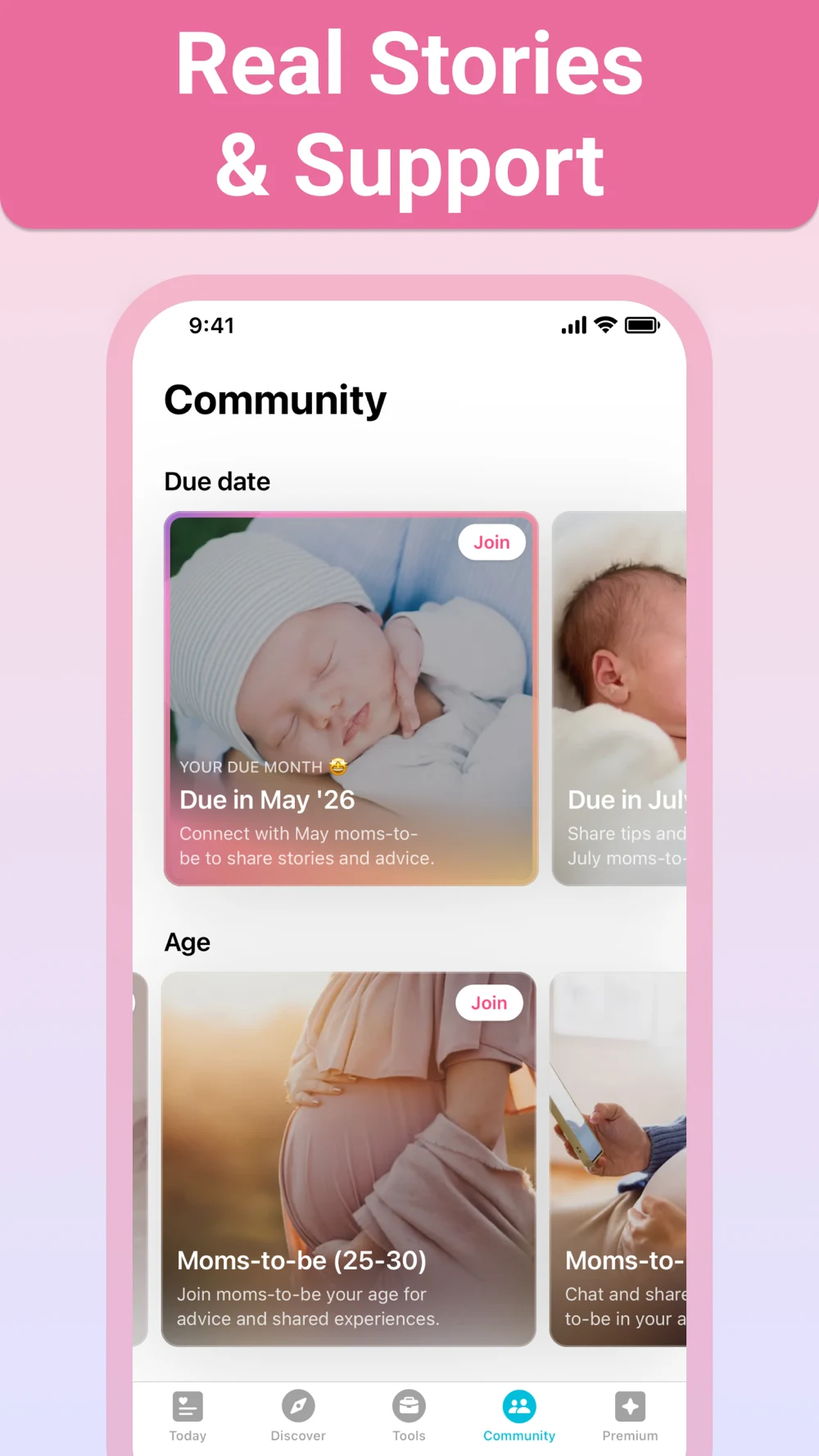
What the screenshots show: The first panel identifies pregnancy tracking with a development illustration, week information and an editable due date. The second shows a size-comparison tool under a broad tools heading. The third introduces community groups by due date and age. The fourth displays a week-based timeline of educational milestones. Straight-on screens keep the interface recognizable; some pale text over illustrations has lower contrast.

What I would test: Test a specific planning benefit in the second frame, such as organizing week-related questions, if supported. Label development imagery as educational rather than personal scan data. Give community its own place in the story and explain its purpose. Localize milestone wording and timing through the product’s reviewed content rather than copying another market’s timeline. These are editorial hypotheses, not performance findings.

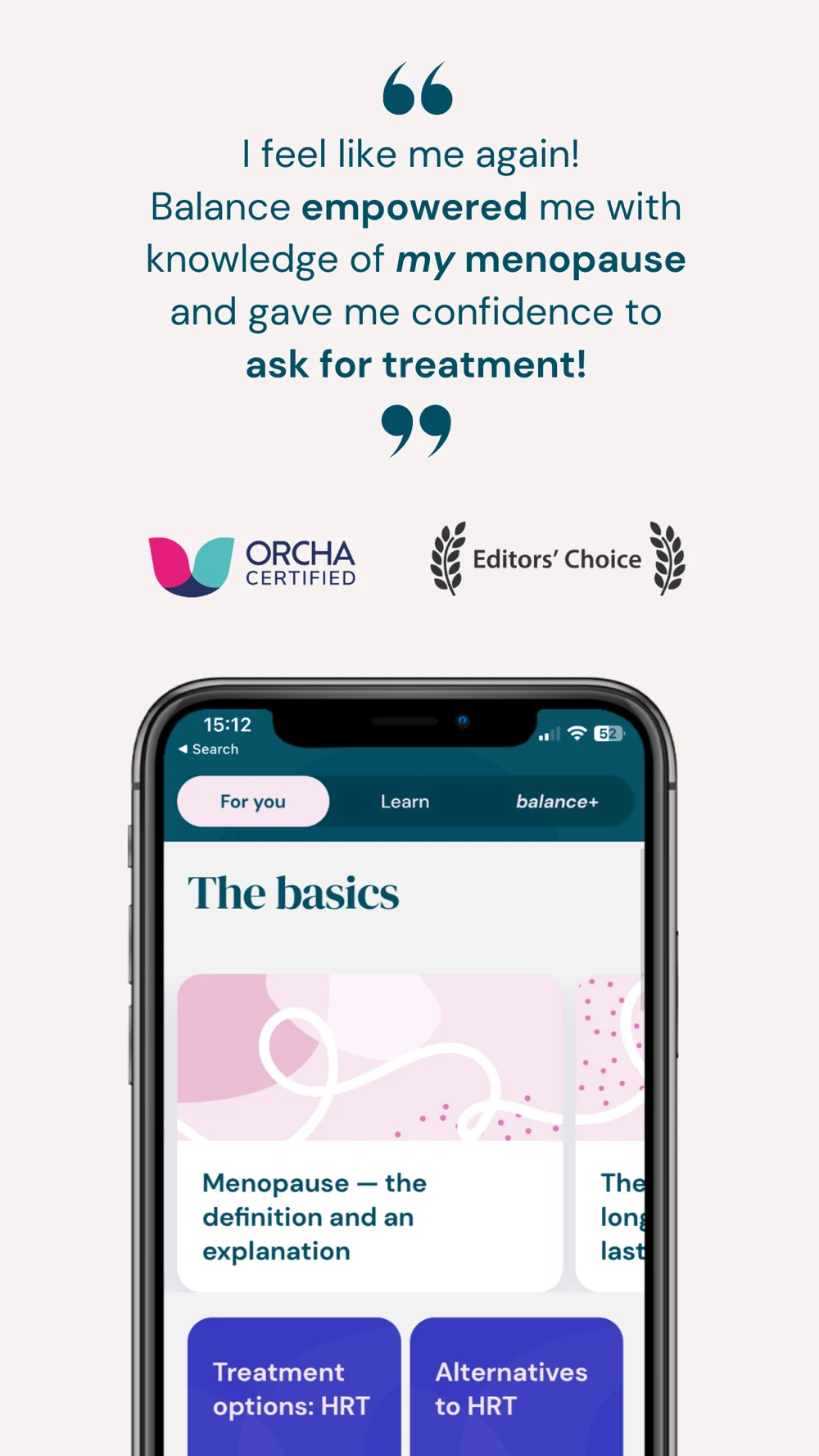
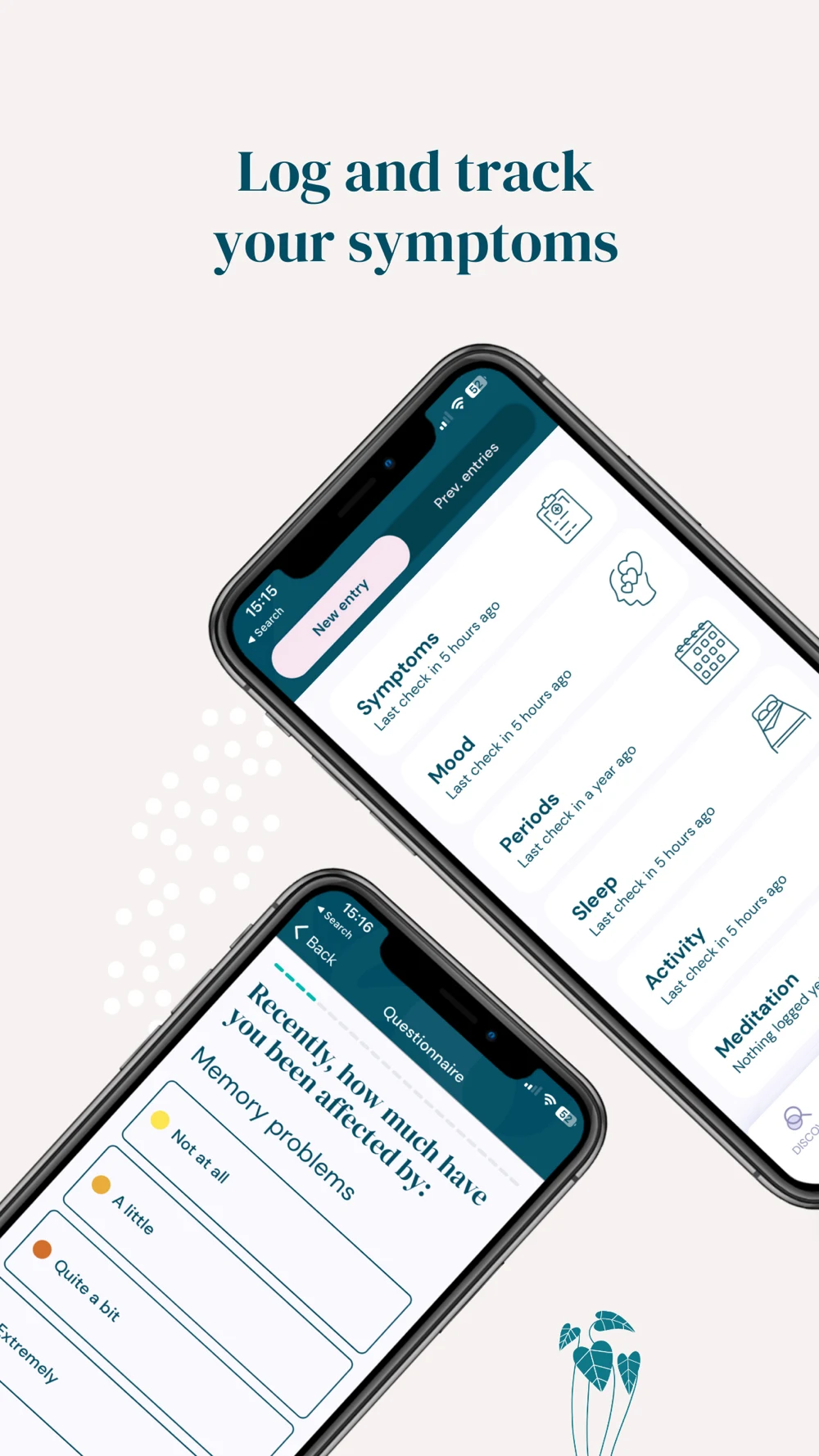
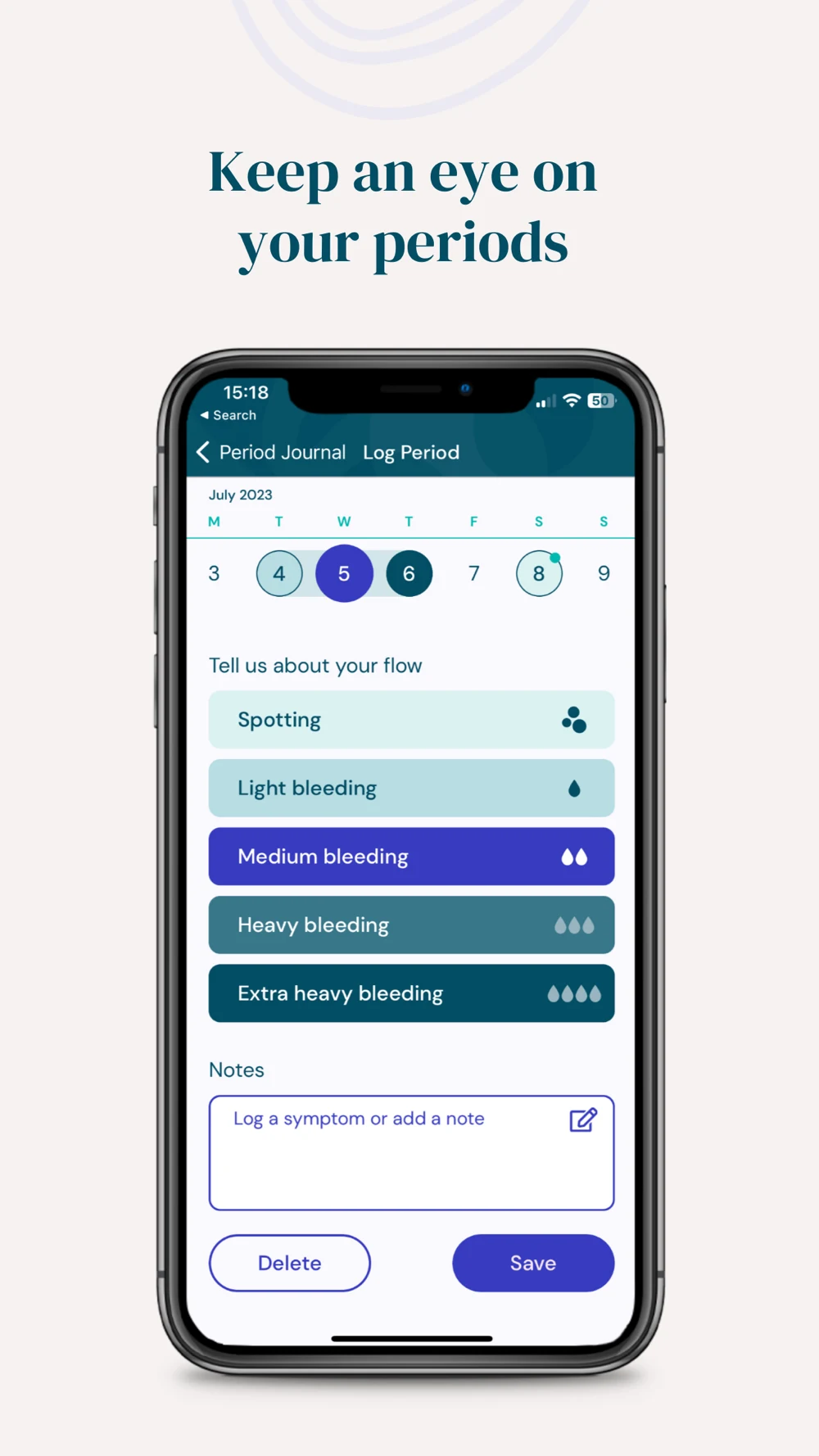
Balance: A clear symptom record could do more work than the opener.

Source: Balance on the US App Store · captured 27 October 2026.

What the screenshots show: The opener gives most space to a testimonial and certification or editorial badges, with an education screen below. The second uses two diagonally angled phones to show symptom entry and a questionnaire. The third is an upright flow-entry form with labeled choices, notes and save controls. The fourth returns to author-led education. The third panel is easier to inspect; the angled screens make longer labels harder to read.

What I would test: Test an upright symptom record or appointment-report preview as the first frame, then support it with accurately sourced expertise. Use one screen per panel and a clear next action. A report should show its time range and missing entries. Evaluate comprehension before claiming that a new sequence improves conversion. These are editorial hypotheses, not performance findings.

Lesson 1 — Choose the job before the life-stage label.

Choose the job before the life-stage label
  1. QUERYIs the search about a record, a prediction or support?
  2. PRODUCTSelect the actual mode that serves that need
  3. PROOFShow a real task from that mode
  4. BOUNDARYState what the mode does not establish

Lesson 2 — Separate what was logged from what was estimated.

Separate what was logged from what was estimated
  1. RECORDEDA user entered a date, symptom or measurement
  2. ESTIMATEDAn algorithm produced an estimate from inputs
  3. EXPLAINEDLabels and limits make the distinction visible
  4. TESTEDAsk users what they believe the screen tells them

Lesson 3 — Let the name identify the product.

Let the name identify the product
  1. NAMEPhaseNote: Period Journal
  2. SUBTITLECycle Notes & Symptom History
  3. SCREENSHOTOne editable dated entry
  4. CTACreate your first entry

Lesson 4 — Give the first three panels different jobs.

Give the first three panels different jobs
  1. 01 / PURPOSEPeriod journal, pregnancy guide or menopause record
  2. 02 / PROOFA dated entry, week view or report preview
  3. 03 / DIFFERENCEA supported control, workflow or useful export
  4. REMOVERepeated promises and interfaces too small to read

Lesson 5 — Make sharing a visible choice.

Make sharing a visible choice
  1. SCOPEWhich fields leave the personal record?
  2. RECIPIENTWho receives the invitation or export?
  3. PREVIEWReview the exact content first
  4. CONTROLExplain revocation and what an export cannot retract

Lesson 6 — Make missing entries visible in a report.

Make missing entries visible in a report
  1. RANGEChoose a defined period of time
  2. COVERAGESeparate recorded days from days without entries
  3. CONTENTShow notes and questions without diagnosing
  4. REVIEWLet the user remove details before sharing

Lesson 7 — Match the promise to the product and market.

Match the promise to the product and market
  1. MODEIdentify the exact function being promoted
  2. EVIDENCEVerify product support and any medical claim
  3. LOCALECheck eligibility, availability and authorized use
  4. CREATIVEUse wording and artwork that keep those limits clear

Lesson 8 — Carry the same intent from search to setup.

Carry the same intent from search to setup
  1. SEARCHA person looks for a cycle journal
  2. PAGEThe opening shows a dated editable entry
  3. SETUPThe user understands and saves a first entry
  4. REVIEWAssess aggregate setup quality, not intimate content

Use screenshot strategy to choose the story, ordering to assign each panel a job, and readability to check it at store size. The diagrams above explain decisions; they do not pretend to chart conversion data.

WOMEN’S HEALTH APP ASO

Worked copy: a journal should sound like a journal.

PhaseNote is a fictional example, not a shipped app or a verified brand name. Assume editable period and symptom records, notes, a date-range report and a preview before export. It does not predict fertility, diagnose conditions, provide contraception, recommend treatment or automatically share records. The example deliberately chooses a journal promise.

Swipe horizontally to compare all columns →

Illustrative editorial review
FieldWorked copyCharacters
iOS namePhaseNote: Period Journal25 / 30
iOS subtitleCycle Notes & Symptom History29 / 30
iOS keywordsmenstrual,calendar,flow,diary,log,cramps,spotting,mood,appointment,report,export80 / 100
Google Play titlePhaseNote: Period Journal25 / 30
Google Play short descriptionLog period dates, symptoms and notes. Review your history before appointments.78 / 80
Let the name identify the product
  1. NAMEPhaseNote: Period Journal
  2. SUBTITLECycle Notes & Symptom History
  3. SCREENSHOTOne editable dated entry
  4. CTACreate your first entry

Long-description opening: Keep your period dates, symptom entries and personal notes in one journal. Add what you want to record, review the date and change an entry if you made a mistake. Your history stays separate from any interpretation of what it might mean.

Feature copy: Review a selected date range before an appointment. See which days have entries and which do not. Add questions you want to discuss, preview the report and choose the details to include before exporting it. A day without an entry is not treated as a symptom-free day.

Scope copy: PhaseNote organizes information you enter. It does not diagnose a condition, predict ovulation or provide contraception. Add the real product’s account, storage, pricing and export details before using this copy in production; this fictional example does not establish those facts.

CTA: Create your first entry. It identifies the useful next step without promising a health transformation. For a separate menopause-first product, test a name such as “PhaseNote: Menopause Journal” and a report-focused opening only if that experience is actually supported. Do not stuff both directions into the same title.

Swipe horizontally to compare all columns →

Illustrative editorial review
FrameProposed headlineProof that earns the words
01Your period journal. In your words.One dated editable entry
02See what you recorded.History with missing entries distinguished
03Bring the details.Date-range report and user-authored questions
04Choose what you share.Actual export preview and field controls
05Correct it when life gets messy.A simple supported edit flow
Give the first three panels different jobs
  1. 01 / PURPOSEPeriod journal, pregnancy guide or menopause record
  2. 02 / PROOFA dated entry, week view or report preview
  3. 03 / DIFFERENCEA supported control, workflow or useful export
  4. REMOVERepeated promises and interfaces too small to read

Preview direction: Capture the real app creating a demonstration entry, correcting a date, reviewing a bounded history and previewing an export. Use fictional data and show the missing-entry treatment. Keep each state on screen long enough to read. An animated fertility wheel would introduce a function this example does not have.

Use screenshot copy and storytelling to keep headline, interface and action aligned. Adapt the longer copy with the Google Play description guide; unused character space is preferable to repetitive claims.

WOMEN’S HEALTH APP ASO

Ten mistakes to look for before chasing more traffic.

Swipe horizontally to compare all columns →

Illustrative editorial review
Problem to investigateConcrete evidence or riskBetter test
One opening for every life stageFlo moves from periods to partners to symptom matching in its first three feed panelsTry a single-mode opening for a matching intent page
Headline certainty exceeds the labelClue’s ovulation heading is more definitive than its prediction calloutKeep estimate wording consistent and test comprehension
A tracker borrows a contraceptive storyNatural Cycles shows a specific regulated mode; a generic journal is differentMatch every claim to exact intended use and market
A small footnote carries a big availability limitFlo’s symptom-matching panel includes a small regional exclusion noteMake eligibility clear in creative used for that market
Two tilted screens shrink the taskBalance’s symptom panel uses diagonal devices with longer labelsOne large upright interaction
Expertise arrives before a useful actionBalance leads with a testimonial and badgesTest a record or report first, with verified expertise supporting it
Broad headings hide practical featuresPregnancy+ places its size-comparison view under a generic tool messageDescribe the specific benefit and distinguish educational illustration
A service appears available to everyoneOvia’s description includes benefit-dependent supportLabel entitlement and keep public onboarding accurate
Private is used as an unexplained synonymAnonymous use, account-free use and local storage mean different thingsShow an actual control and substantiate the exact claim
Missing data becomes a health conclusionAn empty date can mean no entry rather than no symptomExplain coverage in the report and test its interpretation

Named critiques concern visible screenshots or publisher copy, not clinical quality, reliability or measured conversion harm. Recheck the current listing before acting. Download the ten-test backlog and use test hypotheses to choose one change, a metric and a comprehension guardrail.

Make missing entries visible in a report
  1. RANGEChoose a defined period of time
  2. COVERAGESeparate recorded days from days without entries
  3. CONTENTShow notes and questions without diagnosing
  4. REVIEWLet the user remove details before sharing

WOMEN’S HEALTH APP ASO

Turn the keyword research into a careful Apple Ads plan.

Build Apple Ads search-results groups from supported tasks, not assumed intimate profiles. The table is a planning blueprint; no campaign or spending is created. For PhaseNote, start with period journaling and appointment records. Conception, contraceptive, pregnancy and menopause groups are separate conditional examples for products that actually serve those needs.

Swipe horizontally to compare all columns →

Illustrative editorial review
Campaign / groupCandidate query familyPage storyUseful activation
Category — exact: journalperiod diary; cycle journalEditable dated entry and historyFirst entry saved and understood
Category — exact: reportsperiod history PDF; cycle report for doctorDate range, coverage and previewSupported report preview completed
Conditional — exact: menopausemenopause symptom trackerSymptom notes and appointment briefFirst relevant record reviewed
Conditional — exact: pregnancypregnancy week by weekWeek-specific educational toolSupported mode and date setup
Conditional — exact: conceptionBBT chart app; LH test logSupported inputs and clear intended useInput workflow understood
Own brand — exactActual brand and verified variantsDefault supported experienceQualified new-user setup
Competitors — optional separateRelevant app names after suitability reviewYour own distinctive supported workflowQualified setup and economics
Discovery — broadApproved task-level seedsMost relevant supported experienceRelevant search terms and qualified setup
Discovery — Search MatchSeparate group without manual keywordsAccurate default listingSame relevance review

Following Apple’s campaign structure guidance, separate brand, category, competitor and discovery themes. Turn Search Match off in exact and broad groups; keep it in its own group. Move useful, supported queries into exact groups and use exact negatives in discovery to reduce exact-query overlap. Competitor groups are optional; competitor brands are not organic metadata.

Exact match can include close variants. Negative exact blocks the specified term; negative broad requires all words, and variants may need separate exclusions. For a journal with no clinical or predictive services, review irrelevant query families such as pregnancy test, contraception app, fertility treatment, diagnose PCOS and online prescription. Treat these as examples to evaluate, not a universal negative list. Do not broadly exclude pregnancy if a different product legitimately supports pregnancy education. Sources: match types and negative keywords.

Carry the same intent from search to setup
  1. SEARCHA person looks for a cycle journal
  2. PAGEThe opening shows a dated editable entry
  3. SETUPThe user understands and saves a first entry
  4. REVIEWAssess aggregate setup quality, not intimate content

Match the page: A journal query should land on a record-first creative, while a report query can lead with the preview. Use supported custom product-page configuration and deep links only when the destination exists and works for the user. Keep the first-session promise consistent with the ad and verify the applicable health-category advertising rules before any real launch.

Set bounds first: Agree one market, product eligibility, maximum spend, evaluation window, minimum evidence and stop conditions before launching. Compare new downloads separately from redownloads. Do not declare a winner from a handful of taps or repeatedly stop a test when a temporary result looks attractive.

Illustrative economics: Suppose net contribution per paying customer were $60 and 10% of activated users paid. Expected contribution per activation would be $6. If the business allowed half for acquisition, its illustrative ceiling would be $3 per activation. At 20% tap-to-install and 50% install-to-activation, that implies $0.30 per tap. Every number is hypothetical; none is a category benchmark or a recommended bid.

Measure the task, not the intimate detail: Use privacy-reviewed aggregate events such as setup completed or report preview opened. Do not pass cycle dates, pregnancy status, symptoms, notes or partner identities to advertising tools. An install attribution report and an in-app activation report use different windows and denominators. Document them with ASO KPIs and conversion definitions.

Return the learning to ASO: Review actual search terms for relevance and qualified setup, then test the clearest supported message in metadata or creative. Keep paid and organic observations separate. A successful paid query does not prove organic rank or population demand. Record each change in the metadata log.

WOMEN’S HEALTH APP ASO

Current category patterns worth watching—not invented trend charts.

Swipe horizontally to compare all columns →

Illustrative editorial review
Pattern in the current sourcesPrimary evidence reviewed 27 October 2026What to test
One brand spans several life stagesFlo, Clue and Ovia descriptions cover multiple modesA named-mode opening instead of an all-purpose life-stage collage
Shared use has its own creative storyFlo’s partner panel and Stardust’s connection featuresClear invitation scope and voluntary control
A record can support an appointmentClue shows a report action; Balance describes appointment reportsRange, coverage and preview as creative proof
Measurement inputs extend beyond manual calendarsNatural Cycles lists supported temperature sources; Clue describes wearable connectionsExact device and data-source explanation, without inflated accuracy claims
Pregnancy education has visual and community layersPregnancy+ panels show developmental illustration, size comparisons and groupsA specific useful sequence rather than a list of content formats
Distinctive tone can be a category positionStardust combines cycle tools with astronomy and folkloreVoice that stays clear about the boundary between entertainment and medical evidence

These are dated patterns in the linked listings, not measured growth trends. A current feature is not proof that its adoption is increasing. The eight primary listings above support the comparison; no market shares, demand trajectories or conversion lifts were available. Track future changes with the change-log process.

WOMEN’S HEALTH APP ASO

Use AI to explain a real task, then challenge the result.

These original PhaseNote images are AI-generated concepts, not real competitor screenshots or a shipped interface. Concept A explains a personal journal. Concept B explores a separate appointment-preparation angle for a symptom-record product. Neither demonstrates medical effectiveness or tested conversion performance.

AI concept showing a dated period and symptom journal entry with edit control
Concept A · make the recorded entry tangible
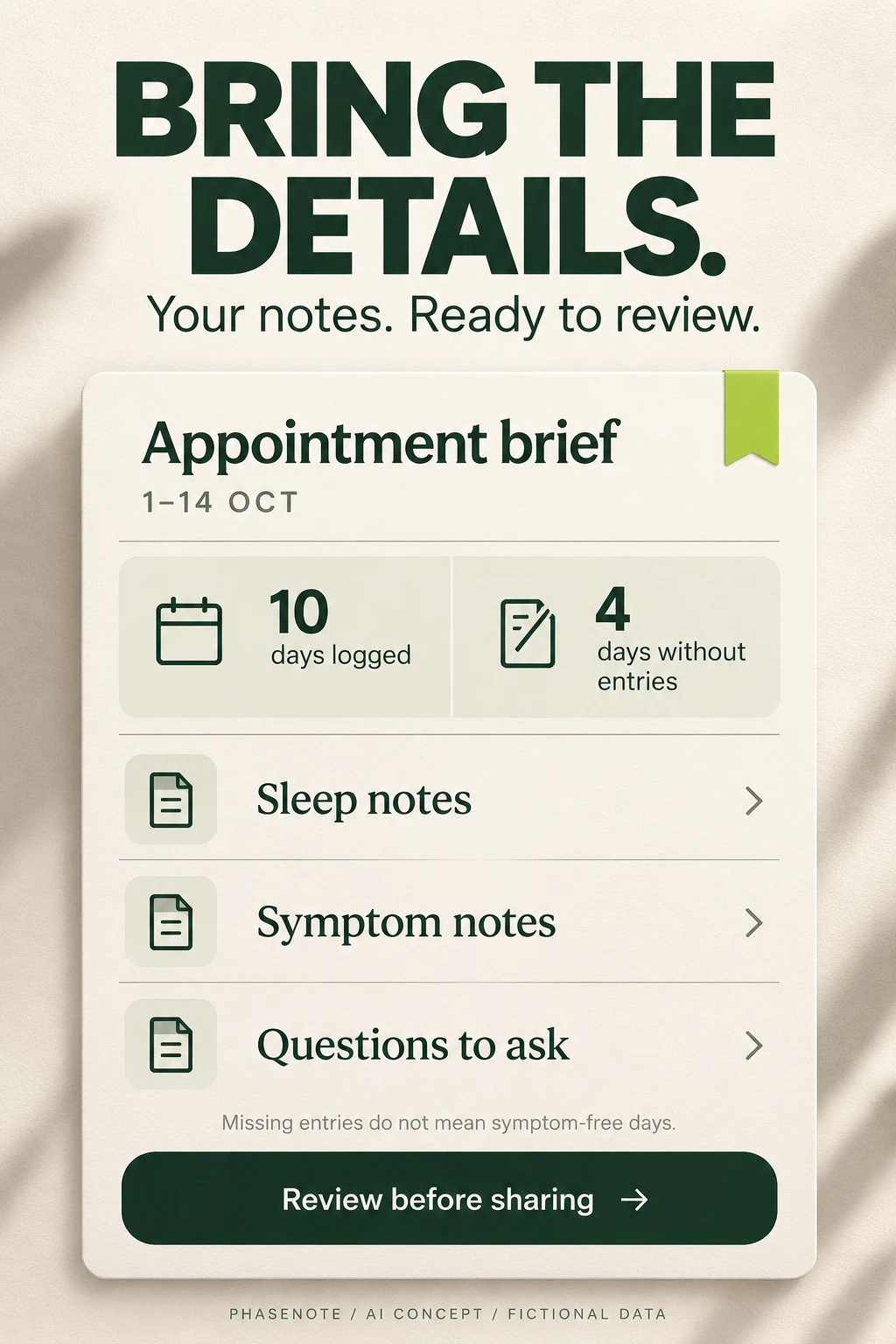
AI concept showing an appointment brief with ten logged days and four days without entries
Concept B · explain the report and its missing entries

Swipe horizontally to compare all columns →

Illustrative editorial review
Workshop taskApproved inputUseful prompt directionHuman check
Choose the jobActual product mode and intended useShow one editable cycle entry, not a fertility forecastNo function invented to make artwork exciting
Improve hierarchyReal interface with demonstration dataMake date, source and edit action readable at store sizeText fits and state is unambiguous
Explain a reportActual export fields and coverage rulesShow range, logged days and days without entriesMissing data is not interpreted as symptom absence
Make sharing understandableReal recipient and field controlsShow a preview before a voluntary share actionDo not imply exported copies can be remotely deleted
Rewrite a claimProduct evidence and approved limitationsReplace a diagnosis-like promise with the supported logging actionExpert review for medical or regulatory wording
Prepare an experimentOne hypothesis and current controlCompare record-first with the current openerComprehension plus conversion; no invented uplift

Concept A critique: The entry source, date and edit action are clear. The generator added a large flower and fine decorative lines. They give the image personality but compete with the record at small sizes. The estimate note is conceptually useful, yet this fictional journal has no prediction feature; a production version should remove it or explain the actual context instead of hinting at an absent function.

Concept B critique: The 14-day range is divided coherently into ten logged days and four without entries. Those numbers are fictional, not research data. The report still needs an explicit definition of a logged day: any entry, a completed check-in or a specific field? Add the actual year and export scope in production. The sharing action must match real implementation.

Test sequence: First ask users to identify what is recorded, what is missing and what would be shared. Fix misunderstandings. Then compare one revised opener against the current creative with the same remaining sequence and eligible audience. Evaluate store conversion alongside qualified setup, correction behavior and support themes. AI polish is not evidence of a better result.

WOMEN’S HEALTH APP ASO

A release checklist built for sensitive, specific product promises.

Swipe horizontally to compare all columns →

Illustrative editorial review
StageCategory-specific check
Locale researchPeriod versus menstrual vocabulary; menopause terminology; pregnancy-week conventions; date order; temperature units; actual local availability
Product scopeMode, eligibility, feature entitlement, supported wearable and export behavior; any authorized intended use
Language and inclusionNo assumption of pregnancy goals, partner access or gender identity; terminology tested with the intended audience
Screenshot comprehensionRecorded versus predicted labels; educational models versus personal data; legible qualifications and one useful action
Sensitive transitionsMode change, loss-related or unwanted reminders, pause controls and voluntary sharing reviewed with the product team
Reports and privacyCoverage, empty dates, editable fields, recipient preview, storage statements and deletion scope
Experiment setupOne hypothesis, stable comparison, sample plan, stopping rules, rollback and appropriate platform test
Outcome reviewStore conversion, qualified setup, task comprehension, corrections, retention and aggregate support themes
Make sharing a visible choice
  1. SCOPEWhich fields leave the personal record?
  2. RECIPIENTWho receives the invitation or export?
  3. PREVIEWReview the exact content first
  4. CONTROLExplain revocation and what an export cannot retract

Use market prioritization, local keyword research, screenshot adaptation and localization QA. Reuse the symptom-tracking guide for record design and the sleep-tracking guide when sleep is a supported part of the experience.

Start an ASO audit with the actual mode and listing, then connect research, copy, creative and testing through ASO services. More keywords cannot fix a promise the first session does not deliver.

Research limits: Public US iOS listing review, with official iOS and Google Play platform guidance. No Android competitor screenshot audit, in-app feature verification, clinical evaluation, independent privacy audit, search volumes or conversion results. Refresh sources and verify the real product before production.