Core Nutrition
nutrition app · nutrition tracker · diet tracker · healthy eating app · nutrition diary · nutrition log · daily nutrition tracker · food nutrition app · nutrition goals app · personal nutrition app
CATEGORY ASO PLAYBOOK / NUTRITION
A calorie counter, food diary, macro tracker and meal planner are not the same product. Choose the nutrition job your listing can prove.
CHOOSE THE NUTRITION JOB ↓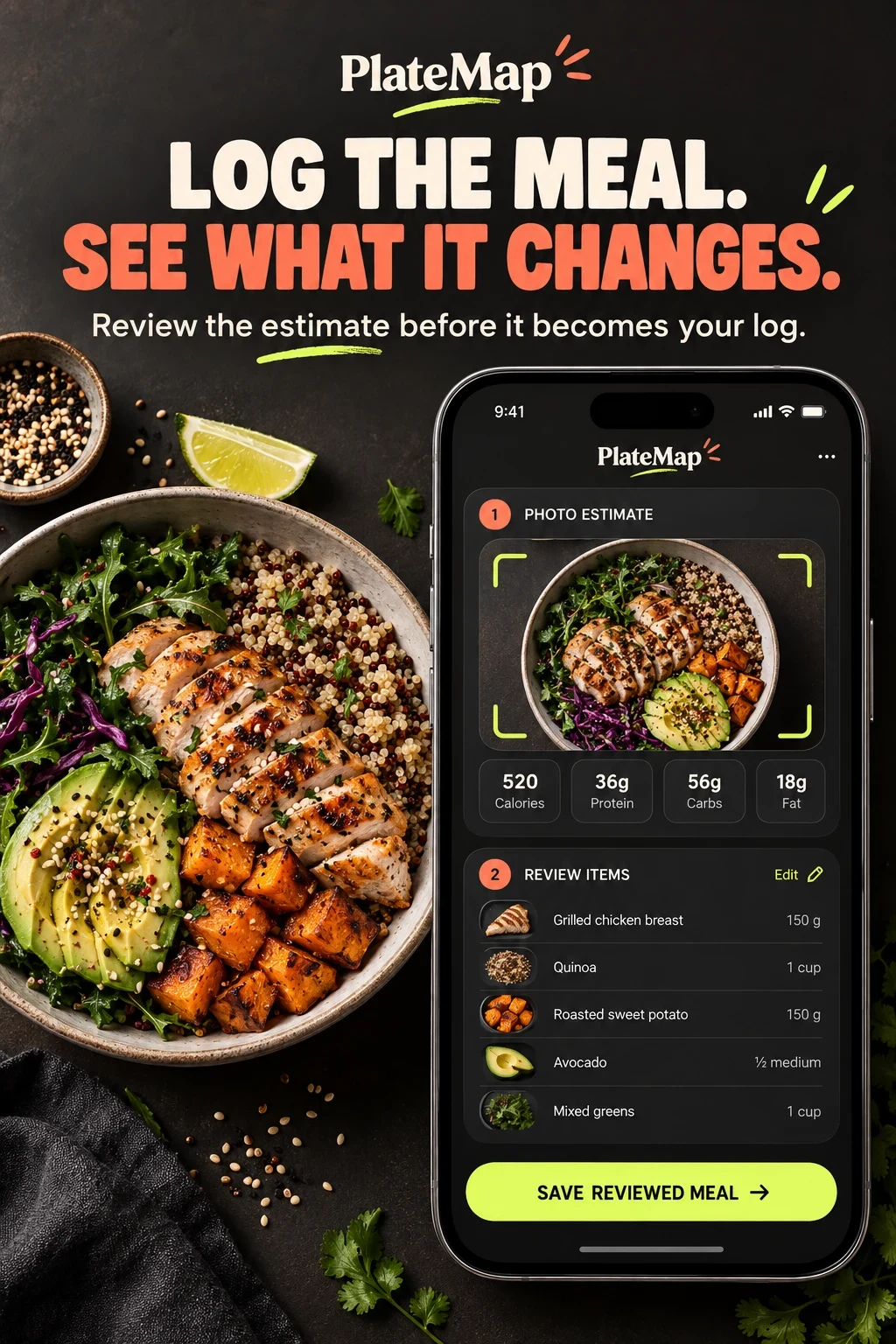
NUTRITION APP ASO
These are audience hypotheses, not demographic shares. Nutrition intent is better defined by the job, sensitivity, product behavior, language and decision than by age alone. Research each segment before targeting it.
Swipe horizontally to compare all columns →
| Potential audience | Job | Constraint | Proof to test |
|---|---|---|---|
| Fast meal loggers | Record meals with minimal friction | Recognition errors and portion uncertainty | Input method, review step and elapsed effort |
| Calorie-budget users | Understand daily energy against a chosen target | Numbers without context or flexible controls | Clear budget, source and adjustment rules |
| Macro-focused users | Track protein, carbohydrates and fat | Too many nutrients competing for attention | Macro hierarchy and serving controls |
| Micronutrient explorers | See detailed nutrient coverage | Database quality and false precision | Named sources and drill-down detail |
| Meal planners | Decide meals and groceries in advance | Plans that ignore time, budget or household | Week plan, swaps and grocery handoff |
| Food-diary users | Notice meals and patterns without a weight goal | Judgmental scores and forced targets | Private notes, optional metrics and neutral language |
| Hydration trackers | Record water consistently | Reminders that become noise | Fast logging and adjustable reminders |
| Fasting schedulers | Understand a chosen eating window | Overclaiming health outcomes | Timer mechanics and qualified language |
| Diet-preference users | Find foods and plans that fit preferences | Thin databases and mislabeled recipes | Filters, exclusions and local examples |
| People sharing with professionals | Export or share a useful record | Medical interpretation beyond the product | Consent, export format and professional boundary |
Map the query with the search-intent guide, then qualify it with keyword relevance.
NUTRITION APP ASO
These 100 candidates are unmeasured starting points. Validate relevance, store suggestions, paid-search evidence and conversion quality before assigning priority.
nutrition app · nutrition tracker · diet tracker · healthy eating app · nutrition diary · nutrition log · daily nutrition tracker · food nutrition app · nutrition goals app · personal nutrition app
calorie counter · calorie tracker · daily calorie counter · calorie budget app · calories per meal tracker · calorie intake tracker · calorie diary · food calorie calculator · meal calorie tracker · calorie tracking without weight goal
macro tracker · macro calculator · protein tracker · carb tracker · fat tracker · micronutrient tracker · fiber tracker · vitamin tracker · macro meal planner · high protein meal tracker
food diary · food tracker · meal log · meal diary · daily food log · quick food logging app · food journal with photos · voice food logger · food log with notes · meal tracker for recurring meals
meal planner · weekly meal planner · meal plan app · grocery list meal planner · healthy meal planner · personalized meal planner · meal prep planner · family meal planner · budget meal planner · meal planner with macros
water tracker · hydration tracker · drink water reminder · daily water log · fasting tracker · intermittent fasting timer · fasting schedule app · fasting and food tracker · water and meal tracker · hydration with meal log
vegetarian food tracker · vegan nutrition tracker · mediterranean meal planner · low carb food tracker · keto macro tracker · plant based meal planner · gluten free meal planner · high protein nutrition app · balanced eating tracker · nutrition tracker without food scores
photo calorie tracker · meal scan app · food scanner app · barcode food scanner · scan nutrition label · ai food tracker · ai meal scanner · voice calorie tracker · text meal logger · food database scanner
nutrition tracker for home cooking · food diary for restaurant meals · meal planner for shift workers · macro tracker for strength training · nutrition app for busy parents · food tracker with editable photo results · meal log with ingredient corrections · nutrition tracker with data sources · private food diary app · simple nutrition tracker for beginners
nutrition trends app · weekly nutrition report · meal pattern tracker · nutrient intake report · food habit tracker · meal consistency tracker · nutrition dashboard app · food diary export · share food log with dietitian · meal history app
Download the 100-keyword worksheet. Continue with seed keywords, competitor research, long-tail research and prioritization.
NUTRITION APP ASO
A category page should reveal the branches without pretending every app serves them all. Each branch deserves different keywords, screenshots, onboarding and activation events.
Swipe horizontally to compare all columns →
| Subcategory | Primary job | Candidate intent | Proof required |
|---|---|---|---|
| Calorie tracking | Daily energy and meal totals | calorie counter; meal calorie tracker | Budget logic and editable food records |
| Macro tracking | Protein, carbohydrates and fat | macro tracker; protein tracker | Serving controls and macro hierarchy |
| Food logging | Meals, notes and personal patterns | private food diary; meal log | Capture, correction and optional metrics |
| Meal planning | Future meals and shopping | weekly meal planner; grocery meal planner | Week plan, swaps and grocery list |
| Capture tools | Faster meal entry | photo food tracker; voice food logger | Estimate, correction and saved result |
| Hydration | Water records and reminders | water tracker; hydration app | Exact containers and adjustable reminders |
| Intermittent fasting | Eating-window timing | fasting timer; fasting schedule | Editable timer, flexible plan and safety boundary |
| Diet preferences | Foods fitting a chosen pattern | vegan tracker; high protein planner | Filters, exclusions and local food depth |
Use the ASO strategy guide to choose one commercial priority and document the exclusions.
NUTRITION APP ASO
Eight current US App Store listings were checked on 26 October 2026. This is positioning analysis, not a performance ranking. All eight matching Google Play listings were also verified.
Swipe horizontally to compare all columns →
| App | Developer | Title | Subtitle | Positioning role |
|---|---|---|---|---|
| MyFitnessPal | MyFitnessPal, Inc. | MyFitnessPal: Calorie Counter | AI Coach & Nutrition Tracker | Broad nutrition, calorie and macro tracking with multiple capture methods. |
| Lose It! | FitNow, Inc. | Lose It! – Calorie Counter | Food Tracker for Weight Loss | Weight-led calorie budgeting, meal logging and photo capture. |
| Yazio | YAZIO GmbH | AI Calorie Tracker by Yazio | Weight Loss Food Diary | Calorie tracking, food diary, fasting and planning. |
| Lifesum | Lifesum AB | Lifesum: AI Calorie Counter | Food Diary & Macro Tracker App | AI-assisted capture, macros, ratings and meal plans. |
| Cronometer | Cronometer Software Inc | Cronometer: Calorie Counter | Nutrition, macro, diet tracker | Detailed macro and micronutrient tracking with data-source proof. |
| MacroFactor | Stronger By Science Technologies LLC | MacroFactor - Macro Tracker | Calorie Counter & Food Log | Macro logging, expenditure context and coaching workflows. |
| Foodvisor | Foodvisor | Foodvisor - AI Calorie Counter | Diet Tracker for Weight Loss | AI meal capture, nutrition detail and coaching content. |
| MyNetDiary | MyNetDiary Inc. | Calorie Counter - MyNetDiary | Food Nutrition Macro Tracker | Calorie and macro tracking, meal scan, planning and reports. |
Build your own evidence sheet with competitor research; record exact fields in a metadata change log.
NUTRITION APP ASO
Swipe horizontally to compare all columns →
| Decision | iOS | Google Play | Nutrition consequence |
|---|---|---|---|
| Name | 30 characters | 30 characters | Name the supported nutrition job |
| Support line | 30-character subtitle | 80-character short description | Explain capture method or useful output |
| Discovery | Keyword field plus description | Full description | Research separately |
| Testing | Product Page Optimization | Store listing experiments | Test one claim or sequence at a time |
| Intent pages | Custom product pages | Custom store listings | Match calories, macros or planning only when supported |
NUTRITION APP ASO
All 20 panels were opened at readable size. Below, visible choices are separated from recommendations and unknown outcomes.
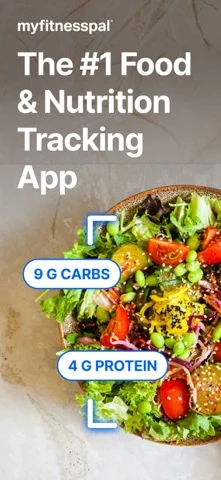
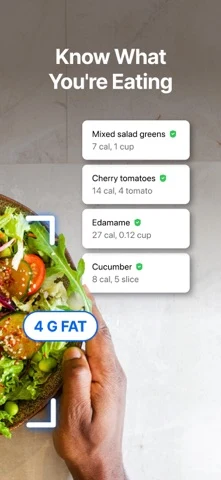
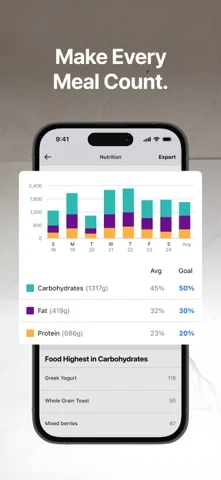
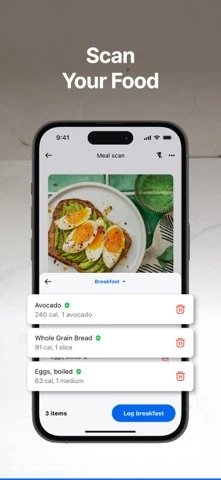
Original artwork from the MyFitnessPal US App Store listing, captured 26 October 2026. Select a panel to enlarge it.
What the screenshots show: The sequence opens with a broad leadership claim, then shows photo nutrients, ingredient recognition, trends and meal scan.
What I would test: Test a mechanism-led first frame against the broad category claim; keep the review step visible. The outcome is unknown until tested.
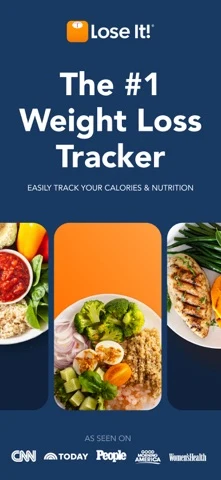
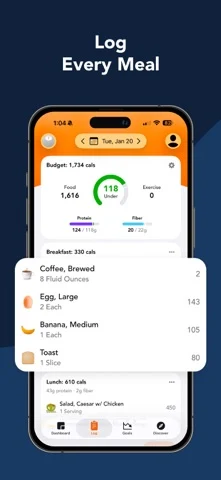
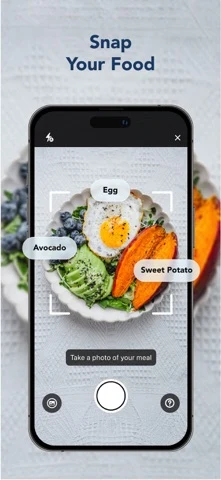
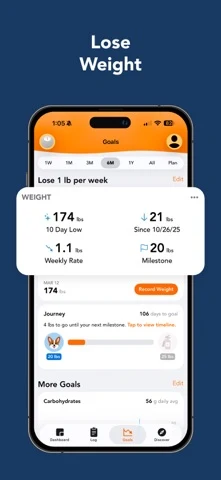
Original artwork from the Lose It! US App Store listing, captured 26 October 2026. Select a panel to enlarge it.
What the screenshots show: The first frame names weight loss, while later frames prove meal logging, photo capture and a weight timeline.
What I would test: For non-weight traffic, replace the opening with food-diary or logging proof and keep the product sequence. The outcome is unknown until tested.
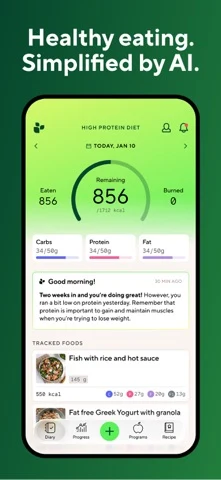
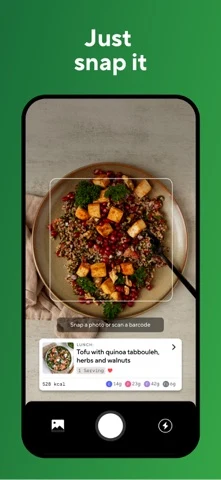
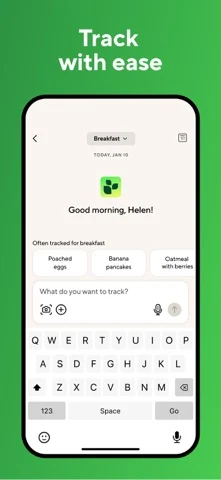
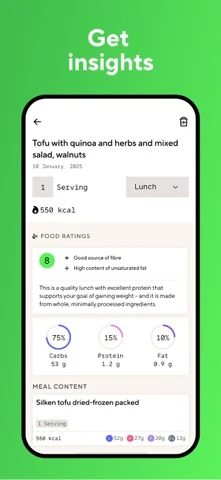
Original artwork from the Lifesum US App Store listing, captured 26 October 2026. Select a panel to enlarge it.
What the screenshots show: A bright system moves from daily summary to photo capture, keyboard entry and nutrition insight.
What I would test: Test the reviewed result—not only the camera—so convenience does not imply perfect recognition. The outcome is unknown until tested.
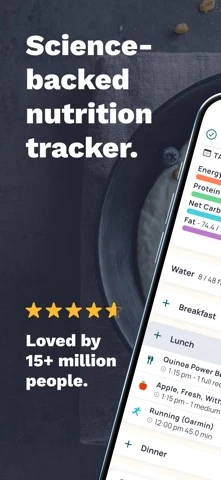
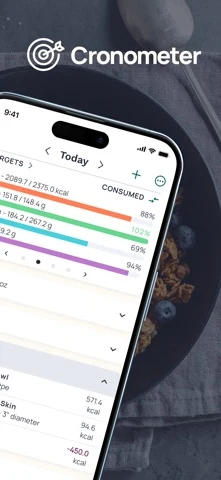
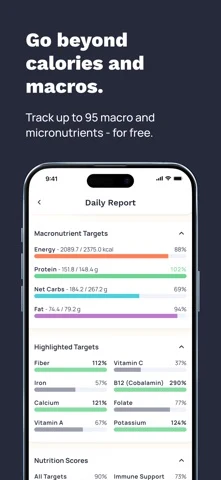
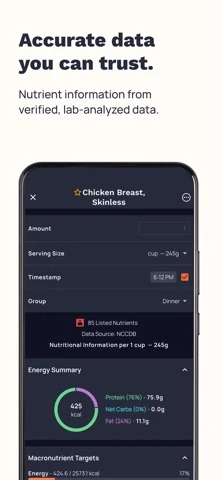
Original artwork from the Cronometer US App Store listing, captured 26 October 2026. Select a panel to enlarge it.
What the screenshots show: The sequence frames science and trust, then shows daily targets, many nutrients and source-backed food data.
What I would test: Bring one database proof point closer to the first frame and reduce the number of simultaneous nutrient bars. The outcome is unknown until tested.

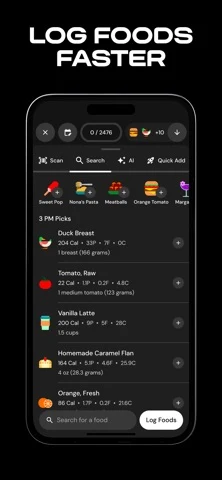
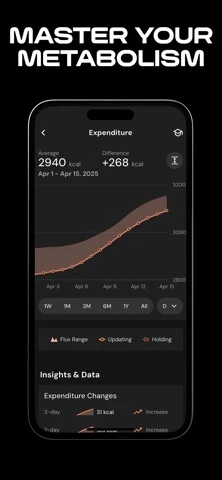
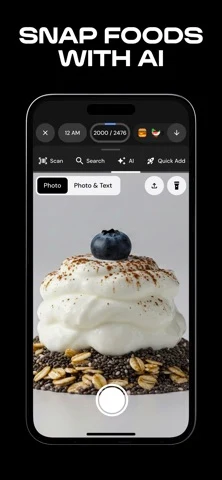
Original artwork from the MacroFactor US App Store listing, captured 26 October 2026. Select a panel to enlarge it.
What the screenshots show: The sequence is visually ownable and moves from macro identity to fast food search, expenditure context and AI photo capture.
What I would test: Test the logging mechanism before the metabolism message for visitors arriving on food-log intent. The outcome is unknown until tested.
Build the sequence with screenshot strategy, screenshot order, readability and storytelling.
NUTRITION APP ASO
PlateMap is fictional. This worked example assumes photo estimates can be reviewed, food records are editable and energy, macros, fiber and water are supported.
Swipe horizontally to compare all columns →
| Field | Worked copy | Count |
|---|---|---|
| iOS name | PlateMap: Nutrition Tracker | 27 / 30 |
| iOS subtitle | Review Meals, Macros & Water | 28 / 30 |
| iOS keywords | nutrition,food,meal,diary,calorie,macro,protein,fiber,water,photo,scanner,log,planner | 85 / 100 |
| Google name | PlateMap: Nutrition Tracker | 27 / 30 |
| Google short description | Review meals, track useful nutrients and see the day without food grades. | 73 / 80 |
Description opening: Log a meal by photo, voice, barcode or search. Review the match and portion before saving, then open the day to see energy, protein, fiber and water in context.
CTA: Review my first meal.
Swipe horizontally to compare all columns →
| Frame | Message | Proof |
|---|---|---|
| 01 | Log the meal. Review the estimate. | Photo, items and edit control |
| 02 | Four ways to add food. | Photo, voice, barcode and search |
| 03 | Know where each value came from. | Source and serving detail |
| 04 | One day. Four useful details. | Energy, protein, fiber and water |
| 05 | Your food diary, without a grade. | Optional metrics and private notes |
NUTRITION APP ASO
Swipe horizontally to compare all columns →
| Mistake | Why it is unclear | Better test |
|---|---|---|
| Calling every app a calorie counter | Food diaries, planners and macro tools solve different jobs | Name the primary nutrition job |
| Saying AI without showing review | Recognition looks magically certain | Show estimate, correction and saved result |
| Using weight loss for every visitor | Motivations and sensitivities differ | Create qualified non-weight positioning |
| Leading with a crowded dashboard | The decision disappears inside data | Crop one useful pattern |
| Treating food scores as universal | Scores can feel moralizing or opaque | Explain method or offer neutral views |
| Hiding serving size | Precise-looking totals lack usable context | Show the portion control |
| Repeating the same log screen | The sequence does not advance | Move from job to method to value |
| Claiming database accuracy broadly | Coverage and sources vary | Name the source and market |
| Mixing planning and tracking | Future decisions and past records compete | Separate the intent pages |
| Making medical promises | The listing exceeds evidence and product scope | Use qualified review and professional boundaries |
Download the ten-test backlog. Turn each idea into a falsifiable A/B-test hypothesis.
NUTRITION APP ASO
No campaigns or spend are authorized. Separate intent before bidding. Negatives should exclude unsupported medical conditions, supplements, food delivery, recipes, grocery shopping, local dietitians and promises the product cannot support.
Swipe horizontally to compare all columns →
| Campaign group | Query family | Landing argument | Activation event |
|---|---|---|---|
| Brand | Your exact brand and close variants | Core product page | First reviewed meal |
| Calories | calorie counter; calorie tracker | Calorie job page | Daily budget opened |
| Macros | macro tracker; protein tracker | Macro page | Macro target reviewed |
| Food diary | food diary; meal log | Diary page | First entry saved |
| Meal planning | weekly meal planner; meal prep planner | Planning page | Plan created |
| Capture | photo food tracker; barcode scanner | Capture-method page | Estimate corrected and saved |
| Hydration | water tracker; hydration app | Hydration page | First water entry |
| Fasting | fasting timer; fasting schedule | Fasting page | Schedule created |
| Discovery | Search Match or carefully bounded broad terms | Closest supported job | Qualified activation |
Use Apple documentation for match types, negative keywords and ad variations. Judge the loop with ASO KPIs and conversion-rate definitions.
NUTRITION APP ASO
Swipe horizontally to compare all columns →
| Visible pattern | Evidence | Working hypothesis |
|---|---|---|
| Photo capture | MyFitnessPal, Lose It!, Lifesum, MacroFactor | Convenience is now common; review quality may differentiate |
| AI language | MyFitnessPal, Lifesum and current store fields | The mechanism needs proof beyond the label |
| Weight-led positioning | Lose It! and several store subtitles | Strong for one motive, limiting for others |
| Nutrition depth | Cronometer | Source and nutrient detail may fit research-heavy intent |
| Specialist macro identity | MacroFactor | A narrow job can support distinctive visual language |
| Multiple input methods | Lifesum and broader competitor fields | Choice may reduce logging friction if clearly sequenced |
These are dated listing observations, not market-share conclusions. Recheck them before every release.
NUTRITION APP ASO
These two PlateMap concepts are AI-generated, fictional and untested. They are not competitor screenshots or claims about a live product.
What the concept promises: A photo becomes a labeled estimate the user reviews.
What you can learn: Trust comes from correction, not from pretending recognition is perfect.
What I would test: Reviewed-estimate story versus generic AI logging.
Human review: Replace every invented record, source and target with real product behavior; review nutrition sensitivity, policy, rights, accessibility and localization.
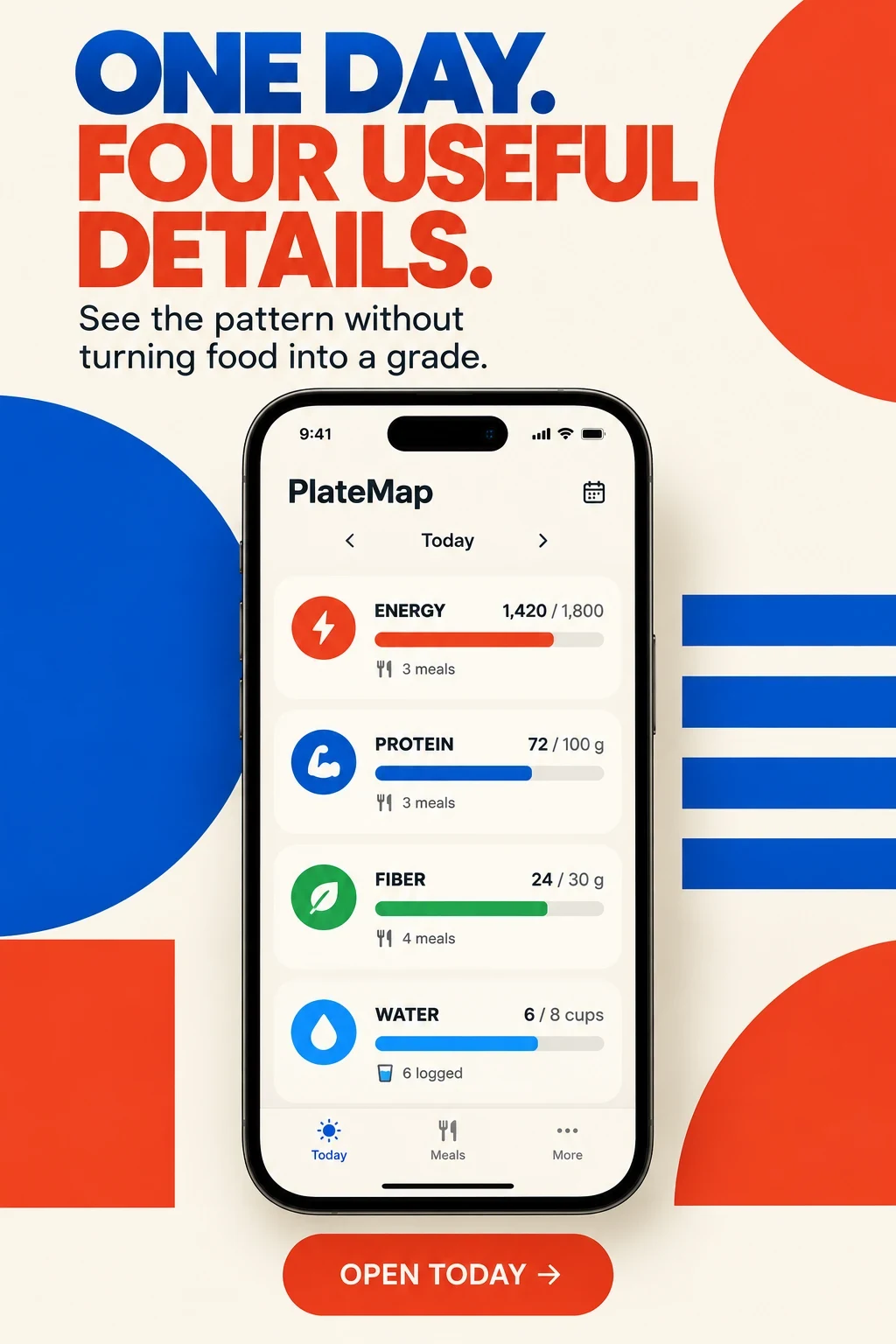
What the concept promises: Energy, protein, fiber and water get separate roles.
What you can learn: A neutral hierarchy can replace a single grade.
What I would test: Four-detail summary versus score-led dashboard.
Human review: Replace every invented record, source and target with real product behavior; review nutrition sensitivity, policy, rights, accessibility and localization.
Swipe horizontally to compare all columns →
| Workshop step | Approved input | Human check |
|---|---|---|
| Choose the job | Verified product behavior | Reject unsupported promises |
| Choose capture | Real input methods | Label estimates and correction |
| Set hierarchy | Supported nutrients | Avoid false precision |
| Generate variants | One controlled message | Keep offer and audience stable |
| Review sensitivity | Language and controls | Check shame, accessibility and policy |
| Test carefully | Event and stop rule | Never call a concept proven |
NUTRITION APP ASO
Swipe horizontally to compare all columns →
| Moment | Nutrition-specific checks |
|---|---|
| Localization | Foods, brands, portions, units, meal names, cultural patterns, dietary labels and native review |
| Submission | Fields, screenshots, claims, database scope, recognition wording, integrations, offers and privacy |
| After release | Traffic, first food match, corrections, first reviewed meal, day summary, plan created and retained use |
Plan markets with market prioritization, research locally with local keyword research, adapt foods with screenshot adaptation and finish with localization QA. For a second opinion, see ASO audit or ASO services.