Core Calorie
calorie counter · calorie tracker · daily calorie counter · food calorie tracker · meal calorie tracker · calorie diary · calorie intake tracker · calorie log · calorie calculator app · calorie counting app
CATEGORY ASO PLAYBOOK / CALORIE TRACKING
Logging speed gets attention. Portion controls, source clarity and a useful daily context make the calorie total believable.
CHOOSE THE CALORIE JOB ↓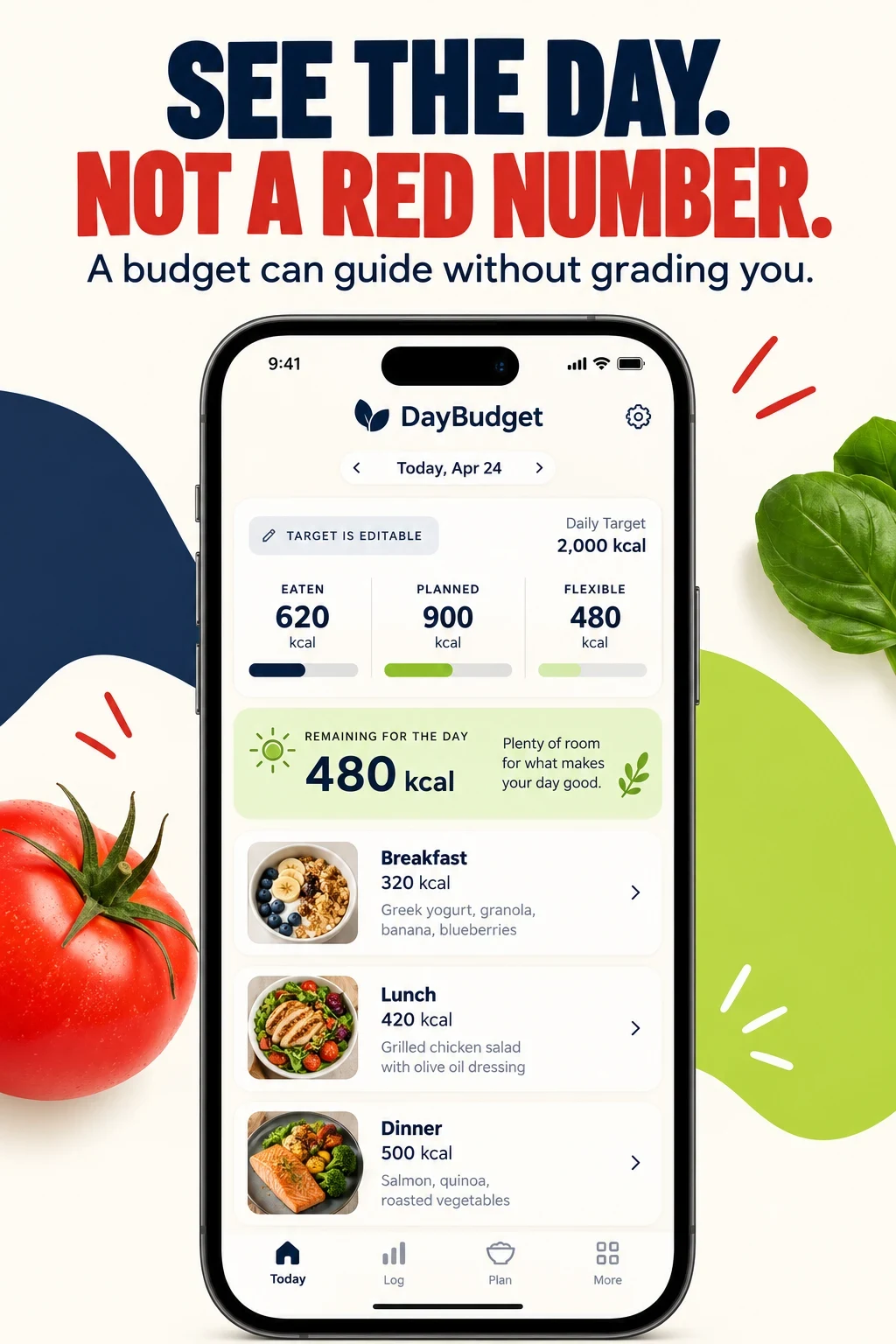
CALORIE TRACKER ASO
These are research hypotheses, not measured demographic shares. Investigate motivation, logging experience, food context, units, device, locale and the decision the person wants to make.
Swipe horizontally to compare all columns →
| Potential audience | Job | Constraint | Proof to test |
|---|---|---|---|
| First-time counters | Understand what a calorie log records | Serving units and target logic are unfamiliar | Simple first meal and target explanation |
| Fast repeat loggers | Record familiar meals quickly | Daily effort causes abandonment | Recent foods, saved meals and elapsed effort |
| Photo-led loggers | Start from a meal image | Recognition and portion uncertainty | Proposed foods, edits and final save |
| Barcode users | Log packaged foods accurately | Serving labels differ from consumption | Barcode source and serving editor |
| Home cooks | Calculate recipes and portions | Ingredient and yield complexity | Recipe builder and per-serving math |
| Restaurant diners | Record meals without a package label | Database coverage and portion ambiguity | Search depth, ranges and editable portions |
| Weight-maintenance users | Keep intake near a chosen range | Listings assume loss as the only motive | Maintenance language and flexible target |
| Strength and endurance users | See energy beside training context | Activity adjustments can be opaque | Source label and adjustment rule |
| Non-weight diary users | Observe intake without weight prompts | Shame, scores and forced goals | Optional weight, neutral language and privacy |
| Professional-sharing users | Export a useful food record | The app should not diagnose | Consent, export format and clear boundary |
Start with the broader nutrition-app ASO report, then use search intent and relevance to isolate the calorie job.
CALORIE TRACKER ASO
These 100 candidates are unmeasured. Validate relevance, suggestion evidence, paid-search behavior and downstream activation before assigning priority.
calorie counter · calorie tracker · daily calorie counter · food calorie tracker · meal calorie tracker · calorie diary · calorie intake tracker · calorie log · calorie calculator app · calorie counting app
food diary calorie counter · food log with calories · daily food calorie log · quick calorie logging app · meal diary with calories · calorie journal app · track meals and calories · calorie tracker with notes · repeat meal calorie tracker · private calorie diary
calorie budget app · daily calorie budget · calories remaining tracker · meal calorie budget · weekly calorie budget · flexible calorie budget · planned meals calorie tracker · editable calorie target · calorie target without food grades · calorie tracker without red numbers
photo calorie tracker · ai calorie counter · ai food calorie tracker · meal photo calorie estimate · snap food calorie app · calorie camera app · photo meal logger with edits · calorie estimate review app · voice calorie tracker · text calorie logger
barcode calorie scanner · food barcode scanner calories · nutrition label calorie scanner · calorie database app · verified food calorie database · restaurant calorie database · grocery food calorie scanner · calorie tracker with food sources · scan recipe calories · custom food calorie database
portion calorie calculator · serving size calorie tracker · recipe calorie calculator · home cooked meal calorie tracker · ingredient calorie calculator · calories by serving size · calorie tracker with grams · calorie tracker with ounces · recipe servings calorie tracker · editable portion calorie app
calorie tracker for weight management · calorie tracker for maintenance · calorie tracker for weight gain · calorie deficit tracker · calorie surplus tracker · calorie tracker for strength training · calorie tracker for runners · calorie tracker without weight loss · calorie tracker for balanced eating · calorie tracker with custom goals
calorie tracker for shift workers · calorie tracker for restaurant meals · calorie tracker for family recipes · simple calorie tracker for beginners · offline calorie tracker · calorie tracker with no account · calorie tracker with metric units · calorie tracker with imperial units · calorie tracker for meal prep · calorie tracker for recurring meals
weekly calorie report · calorie trend tracker · meal calorie history · calorie intake chart · calorie diary export · share calorie log with dietitian · calorie tracker csv export · calorie pattern tracker · calorie tracker with meal breakdown · daily calorie summary
calorie tracker with health sync · calorie tracker with fitness sync · calorie tracker with step adjustment · calorie tracker with exercise calories · private calorie counter · calorie tracker data export · calorie tracker with source labels · calorie tracker with reminder controls · calorie tracker with hidden weight · calorie tracker without ads
Download the 100-keyword worksheet. Expand it with seed keywords, competitor research, long-tail research and prioritization.
CALORIE TRACKER ASO
Swipe horizontally to compare all columns →
| Narrow angle | Candidate phrases | Proof required |
|---|---|---|
| Portion credibility | calorie tracker with grams; editable portion calorie app | Serving editor and recalculation |
| Home cooking | recipe calorie calculator; family recipe calorie tracker | Ingredients, yield and per-serving math |
| Dining out | calorie tracker for restaurant meals | Market coverage and editable estimate |
| Non-loss intent | calorie tracker for maintenance; calorie tracker without weight loss | Neutral goal setup |
| Fast repeats | calorie tracker for recurring meals | Recent and saved meals |
| Privacy | private calorie diary; calorie tracker with no account | Actual account and export behavior |
| Training context | calorie tracker for runners; calorie tracker for strength training | Qualified activity-source logic |
| Shift work | calorie tracker for shift workers | Flexible day boundary and reminders |
| Source transparency | calorie tracker with source labels | Label, recipe or database source |
| Neutral interface | calorie tracker without red numbers | Optional metrics and non-shaming language |
Use the long-tail guide to validate specificity without inventing demand.
CALORIE TRACKER ASO
Eight current US App Store listings were checked on 26 October 2026. All eight matching Google Play listings were also verified. The table compares visible positioning, not product quality or performance.
Swipe horizontally to compare all columns →
| App | Developer | Title | Subtitle | Calorie-tracking role |
|---|---|---|---|---|
| MyFitnessPal | MyFitnessPal, Inc. | MyFitnessPal: Calorie Counter | AI Coach & Nutrition Tracker | Broad calorie and nutrition tracking with photo, search and scan mechanisms. |
| Lose It! | FitNow, Inc. | Lose It! – Calorie Counter | Food Tracker for Weight Loss | Calorie budgeting and food logging framed around weight management. |
| Yazio | YAZIO GmbH | AI Calorie Tracker by Yazio | Weight Loss Food Diary | Calorie diary combined with AI capture and fasting. |
| Lifesum | Lifesum AB | Lifesum: AI Calorie Counter | Food Diary & Macro Tracker App | Multi-input meal capture with calorie and macro context. |
| Cronometer | Cronometer Software Inc | Cronometer: Calorie Counter | Nutrition, macro, diet tracker | Calorie totals supported by detailed food-data provenance. |
| MacroFactor | Stronger By Science Technologies LLC | MacroFactor - Macro Tracker | Calorie Counter & Food Log | Calorie and macro logs connected to expenditure context. |
| Foodvisor | Foodvisor | Foodvisor - AI Calorie Counter | Diet Tracker for Weight Loss | Photo and barcode capture with calorie detail and coaching. |
| MyNetDiary | MyNetDiary Inc. | Calorie Counter - MyNetDiary | Food Nutrition Macro Tracker | Calorie dashboard, food scanner, meal scan and nutrient breakdown. |
Keep a dated evidence sheet using competitor research and the metadata change log.
CALORIE TRACKER ASO
Swipe horizontally to compare all columns →
| Decision | iOS | Google Play | Calorie-tracking consequence |
|---|---|---|---|
| Name | 30 characters | 30 characters | Name calorie tracking only when central |
| Support line | 30-character subtitle | 80-character short description | Explain capture or review mechanism |
| Discovery | Keyword field plus description | Full description | Plan terms separately |
| Testing | Product Page Optimization | Store listing experiments | Test one message or sequence |
| Intent pages | Custom product pages | Custom store listings | Separate scan, recipe and budget intent |
CALORIE TRACKER ASO
All 20 panels were opened at readable size. Visible choices, recommendations and unknown outcomes are kept separate.

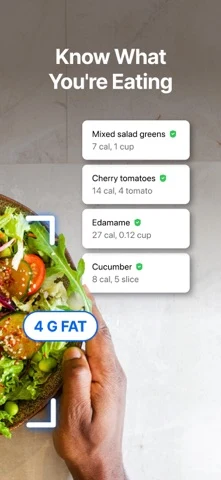
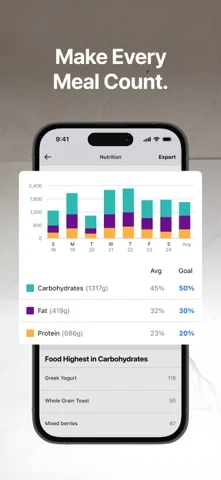
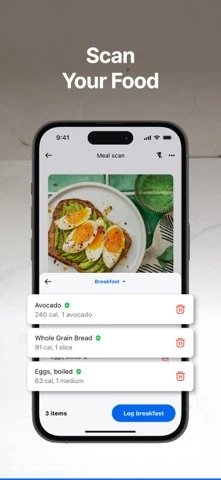
Original artwork from the MyFitnessPal US App Store listing, captured 26 October 2026. Select a panel to enlarge it.
What the screenshots show: The first four frames show category authority, photo nutrient estimates, ingredient recognition, trends and meal scanning.
What I would test: Lead with the calorie mechanism for generic calorie-counter traffic and keep the review step visible. The result is unknown until tested.

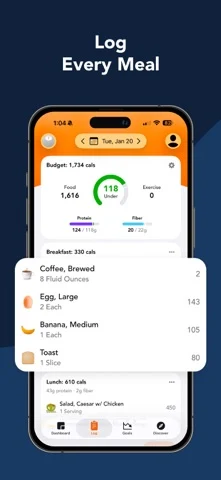

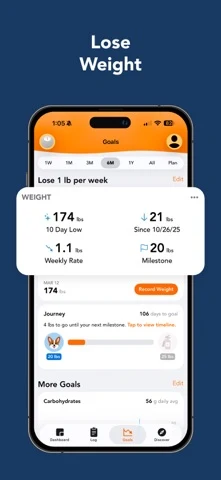
Original artwork from the Lose It! US App Store listing, captured 26 October 2026. Select a panel to enlarge it.
What the screenshots show: The sequence begins with weight positioning, then shows the food log, photo capture and progress timeline.
What I would test: Test a calorie-budget first frame for budget intent while keeping weight language for qualified traffic. The result is unknown until tested.
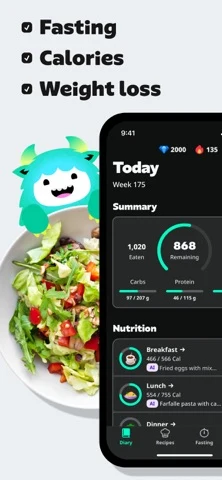

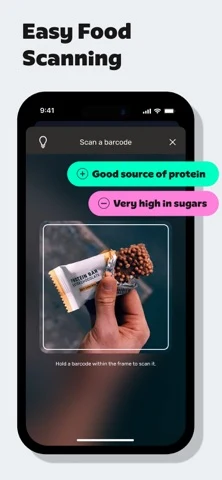
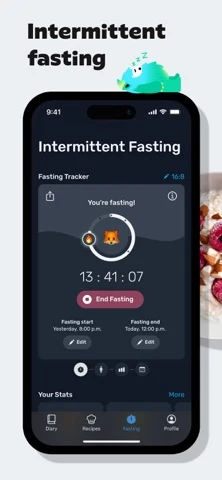
Original artwork from the Yazio US App Store listing, captured 26 October 2026. Select a panel to enlarge it.
What the screenshots show: A day summary is readable, followed by rating proof, barcode capture and intermittent fasting.
What I would test: Keep the first three screens on calories, capture and correction; move fasting to an intent-specific page. The result is unknown until tested.


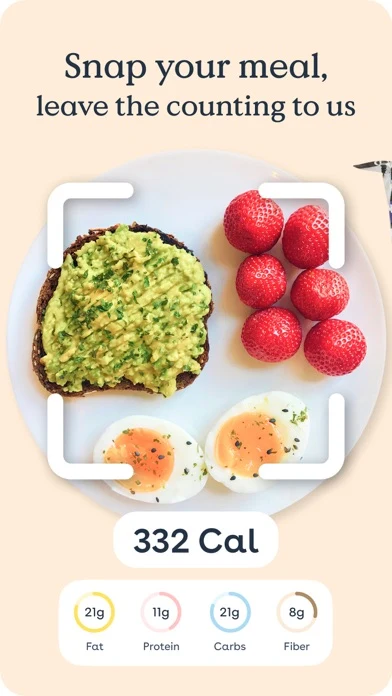
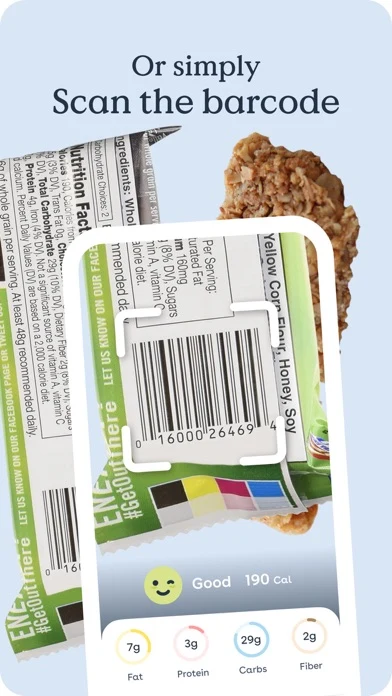
Original artwork from the Foodvisor US App Store listing, captured 26 October 2026. Select a panel to enlarge it.
What the screenshots show: The opening uses awards and media proof, then moves through a result story, photo calories and barcode scanning.
What I would test: Test product evidence before volatile awards and replace the outcome story for non-loss intent. The result is unknown until tested.
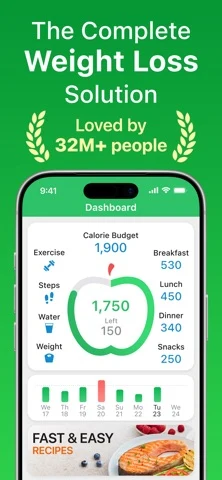
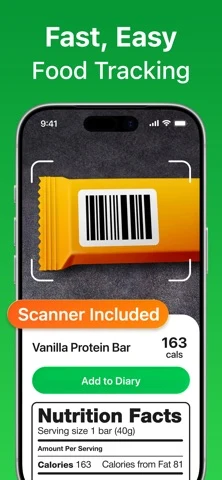
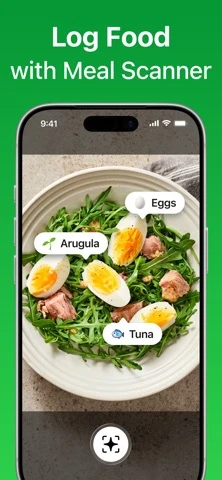
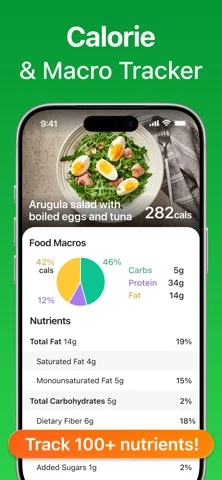
Original artwork from the MyNetDiary US App Store listing, captured 26 October 2026. Select a panel to enlarge it.
What the screenshots show: The first frame shows a calorie budget, followed by barcode scanning, meal scanning and a calorie-plus-macro detail view.
What I would test: Show serving correction after each scan so the total has a visible credibility mechanism. The result is unknown until tested.
Use screenshot strategy, order, readability and storytelling.
CALORIE TRACKER ASO
DayBudget is fictional. The example assumes editable targets, photo and barcode capture, portion controls, source labels and a daily calorie summary.
Swipe horizontally to compare all columns →
| Field | Worked copy | Count |
|---|---|---|
| iOS name | DayBudget: Calorie Tracker | 26 / 30 |
| iOS subtitle | Review Meals & Serving Sizes | 28 / 30 |
| iOS keywords | calorie,counter,food,meal,diary,tracker,portion,serving,barcode,photo,recipe,budget,log | 87 / 100 |
| Google name | DayBudget: Calorie Tracker | 26 / 30 |
| Google short description | Log food, review portions and see your daily calorie budget without grades. | 75 / 80 |
Description opening: Add food by photo, barcode, search or saved meal. Check the match and serving before saving, then open the day to see what is eaten, planned and flexible.
CTA: Review my first day.
Swipe horizontally to compare all columns →
| Frame | Message | Product proof |
|---|---|---|
| 01 | See the day. Not a red number. | Eaten, planned and flexible |
| 02 | Four ways to log. One review step. | Photo, barcode, search and saved meal |
| 03 | The portion changes the total. | Serving editor and recalculation |
| 04 | Know where the number came from. | Label, recipe or database source |
| 05 | Your target is yours to manage. | Settings and optional metrics |
CALORIE TRACKER ASO
Swipe horizontally to compare all columns →
| Mistake | Why it is unclear | Better test |
|---|---|---|
| Treating photo estimates as final | Portion and ingredient uncertainty disappears | Show proposed match and correction |
| Leading with a red remaining number | The interface feels like a grade | Show eaten, planned and flexible |
| Assuming every visitor wants weight loss | Maintenance and diary motives disappear | Build qualified intent pages |
| Hiding serving units | Precise totals lack inspectable inputs | Show amount and unit |
| Claiming database accuracy broadly | Coverage varies by market and food | Name source and scope |
| Adding exercise without explaining it | Target adjustments look arbitrary | Show source and rule |
| Repeating one dashboard | The sequence never proves logging | Move job to input to context |
| Tiny nutrition tables | Store visitors cannot inspect the claim | Crop one useful detail |
| Mixing calorie, fasting and recipes | One listing serves too many jobs | Separate supported intent |
| Making health outcomes certain | The listing exceeds evidence | Use qualified language and review |
Download the ten-test backlog and turn each idea into a falsifiable A/B-test hypothesis.
CALORIE TRACKER ASO
No campaigns or spend are authorized. Keep exact, broad and Search Match controlled. Negatives should exclude unsupported medical conditions, food delivery, supplements, local professionals, grocery shopping and outcomes the product cannot support.
Swipe horizontally to compare all columns →
| Campaign group | Query family | Landing argument | Activation event |
|---|---|---|---|
| Brand | Exact brand and close variants | Core product page | First reviewed day |
| Calorie core | calorie counter; calorie tracker | Day-budget page | First completed day |
| Food log | food calorie log; meal calorie tracker | Logging page | First meal saved |
| Photo | photo calorie tracker; calorie camera | Photo-review page | Corrected photo meal |
| Barcode | barcode calorie scanner | Barcode page | Scanned serving saved |
| Recipes | recipe calorie calculator | Recipe page | Recipe serving saved |
| Portions | serving size calorie tracker | Portion page | Serving corrected |
| Maintenance | calorie tracker for maintenance | Neutral-goal page | Target reviewed |
| Discovery | Search Match and bounded broad terms | Closest supported job | Qualified activation |
Follow Apple documentation for match types, negatives and ad variations. Evaluate with ASO KPIs and conversion definitions, not taps alone.
CALORIE TRACKER ASO
Swipe horizontally to compare all columns →
| Visible pattern | Dated evidence | Working hypothesis |
|---|---|---|
| Photo logging | MyFitnessPal, Lose It!, Foodvisor and others | Review quality may differentiate a common feature |
| AI naming | MyFitnessPal, Yazio, Lifesum and current fields | The mechanism needs proof beyond the label |
| Weight framing | Lose It!, Yazio and Foodvisor fields | Strong for one motive but not universal |
| Barcode proof | Yazio, Foodvisor and MyNetDiary screens | A familiar capture mechanism remains concrete |
| Calorie plus macros | MyNetDiary and broader competitor fields | Calories rarely stand alone in detail views |
| Multiple jobs | Yazio adds fasting; others add planning or coaching | Intent pages can reduce first-frame conflict |
These are storefront observations from 26 October 2026, not market-share or conversion conclusions.
CALORIE TRACKER ASO
These DayBudget concepts are AI-generated, fictional and untested. They are not competitor screenshots or claims about a live app.
What the app promises: The day separates eaten, planned and flexible calories.
What you can learn: A budget can explain context without grading the user.
What I would test: Neutral day hierarchy versus a red remaining ring.
Human review: Replace invented meals, sources and targets with real behavior; review nutrition sensitivity, rights, accessibility, policy and localization.
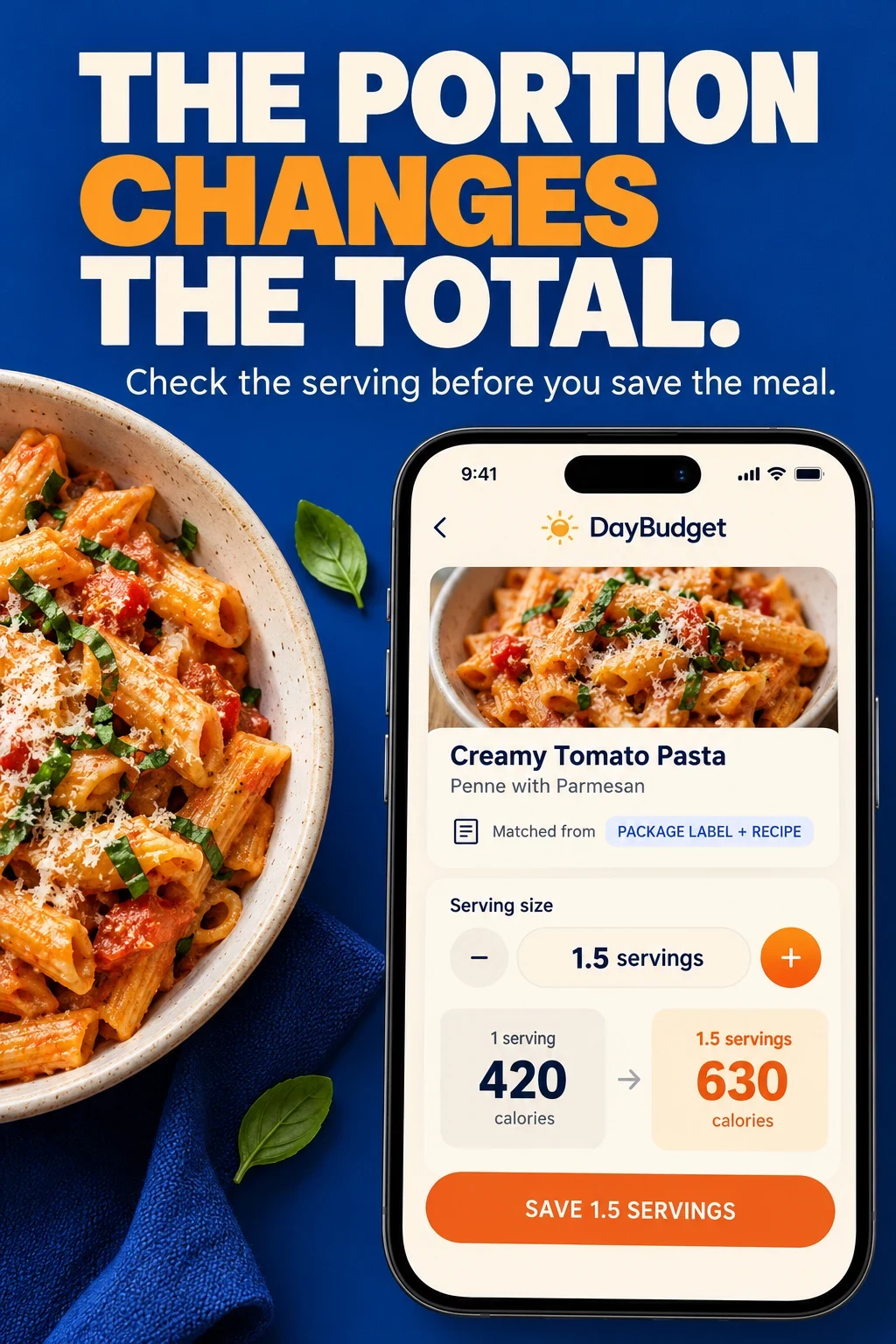
What the app promises: Serving size, source and recalculation are visible before save.
What you can learn: Credibility can come from the editable input, not an accuracy slogan.
What I would test: Serving-review proof versus generic scan speed.
Human review: Replace invented meals, sources and targets with real behavior; review nutrition sensitivity, rights, accessibility, policy and localization.
Swipe horizontally to compare all columns →
| Workshop step | Approved input | Human check |
|---|---|---|
| Choose the job | Verified calorie workflow | Reject unsupported goals |
| Map the inputs | Real capture methods | Keep correction visible |
| Explain the total | Target and adjustment rules | Avoid false precision |
| Generate variants | One controlled message | Keep audience and offer stable |
| Review sensitivity | Tone and controls | Check shame, accessibility and policy |
| Test carefully | Activation event and stop rule | Never call a concept proven |
CALORIE TRACKER ASO
Swipe horizontally to compare all columns →
| Moment | Calorie-tracking checks |
|---|---|
| Localization | Foods, brands, portions, decimal separators, units, meal names, day boundary and native review |
| Submission | Fields, screenshots, database scope, recognition wording, target logic, integrations, offers and privacy |
| After release | Traffic, first match, correction, first meal, completed day, target review, export and retained use |
Prioritize markets with market prioritization, research them with local keyword research, adapt foods through screenshot adaptation and finish with localization QA. For a second opinion, see ASO audit or ASO services.