Start running
Walk/run sessions and achievable starting levels
- beginner running app
- learn to run
- walk run intervals
- first 5k training
- running for beginners
CATEGORY PLAYBOOK / RUNNING FITNESS APPS
Study established running apps. Build titles, screenshot stories and copy that make your own running product easier to choose.
Tracking a run, following a training plan and finding a route are different promises. Your listing should make its primary promise obvious before asking someone to install.
SEE THE SCREENSHOT BRIEF ↓
Before writing your own listing, study how established running apps explain the job they do. This comparison covers Strava, Runna, Nike Run Club, ASICS Runkeeper and adidas Running. They provide five useful positioning references, not a measured ranking of the world’s best apps.
Research scope: US English App Store titles, subtitles, developer labels and publisher descriptions reviewed on 26 October 2026. Store copy can change. This is public listing analysis, not a product test, client case study or access to private ASO results. The ideas below are suggestions for your app. The real screenshot examples later in this guide show what Runna and Nike currently display. Google Play requires a separate listing audit.
Swipe horizontally to compare all columns →
| Listed developer | App title | Subtitle | What this tells a runner |
|---|---|---|---|
| Strava, Inc. | Strava: Run, Bike, Walk | Track & share with friends | Several activities; a social reason to record them |
| Strava, Inc. | Runna: Running Plans & Coach | 5k to Marathon Training | A specific training job and distance range |
| Nike, Inc | Nike Run Club: Running Coach | Workout App & Distance Tracker | Coaching first; tracking adds functional context |
| ASICS Runner App, Inc. | ASICS Runkeeper—Run Tracker | Running App and Training Plans | Recording first; planning extends the offer |
| adidas | adidas Running: Run tracker | From Walk to Marathon training | Tracking with a broad progression story |
What the app promises: The title names three activities, while the subtitle supplies a social benefit. The description develops activity recording, routes, community and challenges. Its breadth is part of the proposition. Read the public App Store listing.
What you can learn: An unfamiliar running-only brand should not automatically imitate that breadth. A specific running workflow may explain its value faster than a catalogue of sports. Separate functional relevance from the extra reason someone would choose you.
A screenshot idea to test: Test a completed-run summary followed by a real sharing interaction. Keep distance and pace readable; make the social action visible rather than relying on a stock group photograph.
A call to action to try: “Record a run. Share the effort.” Use only where sharing is supported; do not imply an existing community your product cannot deliver.
What the app promises: The title identifies plans and coaching; the subtitle narrows the training scope by distance. The description develops tailored programmes and compatible devices. The listing names Strava, Inc. as developer, so these two apps are not two independent developer examples. Read the public App Store listing.
What you can learn: The metadata makes the training job legible before discussing secondary capabilities. A smaller competitor can investigate a narrower supported audience, but should not borrow coaching language for a static calendar.
A screenshot idea to test: Show a supported goal, its weekly schedule and one session instruction. This turns a planning claim into a sequence a runner can inspect.
A call to action to try: “Preview your training week.” Check whether a preview exists and explain setup or paid access accurately.
What the app promises: The title leads with coaching. The subtitle adds workout and distance-tracking context. The description explains guided runs, training plans and challenges, with country availability notes for plans and guided runs. Read the public App Store listing.
What you can learn: Coaching is an expectation to substantiate. Distinguish recorded audio guidance, automated recommendations and live human support. Nike’s description also illustrates why availability details belong in the localization review.
A screenshot idea to test: Pair a guided-session selection with the actual playback or guidance interface. Demonstrate the experience instead of letting a coach photograph stand in for it.
A call to action to try: “Find a guided run for today.” Confirm that the shown session is accessible in the target market.
What the app promises: The title identifies run tracking; the subtitle introduces plans. The description adds activity recording, audio statistics, progress and a premium training offer. Read the public App Store listing.
What you can learn: The opening metadata gives recording priority without removing planning from the offer. For a similar product, make the first screen answer the tracking question before introducing a separate paid training proposition.
A screenshot idea to test: Test a readable completed-run view first, followed by progress and then planning. Label access conditions where the sequence moves into paid functionality.
A call to action to try: “Track your next run.” This is more aligned with a recording-led opening than an unsupported promise to achieve a personal best.
What the app promises: The title foregrounds tracking, while the subtitle spans walking to marathon training. The description combines activity statistics, plans, community challenges and rewards. Read the public App Store listing.
What you can learn: A broad motivational message needs a concrete mechanism. A smaller app should show how its challenge or habit feature works before asking visitors to believe a general transformation story.
A screenshot idea to test: Pair a running summary with a real challenge-progress screen. Keep reward eligibility accurate and avoid decorative badges that imply benefits the app does not offer.
A call to action to try: “Choose your next running challenge.” Appropriate only when an accessible challenge-selection workflow exists.
Do not turn this review into five brand names in your keyword list. Use it to choose a clearer promise. These companies can combine multiple capabilities; your listing still needs a first reason to install. The following are positioning hypotheses, not claims that the established apps lack these features.
Swipe horizontally to compare all columns →
| Your supported running job | Specific listing direction | First-screen proof |
|---|---|---|
| Beginner walk/run sessions | Explain the alternation between running and walking | A legible interval session with both phases |
| Race-distance planning | Name the supported distance and show the schedule | A real plan week and its next session |
| Simple run recording | Lead with recording and reviewing a run | Start/record workflow or completed activity |
| Trail route discovery | Explain route suitability and available detail | An actual route with terrain and elevation information |
| Treadmill sessions | Clarify the indoor workout and recording method | A genuine indoor-session screen without a misleading GPS map |
Translate one chosen direction into the metadata exercise, the screenshot storyboard and the test brief. Keep the audience and promise consistent across all three. For a wider competitor review, use the research process to record country, platform, date and evidence.
What this sample cannot establish: keyword volumes, organic keyword positions, download share or conversion uplift. A visible title shows a messaging decision; it does not prove that decision caused growth. Repeat the audit separately for Google Play before recommending Android metadata or creative changes.
Start with the runner’s situation, then investigate demographics. Age alone will not tell you whether someone needs a beginner plan or marathon training. A 55-year-old first-time runner and a 25-year-old first-time runner may need the same explanation.
These are potential audiences to research, not measured profiles of Nike, Runna or any other app. Age ranges below are suggested interview groups. They are not audience-size estimates or instructions to exclude other ages or genders.
Swipe horizontally to compare all columns →
| Potential audience | Demographic questions to investigate | What they need to understand | Show this in the listing |
|---|---|---|---|
| First-time adult runner | Interview adults across 18–34, 35–54 and 55+; compare experience, not assumed fitness | Can I start with walking? How long is a session? | A real walk/run session, duration and starting-level choices |
| Time-constrained runner | Explore work patterns and caring responsibilities across adult ages | Can I move a workout when my week changes? | Rescheduling and the updated week |
| First-race entrant | Compare first 5K, 10K and half-marathon entrants across ages | Does this plan fit my distance and current level? | Supported distance, prerequisites and the first week |
| Experienced recreational runner | Ask about current training, watch ownership and paid-app experience | What does this add to my existing tracker? | Session detail, planning logic or a verified device workflow |
| Indoor runner | Research climate, local running conditions and treadmill access | Will it work indoors, and how is distance measured? | Indoor session and measurement explanation |
| Runner who values readability | Include older adults and people with different vision or accessibility needs | Can I read and follow instructions while moving? | Large, clear session instructions and supported accessibility features |
Recruit across gender, age, language and experience rather than assuming a runner stereotype. Ask which words participants use to find help, what they expect after installing, and which screenshot answers their first question. Compare answers with consented onboarding information, store search evidence and activation data. Store age ratings are content classifications, not demographic profiles.
For each country, check language, distance units, local race terminology, device support and pricing expectations. A watch-heavy creative direction should come from evidence about your audience, not a guess about income.
This is a starting list for research. No search volume, difficulty or growth rate has been measured here. Some phrases may receive little or no App Store traffic. Keep only terms your product can honestly satisfy; the fictional PacePilot planner should not target route discovery or standalone watch tracking unless those features exist.
Walk/run sessions and achievable starting levels
Plans for the named distance and starting ability
Recording, distance, pace and activity history
A schedule and the specific adjustment promised
Indoor sessions and an honest explanation of measurement
Route coverage, terrain information and supported offline behaviour
The precise guidance format, without implying live human support
Verified device, standalone and syncing capabilities
A beginner programme with clearly stated prerequisites
A supported 10K plan and the promised session types
Appropriate half-marathon programmes and schedule controls
Marathon coverage with prerequisites and accurate plan details
Timing, alerts and interval settings that actually exist
History, notes or mileage reporting as described
Working calculators or conversion tools; not just a generic tracker
Verified privacy, offline or export behaviour for the chosen query
For every term, record the country, language, store, date, intent, supporting feature, demand source, visible competitors and intended destination. A tool estimate and Apple Ads impressions answer different questions. Low impressions can reflect bids, relevance or eligibility as well as limited demand.
Use the keyword research workflow before choosing metadata. Do not paste these eighty phrases into a title or subtitle. For iOS, distribute relevant terms across the metadata fields while keeping visible copy natural. Download the keyword worksheet.
Long-tail phrases describe a more specific need. They are not automatically cheap, easy to rank for or commercially valuable. A niche is worth exploring when your app has a convincing answer and enough relevant people actually look for it.
Build candidates from job + constraint + context: a training plan + three days a week + first 10K. Test shorter variations too; people rarely search exactly like a planning document.
Swipe horizontally to compare all columns →
| Niche to investigate | Long-tail candidates | What the app must deliver | Creative angle |
|---|---|---|---|
| Limited weekly availability | 3 day 10k training plan; half marathon plan 3 days a week | A genuine plan for that frequency and appropriate starting level | Show three scheduled training days |
| Beginner intervals | walk run timer for beginners; first 5k walk run plan | Walk/run timing or a supported beginner programme | Make the walking part obvious |
| Indoor training | treadmill interval running plan; indoor 5k training app | An indoor-compatible session and truthful tracking method | Show the treadmill session, not a GPS route |
| Phone-free workouts | Apple Watch running intervals without phone | Verified standalone operation on supported devices | Show what works without the phone |
| Flexible scheduling | running plan for changing work schedule; move running workouts | Meaningful rescheduling with clear limitations | Demonstrate moving a session |
| Trail preparation | trail running elevation planner; offline trail running routes | Accurate route/elevation data and specified offline coverage | Show terrain and download availability |
Treat these as six different product opportunities, not six promises to bolt onto one app. Begin with one supported niche. Interview relevant runners, inspect local search results, check demand signals and trial an appropriate listing or ad variation. Expand only if the evidence and product support it.
A phrase such as “running plan after injury” introduces a medical expectation. Do not target it simply because it sounds narrow; it needs an appropriate product, evidence and review. Likewise, a brand-associated programme name is not a shortcut to generic keyword ownership.
Here are two real US iPhone screenshot galleries reviewed on 26 October 2026. The images below are individual screenshot assets from the public App Store pages. They show creative choices, not evidence of conversion performance. Select a screenshot to inspect it at full size.
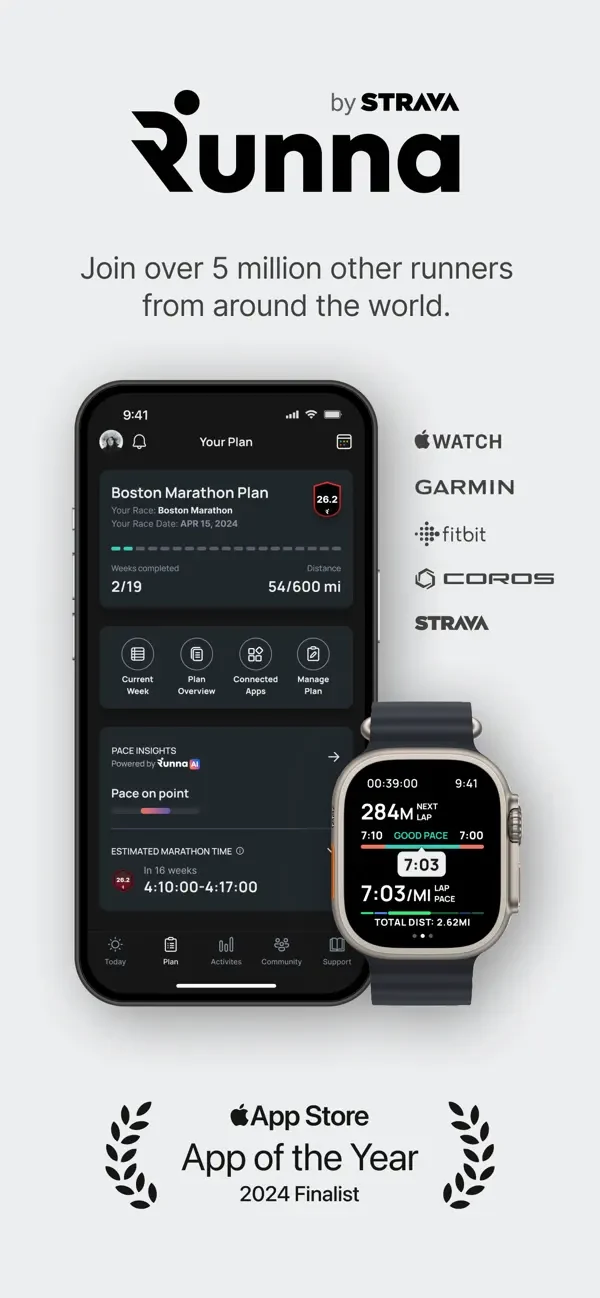
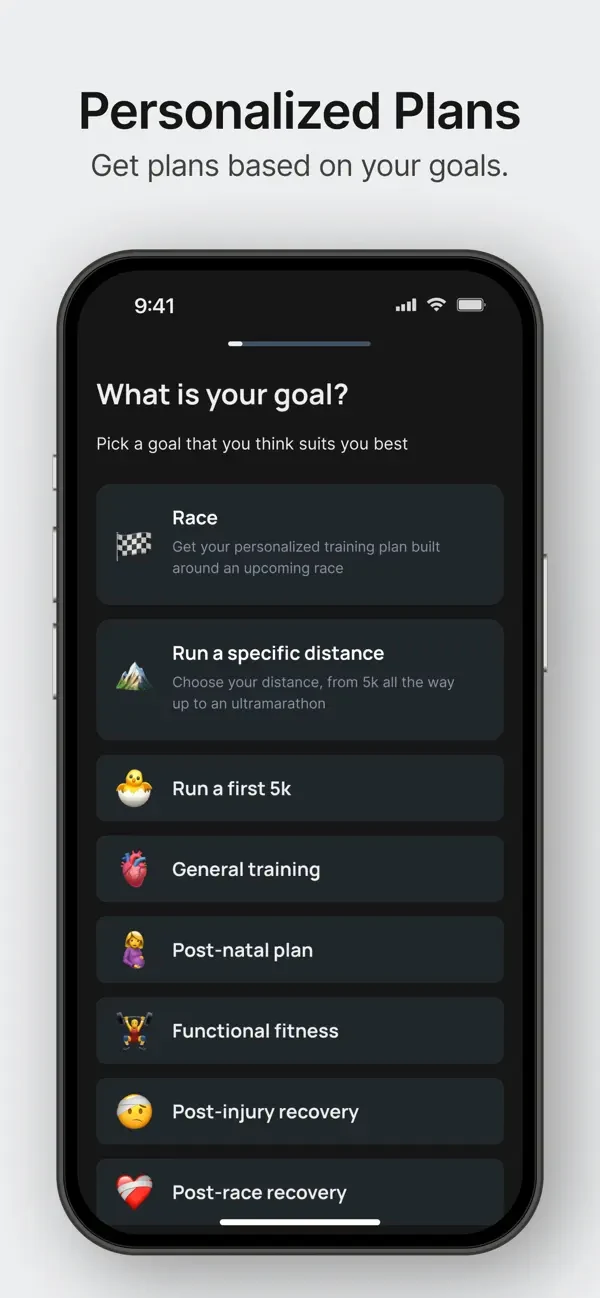
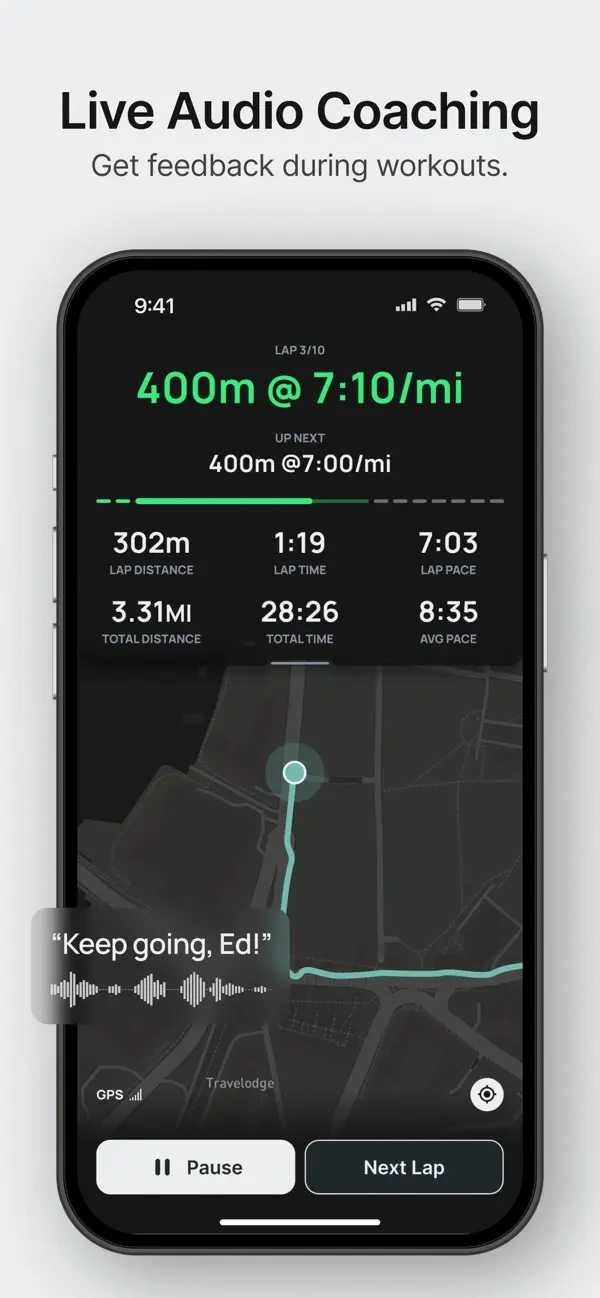
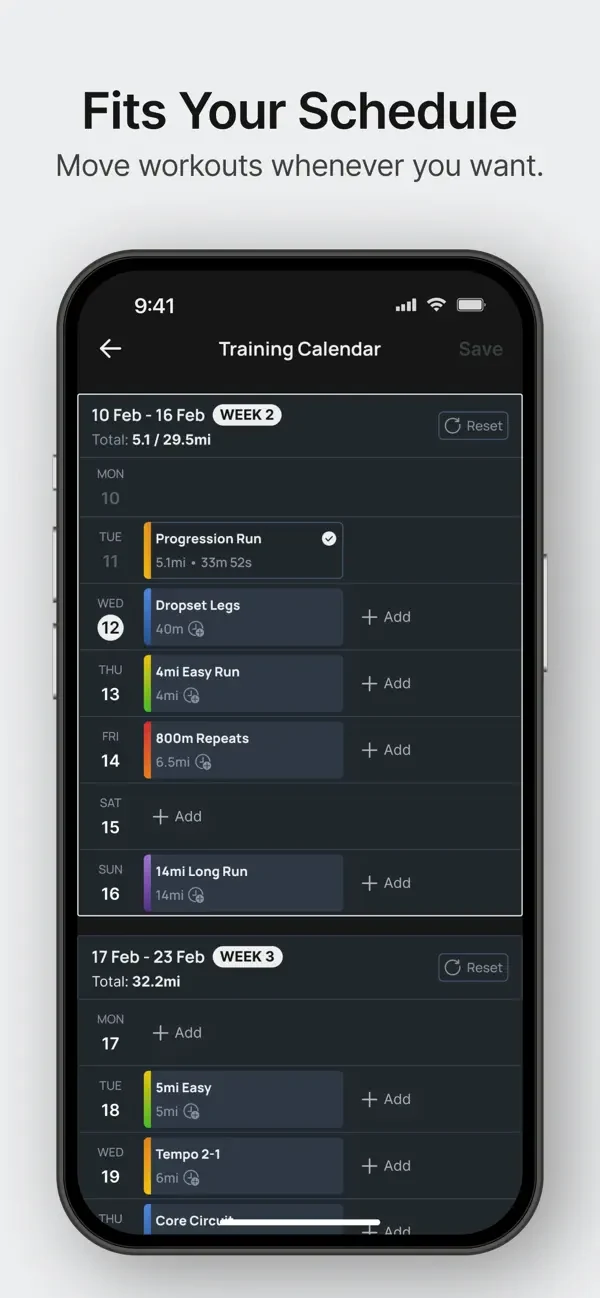
Original screenshot artwork from the Runna US App Store listing, reviewed 26 October 2026. Select a panel to enlarge it. Screenshots remain the property of their respective owners.
The first frame combines the logo, social proof, device marks and an award badge. The next three move into choosing a plan, audio guidance and changing the schedule. The sequence shifts from reassurance to concrete jobs.
The useful lesson is the connection between a feature promise and a relevant interface. Goal selection explains planning; the calendar supports flexibility. At this displayed size, the headlines are easier to read than the small details inside the phones.
The trade-off: the opening asks you to absorb several trust signals before explaining a specific running problem. For a lesser-known planner, test a next-session screen first and move supporting credentials later. That is a test idea, not a claim that Runna’s opening performs poorly.
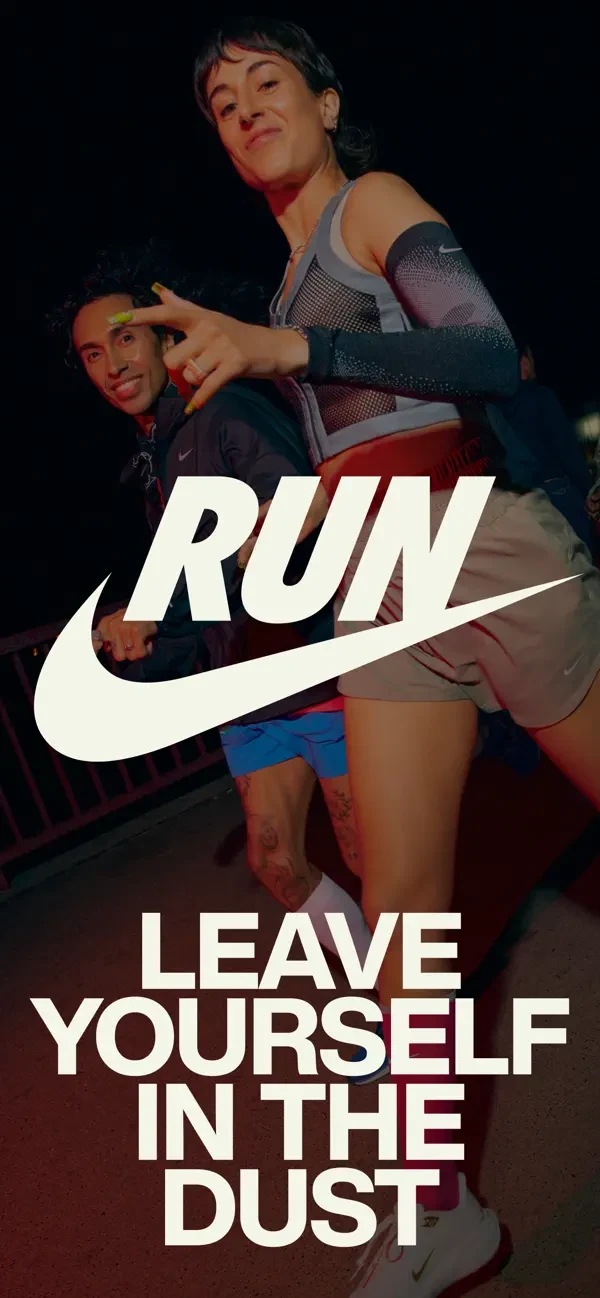
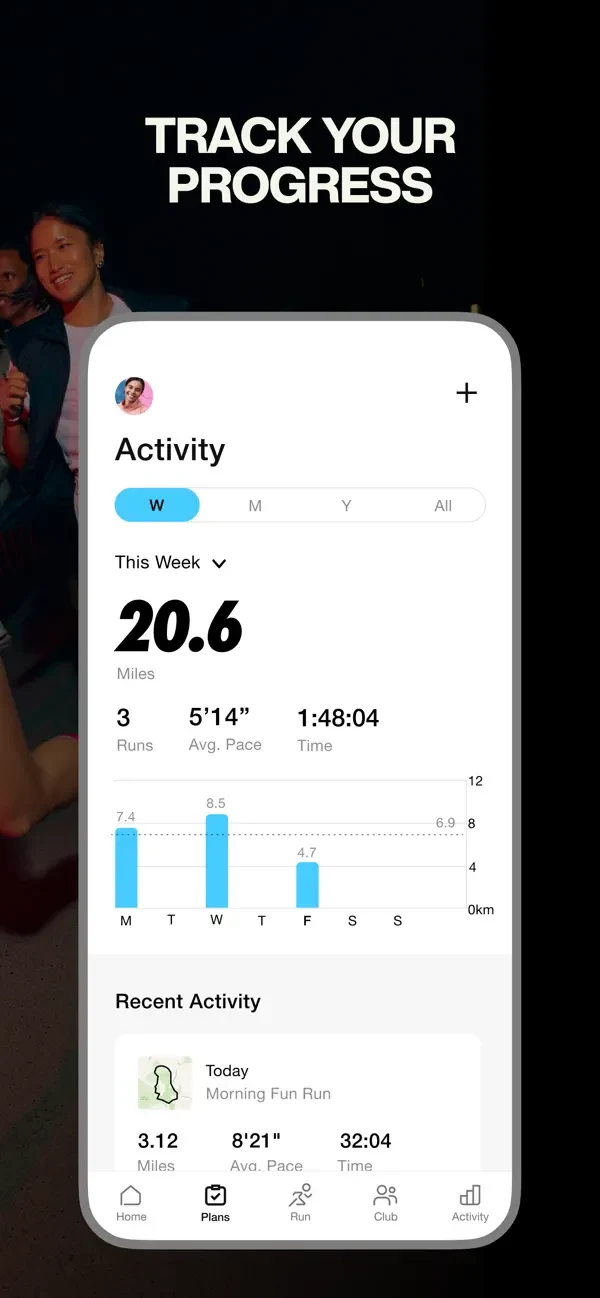
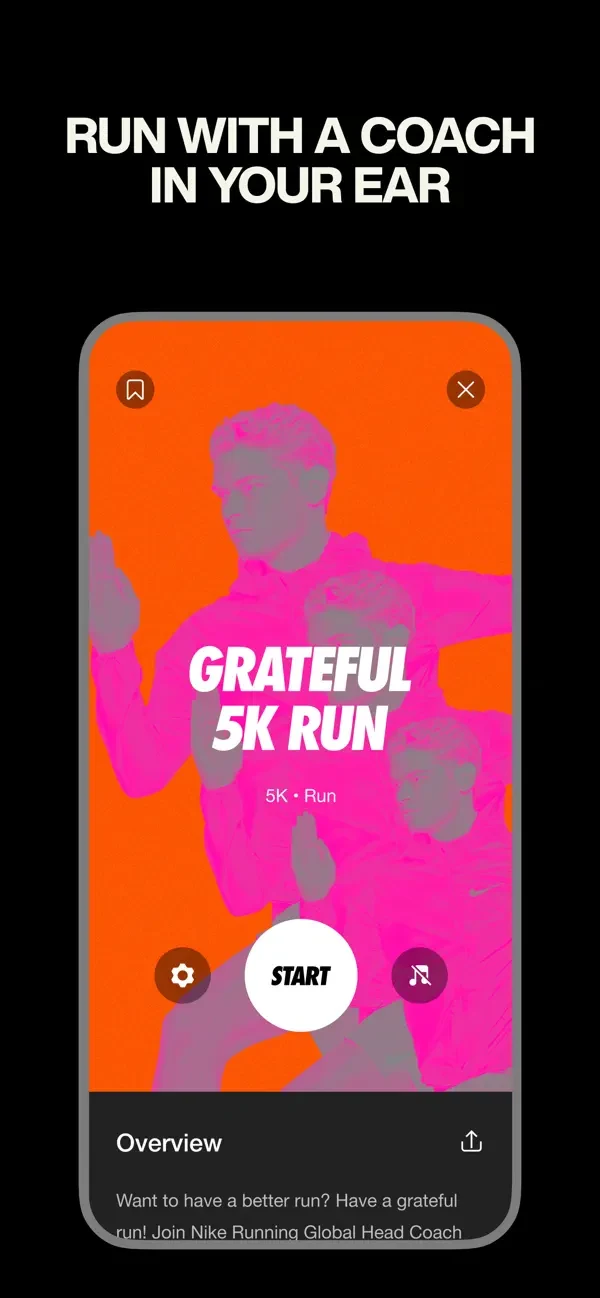
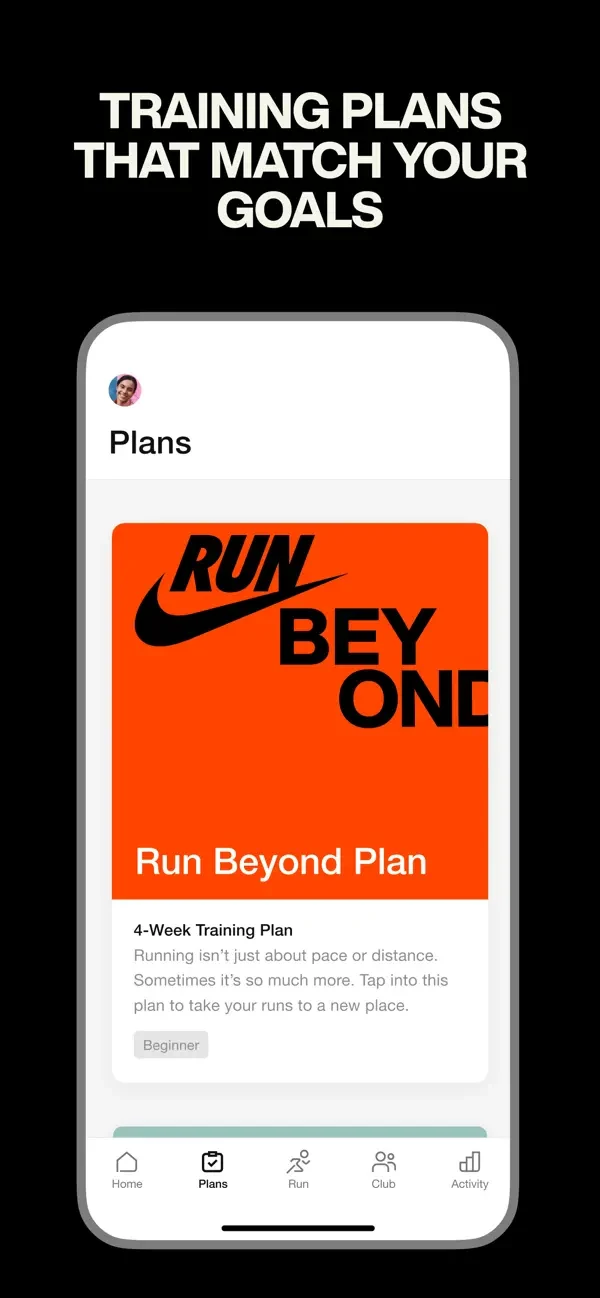
Original screenshot artwork from the Nike Run Club US App Store listing, reviewed 26 October 2026. Select a panel to enlarge it. Screenshots remain the property of their respective owners.
Nike opens with runners, a large brand mark and a motivational statement. The following frames show activity progress, an audio-guided run and a training plan. Dark backgrounds, large white headings and bright product screens create a clear hierarchy.
The second frame makes tracking tangible through an activity summary. The coaching frame shows a session with a start control, making the experience easier to picture than a coach portrait alone. The final visible frame connects a goal to a plan.
The trade-off: the first image sells identity before functionality. An unfamiliar app copying that opening may leave visitors asking what it actually does. Test product-first against motivation-first creative for the same audience. Keep dense dashboard numbers secondary to the main benefit.
Review the exported image at realistic phone size, not only on a designer’s monitor. Ask someone to explain the promise without zooming. If they can read the headline but cannot tell what the interface proves, simplify the crop or use a different product screen. See the screenshot readability guide.
These three apps expand the comparison beyond the original five. They represent different ways to explain running: a recognisable coach, a beginner programme and an endurance-training platform. They are not ranked by downloads or results.
Swipe horizontally to compare all columns →
| App | Listed developer | App Store title | Subtitle |
|---|---|---|---|
| Run With Hal | Peaksware, LLC | Run With Hal | Coach-Led Run Plans |
| C25K | Zen Labs | C25K® 5K Running Coach & Map | Run Training - Couch to Runner |
| TrainingPeaks | Peaksware, LLC | TrainingPeaks: Plan Train Lift | Triathlon, Cycling, Running |
What the app promises: The name leads with a person; the subtitle explains the product. The description connects that coaching identity to adaptive plans, scheduling and race distances.
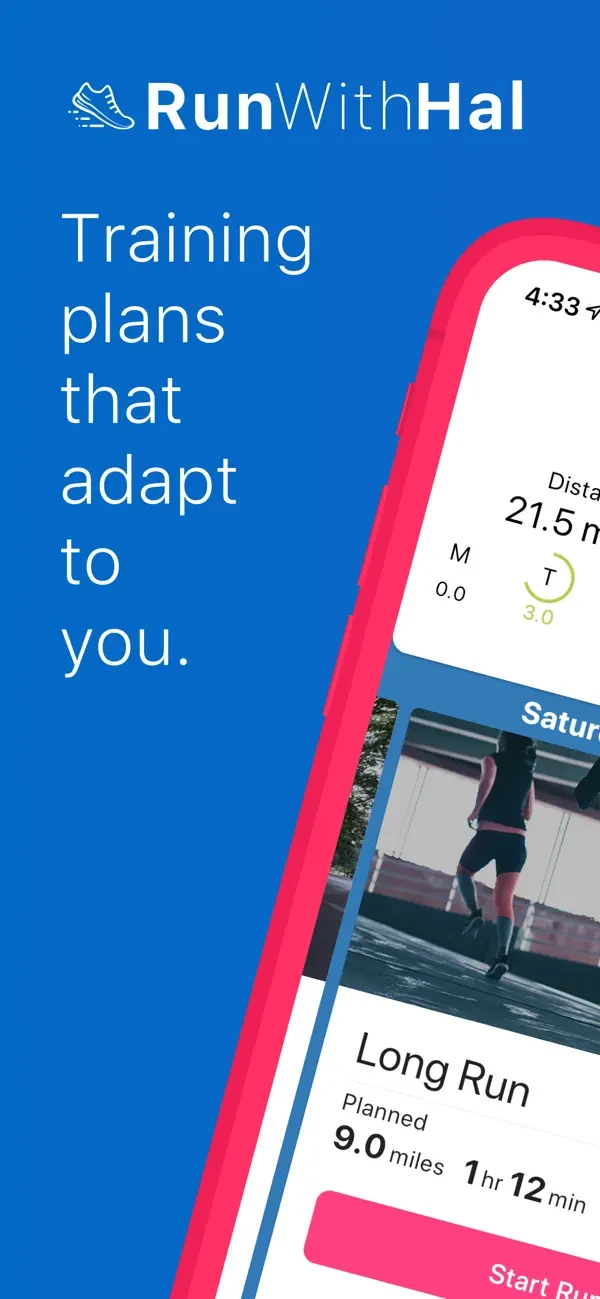
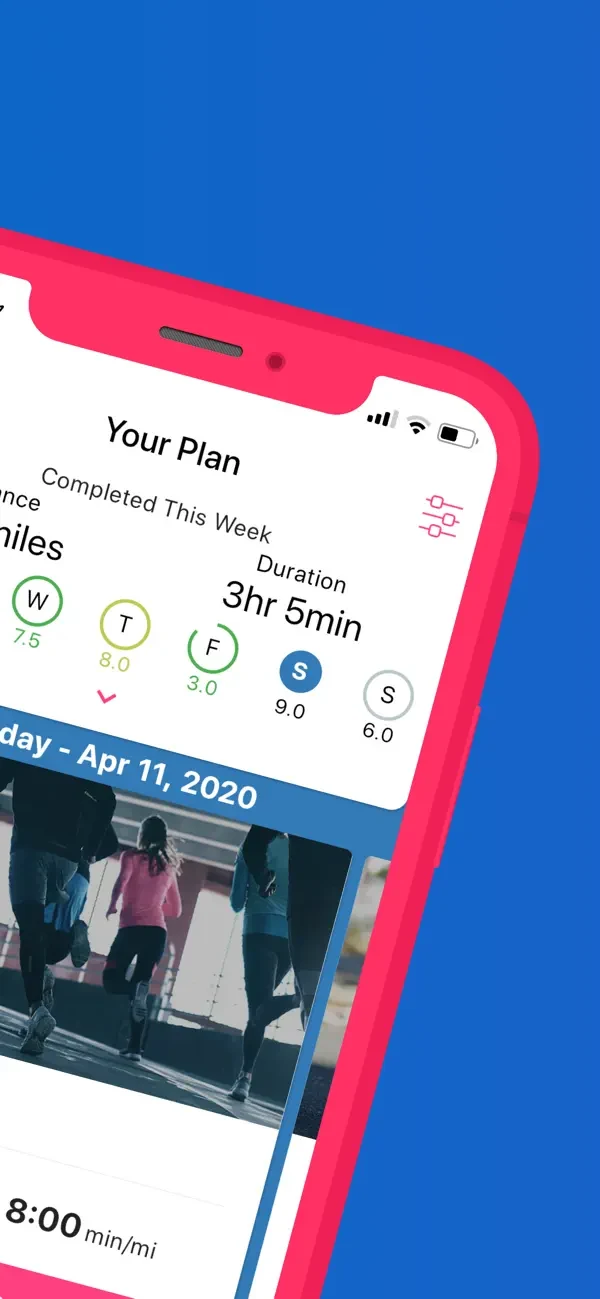
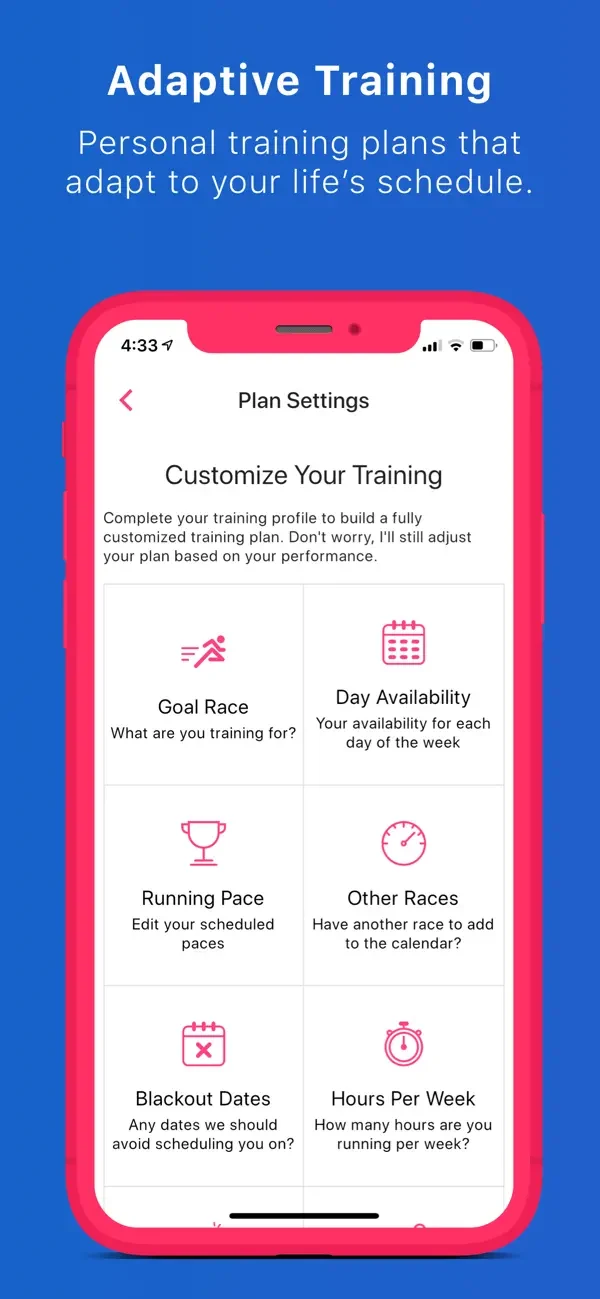
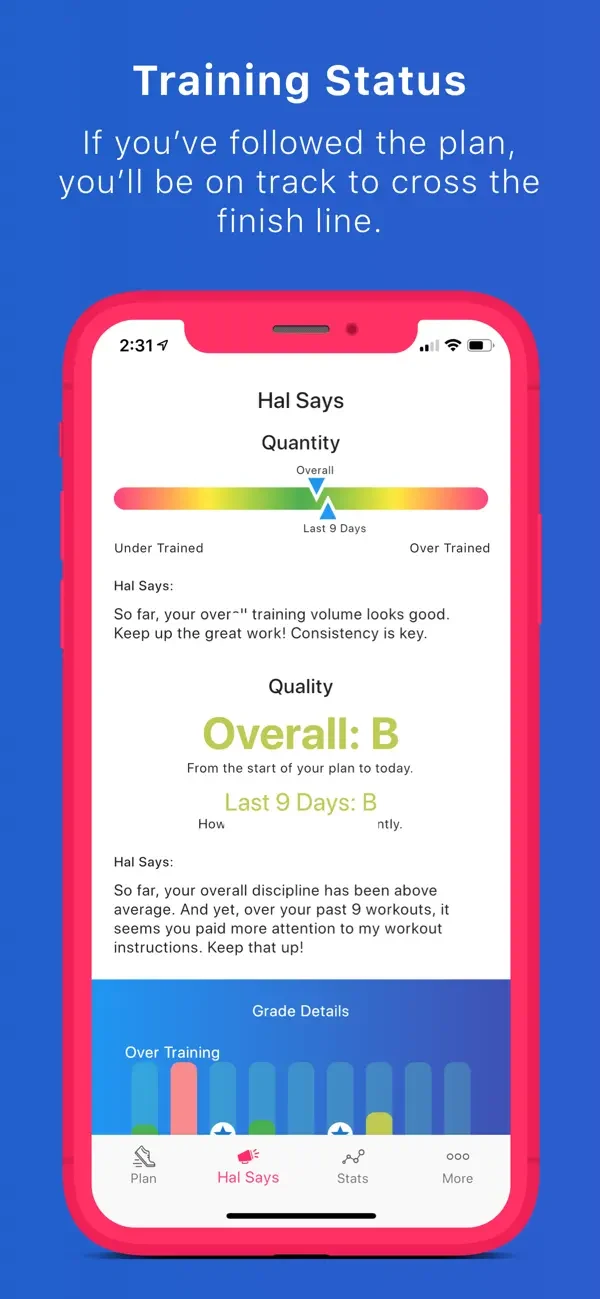
Original screenshot artwork from the Run With Hal US App Store listing, reviewed 26 October 2026. Select a panel to enlarge it. Screenshots remain the property of their respective owners.
What the screenshots do: The first two screenshots spread a tilted phone across neighbouring panels. Blue backgrounds and pink device frames make the sequence distinctive, but each crop reveals only part of the interface. A later settings screen makes scheduling controls more concrete.
What I would test: For an unfamiliar brand, test a complete schedule in the first frame, then show one adjustment. Use AI to explore the composition; place the real product screen in the final artwork. The key test is whether a single visible panel explains the benefit.
What the app promises: The title and subtitle focus on a beginner’s transition into running. The description explains alternating walking and running, with a scheduled programme.
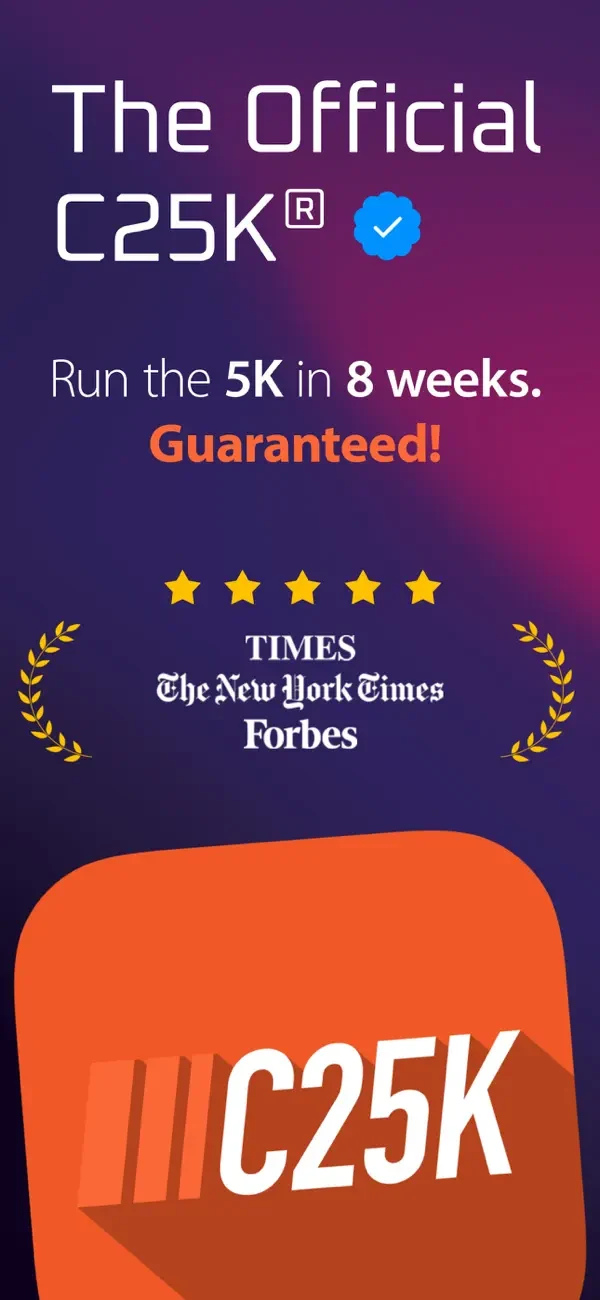
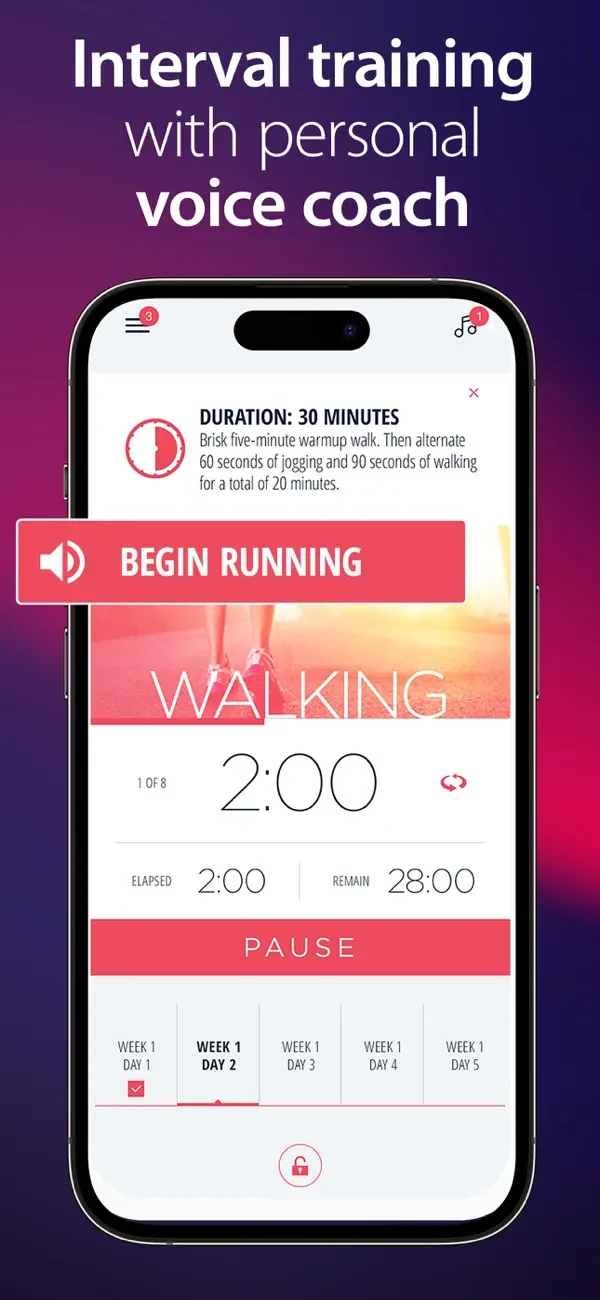
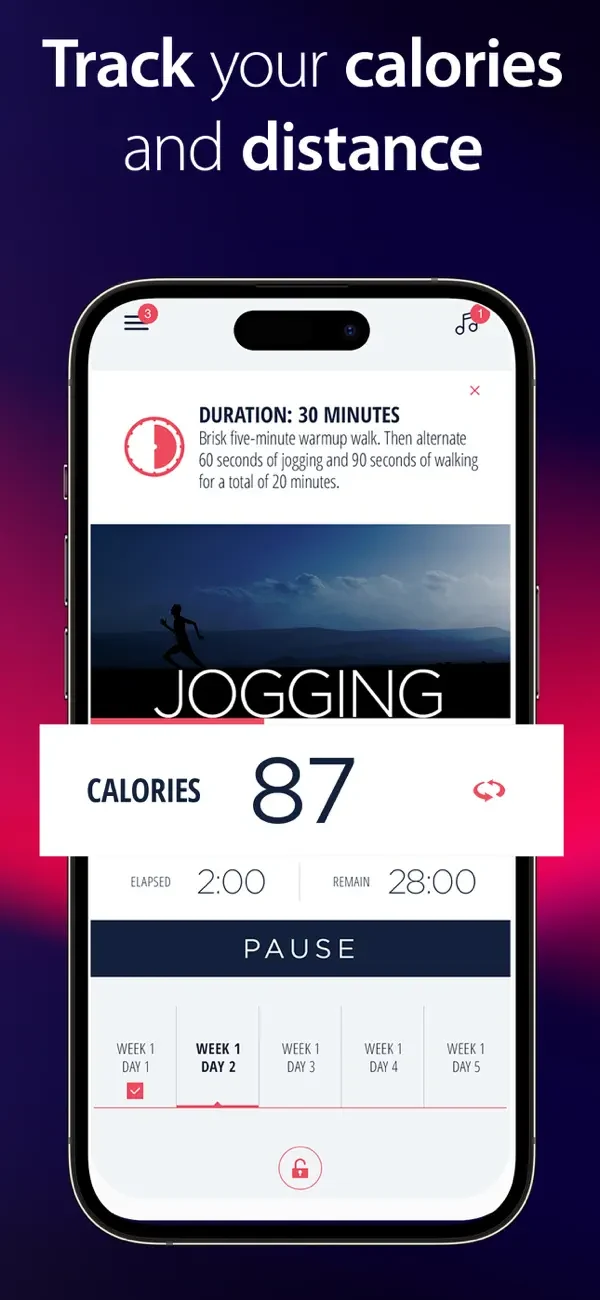
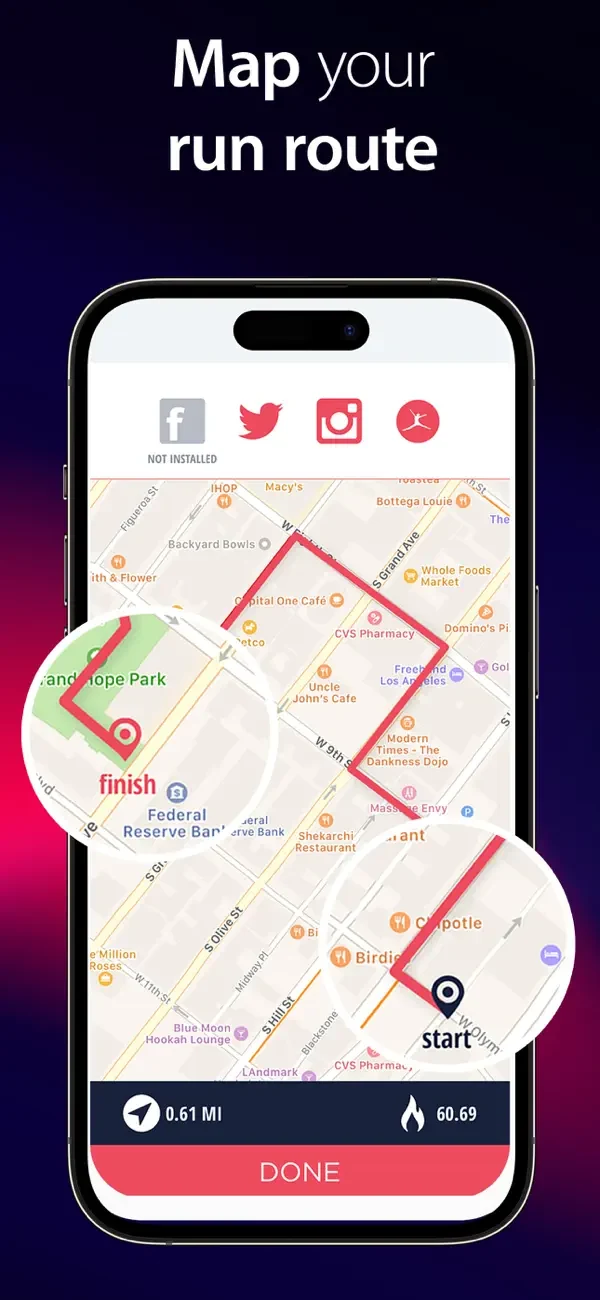
Original screenshot artwork from the C25K US App Store listing, reviewed 26 October 2026. Select a panel to enlarge it. Screenshots remain the property of their respective owners.
What the screenshots do: The opening combines programme identity, a time-bound outcome, a guarantee and credibility signals. Later frames enlarge an interval alert, activity numbers and a route. The timer demonstrates the beginner workflow more directly than the opening badge collection.
What I would test: Test a first-session view before the badges. AI can draft reassuring captions centred on starting, walking and following the timer. Do not copy the guarantee: a visible competitor claim is not evidence for your product, and a completion promise needs substantiation.
What the app promises: The metadata spans several sports. The description addresses athletes and coaches, combining planning, connected devices and training analysis. It shares its listed developer with Run With Hal.
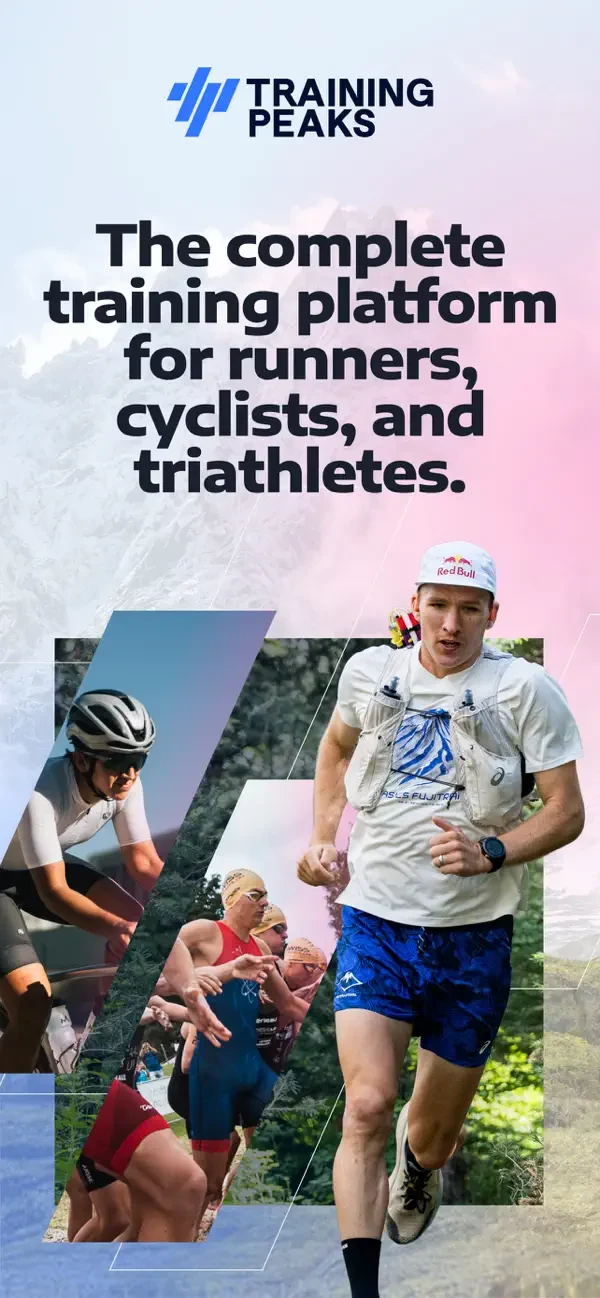
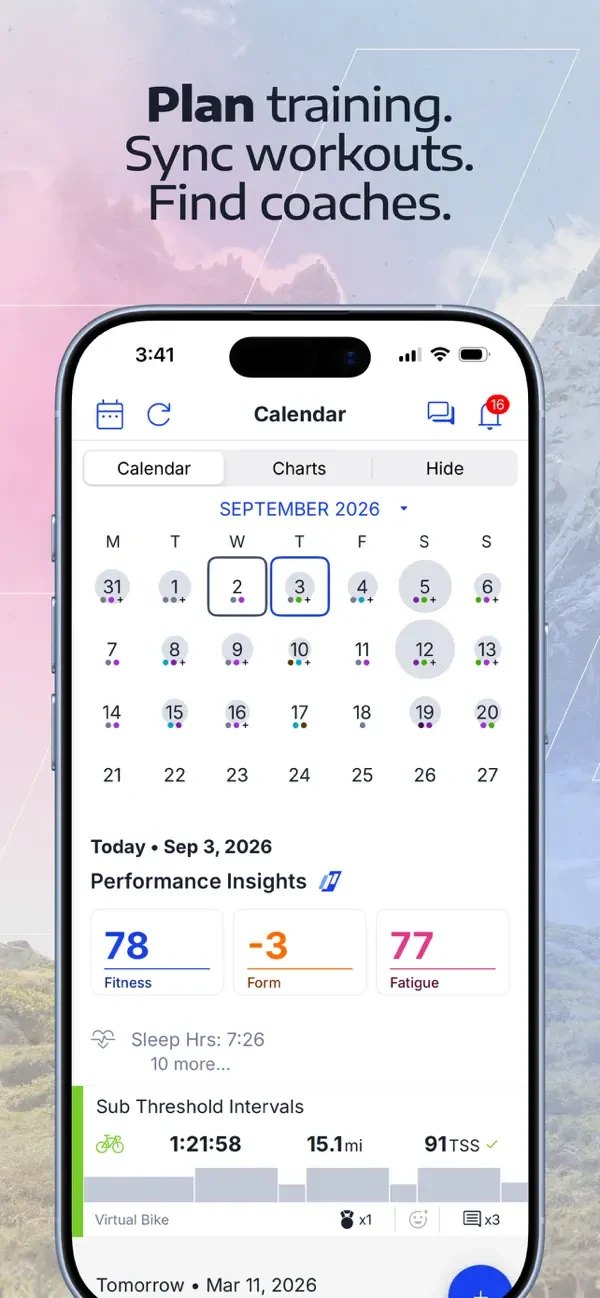
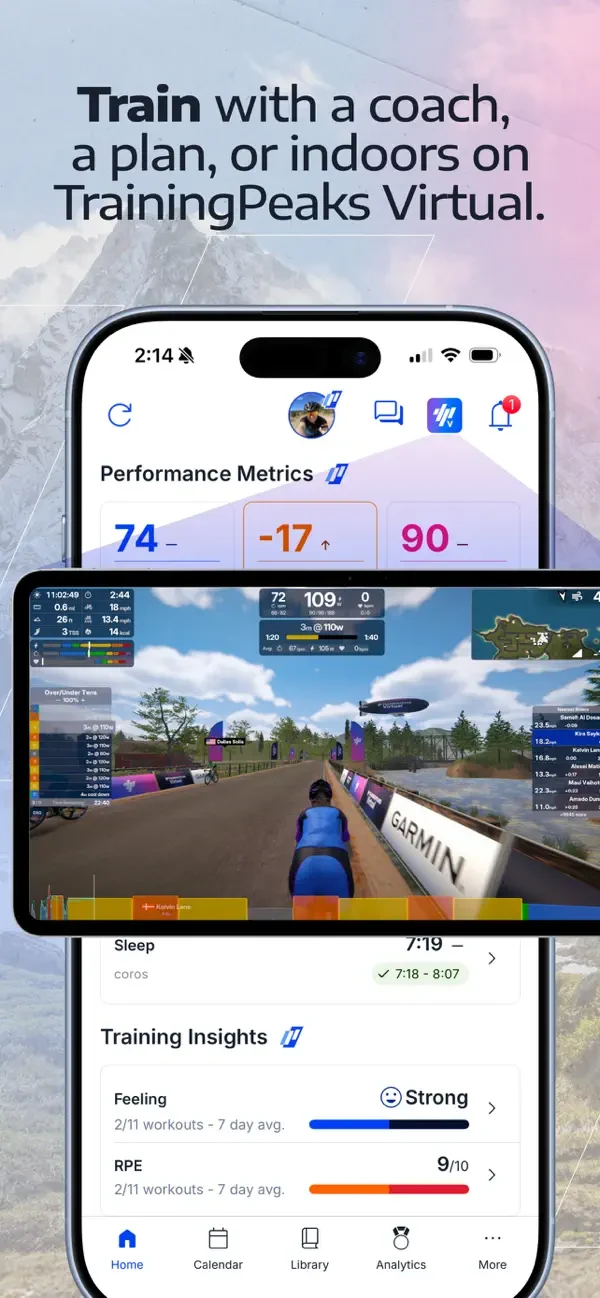
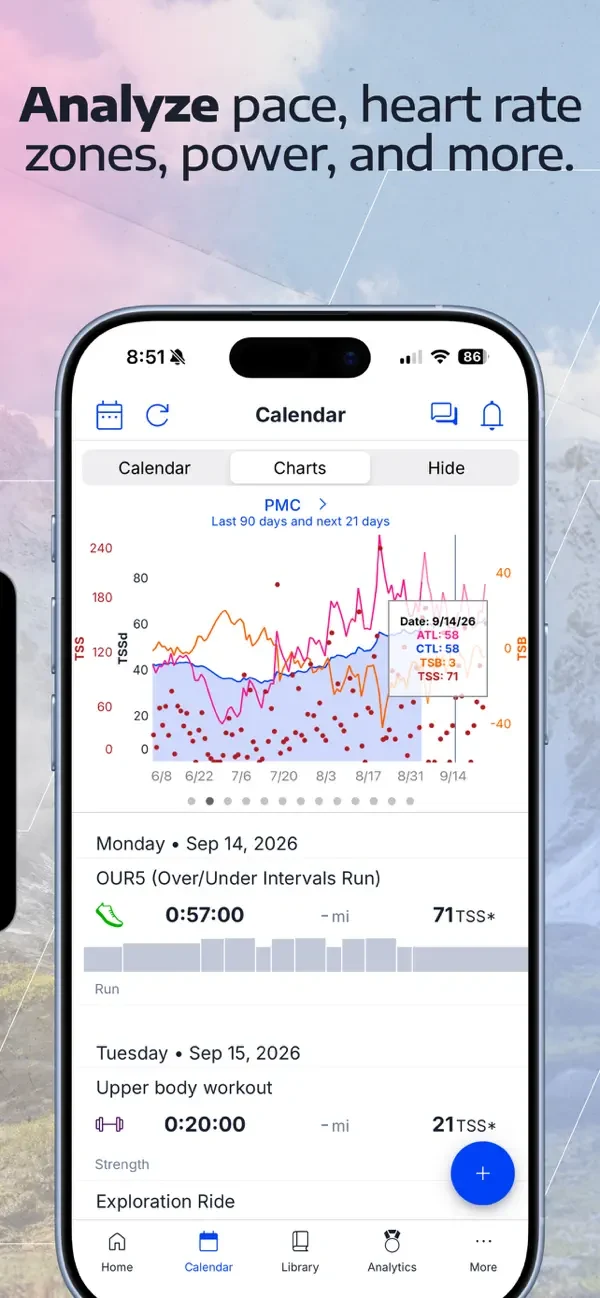
Original screenshot artwork from the TrainingPeaks US App Store listing, reviewed 26 October 2026. Select a panel to enlarge it. Screenshots remain the property of their respective owners.
What the screenshots do: The opening uses athlete photography and an audience statement. Subsequent frames show a calendar, multiple training options and a detailed performance chart. The sequence communicates depth, but small chart labels ask more of a new visitor.
What I would test: For a running-specific page, test one running session and one understandable insight before showing the full dashboard. Ask AI to draft explanations for existing data, not invent progress. Preserve the actual product numbers and terminology in production.
Use these examples to find a better explanation of your own product. A narrow promise can be more useful than another feature list. Continue with the keyword gap analysis guide, long-tail keyword guide and first-screenshot guide.
AI can help you explore different ways to explain a running app. It cannot tell you which design will convert best without a real test. Start with approved features, a clear audience and genuine product screens. The examples here are original concepts for fictional PacePilot; they are not redesigned screenshots from Nike or Runna.
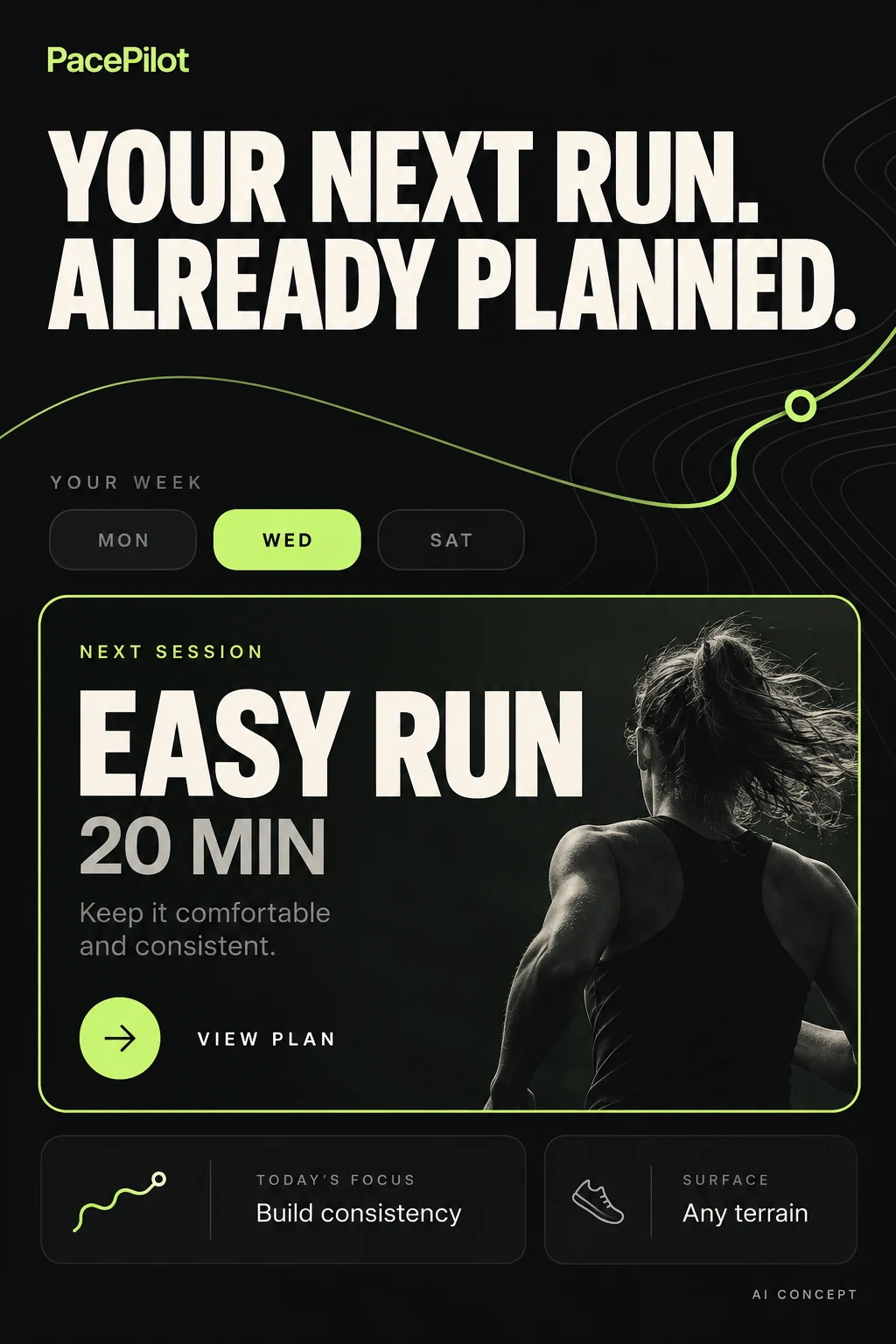
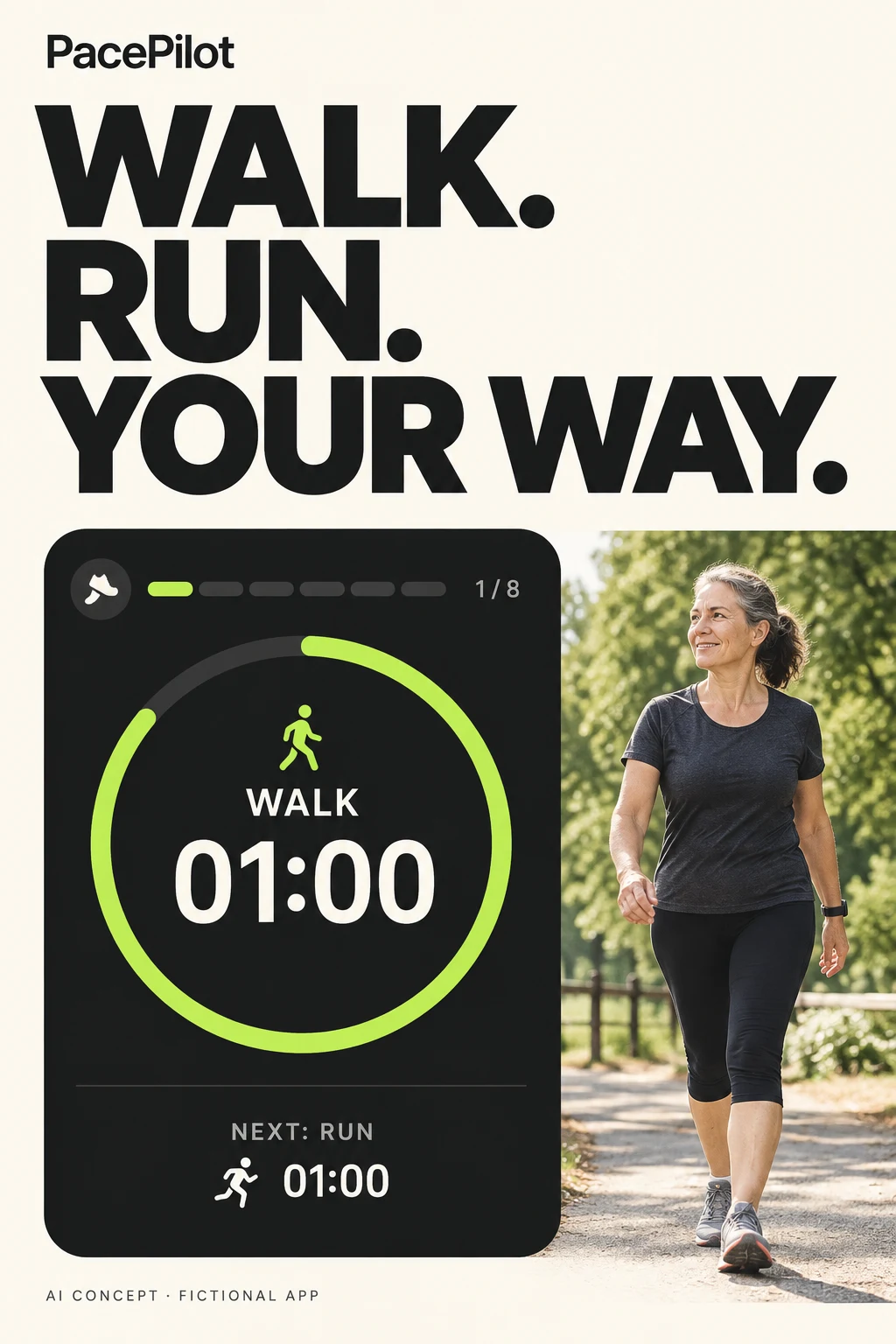
Why these are different: the planning concept answers “What should I do next?” The beginner concept answers “Can I start with walking?” They need different keywords, screenshots and first-use experiences. A more attractive layout cannot repair a mismatch between those promises and the app.
A detail to fix in Concept A: the generated image added “Any terrain,” which is not in the approved product brief. Remove that claim before production. This is exactly why a person must check AI artwork.
Before release: replace generated interface details with approved product screens. Rebuild text in your design tool, verify every label, check small-screen readability and confirm the feature is available. Use AI for direction; use the real product for proof.
Swipe horizontally to compare all columns →
| Task | Useful AI input | What to ask for | What a person checks |
|---|---|---|---|
| Find audience language | Anonymised, permitted research notes | Group questions about starting, scheduling and tracking; preserve the original evidence | Themes are supported and no participant details are exposed |
| Expand keyword clusters | Approved features and candidate terms | Suggest variations by job, distance and constraint; flag unsupported intent | Relevance, demand and local search results |
| Improve the title | Brand, actual purpose, field limit | Five clear names; count characters; explain the trade-off | Actual count, truthfulness, brand rules and keyword fit |
| Improve screenshots | Real screens and one audience question | Three compositions using the same proof, with larger hierarchy | No invented controls, charts, results or testimonials |
| Write stronger copy | Approved claims and actual access conditions | Replace abstract benefits with actions a runner can take | The tone feels human and promises match the product |
| Prepare Search Ads | Query report with identifiers removed | Suggest intent groups and irrelevant terms with reasons | Negative keywords do not block useful searches; bids stay human-controlled |
| Plan a test | One uncertainty and a supported test surface | A hypothesis, variants, primary metric and possible confounders | The test can answer the question; results are not invented |
“You are helping explain a running-plan app. It supports weekly schedules, session instructions and manual rescheduling. It does not provide live coaching or GPS tracking. Our audience wants to know what to run next. Write six first-screenshot headlines of no more than seven words. For each, name the real screen needed to prove the claim. Avoid guarantees, superlatives and features outside this brief.”
Use the screenshot strategy guide to select the story, the copy guide to refine the words and test prioritization to choose what deserves traffic. For metadata, work through keyword relevance before keyword prioritization.
These are review checks for your own app, not allegations that every app above makes these mistakes. The screenshot discussion identifies specific visible trade-offs; only a controlled test can establish their effect on conversion.
Swipe horizontally to compare all columns →
| Mistake | Why a runner may hesitate | A better approach |
|---|---|---|
| Opening with a slogan and no product clue | They cannot tell whether this is a tracker, plan or coaching service | Pair a clear running job with its actual screen |
| Treating all runners as one audience | Beginner reassurance and advanced training detail compete | Choose the audience for this page; move other needs to suitable pages |
| Calling every feature coaching | A runner may expect live help when only a timer exists | Name audio guidance, a static plan or human support accurately |
| Shrinking the interface to fit decoration | The screenshot offers a promise without readable proof | Enlarge the relevant interaction and remove nonessential detail |
| Using a map for an indoor promise | The visual conflicts with how the product works | Show the indoor session and recording method |
| Showing paid features as though everything is included | The listing creates the wrong access expectation | Clarify material access conditions |
| Repeating the same benefit across every frame | The sequence never answers the next question | Give each frame a role: outcome, workflow, control, compatibility |
| Copying a famous app’s breadth | An unknown app loses its specific reason to exist | Lead with the supported job you can explain most convincingly |
Use a simple review question for every claim: “Which screen or verified fact proves this?” If there is no answer, rewrite the claim. For every screen, ask: “What question does this answer?” If it adds nothing, remove or replace it.
Apple’s current documentation calls the platform Apple Ads. This example focuses on App Store search results campaigns with keyword bidding, often called Apple Search Ads. It is a setup blueprint, not a campaign launch. No budget is being spent.
Start with a single country and language so the search terms, screenshots and product support match. Choose a primary conversion beyond the install—for example, completing plan setup—and check attribution before buying traffic. Your ASO research supplies candidate intent; paid traffic helps test that intent under advertising conditions.
Swipe horizontally to compare all columns →
| Campaign / ad group | Keyword setup | Search Match | Page and purpose |
|---|---|---|---|
| Own brand | Your own app name, exact match | Off | Default page; report separately from new discovery |
| Supported running intent | Separate exact groups for beginner plans, distance plans or scheduling | Off | Relevant custom product page where available; only supported features |
| Discovery: broader terms | A small set of relevant broad-match seeds | Off | Find useful query variations with a capped exploratory budget |
| Discovery: automatic matching | No manually added keywords in this example | On | A separate group to inspect what Search Match discovers |
| Competitor research, optional | Separately controlled relevant brand queries | Off | Only if appropriate and allowed; do not insert competitors’ brands into your metadata |
This separation is a practical starting structure, not a platform requirement. Apple supports exact and broad matching; exact match can include close variants. Search Match uses listing and related search information to find relevant searches. Review the actual search-term report rather than assuming the keyword text is the query. Apple’s matching guide · Apple’s keyword guidance.
For each intent group, make the first screenshots answer that search. A beginner-plan page should show the starting level and a first session; a supported marathon page should show the distance and plan. Custom product pages can supply search-results ad variations. The destination must describe the real app; a custom page cannot create a missing feature. Apple’s search-results guidance.
For a planner without route discovery, investigate excluding searches for route maps. For an app without indoor tracking, exclude clearly irrelevant treadmill-tracker queries. Use exact negatives for a specific unwanted query; use broader exclusions carefully because they can block useful searches too. Do not exclude “free” blindly if the app genuinely has a relevant free experience. How Apple’s negative keywords work.
When a discovery query earns a dedicated exact-match test, add an appropriate exact negative in discovery if you want cleaner separation. Check close variants and remaining overlap. Moving a term after one install is not proof that it is a winner.
Illustrative arithmetic: if your acceptable cost per acquired customer is $30 and 5% of taps become customers, the implied maximum average cost per tap is $1.50 before a safety margin ($30 × 0.05). These are invented teaching numbers. Replace them with mature cohort data, refunds, margins and your payback requirement; a keyword bid is not a guarantee of the eventual average cost.
Swipe horizontally to compare all columns →
| What to review | What it tells you | What to do next |
|---|---|---|
| Search query and relevant impressions | Which searches actually reached the ad | Reject irrelevant intent; investigate limited delivery before assuming no demand |
| Taps ÷ impressions | Whether the ad attracts attention in that context | Check the promise, relevance and competing search results |
| Attributed installs ÷ taps | Whether the visit becomes an attributed install | Review page fit and measurement definitions |
| Activated users ÷ attributed installs | Whether new users reach the intended first useful action | Inspect expectation mismatch and onboarding |
| Spend ÷ acquired customers | Whether mature customer acquisition fits your economics | Keep cohorts and attribution windows comparable |
Agree a spend cap, review date and primary event before launch. Pause obviously irrelevant queries early; give relevant terms enough observations and conversion time to assess uncertainty. Do not pool countries, brand searches and generic searches into one verdict. Use the measurement guide to keep denominators consistent.
Bring useful language back into the ASO research sheet, then validate organic relevance and metadata fit separately. A paid conversion does not establish organic ranking potential, and buying ads does not guarantee organic ranking gains.
A running app can be a recorder, a planner, a coach or a route finder. The category name alone does not tell a visitor which one they are looking at. Choose a primary job for the listing, then use supporting frames to explain adjacent capabilities. An opening crowded with maps, training schedules and achievement badges can make a capable app harder to understand.
This guide uses PacePilot, a fictional running-plan app that offers a weekly schedule, session instructions, rescheduling and completion records. It does not provide live human coaching, route discovery or guaranteed race improvements. Every copy example below follows those boundaries. It is an editorial example, not a client case study.
Swipe horizontally to compare all columns →
| Product type | Visitor question | Opening evidence |
|---|---|---|
| Run tracker | Can I record and review my run? | Actual recording screen and readable pace/distance summary |
| Training-plan app | What should I run next? | Next session and weekly schedule |
| Route-discovery app | Where can I run? | Relevant route options, coverage and route details |
| Coaching service | Who guides me and how? | Real coach interaction and the service delivered |
If the app supports several jobs, decide which audience the default listing should lead with. Investigate available audience-specific listing surfaces for genuinely different campaigns, rather than making one vague headline cover incompatible expectations. See the value-proposition guide for selecting between truthful promises.
Swipe horizontally to compare all columns →
| Candidate cluster | Expected experience | PacePilot decision |
|---|---|---|
| running plan / running schedule | A usable sequence of sessions | Core research direction; verify local vocabulary and demand |
| 5K training / marathon plan | Support for a specific distance and starting level | Use only for distances and levels actually covered |
| GPS run tracker / pace tracker | Recording and activity data | Exclude unless the relevant tracking workflow exists |
| running routes / route planner | Finding or creating a route | Exclude from this fictional product |
| running coach | Human or automated guidance; potentially ambiguous | Clarify what guidance is delivered before targeting |
These are candidate ideas, not measured keyword volumes. Capture the store, market, language, research source and date. Inspect what a searcher would reasonably expect, then verify the product can satisfy it. A broad phrase with an attractive tool estimate should not displace a clearer supported use case.
Do not assume “beginner” is sufficient positioning. A beginner looking for walk/run sessions differs from an experienced runner starting marathon training. Likewise, a “free running app” query does not justify implying that paid features are free. Keep pricing expectations accurate and check the relevant store rules for each field. Use the research workflow to document exclusions and uncertainty.
For a new or unfamiliar brand, the product descriptor should help the visitor recognise the primary job. PacePilot uses “Running Plans” because the example product is a planner. Substituting “GPS Tracker” to reach a different query would create a false expectation.
The examples below fit the stated field limits. Counts include spaces and punctuation. The names are fictional copy exercises, not a trademark-availability check or a guarantee of submission approval.
Swipe horizontally to compare all columns →
| Field | Example copy | Characters |
|---|---|---|
| iOS app name | PacePilot: Running Plans | 24 / 30 |
| iOS subtitle | Your next run, already planned | 30 / 30 |
| Google Play title | PacePilot: Running Plans | 24 / 30 |
| Google Play short description | Build your running week, preview each session and follow your plan. | 67 / 80 |
Apple allows up to 30 characters for the app name and subtitle. Google Play allows up to 30 for the title and 80 for the short description. Check the actual localized fields before release. Apple field guidance · Google listing guidance.
On iOS, review the name, subtitle and keyword field as one metadata set. Preserve readable visible copy; use the research record to decide which relevant candidates belong elsewhere. The subtitle above is an outcome-led direction. A feature-led alternative is “Weekly plans and session notes.” Choose between them using relevance and comprehension evidence, not a promise that one phrasing must rank better.
For PacePilot, the argument is: you can see what comes next, understand the week, adjust the schedule and inspect the session. Start with the outcome the runner wants to recognise. A splash screen or dense historical chart may be attractive while failing to demonstrate that outcome.
The following are schematic editorial frames, not finished store screenshots. Their job is to define copy and required product evidence. Production must use accurate product screens and appropriate store specifications.
Show the next-session screen. The action and session purpose must be clear.
Show the real weekly plan. Avoid a decorative calendar that hides the workflow.
Show rescheduling only if supported. A movable calendar is not proof of automatic coaching.
Use actual session details. Do not imply live audio coaching if the product only displays text.
Show genuine recorded progress. Never invent a performance improvement or user testimonial.
Keep the first frame understandable on its own. Do not rely on a sentence stretched across three images or a tiny map legend to explain the product. Give each frame one dominant caption and one legible piece of evidence. Preserve breathing room around the relevant interface content instead of shrinking the whole phone screen to fit decorative typography.
For a tracker, replace the opening with a real activity-recording or completed-run view. For a route finder, start with route choice and relevant details. Those products should not borrow PacePilot’s planning narrative simply because the visual treatment looks good.
A preview-video concept should demonstrate the same job through motion: open the plan, select a session, inspect its details and show the supported adjustment. A running montage can establish atmosphere but does not establish app functionality. Check comprehension with sound off and review current platform requirements before production. See readability checks and the full screenshot method.
Swipe horizontally to compare all columns →
| Weak direction | More specific direction | Why it changes the message |
|---|---|---|
| Unlock your running potential | See your next planned run | Replaces an abstract aspiration with a visible workflow |
| The ultimate running companion | Build your running week | Identifies the job rather than asserting superiority |
| Personalized coaching for everyone | Move sessions to fit your week | Describes the actual supported control; does not imply a human coach |
| Smash every personal best | Review completed sessions | Avoids an unsupported performance promise |
Worked full-description opening: “Plan your running week with PacePilot. See your next session, read the instructions and keep your schedule in one place. When your week changes, move a session and review the updated calendar.”
Workflow paragraph: “Open your plan to see upcoming sessions. Select a session to check its purpose and instructions before you begin. Record completed sessions so you can return to your plan and see what is next.”
Expectation-setting paragraph: “PacePilot helps you organise and follow a running plan. It does not provide live coaching or discover new running routes.”
This is a short fictional description draft, not a complete production listing. Add verified details about supported plans, access conditions, integrations and material limitations only when they answer real questions. Avoid repeating the short description verbatim on Google Play; develop it. Its full-description limit is 4,000 characters, not a requirement to fill the field. Google’s copy guidance recommends clear, accurate descriptions and discourages excessive repetition.
The store controls its native install or purchase control; you are not rewriting that button. Your screenshot captions, description and preview can still suggest a meaningful next step. Keep them visually distinct from real interface controls: a fake tappable button inside a screenshot can confuse the experience.
A useful CTA names an action the product enables and reinforces the reason to try it. “Download now” supplies little information by itself. Do not claim a free plan, trial, instant access or device compatibility without verifying it and the applicable placement rules.
Swipe horizontally to compare all columns →
| Product promise | CTA direction to evaluate | Required support |
|---|---|---|
| Training plan | See what your next run looks like | A useful plan preview or immediate access path |
| Run recording | Record your next run | Supported recording workflow and clear permission/setup needs |
| Route discovery | Find a route for your next run | Relevant coverage and route-selection functionality |
| Human coaching | Explore your coaching options | Accurate service scope and a clear selection process |
For PacePilot’s last frame, “See your week. Choose your next session.” is a coherent direction. If onboarding requires several steps before a plan appears, ensure the listing does not imply that the plan is already waiting without setup. Test the clarity of the expectation as well as the wording.
The five named listings analysed above show different running propositions: planning, coaching, tracking and social activity sharing. Associated product documentation also discusses schedule flexibility and wearable connections. This supports treating those as relevant positioning questions. It does not establish market-wide growth, keyword demand or the conversion performance of those messages.
Sources for this limited observation: Runna listing, ASICS Runkeeper listing, and product workflow documentation. These are public references, not client examples or endorsements.
Swipe horizontally to compare all columns →
| Creative direction to investigate | ASO execution | Evidence needed before making the claim |
|---|---|---|
| Goal-specific plans | Lead with the supported distance or planning job | Actual plan coverage and relevant audience research |
| Schedule flexibility | Show the rescheduling interaction | The real behaviour and any limitations |
| Wearable support | Show the supported device workflow in a later frame | Specific devices, sync behaviour and current compatibility |
| Adaptive or AI planning | Demonstrate what changes after a user input | Verified adaptation mechanism; do not relabel a static plan |
| Readable product-led creative | Make the main workflow visible at small size | Comprehension review and, where suitable, a controlled experiment |
The last two rows are editorial test directions, not measured category trends. To make a stronger trend claim later, define a market and a repeatable listing sample, capture dated assets, classify the same features and repeat the observation. More apps using a visual style would still not prove that the style causes better conversion.
Swipe horizontally to compare all columns →
| Question | Controlled creative direction | What a result cannot prove alone |
|---|---|---|
| Is the product job clear? | Next-session opening versus generic running imagery | That the same direction fits trackers and route apps |
| Which benefit matters? | Weekly overview versus rescheduling-led opening | Which psychological mechanism caused behaviour |
| Is the promise understandable? | Concrete action caption versus abstract motivational caption | A universal rule for every audience |
| Is device uncertainty a barrier? | Supported wearable proof earlier versus later | That all visitors own that device |
| Does a narrower goal improve fit? | Supported distance-specific concept versus general planning concept | That an untested distance or market will behave the same |
Choose the actual platform-supported experiment surface before producing variants. Name the eligible audience, primary event and interpretation conditions. Do not call a title rewrite a randomized screenshot test or compare different campaign populations as if they were the same audience. Read the hypothesis guide and preserve the exact metric definition.
Use comprehension review to catch an unclear promise before investing in a behavioural experiment. For performance evaluation, retain uncertainty and competing changes. A preference vote for a handsome runner photograph is not evidence that the listing helps suitable users choose the app.
Before publication, the owner should be able to identify the primary running job, approved title and supporting copy, the role of each screenshot, claim evidence, localized versions and the evaluation plan. Save the original assets and exact published version so a later review can reconstruct what changed.
For localization, check running terminology, kilometres versus miles, pace notation, supported plan names, device availability and the product language. Re-review caption length in the final export. A grammatically correct translation can still show an unsupported device or a workflow unavailable in that market.
The release is ready when the copy accurately describes the product, captions remain readable at realistic size, the screenshot order makes sense without explanation and every feature promise has an owner who can verify it.
Both files contain fictional worked examples you can replace with your product details.
For help turning your app’s positioning into a listing, explore screenshot optimization or keyword research services.